A Z-machine interpreter is supposed to report its screen height and width to the game, and games use this to do various visual effects, like Trinity centering the room name in the status bar.
If an interpreter has infinite or undefined height, like a teletype, it’s supposed to report a height of 255. However, what if an interpreter has undefined width, like a bot that’s sending the output to a Discord server?
The Standard says nothing about this case, as far as I can tell; has any convention arisen (e.g. returning 0 or 255) to indicate this?
(I’m working on Dialog’s screen model support, and want it to handle things like progress bars in a sane way on platforms like this.)
Aha, a question for which I have a pragmatic answer!
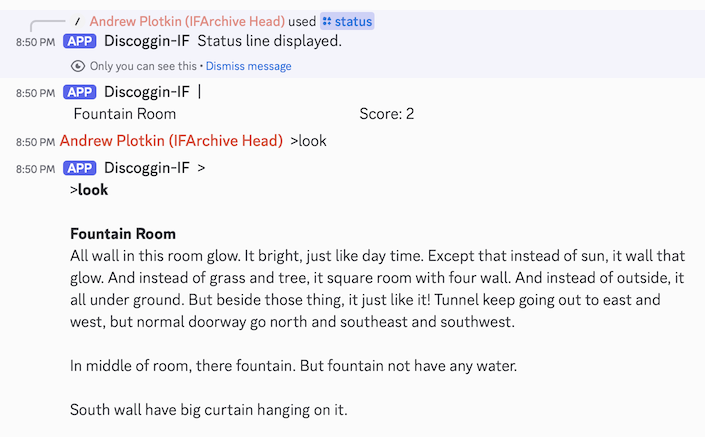
I wanted my Discord bot to retain the current status window and be able to redisplay it at any time. (Until the next turn, at which time it will be replaced by a new current status window.)
For V4+ (and Seastalker), that means I’m retaining a 2D array of characters. And then I figured it was easiest if all V3 status lines worked that way too.
I’ve got an array, which means it has a size. Which means the interpreter should tell the game that that’s the size, so that the game draws the contents correctly in the array.
What size? I picked 80. Nice traditional terminal width.
I would argue against 80 columns as the safe default that it was when the small-screen crowd was the 640x480 crowd. I would think an interpreter has to default to 80 columns to be compatible with games that just assume 80 columns, but on the game side it would be good to go lower if possible, even as low as 20 columns for progress bars. A game displayed in the discord app is getting wrapped by the device at 35 columns, or 20 if I use a large font.
I’m more pointing out that plenty of everyday devices can’t comfortably fit the line lengths we think of as standard. I don’t think you’d want a game to emit line breaks every 20 characters, but it’s worth keeping in mind that 20-40 characters is a very plausible screen width, and thinking about what the behavior of the output is going to be, when and if it does get wrapped.
@ChristopherDrum’s experience with the Status Line interpreter for the artificially small PICO-8 screen (32×21 characters) suggests that the practical minimum width is rather more than 20 characters – he went to the length of rebuilding various Infocom works (and Curses) with tweaks to make them work better on that narrow screen, with the 32-character width being the major constraint. (His work had to consider all the text, not just things like status lines, but still.)
I don’t know if that matters here, though—a Pico-8 screen is pretty short as well as narrow, while a phone screen is tall enough that you can get a lot of lines on it. I have no problem reading longer forum posts on my phone, for example.
I’ve been making sure that my status lines work down to 20 characters and even 10, using some new hacksfeatures in the Dialog compiler, so even with the automaps that shouldn’t break anything. I can’t speak to any other games, though.