web interpreters and mobile devices (looking for testers with android devices)

It isn’t rare for me to hear from a player or tester about their experiences with playing my games in mobile browsers. The issue is always the behavior of the keyboard. It jumps up and down, or it stays visible all the time, which are both annoyances. Actually, that’s putting it lightly. I think a lot of players either quit or reach for the story file at that point.

I can’t control keyboard behavior with Inform code (I don’t think), but I want these players to enjoy mobile content in a comfortable way.

This is hard for me to evaluate, though, because I only have an iOS device that doesn’t seem to have these problems. This appears to be an Android thing.

I don’t know if this is something that can be “fixed,” but I get feedback about it and thought I’d run it up the flagpole. What determines keyboard visibility in a mobile browser? Interpreter? Browser? Device? I guess browser and device amount to the same thing in iOS.

I’ve taken a quick look at quixe, parchment/iplayif, and Dialog (is that A-machine?). Again, all on iOS.

5 Likes

The browser controls this. I know this because the last time I looked at it (a couple of years ago), iOS Safari and iOS Firefox behaved differently. My notes (here) say that Android is different from iOS Safari too.

There is a proposed solution for standardizing behavior (interactive-widget=resizes-content), but it’s not supported by Safari at present.

1 Like

I’ve spent a lot of time working on Parchment’s behaviour. The intent is that the keyboard will stay up for short responses, but if more text was printed than would be visible with the virtual keyboard up, then it puts the keyboard down. I haven’t really heard feedback for or against this, but it’s how I’d like it to act…

3 Likes

I’ve had this exact problem for literally years. It is always Android. There was just no way i could reliably control the appearance of the virtual keyboard. It would pop up and down irritatingly, or flap about annoyingly. And it was different in different browsers!

By contrast, iOS was fine. Once i had that fettled, it remained fettled. On Android, I would think i had it fixed, then, after an update, it would start its shenanigans all over again.

Apparently, there’s a new way coming down the line. Which is basically a raw admission that it currently doesn’t work properly. But when is this? and when will it be safe to use it?

In the end, i wasted so much time, i finally gave in and wrote my own on-screen keyboard. I kept thinking to myself; this is silly, why am i doing this? Surely, i don’t really have to do this?

It took me less time that i thought, and since then, I’ve never looked back.

There are some pros and cons;

The con is that, you don’t have the system virtual keyboard and a lot of people would like that. Or they think they’d like it.

Which leads me to the main pro; size. You can comfortably have just four rows and make the keyboard around 25% of precious vertical space. By comparison, most system keyboards usually occupy as much as half the vertical space!

You can have also make it an “IF keyboard”. What’s that?

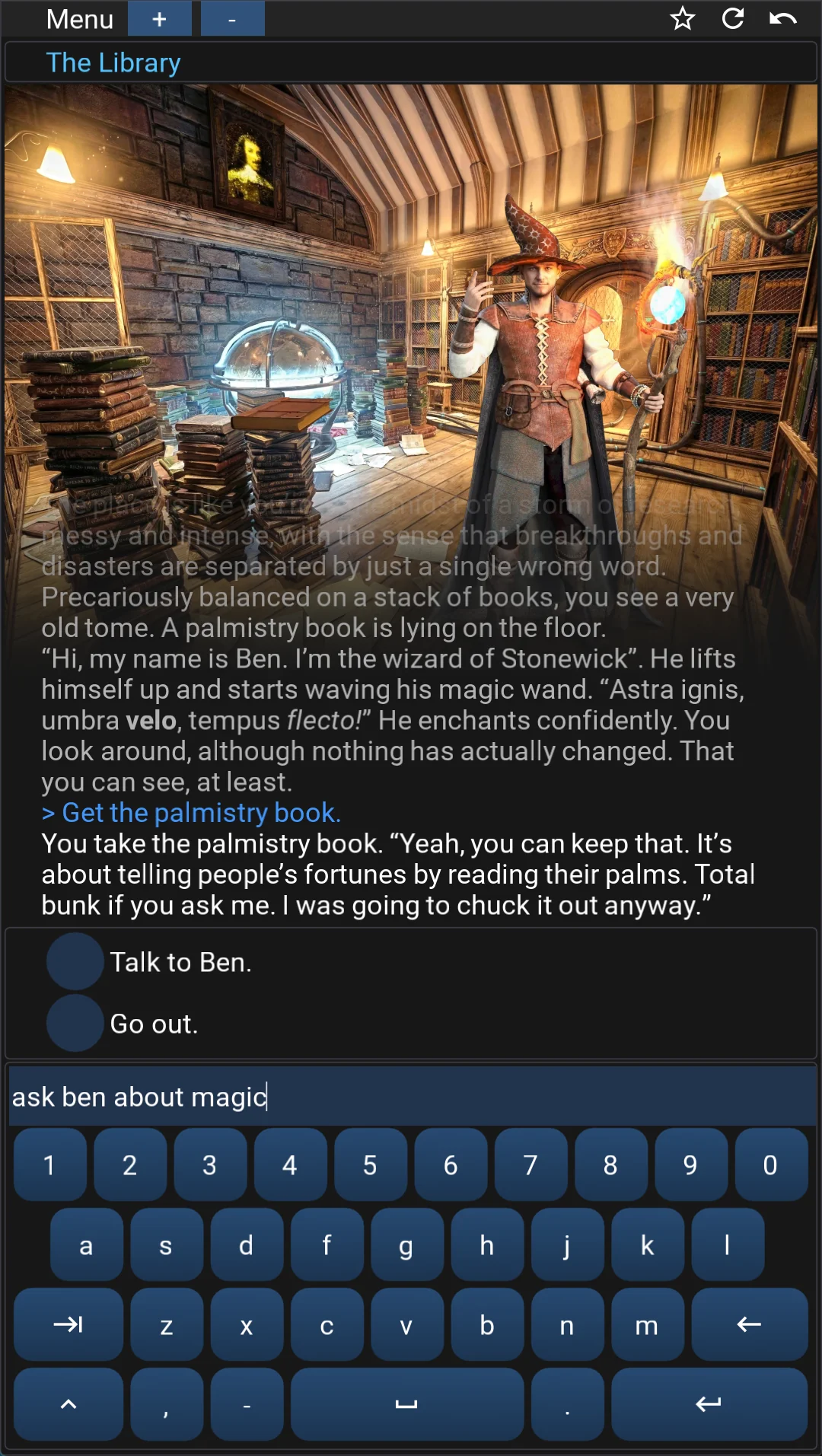
So here’s a mobile screenshot at 9:16 with my keyboard. It’s a normal layout with no silly extra keys you don’t need. Backspace and return are wider whilst “->” in place of “TAB” is for word completion/suggestions.

Suggestions are performed on the entry line so there’s no need for a wasted line of possible words.

A big win is that you don’t need both upper and lower case. So the shift key can immediately convert keys to numbers, symbols and punctuation.

Here’s a shot of the same keyboard when shift is pressed. Right now only the top row changes to numbers, but at some point, I’ll get around to changing a few other keys to useful symbols. So there’s plenty of space for future development.

Conclusion. I would totally recommend the effort to make a custom IF virtual keyboard.

5 Likes

I appreciate all the responses. It’s definitely true that the keyboard takes up a lot of real estate, and its size exacerbates the negative experiences people have with erratic keyboard behavior.

The comments have helped me separate and clarify what seem to be three distinct issues with system keyboards on mobile:

  1. When the input field takes focus and the virtual keyboard pops up, the contents of the window are displaced. Instead of remaining flush with the top of the keyboard, the expected content (including command prompt) is either covered or pushed off-screen.
  2. The keyboard may appear and disappear (then reappear, etc) unpredictably.
  3. The keyboard may “stick” when it is not desirable.

Just for my own understanding, I’d like to make a small game with three differently-sized passages and a command (and matching link) for printing one of more of those passages. And then test for these things across multiple browsers, just to see what’s out there.

That will probably be later in the week, though

3 Likes

I ran into similar issues with the Android soft keyboard in my own mobile text‑adventure player — bouncing, disappearing, reappearing, and shifting the screen around. It took some trial and error, but I eventually got it stable.

What helped was treating the input as a “texting” field rather than a normal text box. I disabled spellcheck and text prediction, set the return key to “Go,” and handled the return action myself instead of relying on the default Enter behavior. I also made sure the input gets focus immediately after creation and explicitly request the soft keyboard if it isn’t already showing.

With that setup, the keyboard stays visible, doesn’t bounce because of the suggestion bar, and doesn’t slide off the screen. My game is portrait‑only, which simplifies things, but the overall approach made the Android keyboard behave consistently.

Not sure if any of that applies directly to your setup, but you’re definitely not alone. The Android keyboard behavior can be a whole adventure by itself.

3 Likes

I’d be happy to test your experiment on my Android and iOS devices. I’m interested to know if this can be finally fixed.

1 Like

That would be great! I’ll set up some games and post here when they’re ready

2 Likes

OK, iOS testing complete (for now)!

Note: all testing uses default CSS except for .BufferWindow .Input because Safari can zoom in when input field takes focus if font size is less than 16px

I wrote a simple program that contains three text passages, with simple commands and matching links. I released from within the Inform IDE with release along with an interpreter assertion. I did not include Bisquixe in these tests, only Quixe and Parchment.

Source

[note that parchment and quixe demos are identical save for the "release along with" code]


"Quixe iOS demo" by Drew Cook

include simple multimedia effects for v10 by mathbrush.
release along with a "quixe" interpreter.

lab is a room.

to say passage_a:
	hyperlink "a" as "a";
	
to say passage_b:
	hyperlink "b" as "b";
	
to say passage_c:
	hyperlink "c" as "c";
	
to say all_passages:
	hyperlink "e" as "e".
	
aing is an action applying to nothing.
understand "a" as aing.

carry out aing:
	say the first text;
	
to say the first text:
	say "Someone must have been telling lies about Josef K., he knew he had done nothing wrong but, one morning, he was arrested."
	
bing is an action applying to nothing.
	
carry out bing:
	say the second text;
	
understand "b" as bing.
	
to say the second text:
	say "Every day at eight in the morning he was brought his breakfast by Mrs. Grubach's cook--Mrs. Grubach was his landlady--but today she didn't come. That had never happened before. K. waited a little while, looked from his pillow at the old woman who lived opposite and who was watching him with an inquisitiveness quite unusual for her, and finally, both hungry and disconcerted, rang the bell. There was immediately a knock at the door and a man entered. He had never seen the man in this house before. He was slim but firmly built, his clothes were black and close-fitting, with many folds and pockets, buckles and buttons and a belt, all of which gave the impression of being very practical but without making it very clear what they were actually for."

cing is an action applying to nothing.
understand "c" as cing.

carry out cing:
	say the third text;

to say the third text:
	say "'Who are you?' asked K., sitting half upright in his bed. The man, however, ignored the question as if
his arrival simply had to be accepted, and merely replied, 'You rang?' 'Anna should have brought me my breakfast,' said K. He tried to work out who the man actually was, first in silence, just through observation and by thinking about it, but the man didn't stay still to be looked at for very long. Instead he went over to the door, opened it slightly, and said to someone who was clearly standing immediately behind it, He wants Anna to bring him his breakfast.' There was a little laughter in the neighbouring room, it was not clear from the sound of it whether there were several people laughing. The strange man could not have learned anything from it that he hadn't known already, but now he said to K., as if making his report  It is not possible. 'It would be the first time that's happened,' said K., as he jumped out of bed and quickly pulled on his trousers. 'I want to see who that is in the next room, and why it is that Mrs. Grubach has let me be disturbed in this
way.' It immediately occurred to him that he needn't have said this out loud, and that he must to some extent have acknowledged their authority by doing so, but that didn't seem important to him at the time. That, at least, is how the stranger took it, as he said, 'Don't you think you'd better stay where you are?' 'I want neither to stay here nor to be spoken to by you until you've introduced yourself.'"

everythinging is an action applying to nothing.
carry out everythinging:
	say every_text;
	
understand "e" as everythinging.

carry out everythinging:
	say every_text;

to say every_text:
	 say "[the first text][paragraph break][the second text][paragraph break][the third text]".

when play begins:
	now the command prompt is "type or click :[passage_a]     [passage_b]     [passage_c]     [all_passages][line break]>";

Quixe:

*Updated below in post # 18

Parchment:

browser test: parchment by Biting Cat Demos

I’m having trouble testing Parchment for Inform, so I’d like to report something to @Dannii before going through the tests.

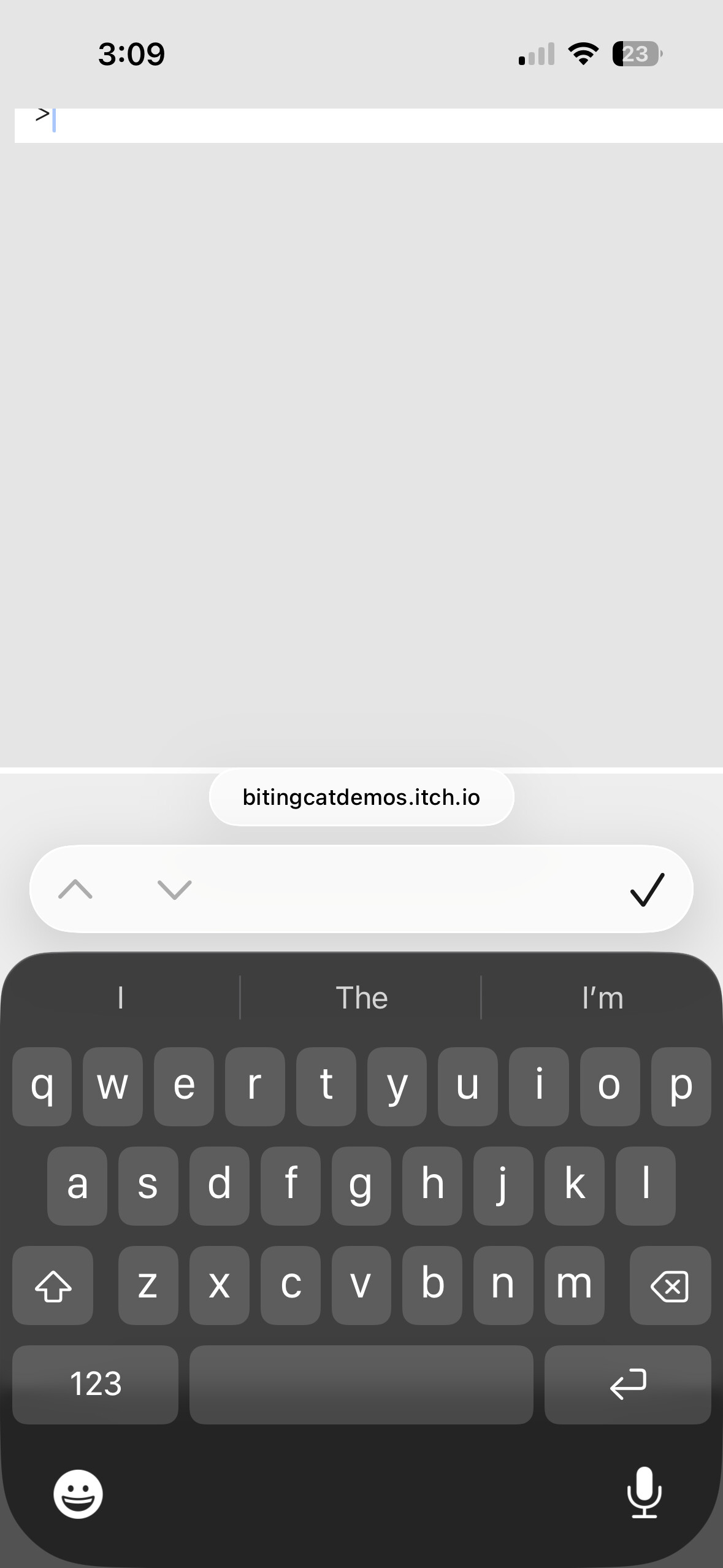
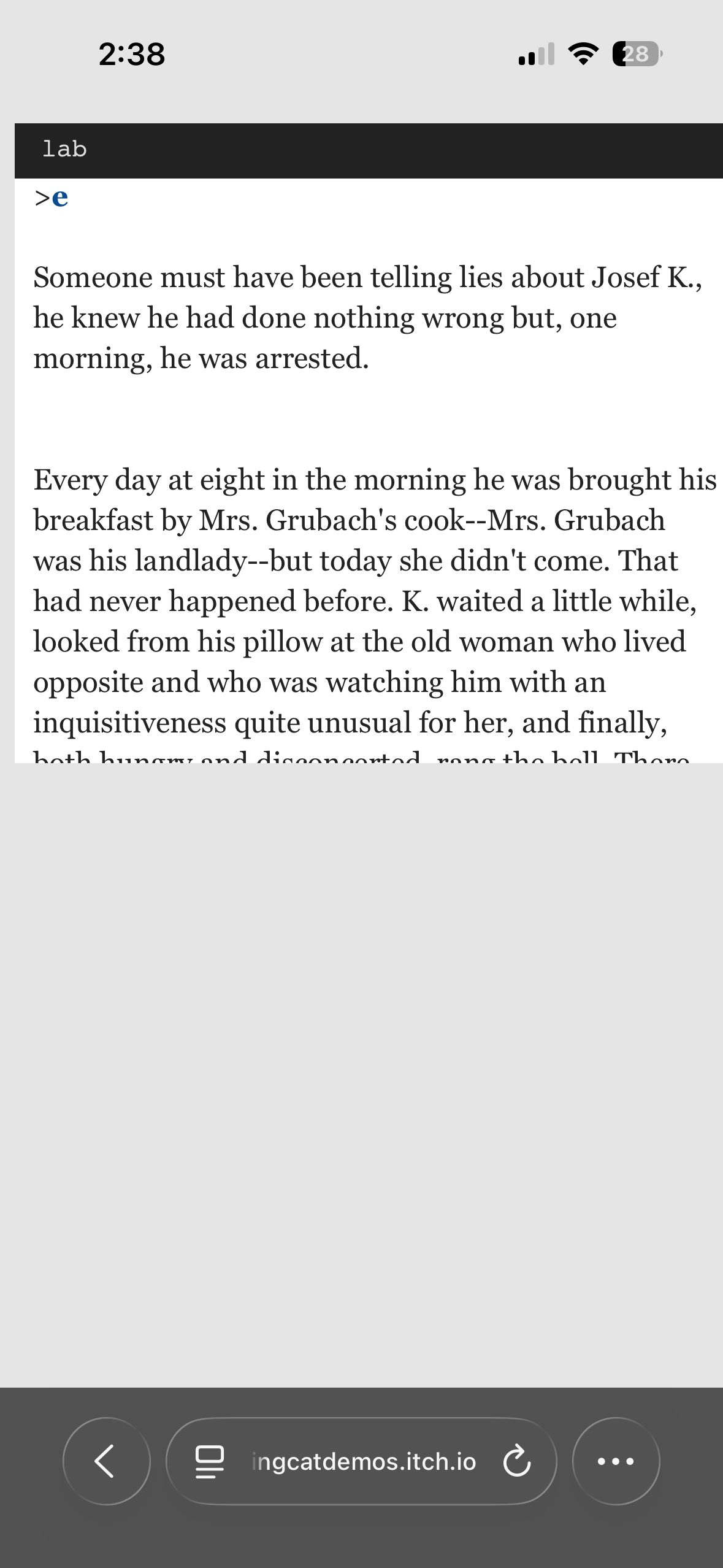
In the below photos, a webpage in Parchment for inform runs in the current version of Safari for iOS. This kind of thing happens even in a minimal program (a single room declaration). The easiest way to trigger it is to print a long passage and then select the input field.


This is not just a Safari thing, as it also happens with chrome (iOS) and opera (iOS).

Firefox (iOS), on the other hand, doesn’t seem to have these problems.

This is only with Parchment for Inform, of course, not iplayif or iplayif sitegen.

While Firefox seems to be the best general “play mobile IF on iOS” browser, it should be noted that it has a slight delay when filling the screen after the keyboard recedes.

Which version of Parchment for Inform 7 is that? There have been some unfortunate bugs in the built in versions of some I7 releases (including one that just didn’t run at all!), but you can use an updated one.

I’m using the latest download download here:
Releases · curiousdannii/parchment

This program, hosted at itch:
browser test: parchment by Biting Cat Demos

"Parchment iOS demo" by Drew Cook

release along with a "parchment-for-inform7-2025-01-14" interpreter.

lab is a room.

If I press enter (iOS safari) ten times, shift focus to the bufferwindow, then focus on the input field, this happens:


After that, it’s intermittent, but the first time seems to happen reliably. If someone else with iOS could confirm, that would be great, but this is what I’m seeing.

I wonder if it’s getting muddled by being inside the itch iframe. I’ll have to investigate.

1 Like

Sorry, do you mean that a sitegen generated page uploaded to itch doesn’t have the problem? If so it’s possible it’s already been fixed. That would be weird because I hadn’t thought I’d done anything to fix it. Unless it was another effect of https://github.com/curiousdannii/asyncglk/issues/42

I’m intending to do an official Parchment for Inform 7 release soon, but I uploaded a beta one here: parchment-testing/dist/parchment-for-inform7.zip at gh-pages · curiousdannii/parchment-testing · GitHub

The important distinction appears to be itch, which I didn’t previously account for. Sorry for that! The sitegen game I recently played on mobile was hosted through Spring Thing. That was fine. A sitegen version of the demo game has the same problems on iOS Safari when hosted by itch.

So it seems your initial hunch might be correct.

Okay, I’ve filed that here: Parchment doesn't play well on mobile when embedded in Itch · Issue #207 · curiousdannii/parchment · GitHub

2 Likes

On android, the keyboard is over the text input, so you can’t see to type.

Is this for the parchment demo?

OK, I need to update my iOS results for Quixe because I’ve found a reliable way to recreate the keyboard-over-content issue on Safari and Chrome (new!).

  1. Fill the output window (just hit enter several times)
  2. Perform an input (even an empty command will do)
  3. Touch the output window (NOT THE CHECKMARK) to recede the keyboard.
  4. With the keyboard receded, scroll up until the command prompt is off the screen.
  5. Scroll back down and touch the input field.

I’ve gone back and re-verified. It looks like Firefox and Opera do not do this.

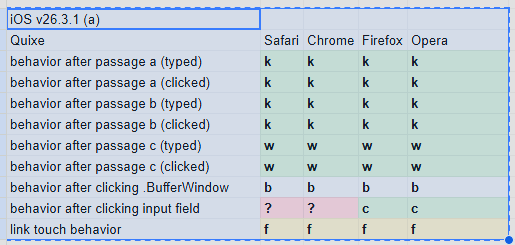
iOS v26.3.1 (a)
Quixe Safari Chrome Firefox Opera
behavior after passage a (typed) k k k k
behavior after passage a (clicked) k k k k
behavior after passage b (typed) k k k k
behavior after passage b (clicked) k k k k
behavior after passage c (typed) w w w w
behavior after passage c (clicked) w w w w
behavior after clicking .BufferWindow b b b b
behavior after clicking input field ? ? c c
link touch behavior f f f f

I think the touch screen to recede feature of Quixe may be a pitfall until Apple figures things out. I haven’t found another way to reliablly reproduce the problem (if someone else has, please speak up).

So until someone makes a new discovery, the iOS recommendations are Opera and Firefox.

But what about Android? It would be great if someone could document their experiences with the Quixe demo project. We need data for Chrome, Firefox, and Opera, so perhaps more than one person would be helpful. There may be identical experiences with each, or there might not.

Here’s my testing spreadsheet, if anyone would like to volunteer! Just try the different tests and additionally try to recreate the Safari issue (steps at top of this post).

browser test: quixe by Biting Cat Demos

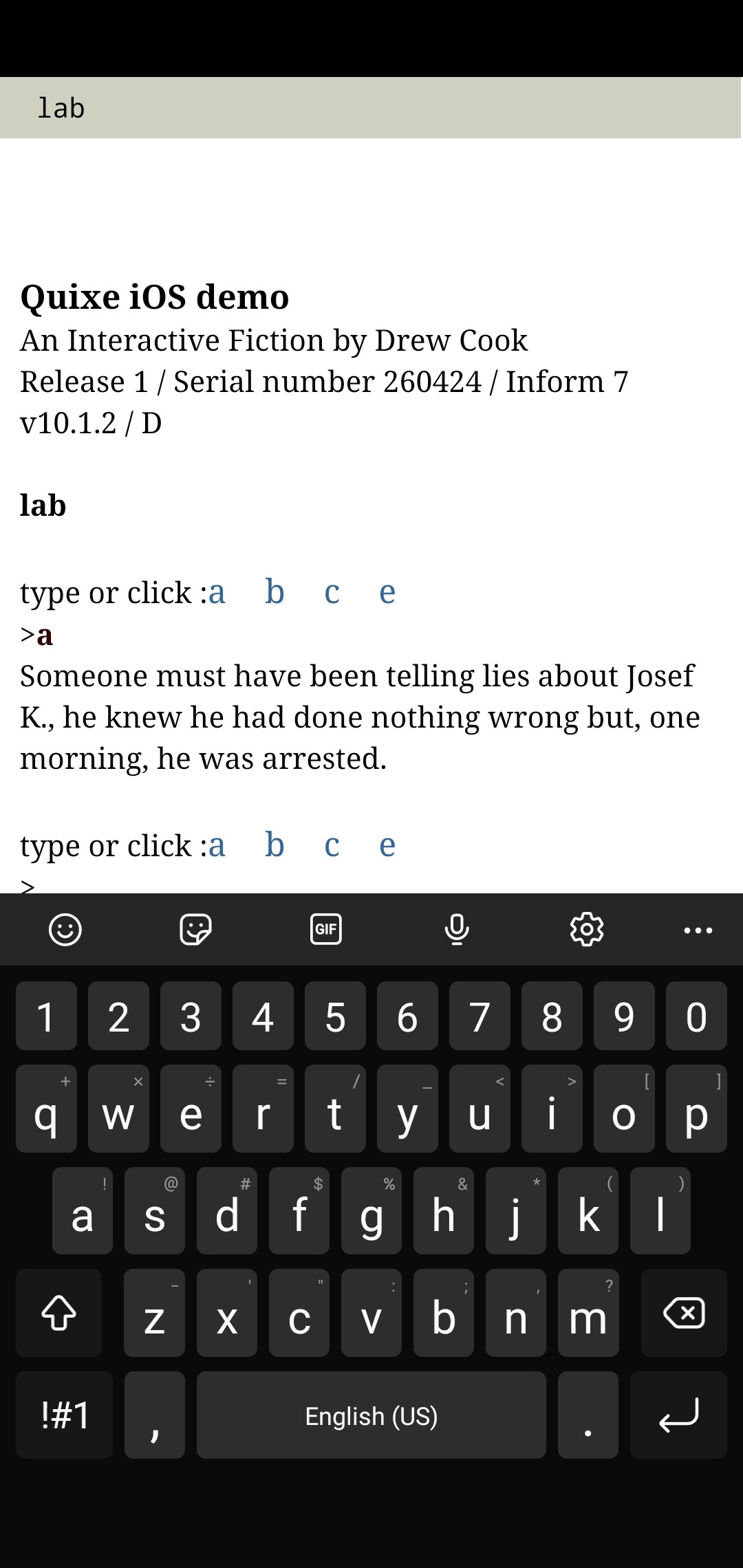
I’ve got a Samsung and use Firefox. When I boot this up:

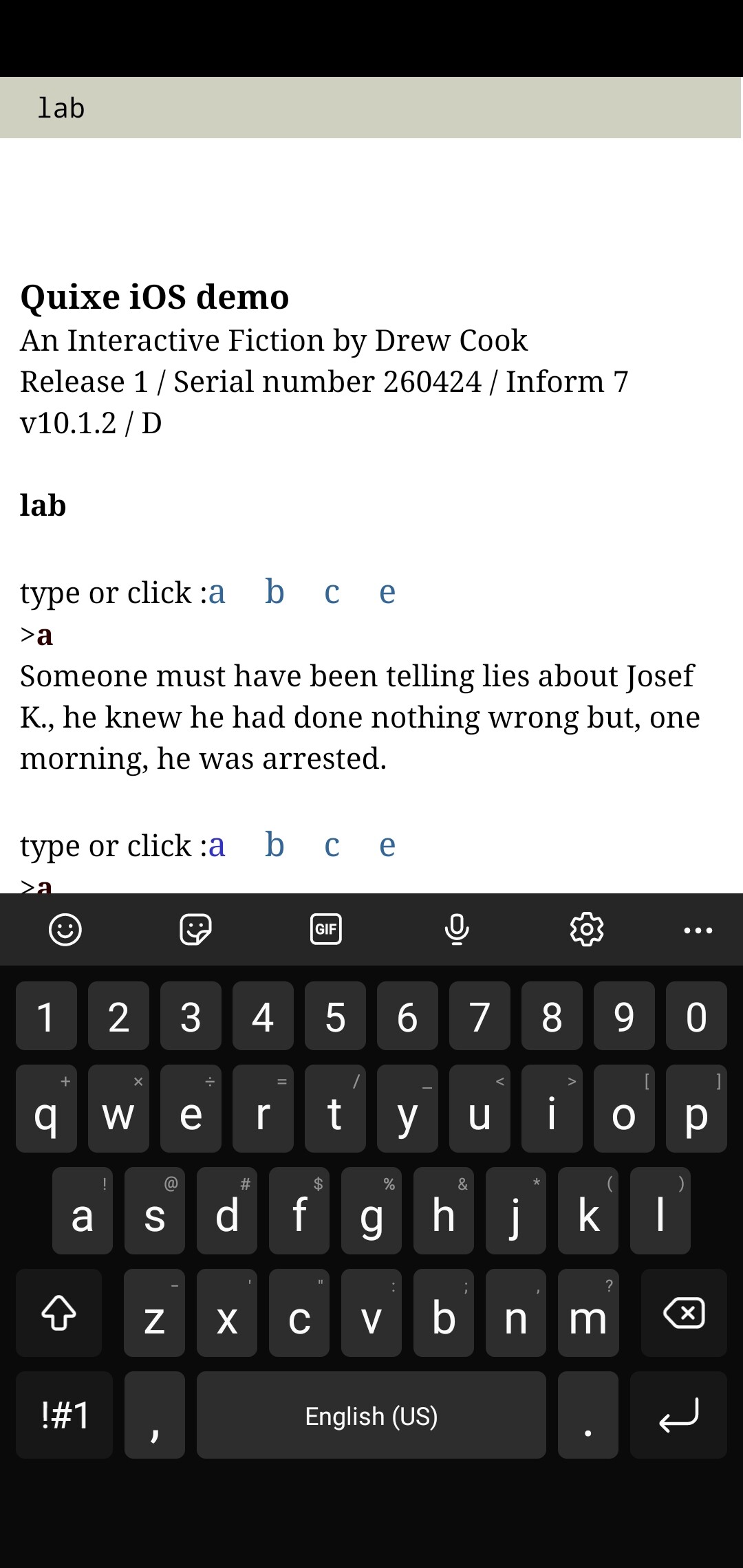
I can click a; keyboard stays put (k). The input field is partially obscured, but still visible, so I can type and see what I’m typing:

When I type and enter a, the the keyboard stays put, I can’t see the new output, and I can’t scroll down:

If I minimize the keyboard I can see the new output and the input field, but as soon as I click on a link or the input field the keyboard pops up, obscuring content & the input field, and I can’t scroll down at all, so there’s no way to see both the keyboard and the input field at the same time.

I briefly downloaded Chrome and Opera and had basically identical experiences.

1 Like

oof. That’s even worse than I expected. The feedback I’ve been receiving has been more “unpleasant” than “impossible.”

It would be interesting to know if other devices do the same thing, or if there is variation out there. Thanks for taking a look! I really appreciate it.