Like a fake Z instruction or pattern (like a serial number of 999999 for Ozmoo maybe?) that can measure ticks / jiffies / milliseconds / whatever?
Obviously only interesting on older interpreters.
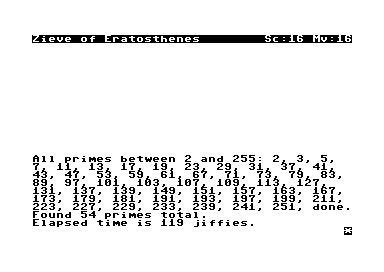
Here’s a story that finds all the prime numbers below 256. Could handle more than 256 but would really be better as a Z5 story since those implement bit shifts.
Yeah, I guess that would be best. It’s going to count a lot of time in your screen display routines but… why not, that’s pretty much what text adventures do all day and you care about its speed.
But I meant more like a standard way to signal to an interpreter you’d like to measure how long a certain following code sequence (Sieve, Adventure, Zork I) takes to execute.
This may not be exactly what you asked for, but Ozmoo can be made to write the two lowest bytes of the jiffy clock into the Z-machine header every instruction.
On line 98 in make.rb, uncommment this line:
# 'TIMING', # Store the lowest word of the jiffy clock in 0-->2 in the Z-code header
A jiffy is 1/60s on C64.
I use this to evaulate the performance of code in PunyInform.
There are walkthroughs for PunyInform Adventure and Inform 6 Adventure in the Ozmoo distribution.
If you build Ozmoo with -bm (i.e.“benchmark”), it will incorporate the walkthrough in the interpreter, rig the PRNG, disable MORE prompts, and it will print the jiffy clock before the first move, as well as after the last move.
Ohh. Zoom added some unofficial opcodes to start and stop a timer. Bocfel also supports them (though the most recent release of Gargoyle dropped support), but they’re otherwise not widely supported so you’d be limited to those interpreters.
FWIW, my new apple 2 interpreter can run the benchmark above in 45 jiffies (Apple 2e) or 43 jiffies (Apple 2e enhanced / 65C02).
It does a pretty good job of measuring raw instruction overhead, because anything I do in the main decode shows up in the benchmark.
I also “cheated” a few things in my interpreter to make it complete the benchmark faster:
Printing numbers below 100 uses a 100 element table and the hex print routine to avoid division or repeated subtraction (this alone saves a jiffie and is probably the biggest cheat)
When rendering the status line, I don’t redraw the room if it hasn’t changed. If it has changed, I don’t write spaces further than necessary to erase the old room.
The text output routines all hit display memory directly.
Depends on the use I guess. A standard test of performance I do on my interpreter is to run Zork I release 88 from start until the first read instruction then reset. I loop that as many times as possible in a fixed period of time to get the average z-machine instructions per second. My z-machine can be run with no front-end attached or various levels of dummy front-ends so I can get numbers with and without output delays, etc.