I tested it and it worked.
Thanks, but I can’t get it working on mobile. I get the first screen and it sat there for five minutes until my screen timed out. It was working yesterday on my pad, so maybe there is an incompatibility, but the phone is newer.
1 Like
Ok, strange, I’m looking into it. Can you try a simple browser page refresh? That MIGHT solve the problem.
Aha! Refresh works. Not sure why, but it reloads, and this time you have the play button.
Playing on a mobile works quite well, and the settings afford useful customisations. A few things:
In the default style, links are somewhat faint.
Quite often, the system has content off the bottom of the screen, which you manually have to scroll. In particular, the input line is not often shown, but worse, when there is a list of options, some are off screen and not visible, so you don’t know about them unless you think of scrolling .
1 Like
This is HUGE and a real problem I’ve had with interpreters for the desktop.
Formatting on WinFrotz works sort of, but messes up the header bar. Gargoyle works pretty well but configuring with a text based conf file is kind of a pain; you’ll spend a lot of time trying different games and tinkering with the margins and colors to get it right. It’s been a long time since I messed with it but I recall some settings in the conf not making the desired changes; but that could be me needing to try the latest version.
Lectrote is easier but good gravy it’s enormous. Being an electron app has trade-offs, and it’s probably the best of the batch, but running an entire instance of Chromium for a text-only game seems… I don’t know. I guess I have the RAM anyway. I’ve found the formatting options limited there too: certain fonts I’ve installed and know are working can’t be found by the style editor.
I know I’m picky here; I’ve sometimes been in a bookstore and unable to buy a book because the text and formatting were all but screaming at my eyes.
1 Like
@jkj yuio
I can probably still optimize how this works on mobile browsers. Ideally, the address bar at the top would disappear as soon as the page loads, and the display area would immediately take up the full height.
What should already work: You can swipe the app “up,” and the title bar will disappear. Once the title bar at the top is gone, the missing lines at the bottom are visible.
This is completely not picky. Because poorly formatted text is just hard on the eyes.
About line length: I’ve had an amazing experience here. Long lines never really bothered me. But now that I’ve added the option to adjust the text length in several steps, I’ve started using much shorter lines myself.
For now, I’ve limited the options to three line lengths plus “as wide as possible.” I’m a little unsure whether these options are enough.
1 Like
You actually want less options here. Ideally none! The app has to somehow choose the right value right from the start. Only dedicated users will even go into the settings and fiddle.
The ideal value for the text length and margin size is not obvious. I have a hairy calculation of heuristics for this. And it’s different on mobile Vs desktop. Why? Actually it shouldn’t be. But I think it’s down to readability. Distance from the screen etc. Also, I’m sure I’m going to be tweaking that calculation again sometime!
1 Like
I agree completely. Currently I’m testing the different options to find out what’s cool and make that default settings for desktop, tablet, phone. But I will keep these options, because I do not believe that one solution always fits for everyone.
On top of that, I definitely wouldn’t type while playing the game on a device without a keyboard. That alone changes the required screen layout.
Once you’ve finished your calculations, I’d be happy to take a look at the results.
I’m glad to hear that, and no argument about the giant resource hog-ness that Electron.
3 Likes
This is honestly a big reason why I often write my own interpreters for the games I make. For one, most of my ideas revolve around making the VM (Tads, Z-machine, A-machine, Gluxe, etc…) do awful and contorted things a text adventure parser was never meant to do. But hey, I know how to make this crazy idea work in Typescript maybe!
Besides that, I can’t seem to get common interpreters to do what I want in the styling department. I know lots of people have two windows up at once: the interpreter and a walkthrough or something. Maybe a music player.
But for immersion purposes, I like to just have one window for the game I’m playing. And unless I make the fonts truly enormous, the lines are too long on my widescreen display. If I could get margining and font rendering working correctly it wouldn’t bother me, but most interpreters have fidgety little display issues, and I end up spending more time fixing than playing the game. It doesn’t help that most interpreters are from AGES ago (digitally speaking.)
That said, I get it: writing a modern interpreter is a massive undertaking. Especially when there’s so many different kinds of IF game files to read, from a long and fruitful history of design.
For your project, which I think is a very interesting idea, I’d say that getting typography and whitespace RIGHT is a make or break issue. Letting the user have fine control over what fonts can be used, and the colors, anti aliasing, accessibility, margins, will make a huge difference. I’d also throw in that respecting a user’s choice for dark and light modes is important.
1 Like
This is why i agree with the idea of separating the GUI from the game interpreter itself. I have a philosophy that the game has no business meddling with how the UI is presented, only what is presented. Having said that, there is still a grey area where the game can “suggest” things. Like fonts, for example.
What this means is that the GUI becomes a presentation system for an interpreter. And there needs to be a messaging language between the two. Once this is done, a given “front end” could, in principle, talk to any “back end”.
2 Likes
ok. this is my “hairy” calculation. I’m not particularly proud of this, because i think it’s a bunch of random hacks. But, until i find something better, this is what i’m using.
static int calculateIdealFontSize(int* margin, int forcesize)
{
    // return ideal font size unless `forcesize` is set for a given
    // font size
    // also calculate the (total) margin for this size

    // this is not usually exact as we calculate the size before areas
    // are set up.

    float w = approxTextArea.width();
    float h = approxTextArea.height();

    //LOG1("Idealfontsize, area ", w << 'x' << h);
    int cpl = 60;

#define GR ((52.0f-32.0f)/(360-440))
#define CR (52.0f - 360*GR)

    if (isMobile && !isWeb)
    {
        // android
        if (androidDPI > 300)
        {
            // apply a reduction with DPI
            // 360 ~ 52
            // 440 ~ 32
            int cpl1 = ROUND(androidDPI * GR + CR);
            //LOG3("CPL1 calculated at ", cpl1 << " GR:" << GR << " CR:" << CR);
            if (cpl1 < 30) cpl1 = 30;  // limit eg for 480
            if (cpl1 < cpl) cpl = cpl1;
        }
    }

    float fh = forcesize;
    float aspect = 0.5f; // nominal char w/h

    float fakemargin = marginMin*2;  // both sides
    int m = fakemargin;
    if (w > fakemargin)
    {
        bool hlimited = false;

        if (!fh)
        {
            float fw = (w - fakemargin)/cpl;
            fh = fw/aspect;

            int lines = 16;
            if (VNMODE) lines = 13;
            if (minLinesForText >= 0) lines = minLinesForText;

            // if zero, then do not account for line height
            if (lines > 0)
            {
                // based on wanted lines, this will be the max font height
                float maxfonth = h/lines;
                if (fh > maxfonth)
                {
                    hlimited = true;

                    if (isMobile && !isWeb)
                    {
                        // do not shrink more than 1/3 ideal size
                        fh = u_max(maxfonth, fh/3.0f);
                    }
                    else
                    {
                        fh = maxfonth;
                    }
                }
            }
        }

        m = u_max(w - fh*aspect*cpl, fakemargin);

        if (m > fakemargin)
        {
            float fmm = m/fakemargin;

            // if we had to shrink font to accommodate lines
            // then relax the margin so we can have more words per line
            // even if this is more than the ideal length
            if (hlimited && fmm > 4)
            {
                // clamp margin
                m = fakemargin*4;
                //LOG2("calculated margin is fake * ", fmm << " relaxed to " << m/fakemargin);
            }
        }

        //LOG2("Calculated ideal font size ", fh << " margin:" << m << " in " << w << "x" << h);
    }

    if (fh < 10)
    {
        // emergency prevent font being tiny, whether forced or not!
        fh = 10;
    }

    assert(m >= 0);
    *margin = m;

    LOG2("Calculated ideal font size for area ", approxTextArea << " font:" << fh << " margin:" << m << " mob:" << isMobile);

    return fh;
}
1 Like
I see it very much the same way. In IF, the interface between game logic and the user interface should also be very minimal. In a classic IF, it’s little more than text input and output. In my games, I add links within the text and multiple-choice options in dialogues. The multiple-choice options for items, etc., are found only in the item metadata. The rest is handled by the presentation framework (or whatever you want to call it).
Uh yes, dark mode support is something that I can add quite easy. When it comes to fine-tuned settings, I see things a little differently: The default settings should be as good as possible and make the majority of users happy right away. In this perfect world, no one would ever even see the options menu.
Okay, but the world isn’t perfect. So, an options menu it is. I’ve tried to choose simple options: complete color schemes that are coordinated, of course, a manageable set of fonts, easy-to-use options for font size, and so on.
Now the question arises: What do I do with those who want complete UI freedom? Sure, I can offer them additional fonts and make text formatting features like kerning, character spacing, line spacing, etc., adjustable. But I can’t help but feel that it’s actually a mistake if they need this kind of fine-tuning capability in the first place.
I currently try to implement that and have ported the method to C# already. There are still some things to add before I really can use it. What exactly does u_max() do?
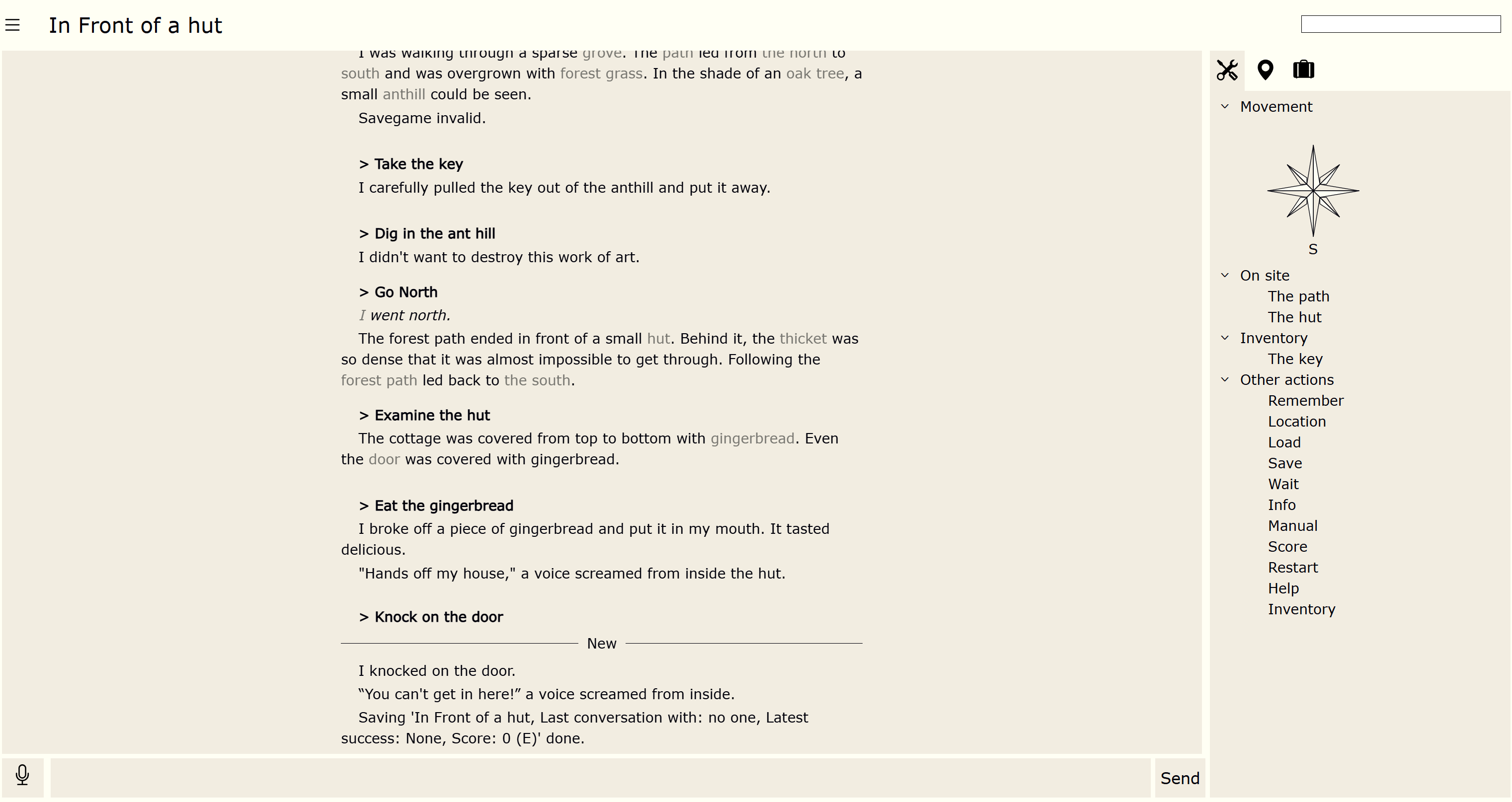
Two more layout variations that may are worth another look:
a) Choosing the “Start fullscreen” button starts the game in the fullscreen mode (if the device/browser allows it) jkj yuio, this should solve your missing lines issue.
b) If you have the “new text separator” option active, after every input action a line is drawn between old and new text. This is very much the same mechanism that’s used in this forum.
(If you already started the app, the preference is probably set to “no new text separator”. But you can activate it from the settings)
Smartphone:

Desktop:
From here you can start the app in the browser:
https://interactive-onions.io:5499
template<typename V> inline V u_max(V _a, V _b) { return _a >= _b ? _a : _b; }
1 Like