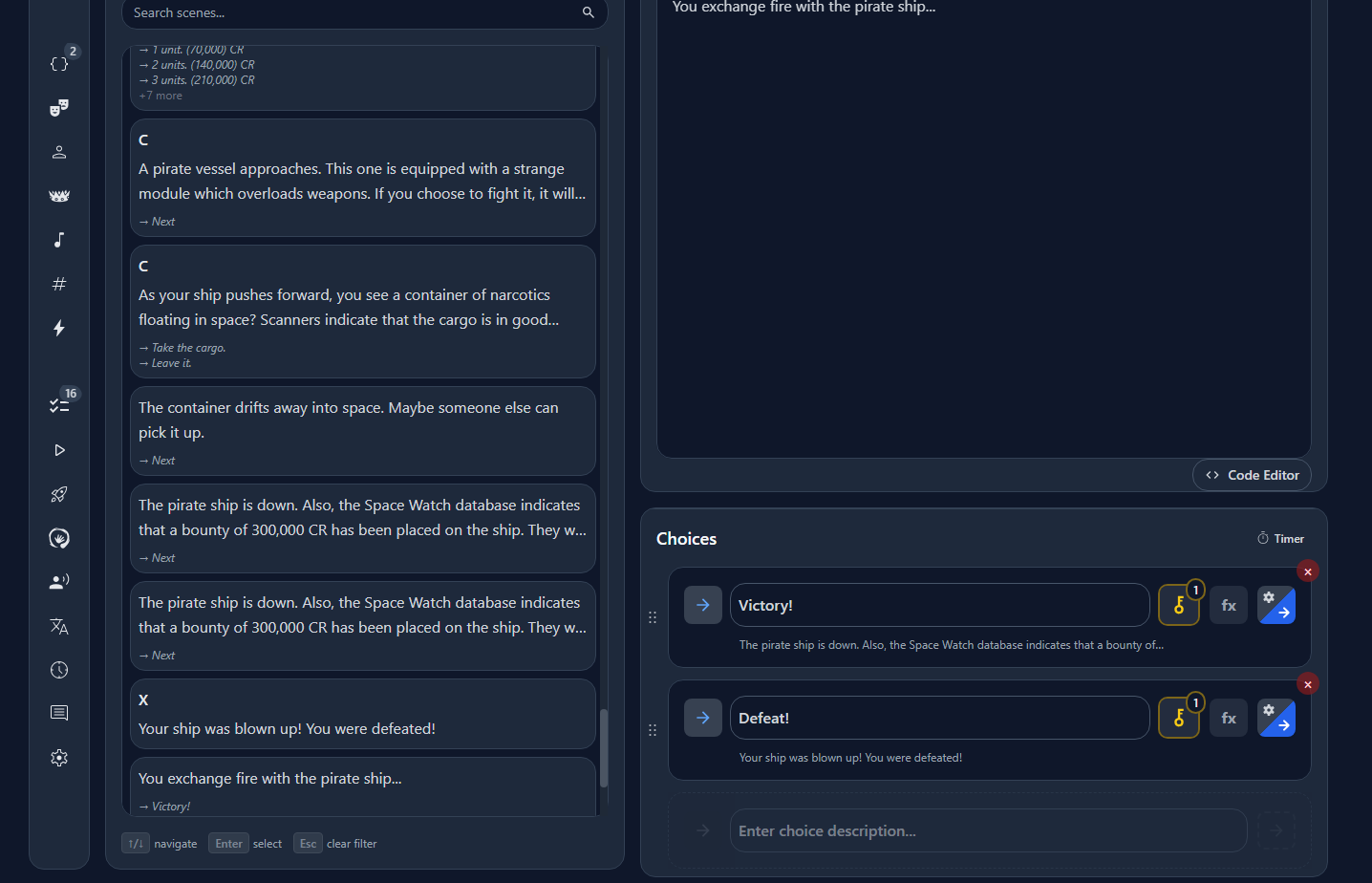
@Storyfall if I may ask, is there an undo delete or version history function? I tried to delete a scene I no longer needed, and the game simply deleted something like 75% of the scenes in the entire game (without even deleting the scene I was trying to delete). I admit I didn’t understand what it meant when it said that it would delete ‘descendant’ scenes as well, so it is partially my fault. (But I’m also not sure why that one useless scene dragged down so many scenes with it into the abyss.) I checked version history, but it seems that my old work isn’t backed up there. There is also scene history, but I don’t know if it can salvage a deleted scene.
If there isn’t, that may be a good thing to add to the bucket list, as I keep multiple backups of notepad files when working on choicescript games. Ren’py also has a very robust backup system which saves a copy of a file every time you modify it.
Anyway, trying to jury-rig my pirate cove management system in storyfall was pretty tough, and losing all of it in one stupid click is frustrating, so…
Oh no! Sorry to hear you accidentally deleted your work. I’ve built several layers of safeguards around this in Storyfall:
You can export your entire story as a JSON file to store locally (which you can re-import whenever).
If you delete text on a scene and you’re still on that scene, you can undo the deletion from the editor.
Changes to text within scenes is backed up in a history tab with a diff, going back 10 changes. This allows you to restore lost text even if you navigate away from the scene or close the browser entirely.
The version system is less of a data recovery system and more a publishing/draft system. New versions get created when you publish a story and then create drafts, and then publish again, etc. Each one of these is saved separately.
However none of these systems protected you in your situation, which sucks.
The warning modal that pops up when you try to delete a scene is telling you that descendent scenes (meaning, scenes that this scene connects to) will be deleted if you delete the parent. That’s because for most of Storyfall’s development, “orphaned” scenes (scenes that float around with no connection to them and no way for a player to get to them) were seen as undesirable. I’m actually in the process of changing this so that you can deliberately create orphan scenes since some writers have requested this for various reasons.
I think to prevent this from happening in the future I’m going to do two things:
Stop cascade deleting orphaned scenes when you try to delete a scene - the warning is I guess not clear enough so I’ll err on the side of leaving orphaned scened than deleting them.
I’m going to leverage the versioning system to do a nightly backup of stories. You’d then be able to recover a specific backup of your story.
In the mean time I suggest you export your story as JSON to keep a local backup.
@Storyfall I think if you present a scrolling list of the scenes that will be deleted (and a total number), you can keep the feature as is. This would keep the intent you have with the feature and alert the author as to what’s really going to happen.
Also, the term “descendant” sounds very technical (I assume the author sees this word). Use “connected” instead. When a simpler word will do, always use the simpler word.
Edit:Hmmm… probably don’t want to infer that connections going up the chain will be deleted as well. Maybe “children”? or the “branch”? or “cascading/dependent scenes”? Anyway, food for thought.
@Storyfall If you like the scrolling list idea, you could have check box beside each scene and uncheck the ones you don’t want deleted. They’d become orphans, but still available. Anyway, I’m just talking out of my ass now.
I think for the regular scene delete button it shouldn’t delete the descendants/children/branches. It feels like too much of a foot-gun where things could go wrong, even with the extra review option. I also don’t think it’s what authors would intuitively assume deleting a scene is expected to do. It’s sort of treating a scene as a folder that contains all branching scenes, which is probably not the right mental model.
But I do think it’s useful to have a bulk delete button, where you can pick from a list of scenes, as you suggested. I’d definitely put that behind a big red “DANGER ZONE”, haha. Maybe even create a story backup right when a user clicks on that, just in case.
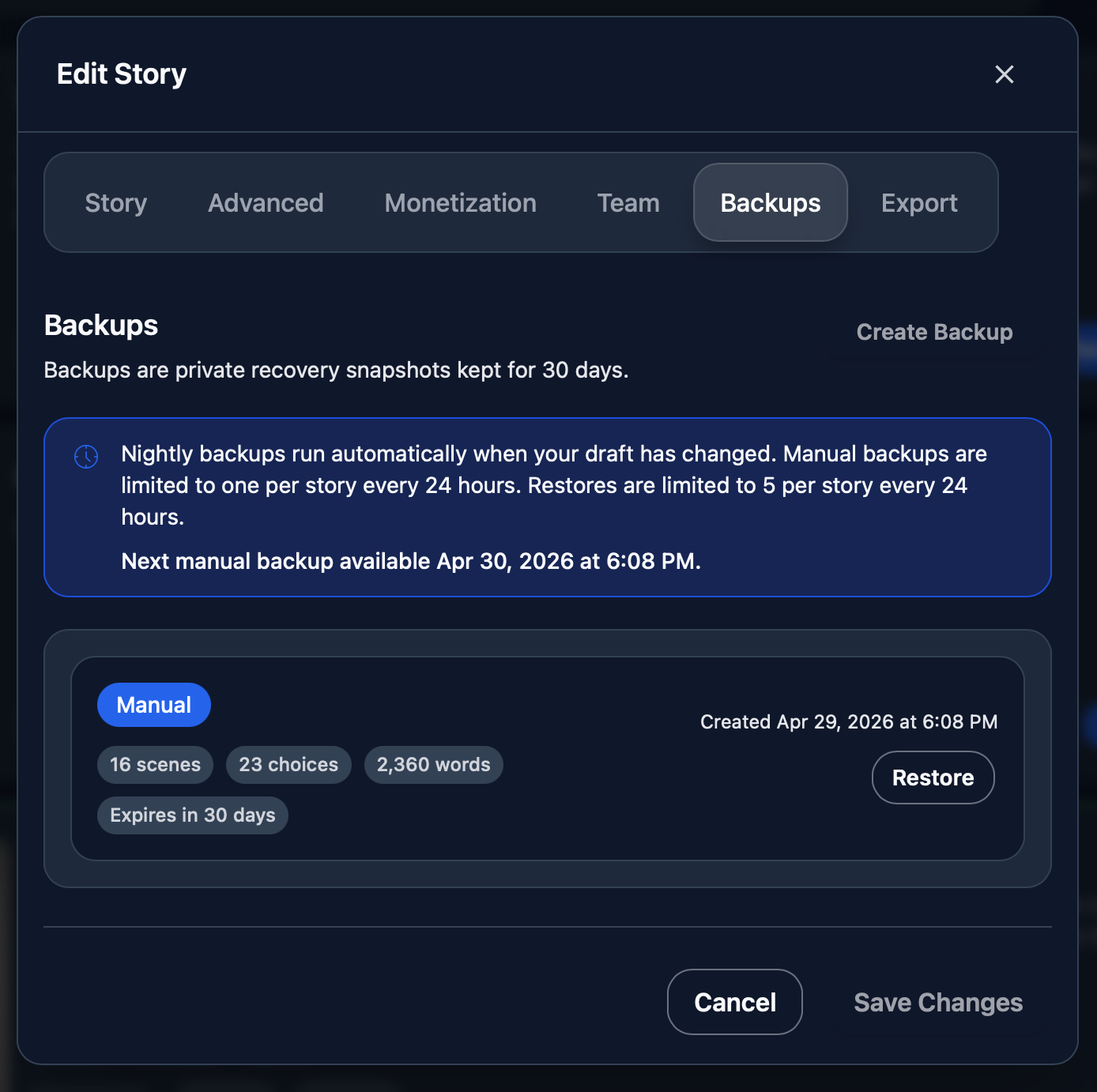
Alright, the backup system is up! You can manually backup and restore from a new tab in settings called “Backups”. Backups are also automatically done every night if your story has been updated at some point that day. Theoretically, if you edited a story for 30 days in a row, you’d end up with 30 backups. That’s quite a bit of extra data so backups older than 30 days get automatically deleted to keep database size manageable.
I’ll find out tomorrow morning if the nightly CRON job backup actually runs. Fingers crossed!
I also made the delete scene button no longer nuke all branching scenes.
I created a project with neatly named scenes and waited for the green checkmark to appear on the top right. As a precaution, I clicked through every single scene and waited for the green checkmark to appear each time.
However, when I left storyfall and came back for it, a lot of the scenes lost their names or had their names corrupted. A few scenes had disappeared completely. I had this issue occasionally when porting Gummybear Galaxy, but it seems very severe for my latest project. I’m not sure if the overall complexity of this project was too heavy on the platform or if a recent update to storyfall broke something somewhere, but there is that.
Anyway, I need a break. Has anyone here played around with Storyfall and had this issue?
Edit: In the code editor, clicking on a scene in the code teleports you to it immediately. I think there should be a way to disable it. It makes it very hard to change the scenes in the code itself.
Edit2: I went back in and tried to correct the scenes. However, when I quit the editor and came back to it, a lot of my corrections were broken. I don’t think I can complete the project at this point, but I thought I would mention it as a bug report.
Someone on the Discord just reported the scene name issue yesterday actually, I think it’s a relatively new bug. I’m looking into it today.
I’ve not heard of scenes disappearing though! I think this is some kind of race condition with the auto-save. Sorry you’re running into all these bugs - I’m not aware of anyone else hitting any kind of scene loss bugs, so it’s possible there’s something you’re doing differently.
In any case, I’m going to refactor this system, it seems to be too fragile. If you have two pending auto-saves (for instance, you create a new choice, and then try to create a scene branching from it, but the first auto-save fails, then the scene has no choice to link to and also fails).
I was considering using browser local storage to maintain a local queue of save patch requests, but then I discovered this https://en.wikipedia.org/wiki/IndexedDB which I had no idea existed. It’s like a local NoSQL database built into every browser.
So I’m going to design a system where any changes get immediately saved to your local browser db, and then as the auto-save fires and saves changes to the server’s database, these changes are marked as synced and removed. If something goes wrong, instead of losing data you’d have a local version that would either get synced automatically or you’d be able to see a list of differences and perhaps manually resolve any issues.
One more thing - I checked the back-end logs and see you have several errors saving your story - did you ever get these shown to you on the editor? They would have been a “toast” that pops up for a few seconds in the bottom right of your page. If you see these, it’s probably best to refresh the page and start with a clean slate (saving any work on that scene first, just in case).
I saw those errors, but if I recall correctly, they would appear when the platform was attempting to save the game, and then disappear after the green checkmark appeared. My deduction (probably incorrect) was that the system was throwing up the error messages because it couldn’t save at first, but auto-fixed itself after a few attempts and completed the save while producing the green checkmark.
Anyway, I’m taking some time off from writing first.
Edit: Some scenes were gone. The preceeding scene choice simply led to nothing instead of the next scene. I think only two scenes were missing, both for my starship battle scenes… but I’m not sure what in those scenes could have caused it.
That green checkmark should not have been showing you a successful “Saved” after the error, so that’s definitely a bug - a pretty misleading one too. I’ll fix this too.
I do have some good news!
I went on a bit of an adventure in “Database recovery land” this morning. My SQL database is backed up every hour, so I restored a database snapshot from roughly an hour before you posted your original message about your pirate story where you accidentally deleted branching/child scenes. I was able to export a JSON file from that database and it has 19 more scenes than your current version in the live database!
I’m going to DM you with this file so you can import it in and hopefully that recovers most of that story’s data.
Thanks, but actually, no pressure. After losing the files, I realized that the pirate project was overscoped anyway, which is why I made a new story from scratch.
Way late to this, but I’m just getting into Storyfall and just discovered that I could see the code (it was bugged in my browser)
I don’t know how difficult this would be, but have the code display separate chapters in tabs kind of like Notepad++?
One tab could be the entire code, the others are separate chapters and they’re all live, so you can update it anywhere, or copy/paste the entire source from the main tab.
That might be a good fix for the request to copy all the choices in a scene to another one. I know you initially were wanting to do everything via the IDE, but just dropping to code, copying five choices and pasting them wherever else is just as easy.
The IDE is actually good because while you’re learning you can switch back and forth and see what each thing does by its matching code.
I know I certainly would rather just type out {cycling: green | yellow | red } than use the drop downs for some more verbose text variation, but I’m glad the IDE is there because I can use the generator to set up “here are five different lines of dialog this character might say - A B C D E” and then drop into code where it’s much easier to write and flesh out than typing a monologue into a narrow dialog box.
I hadn’t considered the visual editor to be a learning tool for the code editor! Good point on the benefits of using both.
For the choice copying, this already works, you can open one scene, go to code editor, copy the choices (or effects or whatever else), go to another scene (which you can also do from inside the code editor) and then paste. But having tabs would definitely be convenient.
Right! Or even just allow splitting the code in two views so you can copy-paste from a source to a destination without ten feet of scrolling down.
That’s one thing I experienced in ChronicleHub - the interface is several narrow columns, so in a complicated storylet there’d be so much distance between the top title description and choice #8 down in the basement
I am the prime candidate for this. I am the worst always like “ugh, not learning code, if there’s no IDE don’t come near me” but once I’ve clicked through the dialog boxes 20 times it’s easy to understand when I drop to code and go “oh, that’s all it is?? I can do that…”
Agreed. Being a coder first and foremost, if I can’t just work from the IDE, then there’s no point. However, if I go through the GUI enough, then look at the code, I immediately understand what I’m doing 10 times more. Especially from a blindness perspective, it’s paramount to understand what the UI elements do from a code level, instead of just saying “click this”, “go here”, Etc. Exactly why I couldn’t get on with Quest, even though the UI is relatively accessible (if I use object navigation) with my screen reader of choice.
Changes you make are first immediately saved to your browser, then synced to the server. If sync fails, you get both a proper error message and it’ll say “Save failed” instead of incorrectly displaying the previous save’s success, which was confusing. You can click that button to retry saving.
If you refresh your browser or your machine crashes or whatever, and you go back online, any locally saved but un-synced changes will be synced to the server, so you won’t lose work.
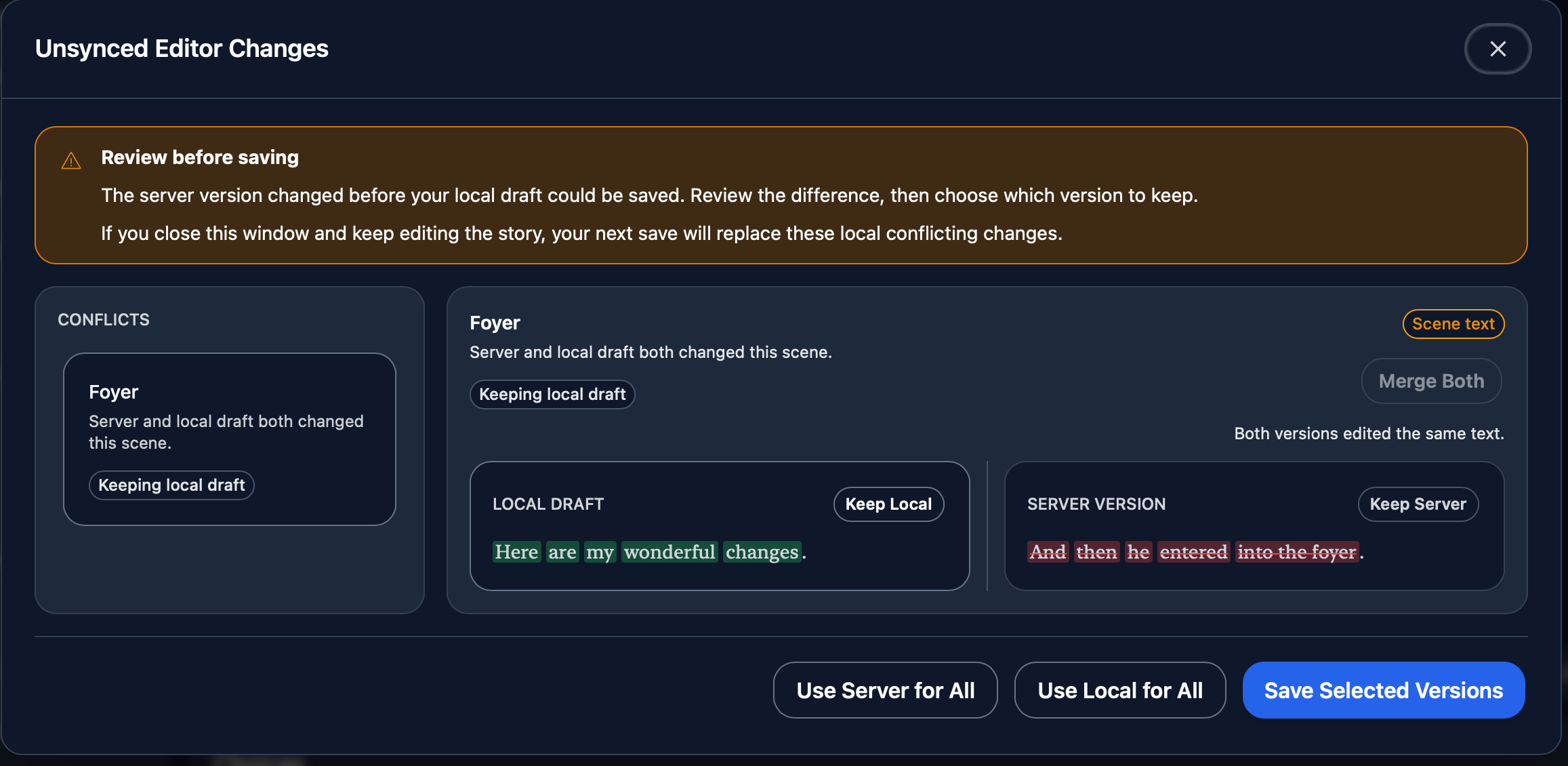
While I was overhauling the auto-save system, I also added conflict detection. If you somehow made changes offline on one device and online on another device, and they conflict, you’ll see this screen, where you can pick which version to keep.
After quickly checking out some the stories for your first game jam, I felt (as a reader), I wished that I had more control over the font for legibility.
If you want a bit of a foundation to build upon, please check out a game from Choice Of Games and go to the settings menu in any story. It’s the closest comparable to Storyfall that I know of.
There’s a stigma towards serif fonts with digital media for legibility so you see a lot of people defaulting to sans-serif, but this is only true for low-resolution displays. Higher resolution looks almost as sharp as print and there’s a reason why physical books still use serif fonts for long reading sessions. Just FYI.
Unrelated to font styles, I read a passage from a story where the body of text was short. Because choices and story share the same rounded corner box, the choice was not distinct from the story content. The only clues were the small numbers and arrows to the right, but on a larger monitor these clues were discreet so I think this is something that needs some tweaking. I would like choices to look distinct from story prose, but this is just my personal preference.
Lastly, while reading a story, I found that the time between clicking a choice and seeing the next page was a bit sluggish for me. It’s not terrible, but 2 seconds seems a bit long. Are the pages being served up as unique server calls and the button growing and text blurring is a distraction to the request time? If the story is fully loaded on the client side, I would decrease the transition time.
Just wanted to also say the Storyfall looks very polished. What you’ve done so far is quite impressive and I hope these critiques don’t distract from all the good things you’ve clearly got going here. Seriously, great job so far.
Thanks for the feedback! I’ll look into adding some font choices.
That’s interesting that the visual similarity between the scene and choices below it was confusing. Maybe there’s some minor design tweaks I can make to more obviously distinguish the two.
I’m afraid you’re not the first to complain about the choices being a bit slow. They are in fact server calls, and you’re right that the animation is meant as a distraction. I’ve spent a while optimizing these (they used to be slower), but it’s still not as fast as I’d like.
There’s a lot of functionality built around the server doing the work - for instance save games are stored on the server (including any variables that apply to that character), playthrough history, etc. and there’s also some gating around monetization - so if somebody has a paid chapter for instance, the server enforces lack of access to that unless the reader has paid.
However, I have over the last few months been working on an offline game engine. It’s what powers the HTML exported games and what will eventually be used for offline iOS/Android play once I launch those apps. It doesn’t yet have feature parity with what the server does, but it’s close, and eventually I’d like it to replace the server calls almost entirely for singleplayer web-based games. The server as the source of truth for purchase status would likely remain, but that would only apply to paid chapter transitions or when starting a paid story. Oh and of course there’s multiplayer games that require the server to coordinate things.
TLDR: I plan to transition to a client engine so choices will become instant, but this is probably a few months out.