Rez v1.9.8 — an open-source tool to simplify building complex IF games

This is the curse of the systems author. It’s always easier to work on a system than the content, and when the system in question is the entire game engine, there’s always something to tinker with instead.

This is why I keep producing SugarCube macro libraries, because I get distracted from some game by building a system it barely needs …

Basically, you are in good company. But games do get built this way. As long as you are having fun, you’ll get there.

Thanks.

That’s the funny thing: it’s only my expectations of progress that trip me up. But I like working on the kinds of things I want to play so I should expect that, given it’s a spare time activity, it should take me a long time. Accepting that the progress I have made is fine. Every change I make to Rez gets me a little closer.

At the moment I have suspended work on the big games to get the demo games working again. That’s also exercising the actions and maps cookbook libs that my other games will depend on. In the dungeon crawl rogue-like I’m procgen’ing levels which is kind of fun. It was always part of the plan for that demo before I got distracted. Could be a fun little game.

As someone who really enjoys tabletop RPG’s, and at least the idea of CRPG’s and JRPG’s, but the closest I’ve gotten to JRPG is Pokemon gens 1-3 thanks to a set of accessibility scripts, I wonder how hard it would be to use Rez to create a classic style RPG, either in the Wizardry or Dragon Quest mold, only in a text-only (or text-first) format. This is a project I’ve dreamed of making for years, but have resisted because nothing I could ever build in TADS or Twine could really duplicate the experience of an RPG, especially considering that parser IF and RPG’s don’t mix well 99.9% of the time.

I think Rez was built for interactive fiction RPGs.

I love Rez’s object level framework. The code syntax is pretty concise and I don’t think you’d need to use any JavaScript or any HTML beyond buttons (@sandbags can correct me if I’m wrong). Rez’s built-in behaviour syntax should handle all conditional logic for you.

I’m working on a very simple narrative Rez game right now, so I’m not well versed with all of Rez’s built-in objects. However, I can’t imagine how Rez could present any obstacles for a text only RPG.

Just FYI, the documentation for Rez is a work in progress, and there aren’t many people using Rez yet. However Matt @sandbags is fantastic guy and willing to field questions.

@blindHunter If you can share (from a player’s perspective) how a battle might play out, or how you would like to navigate a dungeon (or the world), I think that would help us to help you. I think we might be able to help figure out a Rez framework to support your vision for your dream game. :+1:

Here’s a sample game (without any RPG mechanics though), but might give you a good basis for the code structure.

Treasure Hunt (Demo Game)

And I’ve taken the source code from the docs regarding the game and stripped out all non-essential HTML from the content for you (and put spaces in the triple back-ticks to get the code to render properly on these forums). It’s 74 lines of code.

Treasure Hunt Source Code (Edited)
@game {
  name: "treasure_hunt"
  title: "Treasure Hunt"
  IFID: "12345678-1234-5678-9ABC-123456789ABC"
  archive_format: 1
  version: 1.0

  initial_scene_id: #opening_scene
  layout: ` ` `
  ${game.title}
  ${content}
  ` ` `
}

@scene opening_scene {
  initial_card_id: #forest_entrance
}

@card forest_entrance {
  content: ` ` `
  You stand at the edge of a dark forest. A weathered sign reads "TREASURE WITHIN".
  What do you want to do?
    <a card="enter_forest">Enter the forest</a>
    <a card="examine_sign">Examine the sign more closely</a>
  ` ` `
}

@card enter_forest {
  content: ` ` `
  You push through the undergrowth and find yourself in a small clearing.
  In the center sits an old wooden chest!
  <a card="open_chest">Open the chest</a>
  <a card="forest_entrance">Go back to the entrance</a>
  ` ` `
}

@card examine_sign {
  content: ` ` `
  Looking closer at the sign, you notice small text at the bottom:
  "Beware the guardian of the treasure."
  <a card="forest_entrance">Return to the entrance</a>
  ` ` `
}

@card open_chest {
  bindings: [player: #player]
  content: ` ` `
  $if(player.has_key) -> {%
    Using the key, you open the chest and find a pile of gold coins!
    You win!
    <a card="forest_entrance">Play again</a>
  %}
  () -> {%
    The chest is locked tight. You need a key.
    <a card="search_area">Search the area for a key</a>
    <a card="enter_forest">Go back</a>
  %}
  ` ` `
}

@card search_area {
  content: ` ` `
  You search around the clearing and find a rusty key hidden under some leaves!
  <a card="open_chest">Try the key on the chest</a>
  ` ` `
  on_start: (card) => {
    $player.has_key = true;
  }
}

@actor player {
  $global: true
  has_key: false
}

I’m only superficially familiar with JRPG’s, but I am pretty versed in table top and CRPGs.

RPGs can be some of the most complex games out there so part of the question is “How complex a CRPG do I want to make?” then, “How well does your tool support those ambitions?”.

What I can say is that I designed Rez for handling bigger, more complex, games because my ambitions lie in that direction also.

Three examples:

  • The @actor element is there to represent the player, as well as NPCs, and which combines with the @inventoryelement to support item style inventories but also discussion topics, spell lists, etc.
  • The @plot and @quest elements for represent different ways of modelling world state as it relates to the player and player achievement.
  • The @asset element for managing digital assets be they images, sounds, movies or whatever and bringing them into the game.

In terms of user interface, Rez ships with Bulma.CSS and Alpine.JS which are reasonably sophisticated but also totally replaceable. Rez doesn’t actually depend upon either and you can switch them out for, say, Tailwind CSS (which I have done), or even write all of your CSS from scratch if your talents lie in that direction. If you can imagine your RPG UI in a web browser, it should be possible.

There are certainly rough edges in Rez. The core is pretty solid but as I build out myself I find things that need to be revised or improved. For example the RezInventory class has undergone a lot of changes to make the API more intuitive. There are also bugs, although I am finding them less often now. Lastly, as @HAL9000 mentions, the docs are a work in progress. At a certain point the product leapt ahead of the docs and they still have to fully catch up.

Here are the two games I was thinking about that inspired me to build Rez as a vehicle for my ambitions:

Rise of the Necromancer: a CRPG that is kind of an inversion of the story of Neverwinter Nights where you play a necromancer sent to infiltrate and corrupt a city.

Fleet Commander: manage fleet and crew of star ships in a sector sending them to respond to different situations and, ultimately, conflict with another faction.

@blindHunter The mechanics for blind accessible games, I would assume, are usually an afterthought. I’ve always thought that blind players, though patient, don’t want long descriptions and favour terse text outside of story prose. Also, keeping certain text silent as new content is presented.

Tabbing through button links in Rez just works as you’d expect, but because it’s browser-based, the tabbing goes outside the game too. It would not be hard at all to set up a different key to act as the tabbing key (keeping game button selection locked within the game) and still use the space bar to activate a button as usual. We could help build a component for you, if needed.

A nice thing about authoring in Rez is that the game code can be split up into smaller files of your own design; a must for keeping code manageable.

Plus, it supports player keybindings to your own Rez game logic. I would imagine the keyboard is the ultimate way to play accessible games. (Especially when mapping keys to a game pad.)

Another thing about Rez is it’s component feature. You can make complex HTML / JS widgets that take advantage of accessibility features (like JS speech synthesis) and wrap your content into a single custom HTML-like tag to streamline your authoring and game logic experience. I love the components system. I hate parsing lots of code while authoring.

I’ve often wondered what the best RPG interface for blind players would be like. I would love to hear your thoughts on that. I’d imagine it would have to be very streamlined and organized well, especially with the repetitive nature of JRPGS. I have to admit, the traditional RPG leveling grind can be quite enjoyable when done right. Fun does not require complexity.


For those who are curious, speech synthesis is for blind accessibility scenarios in that text can be read out loud without being added to the rendered HTML. It’s great for menu systems and such that you don’t want a screen reader to traverse every time the page is redrawn in the browser. And I can honestly say that Rez stays out of the way when it comes to JS and HTML content. Here is a link to an example code pen where you type something and press a button for it to be read. (I’d also imagine that a widget could be made to do a poor man’s speech synthesis – by adding the text and removing it upon any key press to avoid it being re-read.)

This is a very interesting challenge.

Rez works with plain markup. For example you write links as <a href=”…”>, buttons as <button> and so on. It uses a few special classes such as rez-evented and attributes like data-event, data-target, rez-live, rez-bind, and so on to do its work.

I think that this, combined with (as @HAL9000 mentions) its good support for creating custom components means it should be relatively easy to create an accessible interface.

I just released Rez v1.9.8 for macOS, Linux, and Windows.

This version greatly improves the cookbook. In particular cookbook docs, you can now add images and an HTML file is automatically generated for the user when the library gets installed.

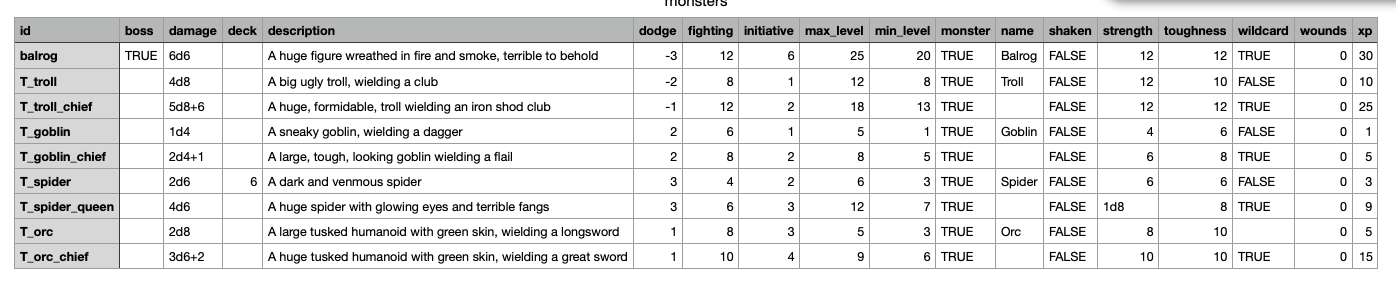
It adds a rez export command to do CSV export of object attributes, e.g. NPCs, items, places. Handy for seeing data regarding a set of objects all at once. I built this to make it easier to balance monster attributes for encounters.

It adds a new event chaining syntax +(obj) => {…} that allows appending new handlers to life-cycle events such as on_init or on_will_start.

It adds a new <.compose_attr attr="…"/> component to the stdlib for rendering template attributes using bindings (@HAL9000 this is in the stdlib now).

Also numerous other enhancements and fixes.

The cookbook actions library (which dynamically generates links for available choices) is now pretty well baked, being tested in 3 projects.

The cookbook maps library (which handles defining locations and connecting them in zones) is getting there. In one of my projects I am using the maps library to procedurally generate levels of a dungeon and it’s working well.

I’m quite pleased with the way that Actions cookbook lib is working now. For the most part in choice based games you end up writing a bunch of static <a> links ([[…]] if you’re working in Twine or some such).

In a game where systems come to the fore this starts to become rather tedious. In Rez it’s easy to use another card or a component to render a bunch of links from multiple different places but that’s just one part of the tediousness.

Instead what Actions library does is let you write an @action element which is akin to a verb in a parser game. Here’s an example from the dungeon brawler example game I am building:

@action act_move {
  label: "move"
  verb: "Go"
  determiner: "to"
  category: "move"
  event: "card"
  target: "object"

  objects: function() {
    return $player.location.exits.map(exitId => $(exitId));
  }

  available: function(decision, location) {
    location.reachable(decision);
  }

  params_for: function(obj) {
    return {};
  }

  link_text: function(obj) {
    const player = $("player");
    const loc = $(player.location_id);
    const dirs = loc.exit_dirs;
    if (dirs && dirs[obj.id]) {
      const dir = dirs[obj.id];
      return `${dir.charAt(0).toUpperCase() + dir.slice(1)} to ${obj.int_name}`;
    }
    return `Go to ${obj.int_name}`;
  }
}

The label: attribute is an internal name for the action while the verb: defines what gets shown to the player. The determiner: is a linking word that relates the verb to an object.

The category: relates actions together for display purposes. While event: and target: determine what happens if an action is used. I’ll come back to these.

The objects: function returns a possibly empty array of objects that the action can be applied to. In this case it returns all of the exits available from the current @location (using the maps cookbook lib). Return [] would mean the action wouldn’t be available at all. By convention I return [$player] for actions that don’t have an object.

The available: function is passed a RezDecision object and one of the objects returned by objects:. It’s responsible for updating the decision by calling one of yes(params), no(reason) or hide. In this example it is delegated to the location itself. In this way a location could for example use hide because the player doesn’t know about it yet. Or no(“The way is blocked.”) as part of a puzzle.

The params_for: function returns any special params that should be applied to the link for this object. In this example, none.

The link_text: function is responsible for determining the markup to use in the link. The default uses "${verb} ${determiner} ${obj_name}” but in this case we have directions are part of the exit descriptions so we customise it.

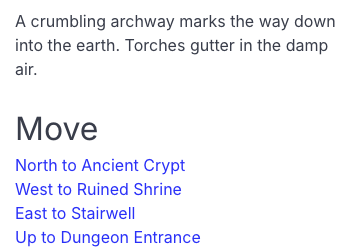
The result is that we can use the <.action_links menu="move" /> component to display a dynamically generated set of links:

Of course you can define as many @actions as makes sense. I use the same thing for NPCs to talk to, objects you can interact with, and so on.

I have in mind an experiment/refinement of this, along the lines of Chris Crawfords “inverse parser” idea. Then, rather than menus of separate links (which can require careful formatting so as not to get out of hand), you’d have something like a select menu to choose an action (move, talk, and so on) that optionally leads to a further select to refer to the object to which the action should be applied (North to Ancient Crypt, Grizzled old prospector, …).

Sounds like a world model that parser games employ, but with a choice-based system input. This gets the mind reeling with many, dare I say, disambiguous possibilities. :wink:

Regarding the action categories, I’ve given this much thought.

  • NAVIGATE - move, enter, climb, jump to, crawl under, hide behind, etc.
  • EXAMINE - look/search, smell, taste, listen, feel, [insert psychic power], etc.
  • INTERACT - push/pull, open/close, drag, use, hit, kiss (I hear that’s popular), etc.
  • TRANSFER - take, drop, place on/in, give, steal, offer, etc.
  • VOCALIZE - talk, ask, command, shout, whisper, sing, whistle, etc.

These 5 categories (coupled with SELF/STATUS and INVENTORY) pretty much encompass all actions an author could allow a player to do. With inventory items, they would carry their own inherent action verbs that can be applied to other objects and characters. Additionally, an author might want to make a COMBAT category with attack, cast, parry, block, etc. for repetitive action sequences and player ease-of-use.

I can imagine an interface of point and click adventure icons and a narrative world chock full of delicious nouns… but I must resist or I’ll never finish my current Rez game. Damn you, Matt! Damn you, and your insatiable appetite for expanding the capabilities of Rez!


Yeah. I’ve given this a bit of thought. :wink:

Yeah, I like where you are going with this. It’s the sort of experiment I want to play with.

My one nitpick is that I didn’t have to expand the capabilities of Rez. The actions library is implemented in Rez :grinning_face:

This draws parallels to when The Tick was at a bus stop and ready to depart to The City. After helping all the people at the bus station…

“Goodbye, plucky, pimply teen.”
“Think you’re ready now to hear the truth.”
“This wasn’t really a magic hubcap.”
Hands the hubcap to the teen.
“The magic was inside you all along.”

Thanks for the hubcap (and dose of truth), Matt. :wink:

I think you meant lick :stuck_out_tongue:

Today I’m releasing Rez v1.9.10 for macOS, Linux, and Windows.

It contains the following fixes and enhancements:

  • Fixes broken loading of procedurally generated content

  • Converts keywords to globals, :weapon => $kWeapon = “weapon”

  • Fixes @behaviour_templatebehaviour_template that was broken in a compiler change

  • Adds RezDie.roll(spec)

  • Adds RezEvent.queueEvent(…)

  • Adds @contains syntax to @inventory

  • Fixes bug in loading cookbook Lua @pragmas

  • Adds ^init, ^roll, ^copy, ^prop syntax extensions

  • All function defaults are now shared across all instances

  • AddsRezEvent.banner() using the width of the viewport

  • Adds ^ir to handle initialization by die roll

  • RezEvent.modal() becomes RezEvent.modalMessage()

These have all been made in service of the demo game Age of Ruin. I seem to have broken through my blockage and am a fair way into the game implementation now. It’s hard to judge but at present pace I’d expect to release something in July or August.

AoR is using a lot of Rez including scenes and scene interludes, events, behaviour trees, items and inventory. What I am learning from implementing these will definitely help me with the other, more ambitious, games I have planned.

I’ve also evolved the cookbook libraries. AoR makes heavy use of @action and @location that come from the cookbook.

Something that didn’t make it into the release notes is that RezEvent.modalCard() now supports a third params argument. RezEvent.modalCard(“card_id”, {}, {showDismiss: false}) suppresses the default Ok button for a modal allowing the card to present its own UI and handle the dismiss event. This combined with the new RezEvent.queueEvent() makes it possible to create highly reactive interfaces.

This will turn out to be prophetic :grinning_face:

I’ve just released Rez v1.9.11.

I’m actually making pretty good progress with my demo game Age of Ruin and all of the changes to Rez lately have been made in support of building that game.

Release notes:

  • Updated to Alpine.JS v3.15.12
  • Only copy standard assets (Alpine.JS, Bulma.CSS, …) if they are referenced using an @asset tag
  • Automatically populate the owner_id of @inventory elements at runtime
  • RezDecision gains an owner property
  • Safety updates to the RezInventory API
  • Pass a copy-customer inline function using the ^copy initializer
  • RezDieRoll gains max property
  • RezInventory passes slot_id and slot_binding correctly to on_insert/on_remove functions
  • RezEvent.modal supports an animation delay
  • Removing items from @inventory now fires the right events with the right params
  • @System’s can now observe life-cycle events such as card_will_start, scene_did_end, etc…
  • Adds Map#buckets() to the JS stdlib
  • RezBasicObject#addCopy() uses param passing style and supports a post-init-fn for in-line customisation of copies
  • RezScene provides resume_event as a way to handle more complex scene resume scenarios

RezInventory is now working really well and seems fairly intuitive to use (to me at least). For example:

@item it_arm_leather_cuirass {
  type: :armour
  label: "leather cuirass"
  value: 25

  weight: 8.0

  material: :leather
  quality: :ordinary

  active_slot_id: #armour_slot

  modifiers: [
    spd: -1
    dex: -1
    dr: 3
  ]
}

When this item is placed in a player (or NPC) armour slot it will automatically modify their SPD, DEX, and DR stats. When it is removed, the stats modifications will be reversed. To make that work I just added an on_insert and on_remove handler to the built in @item, e.g.

on_insert: +(item, {slot_id, owner}) => {
  if(slot_id === item.active_slot_id) {
    item.apply_modifiers(owner);
  }
}

It’s pretty slick.

Now that @system can respond to life-cycle events I was able to build a threat system that responds to player actions:

@system threat_system {
  ...
  after_lifecycle_event: (system, event_name, params, _result) => {
    if(event_name === "card_will_start") {
      const card = $(params.card_id);
      if(card && card.kindOf("location")) {
        system.note_move(card);
      }
    } else if(event_name === "scene_did_end") {
      if($game.current_scene && $game.current_scene.id === "sc_battle") {
        system.note_combat($player.location);
      }
    }
  }
  ...
}

I’m using this to drive NPC response to player actions.

Passing copy customisers lets me move things closer to where the copy is made:

dr_id:^copy:#T_stat{
  copy.base = 0;
}

This creates a copy of the T_stat element and then runs the function binding copy to the new object. A small change but very handy.

The new resume_event for RezScene allows for much more flexible response to a scene being resumed without digging into the guts of the event processor. It’s hard to show a concise example but it allows the scene to, for example, play a card after resuming. This is important in the game because using the inventory in combat costs an action and might result in an NPC, rather than the player, getting the next action. That requires triggering an event on resuming from the inventory scene, during a fight.

Also nothing to do with this release but I am beginning to make real use of Rez’s behaviour trees for NPC behaviour. For example a behaviour template for taunting an NPC:

@behaviour_template behaviour_taunted ^[$sequence [cond_taunted]
                                                  [$select
                                                    [$sequence [cond_in_weapon_range] [act_melee_attack]]
                                                    [act_advance]]]

If the NPC is in its weapon range it will make a melee attack, otherwise it will advance toward the player. I’m building up libraries of increasingly complex behaviours for NPCs.

I’ve given up thinking I will be “done” enhancing Rez because as my game pushes its limits I find ways to improve it.

In thinking about what a Rez v2 might look like I think the major decision I would revisit would be my choice not to use immutable data structures.

It was expedient, they are not “the Javascript way” and when I was starting to build Rez I hadn’t used JS in anger for over a decade, I was having to relearn what modern JS looked like.

But now I see all the things that would be cleaner and simpler with a single, immutable, world model and classes operating as transformers.