im fully aware of bitd clocks (which is why my interest was piqued)! i am wondering if (like bitd) there could be lost progress in a plot/clock or competing plots/clocks between pcs and npcs
I’m not 100% sure I provided a way to reverse progress but it would be a trivial modification. And you could certainly run competing @plots.
I could see for example having a @quest listen to one or more @plots and update its own status accordingly.
It wasn’t a use-case I had anticipated but the next version of Rez will include revert API for @plot clocks.
Both @plot and @quest support subscribers that receive events when they change state. This makes it easy to wire them together.
For example you might have a @quest to deliver a cargo and have a @plot tracking customs suspicion. The plot notifies the quest that customs have identified the player, and the quest automatically botches (also notifying its subscribers).
I was asked for a demo of this scenario, so here it is: the customs demo.
It’s rather rough & ready, but… you get to accept the quest and try to smuggle cargos.
There is a plot for smuggled cargo and customs interception. Each time we roll 1d6 on a 1-2 the customs intercept, on a 3-6 you succeed. If you get caught 2 times you fail the quest, if you smuggle 5 cargos you succeed and get a reward.
The @quest listens to the two @plot elements for their status. If the customs plot completes progress it botches the quest. If the smuggling plot completes the quest is marked as achieved.
Just to toot my own horn a little I love that I can make these games self-documenting by using @pragma(after_process_ast) source_explorer that creates an HTML page including all the source and bundles it into the game distribution. I still think this is really cool.
The UI was so ugly, even for a quick demo, so I’ve tidied that up.
You might reasonably ask the question: couldn’t we just have cargo, inspections, and smuggling as variables on the game? Why do we need all this @plot and @quest malarky and for such a simple example?
If this was all you had in your game you’d be right, it would be overkill. However, this separation of concerns, is what keeps things manageable once you grow past a handful of each.
In Rez’s library, within the quest schema is a function on_bothced: {kind: :function} (line 437). Spelling mistake?
Anyway, I’m just getting my feet wet again with Rez and really digging it. I’m so glad you made the Cookbook. That really helped me understand Rez from the perspective of Twine. That’s where I came from, at least.
Thanks for taking the time to document Rez as much as you have. It’s been a huge help. As I get a little further in authoring, I go back and reread. Then more seems to sink in. 
Question: I noticed that you can set the layout_mode to :stack. If a link in a card reveals the next card, I want the link to disappear. What would be a good best practice? Think of this as a continue link.
It is, thanks for reporting it. What version is that? I’m away from my computer so I can’t check but I did fix a bunch of minor issues in the last release. If I didn’t catch that I will.
Me too I guess 
Up to v1.9.5 the way this works is that a card gets flipped (flipped: true) when a new card is played into the scene.
So you can render the card differently by adding a flipped: template that displays content that responds to the action the player took.
In the 1.9.6 release I’ve made some changes which aren’t documented yet.
It is, thanks for reporting it. What version is that?
1.9.5
In the 1.9.6 release I’ve made some changes which aren’t documented yet.
…related to flipped and stacked cards? Should I hold off until the new release?
Edit: The flipped property works great! Thanks!
In fact the change is not really observable as an author, it’s more the how it’s implemented than how it works. The mechanism is more flexible.
Before we had a boolean flipped: attribute that determined whether a @card should show its content: face or flipped_content: face.
Now it has a current_face: attribute that determines which face to show. This allows for a card to have more than 2 faces. In the quest example I gave above I used a different face to represent each quest state. I could have implemented it using multiple cards but in this instance it felt natural to use multiple faces.
In the stack layout case this attribute is shadowed in the current block so the stack layout sets the blocks current_face: :flipped, so past blocks always show the flipped: face while the current block shows the content: face.
From the perspective of the author nothing has changed even if the mechanism underneath has become more flexible.
Blocks are a rendering system construct that mostly you don’t need to worry about. The rendering system creates a block that represents the instance of a card. In the general case there is a 1:1 relationship but in the stack layout case you can end up with multiple blocks for a single card. At that point it matters whether you store state in the card or block.
I can’t believe that I actually understood everything you said. I must be learning or something.
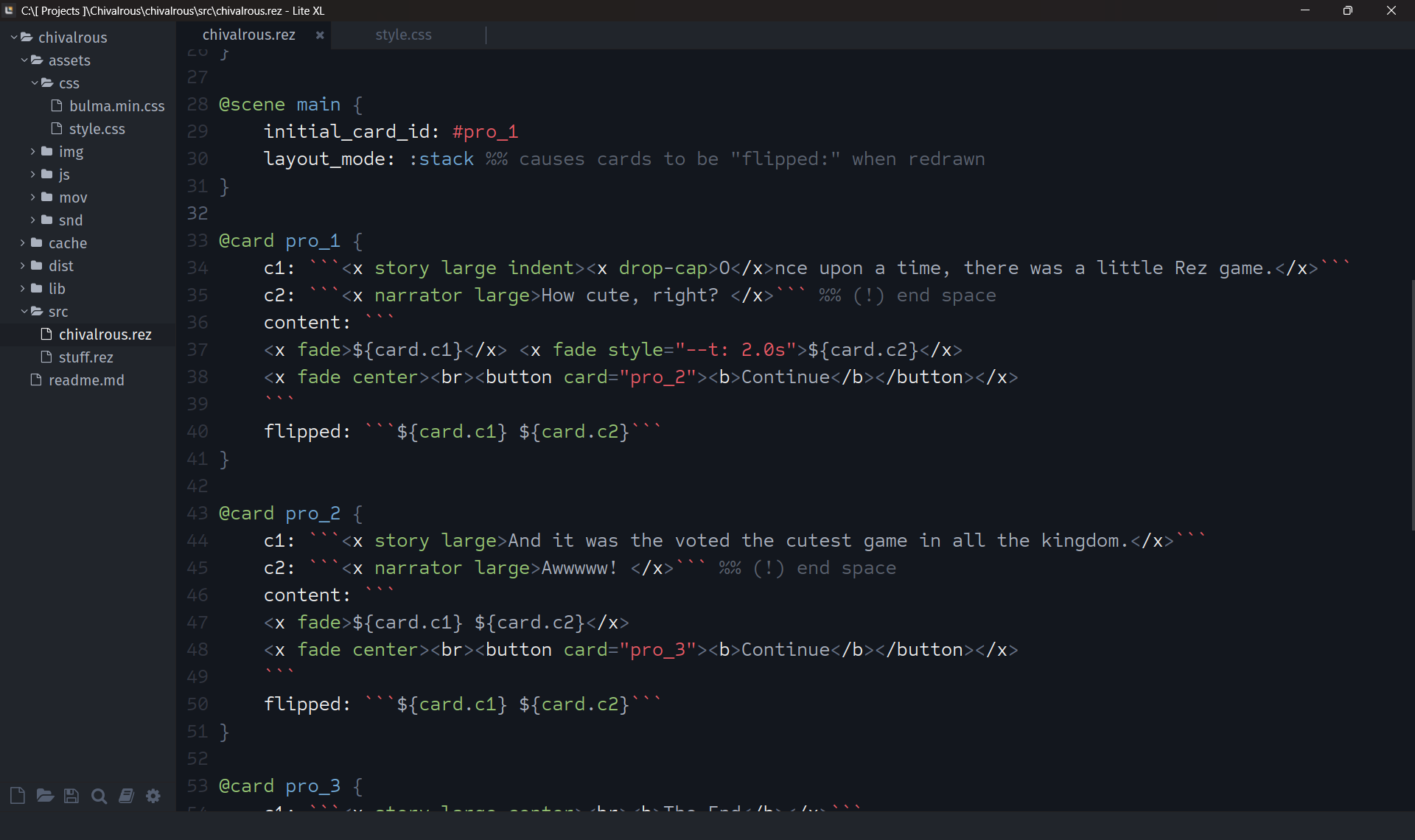
Just FYI, my goal with my first Rez game is to create a simple Twine-like experience. We’ll see how that goes, but I just couldn’t type without syntax highlighting so I used AI to help create a Rez language rules file. Once I write enough Rez code and test drive this highlighter, I’ll share the file. I use Lite-XL for my IDE because it’s portable, hackable and Lua is just a beautiful language to write in. Got my workflow pretty much nailed down. Compiling Rez games with a keyboard shortcut, got the syntax highlighting, using custom HTML tags and attributes for compact structure and styling, flipping cards like a mofo… damn, I’m good.
Looks nice. Similarly I have a basic but functional VSCode plugin. Please do share yours.
With respect to compiling I have two scripts, the first is build
#!/bin/bash
clear
echo "File change. Rebuilding."
rc compile src/ss.rez
osascript -e "tell application \"${REZ_BROWSER}\" to reload active tab of front window"
echo "Finished."
The second is auto_build
#!/usr/bin/env zsh

# PID of the currently running build
BUILD_PID=""
BUILD_RUNNING=false

run_build() {
  # If a build is already running, skip this trigger
  if $BUILD_RUNNING; then
    return
  fi

  # Run the build and wait for it to complete
  BUILD_RUNNING=true
  ./bin/build
  BUILD_RUNNING=false
}

# Watch filesystem changes
fswatch -o src | while read -r _; do
  run_build
done &

# Watch for keypress
while true; do
  read -rk key
  run_build
done
The two together detect any change, rebuild, and reload the game in the browser. Or I can manually retrigger by pressing a key.
I make liberal use of changing initial_scene_id and initial_card_id to jump into the game at any point.
Interesting to see how you are using template attributes within the content template so that you can share content between content: and flipped: I hadn’t thought of doing that.
What are the custom tags doing for you?
I’ve fixed a problem with using user components and bindings which will be in the 1.9.6 release due atk.
I’m also thinking about how to support components within components.
What are the custom tags doing for you?
@sandbags Just condensing the HTML/CSS. Languages wrapping languages, wrapping languages can get verbose. For me, the content needs to breathe and the code needs to not distract from the content as much as possible.
And I want to cleanly play around with the presentation of prose within a card’s block.
Code Comparision (for Prologue 1):
@card pro_1 {
    c1: ```<x story large indent><x drop-cap>O</x>nce upon a time, there was a little Rez game.</x>```
    c2: ```<x narrator large>How cute, right? </x>``` %% (!) end space
    content: ```
    <x fade>${card.c1}</x> <x fade style="--t: 2.0s">${card.c2}</x>
    <x fade center><br><button card="pro_2"><b>Continue</b></button></x>
    ```
    flipped: ```${card.c1} ${card.c2}```
}
— VS —
@card pro_1 {
    c1: ```<span class="story large indent"><span class="drop-cap">O</span>nce upon a time, there was a little Rez game.</span>```
    c2: ```<span class="narrator large">How cute, right? </span >``` %% (!) end space
    content: ```
    <span class="fade">${card.c1}</span> <span class="fade" style="--t: 2.0s">${card.c2}</span>
    <div class="fade center"><br><button card="pro_2"><strong>Continue</strong></button></div>
    ```
    flipped: ```${card.c1} ${card.c2}```
}
For card content to not appear on new lines, I added div.rez-card, div.rez-front-face { display: inline; } to my style sheet. Being able to stack cards and build a story log is already a huge difference maker to regular Twine story formats. With scene layouts, I could easily control nested cards to be inline or block, if needed. In the comparison scenario, I have text that fades in on first draw, but doesn’t when it’s flipped.
All this is because I still haven’t finished digesting your tutorial content though (there’s so much, and that is a good thing). I’m also not a strong programmer so if I can muddle through, any novice programmer will be able to.
Question: Is it possible to parse a content block before Rez parses and renders it? Like, an opportunity for a custom DSL? If so, how would I add that to Rez to globally parse a content block just before it is called by the Rez engine? It almost sounds like injecting something into the compiler, for efficiency of rendering, but if it’s lightweight maybe at runtime?
You mentioned about the Lite-XL language file. It is very alpha. I don’t know Lite-XL very well. I’m a novice with Lua. You’ve been warned. The JS block detection is sloppy, for sure.
language_rez.lua
-- mod-version:3
-- Rez language support for Lite XL

local syntax = require "core.syntax"

syntax.add {
    name = "Rez",
    files = { "%.rez$" },

    patterns = {
        -- HTML fenced blocks: ``` ... ```
        {
            pattern = { "```", "```" },
            syntax = ".html",
            type = "string"
        },

		-- JS arrow-function blocks: () => { ... }
		{
			pattern = { "%(%s*%)%s*=>%s*%{", "%}" },
			syntax = ".js",
			type = "function"
		},

        -- Comments
        { pattern = "%%.-\n",                type = "comment" },

        -- Directives (@game, @scene, @card, @asset)
        { pattern = "@[%a_][%w_]*",          type = "keyword" },

        -- Includes (%(...))
        { pattern = "%b()",                  type = "symbol" },

        -- Hash identifiers (#scene_id, #card_id)
        { pattern = "#[%w_]+",               type = "literal" },

        -- Keys (name:, title:, $built_in:, etc.)
        { pattern = "%$[%a_][%w_]*%s*:",     type = "keyword2" },
        { pattern = "[%a_][%w_]*%s*:",       type = "keyword2" },

        -- Strings
        { pattern = '".-"',                  type = "string" },

        -- Numbers
        { pattern = "%d[%d%.]*",             type = "number" },

        -- Operators and punctuation
        { pattern = "[{}()%[%].,=>]",        type = "operator" },

        -- Identifiers
        { pattern = "[%a_][%w_]*",           type = "symbol" },
    },

    symbols = {
        ["@game"]  = "keyword",
        ["@scene"] = "keyword",
        ["@card"]  = "keyword",
        ["@asset"] = "keyword",
    },
}
This is how easy it is with Lite-XL though. It’s so adorable; you could just squeeze it!
It’s funny that you are using Lua because Rez embeds a Lua interpreter. It’s how @pragma is implemented. If you’ve seen the source explorer, it’s implemented via a Lua script that runs in the compiler and has access to the AST at various points of construction. This is not documented yet so hit me up in Discord if you want the low down.
Runtime, well you can already use any JS lib you like and Rez doesn’t mess with your HTML except for its own template expressions.
Here is an example of a @pragma to add a build number to the game:
do
  local github_binary = values[1]
  local build_num, err = rez.plugin.run("git", {"rev-list", "--count", "HEAD"})
  if build_num then
    build_num = math.tointeger(tonumber(build_num))
    compilation = rez.compilation.add_numeric_const(compilation, "BUILD_NUM", build_num)
  else
    print("Error in get_build_number plugin. Exit code: " .. err)
  end

  return compilation
end
It’s a Lua script (pragmas/add_buildnum_const.lua) that gets included in the game via @pragma add_buildnum_const.
It runs the shell command git rev-list –count HEAD to get the number of git commits which I treat as the build number.
It then uses rez.compilation.add_numeric_const to add it to the AST so you can refer to it in your source as $BUILD_NUM. E.g.
<span>Game build ${$BUILD_NUM}</span>
as if you had added it directly in the game source.
The API is, at the moment, what I’ve needed it to be to solve any given problem. The source_explorer pragma is far more complicated as it builds a mini-site to wrap the game sources and then adds them as game assets so they get packaged with the game when you build it.
A middle complexity example is @pragma(after_process_ast) icons (“assets/img/icons”)
The Rez AST actually gets processed twice. This allows a pragma script to run after the AST has been built and modify it.
-- receives 'compilation' and 'values'

-- values[1] is the path where the Heroicon .svg files should be

-- the plugin will create an inlined asset for each file
-- arrow-path.svg becomes icon_arrow_path
-- whose content attribute is the SVG source


function clean_filename(filename)
  filename = filename:gsub("-", "_")
  filename = filename:gsub("%.svg$", "")
  return filename
end

function make_icon_asset(id, path)
  local asset = rez.asset.make(id, path)
  asset = rez.node.set_attr_value(asset, "$inline", "boolean", true)
  return asset;
end

do
  local icons_path = values[1]

  local files, err = rez.plugin.ls(icons_path)
  if files then
    for i, icon_file in ipairs(files) do
      local icon_name = clean_filename(icon_file)
      local asset_id = "icon_" .. icon_name
      local icon_path = icons_path .. "/" .. icon_file
      local icon_asset = make_icon_asset(asset_id, icon_path)

      compilation = rez.compilation.add_content(compilation, icon_asset)
    end
  end

  return compilation
end
The script reads the list of files in asset/img/icons and auto-builds an inlined @asset for each one.
I can’t vouch for my Lua code as I only learned enough to do the little jobs I needed.
I just made a tiny change to the stdlib <.embed_card /> component that makes it much easier to use cards for conditional rendering.
$foreach(actor: location.npcs) {%
  $if(actor.desc_card) -> {%
    <.embed_card card="${actor.desc_card_id}" char="{actor.id}" />
  %}
  () -> {%
    <p>${actor.desc}</p>
  %}
%}
The change means that char will be passed to the block that is rendering the card as a param. So that card can refer to:
@card npc_info_card {
  content: ```
  <p>My id is ${params.char}.</p>
  ```
}
What this allows me to do is use a card to describe an NPC if I want (with a fallback to a simple attribute) and that card can be shared between a group of alike NPCs. Let’s say we have a bunch of goblin NPCs.
@card goblin_look {
  bindings: [
    goblin: *params.char
  ]
  content: ```
  <p>The goblin called ${goblin.name} is large, green, and $if(goblin.int < 5) -> %{ not very bright, even for a goblin%} ()-> {% about as bright as you would expect for a goblin %}.</p>
  ```
}
This brings embedding cards into line with how you can pass parameters to scenes.
Given that Rez already had a way of rendering cards within cards (the blocks: attribute):
@card foo {
  blocks: [bar: #bar]
  content: ```
  ${bar}
  ```
}

@card bar {
  content: ```
  <p>Embedded Card Here!</p>
  ``
}
Why is <.embed_card /> useful?
The blocks: attribute is static, you are hard coding which card is getting rendered. It also doesn’t support passing data to the card. It’s great for something like a sidebar where you know in advance which card you want.
In the above example using $foreach() we’re iterating through a group of NPCs and picking the card to be rendered based on their attribute (if they have one). We’re also passing the NPCs id through to the card.
This is very much more flexible at a cost of not being as straightforward. In general if you know in advance which card and don’t need to pass parameters then blocks: is the way to go. If you want to decided in the moment which card and potentially pass parameters then <.embed_card /> is what you need.
Today I have released Rez v1.9.6, err actually v1.9.7. Turns out the 1.9.6 release was hitting a rate-limit issue on the cookbook Github repo.
This is a significant QoL release with the following headline features:
The Cookbook
The cookbook is an optional library of components and directives that you can easily include into your own game. I’m now using this to share stuff between my game projects.
In principle I could have just put these things into the stdlib but I felt this was too prescriptive for functionality that is highly author dependent.
I’ve added my “inverse parser” actions library and 3 useful pragmas as a starting point.
Everything is hosted via a public Github repo and PRs for new content are welcome.
rez cookbook list
Fetching module list from mmower/rez-cookbook...

Available modules (mmower/rez-cookbook @ v0.1.5):

  mmower/actions          [lib]  Flexible, inverse-parser, actions generator to reduce/remove hard-coded links.  (by Matt Mower, since 0.1.0)
  mmower/source_explorer  [pragma]  Creates a mini-site within the game to explore the games source.  (by Matt Mower, since 0.1.3)
  mmower/git_buildnum     [pragma]  Adds a BUILD_NUM const from the git commit count.  (by Matt Mower, since 0.1.4)
  mmower/svg_icons        [pragma]  Converts local .svg icons into inlined @assets  (by Matt Mower, since 0.1.5)
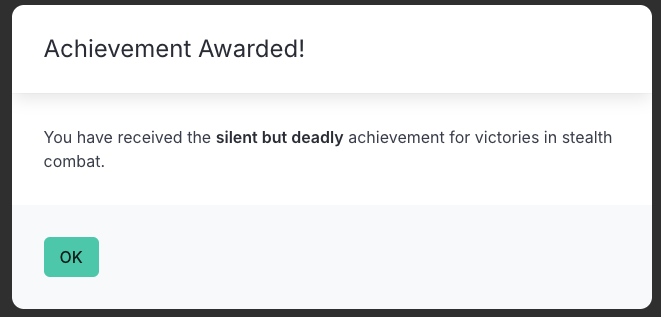
Modal Responses
You can now respond to an event by display a modal using either
RezEvent.modalMessage(“message”) or RezEvent.modalCard(“card_id”)
This allows presenting transient content without affecting the card flow.
Card Faces
A @card now has a current_face: attribute that specifies which template attribute gets rendered. This is a generalisation of the previous flipped: attribute that controlled whether content: or flipped_content: was rendered and allows for quite flexible display of content (e.g. based on quest status)
Here is the full list of changes:
- Introduces the cookbook, a system for sharing library components and pragmas between games
- Adds modalCard() and modalMessage() event responses that display content in a dismissable modal
- Global properties are now created with Object.defineProperty()
- Mixins are now specified via a
mixin:set type attribute and can be added via@defaults - @card now has
current_face:rather than specificflipped:attribute - Improvements and fixes to
RezQuest - Changed syntax of
$breakexpression to$break(expr) - Can re-open
@defaultsfor an element to add new defaults - Specify
on_init: +() =>to append implementations of theon_inithandler - Can now use
data-target="id"withdata-event="foo"for custom events to specify the object handler - Adds
$has_subscribersmixin to the stdlib - Sets join Lists in treating “,” as whitespace
- Fixed UTF-8 parsing bug (actually in LogicalFile)
- Further fixes to binding expression evaluation
- Improvements to <.embed_card /> component
- Improvements to <.img /> component
- Improvements to component parsing & rendering
- Restores table attributes however these created nested objects linked by auto generated id
- Better handling of
_placeholder values and adds hasValue(“attr”) to identify placeholder leakage - Updated API docs
Note: To add support for modals to an existing wip, add these components somewhere in your layout, ideally just after <.flash_messages />:
<.$modal_message />
<.$modal_card />
I keep thinking “I’m done now, no more to add” and then I find some need or use-case I hadn’t anticipated and… here I am at v1.9.6 having made 51 releases of the software. And 0 games. Is this to be Rez fate?
I have very much enjoyed working on it as a problem and do not feel it was time wasted. I’ve continued to hone my Elixir skills by working on it and (ugh, holds nose) maintained a working knowledge of Javascript. But, but…
I have at least 3 WIP games right now but struggle to push them towards anything I could release. It’s a little disheartening. I seem to get stuck at various points and then find it easier to go tinker with something else and by the time I come back I’ve lost my thread and/or see a different approach to the game and start over. Probably what I ought to do is pick 1 of the prototypes and just commit to finishing it by the end of the year.
I’m working on a game, just give me a sec. Jeez! 
Probably what I ought to do is pick 1 of the prototypes and just commit to finishing it by the end of the year.
As long as Rez inspires you, keep working on it. Games are so passé anyway. The new form of entertainment is actually learning game engines and abandoning projects for the next shiny engine. Rinse and repeat. I feel totally fulfilled without a single game to my name. It’s liberating! More people should try it. I call it doom authoring.
But seriously, Rez is awesome and fills a very real gap in the IF landscape. Rez has a syntax and structure that supports systems-based stories right at the root… and I honestly don’t think it has an equal. That’s pretty hardcore, dude. Bringing IF sensibilities into deeper game mechanics is one of the steepest mountains an author can climb… and you’ve thrown a rope down that cliff face and extended a hand.
Please say that you remembered to tie the other end.
Full disclosure: Rez has brought me the closest to finishing a game than I have ever been. If… nay, when my game is done, I’ll have you (and Rez) to thank for it. 
Kind of you to say
Rez has also brought me the closest to finishing a game I have ever been