Changing the open window background color in Glk

Vorple has a feature apply (Vorple style) style to the entire page that AFAIK is impossible in Glk or Z-Machine, even with garglk_set_zcolors().

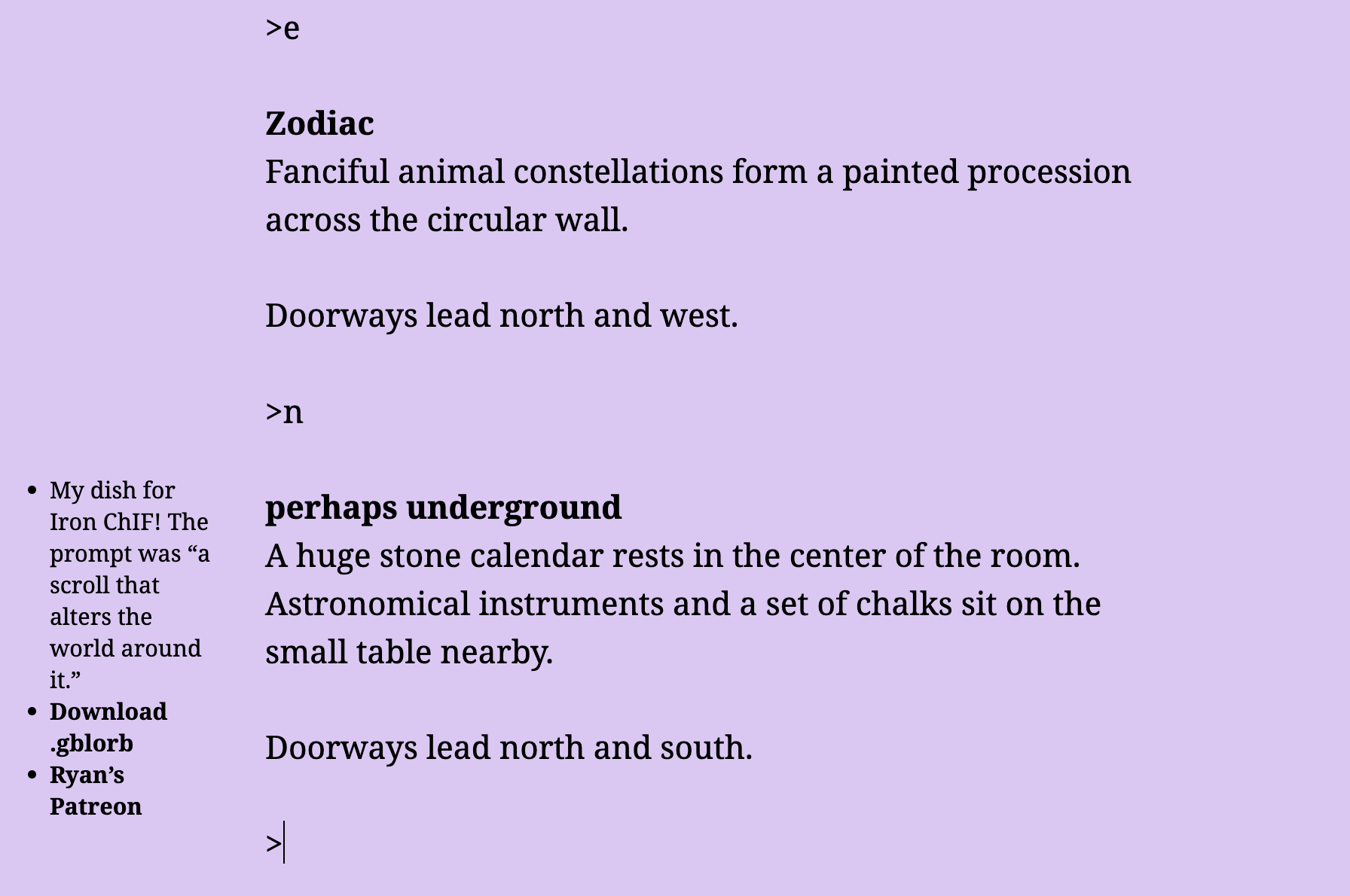
It’s used in games like The Van der Nagel Papyrus, where the background color changes as you navigate from room to room. For example, launch the Vorple version, then go n. e. s. e. e. n.

As you go north into “perhaps underground”, the background changes to a lavender color (which is an important hint). As you return south to “Zodiac”, the background changes back to white. As the background changes, the transcript is preserved; that’s the part that’s impossible in Glk today. @Afterward uses this technique a lot in Vorple games; it would be really nice if standard interpreters could support this.

It is nearly possible to implement something like this effect with garglk_set_zcolors(), but, oddly, you have to call glk_window_clear() to implement it. If you garglk_set_zcolors to set the background to lavender, the window background will remain unchanged; only spans of printed text will have lavender color. But if you glk_window_clear() after garglk_set_zcolors(), the window’s background changes, taking on the zcolor background color you specified. (This behavior isn’t documented in the specification of garglk_set_zcolors() at https://curiousdannii.github.io/if/gargoyle.html.)

Examples of zcoloring with and without clearing the transcript

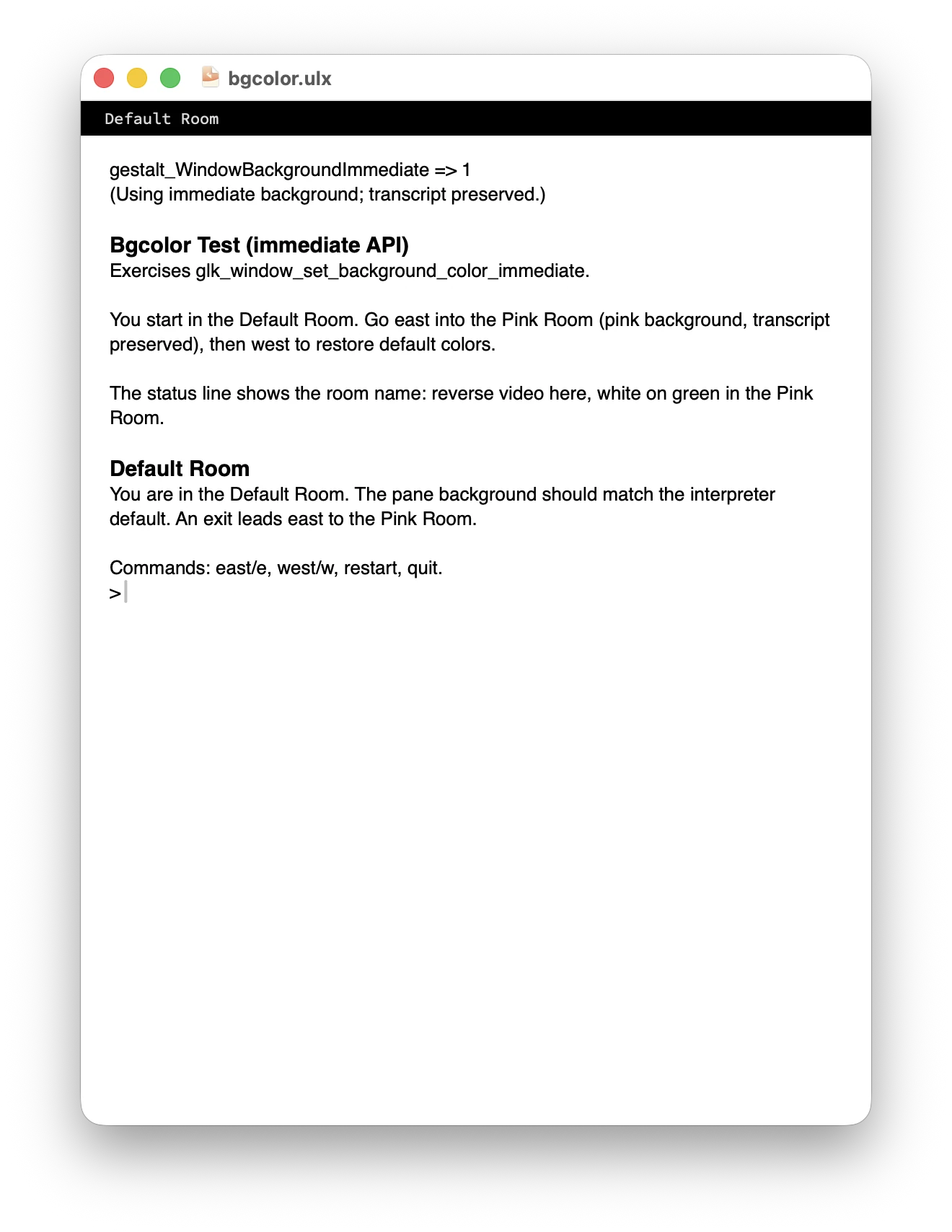
In this first example, we use garglk_set_zcolors to set the background to pink, without clearing the transcript.
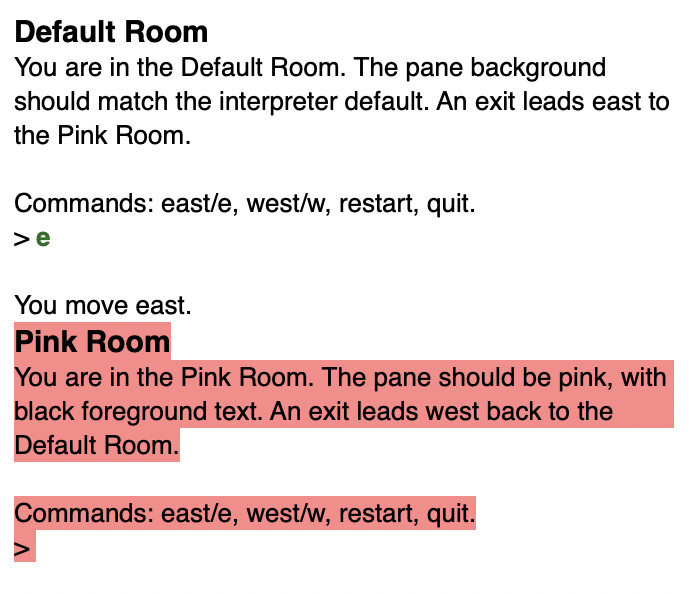
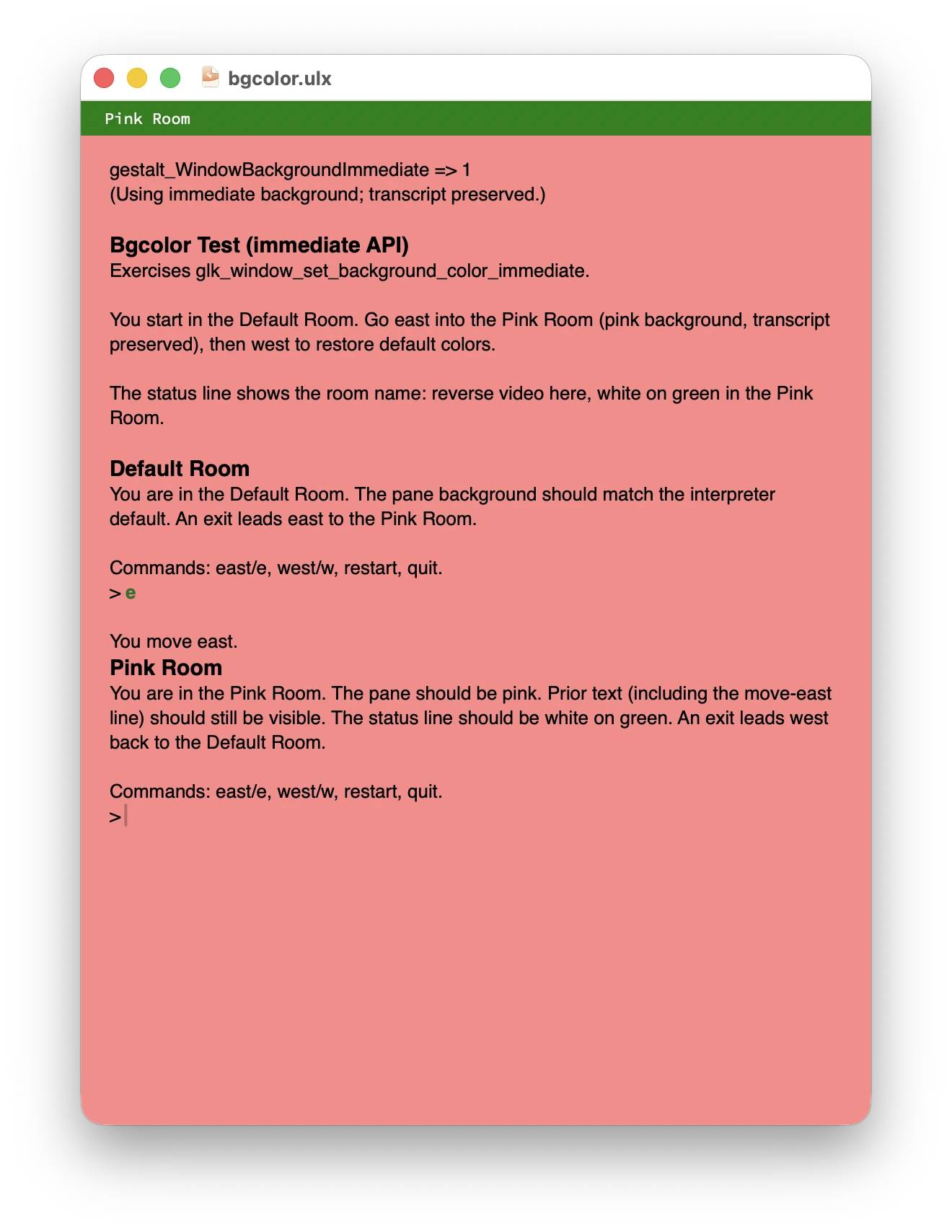
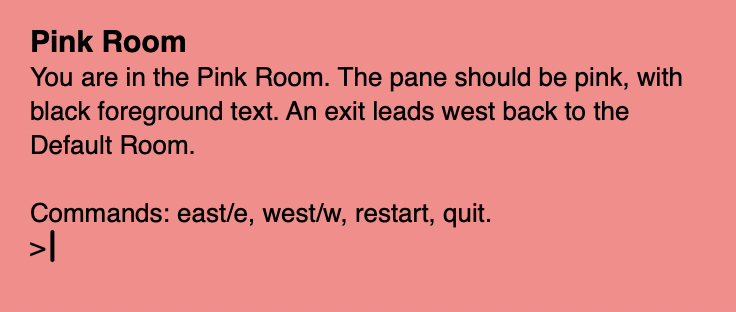
In this second example, we garglk_set_zcolors and then immediately glk_window_clear. You can no longer read “You move east,” because that was cleared from the transcript. But now, the whole window is pink, instead of just the spans.
Even the upcoming Glk CSS proposal is designed to only set styles on windows before you open them. Once a window is opened, you can’t set new CSS to apply immediately.

I’m interested in this because it only just recently dawned on me that ADRIFT supports changing the window’s background color without clearing the screen. In order for Spatterlight/Scarier to implement something like this in Glk interpreters, there would have to be an API for it.

So! Here’s my idea for a Glk extension.

void glk_window_set_background_color_immediate(winid_t win, glui32 color);

It would work just like glk_window_set_background_color(), but it would work on graphics windows, text-buffer windows, and text-grid windows, and it would update the background color immediately, rather than waiting for the next clear/resize.

It would get its own custom gestalt ID, too, gestalt_WindowBackgroundImmediate.

Alternatives

Alternate names

  • glk_window_set_background_color_now(): It’s shorter, and less formal, but I don’t expect authors will actually need to type it. I’m imagining that “Basic Screen Effects” will use it, and then authors will type something like turn the background black immediately.
  • glk_window_set_background_color_sync(): I didn’t pick this one, because glk_window_set_background_color() isn’t asynchronous. If you call it and then immediately glk_window_clear(), that will take effect immediately.
  • glk_window_fill_background(): This mirrors other graphics-window fill calls which act immediately, but I didn’t pick this because fill is about drawing pixels. It’s a strange API to use on a text-buffer window.

We could change the behavior of glk_window_set_background_color()

Currently, glk_window_set_background_color() can only be used on graphics windows, and the Glk specification says:

It does not change what is currently displayed; it only affects subsequent clears and resizes.

In principle, we could update it to support text-buffer windows, and, while we’re at it, we could make it take effect immediately/synchronously.

But I think it would be wrong to change that function’s behavior on graphics windows, and it would be confusing to have it take immediate effect on text buffers and delayed effect on graphics windows.

Changing the live foreground color would make this a lot more complicated, and may be unnecessary

Suppose your game uses black text on a white background, and you’d like to switch to white text on a black background as the player enters a dark room (a cave).

If we only have glk_window_set_background_color_immediate(), the transcript text that was printed while the player was outside the cave would still be black, which would be illegible on a black background. So, I can see why you might want glk_window_set_foreground_color_immediate() too, so all of the transcript text would change to white-on-black as you enter the cave.

But, I think that makes the scope of this proposal very confusing. What text color would glk_window_set_foreground_color_immediate() update? Normal styled text? What about User1? What if Normal had a TextColor stylehint on it? What if zcolors or CSS had been applied? Is there a precedence ordering for how other styles would apply?

Changing the window background color is very clear. Stylehints, zcolors, and CSS styles would always apply to spans and blocks on top of whatever the window background color is.

I think the normal use case for “updating the color scheme without clearing the screen” is to apply subtle background-color changes, like white to lavender in The Van der Nagel Papyrus. In subtle cases like those, changing the foreground color is unnecessary.

If you want to change colore schemes entirely, you can (and probably should) just clear the screen, so all of the new text is in a legible color.

Changing other styles on open windows seems simpler, but is even more complicated, and even more unnecessary

You could imagine changing all of the styling of the transcript text, e.g. changing it all from proportional to monospace.

But I don’t think there’s a common use case for that. You can just leave the old printed proportional text as it is.

I mention it because you could imagine a parallel API to stylehints or Glk CSS that sets arbitrary styles live. It has a certain ideological purity to it!

But that would incorporate all of the complexity of defining precedence orders for foreground colors, and apply that problem to all styles that the parallel API would touch. It seems easy at first, but it’s actually biting off the largest possible scope for this API, when all we really needed was a way to change the background color to lavender.

WDYT?
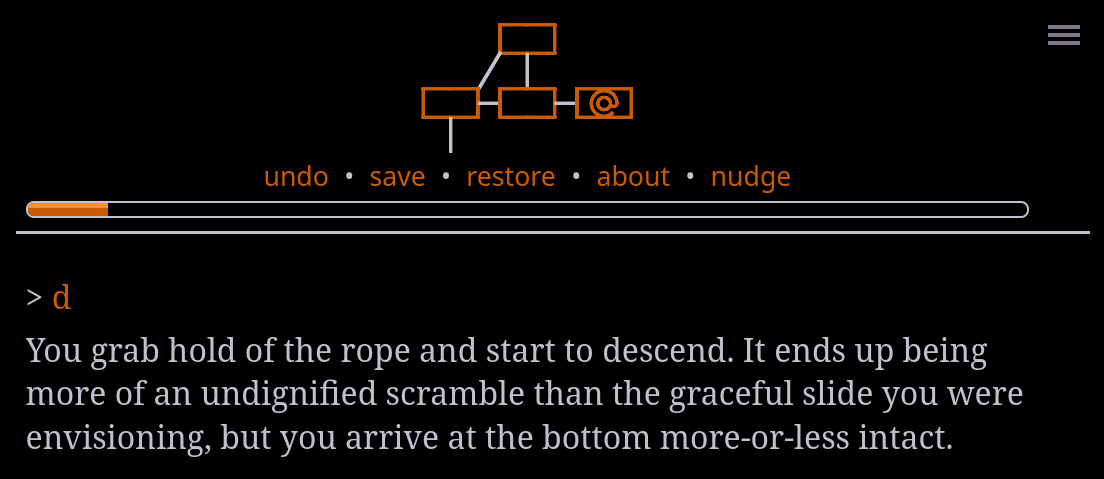
The Å-machine has an “apply this CSS to the entire existing page” opcode, specifically inspired by The Van der Nagel Papyrus, and it’s seen use with foreground as well as background colors. The difference between very light hues is generally more obvious than the difference between very dark hues, so in dark mode, Forensic Necromancy changes the foreground color instead of the background color to signal a change in the world state.

I don’t know how that could be done with Glk, so I don’t have any better proposal myself, but I worry a bit about a proliferation of specific styling calls that can only change small parts of the style—one for only color, one for only reverse video, now one for only background color.

I’m very reticent to change anything already output; that really belongs to things like Vorple which can call arbitrary code to do whatever they like. (Though Gargoyle does actually do retroactive changes, which I think needs fixing!) But this is a small and focused feature, and which would give a big improvement so I think it’s viable.

Currently the conventional way to set a text window’s background colour is to set the background colour of the normal style. I assume this function would need to update that stylehint. Hmm, actually Flexible windows sets the background colour for all styles. I’m not sure if that’s actually necessary.

glk_window_set_background_color_immediate(win, -1) would need to reset to the default background colour.

What about the “page margin”? As a reminder, here’s the current algorithm. Could glk_window_set_background_color_immediate have an argument for whether to update the page margin too?

With “cool” colors:

With “warm” colors:

This implementation changes both foreground and background, but to me the foreground change is much easier to see than the background change (which is why I did it this way).

1 Like

By “that,” you mean, tweak the foreground color in dark mode, but tweak the background color in light mode?

I guess you’d use glk_style_measure to measure the Normal foreground color and background color, then decide whether to tweak the foreground color (with zcolors or, some day, CSS inline) or whether to tweak the background color (with glk_window_set_background_color_immediate).

I’m not sure which interpreters support changing the color scheme at run time (e.g. enabling dark mode when it gets late in the evening), but Spatterlight does, and I think it fires an “arrange” event when that happens.

I guess you’d have to clear the screen if you had been tweaking the foreground color and now want to switch to tweaking the background color…?

Tweaking the foreground color for existing text in general, I mean.

Maybe changing the foreground colour could work too. My main concern would be what happens when people have set stylehint colours.

Yeah, though perhaps zarf saying style hints are deprecated means we shouldn’t worry too much about them.

They’re not really deprecated, not when there’s no replacement. And even if authors can soon move past them (with the CSS extension), interpreter authors still need to consider how they interact together.

Yeah, but if this is part of the replacement, it would be possible to just leave the interaction unspecified, right? “This is part of the CSS suite of functions; how it interacts with style hints is undefined.” Then interpreter authors can do whatever is easiest for their particular platform instead of dedicating a lot of time to a combination that’s unlikely to happen.

I’d prefer as little unspecified behaviour as possible, at least for feature combinations. And story authors won’t always know what they’re using. For example if they’re using Flexible Windows they probably won’t know that it sets background colour style hints on all styles, so if they start using the Change Background Colour Immediately extension they won’t be happy if the combination is unspecified and every interpreter does something different. It’s better if we can sort it out now.

1 Like

I was imagining that glk_window_set_background_color_immediate would immediately update the page’s background and the page margin; I can’t see any reason why anyone would want to change just one of those but not the other.

I actually don’t think this function should automatically set any stylehints, zcolors, or CSS styles. Instead, it should just immediately change the page background color and page margin color.

Very likely the game author (or extension author) will want that change to persist after a clear, but, if so, then the author should choose whether to set a stylehint, to set zcolors, or to set a CSS hint. Whichever color API they choose, the Glk library should then use that API’s background color to configure the page background + page margin the next time the screen is cleared.

(For graphics windows, I think glk_window_set_background_color_immediate would also update the stored background color, just like glk_window_set_background_color, so clear would regenerate it, without requiring authors to call glk_window_set_background_color right after glk_window_set_background_color_immediate.)

Retroactively tweaking the foreground color for existing text is what I’m suggesting would be out of scope for this proposal, precisely because we would be forced to resolve conflicts between stylehints, zcolors, CSS hints, and an immediate-foreground glk_window_set_foreground_color_immediate API.

I basically agree that the Glk CSS proposal should specify what happens if authors set stylehints, zcolors, and CSS hints, but that would be out of scope of the glk_window_set_background_color_immediate extension, which wouldn’t set any of those.

Glk CSS will handle every relevant part of the style (foreground color, background color, reverse video), but Glk CSS doesn’t have a way to set the window background color immediately.

So we’d either have to add a new “immediate” API to Glk CSS (allowing authors to retroactively tweak everything) or, as I’m recommending, limit the scope of the “immediate” API to just window background color.

Someone might want to set the background colour of the status window (or another small window) while leaving the main window the same, and therefore the page margin the same.

If the actual CSS styles aren’t changed then existing text with a background colour would keep their background colour. Ie, only the parts of the window not covered by text would change their colour. Is that what you intended?

Oh, yeah!

I guess glk_window_set_background_color_immediate would update the window’s own page fill, but when updating the root window’s background, then the page margin should change to match. (Right?)

I’m not sure I’m following you. Let me give an example from The Van der Nagel Papyrus.

Here, the player is in a normal room (“Zodiac”), where all the text is black on white.

Then, the player enters a lavender room (“perhaps underground”)

What we wouldn’t want is for the text of the description of “Zodiac” to remain black-on-white on a lavender page when the player is in the “perhaps underground” room, or, vice versa, for the description of “perhaps underground” to remain black-on-lavender on a white page in “Zodiac.”

I’m imagining the game would start the game off like this (assuming it’s using stylehints):

glk_stylehint_set(wintype_TextBuffer, style_Normal, stylehint_TextColor, 0x000000);
glk_stylehint_set(wintype_TextBuffer, style_Normal, stylehint_BackColor, 0xFFFFFF);
mainwin = glk_window_open(0, 0, 0, wintype_TextBuffer, ...);  /* hints apply here */

(In Glk CSS, the code would use glk_css_hint_set instead, for the same effect.)

Then, when entering a lavender room:

lavender = 0xDEC7F5;
 /* margin */
glk_window_set_background_color_immediate(glk_window_get_root(), lavender);
glk_window_set_background_color_immediate(mainwin, lavender);
glk_stylehint_set(wintype_TextBuffer, style_Normal, stylehint_BackColor, lavender);

As I understand it, this would not leave the Zodiac room black-on-white on a lavender page, and so everything is fine here.

Is that your understanding as well?

Ah, I think I know why we’re not on the same page.

glk_stylehint_set won’t change anything on an existing window, it’s strictly for new windows. (Aside from also changing the page margin colour.) That’s why I was thinking that glk_window_set_background_color_immediate would have to, on the client, change the stylehints. (In AsyncGlkOte it would update the actual <style> embedded into the window.) (It would also have to send new measured styles, I guess.)

Also, glk_window_set_background_color_immediate(glk_window_get_root(), lavender) won’t do anything. The root window (if there’s more than one window) will be a pair window.

I’m not sure we’re quite understanding each other. I already knew that glk_stylehint_set won’t change anything on an existing window. (I think you may have been implying that we weren’t on the same page because you thought I thought glk_stylehint_set would update the window immediately…?)

In my example, the author calls glk_stylehint_set ASAP after glk_window_set_background_color_immediate, in order to ensure that if the window gets arranged or cleared, the lavender background color would stick.

You’re right that (if we’re using the stylehints API), someone ought to update the stylehints when the author calls glk_window_set_background_color_immediate, (or else the background color change will be lost on the next arrange/clear), but, as I’m imagining it, the author would update the stylehints, not glk_window_set_background_color_immediate itself, because glk_window_set_background_color_immediate can’t predict whether we ought to update the stylehints, the zcolors, or the CSS hints. So we just don’t update any of them, and leave it up to the author to remember to call whichever color API they want to use.

Ah, right. So that second code block should just say this:

lavender = 0xDEC7F5;
glk_window_set_background_color_immediate(mainwin, lavender);
glk_stylehint_set(wintype_TextBuffer, style_Normal, stylehint_BackColor, lavender);

That first call to _immediate sets the main buffer window’s background to lavender, and sets the page margin to lavender, because it’s the main buffer window. The second call to stylehint_set ensures that if the buffer window arranges or clears, the lavender background will remain.

(Are we on the same page now?)

That won’t happen. glk_stylehint_set only applies to new windows (and the page margin).

glk_stylehint_set(wintype_TextBuffer, style_Normal, stylehint_TextColor, 0x000000);
glk_stylehint_set(wintype_TextBuffer, style_Normal, stylehint_BackColor, 0xFFFFFF);
mainwin = glk_window_open(0, 0, 0, wintype_TextBuffer, ...);  /* hints apply here */
lavender = 0xDEC7F5;
glk_window_set_background_color_immediate(mainwin, lavender);

Based on my understanding of your proposal (no updating of stylehints), it would look like this:

The non-normal style text has no explicit background colour so the lavender shows through. But the normal style text does have an explicit colour, so it remains white.

I’m just not sure if it’s wise to create a new, separate styling API that only does background color. It sounds like the CSS API is meant to replace stylehints, zcolors, and reverse mode, which are currently three separate and unrelated systems; which makes me wary of adding another separate and unrelated system on top of the CSS one.

Background color is the only thing that The Van der Nagel Papyrus changes, but that seems more like a particular design decision by its author than a universal rule that background color is the only thing authors will ever want to change retroactively.

I could be wrong on this; maybe background color is fundamentally different from the other CSS properties. But I currently know of three games that change the overall window style to indicate changes to the world, without clearing existing text; two (Advent Window and The Van der Nagel Papyrus) use only background color, while one (Forensic Necromancy) also uses foreground color. I’m nervous about extrapolating from such a small sample to create a limited API that can’t easily be expanded later.

My line of thinking is that the window background color is genuinely special.

As a philosophy, Glk never changes anything retroactively. But window background color is different, because changing the current window background color isn’t actually “retroactive.”

But I take your point that, perhaps, the philosophy of “Glk never changes anything retroactively” kinda sucks. Maybe you should be able to change any style retroactively…? (Maybe only if you restrict yourself to CSS styles…?)

I filed some draft PRs and ran some tests; I didn’t see the effect you’re demonstrating here, where text that was previously output on a white background retains its white background.

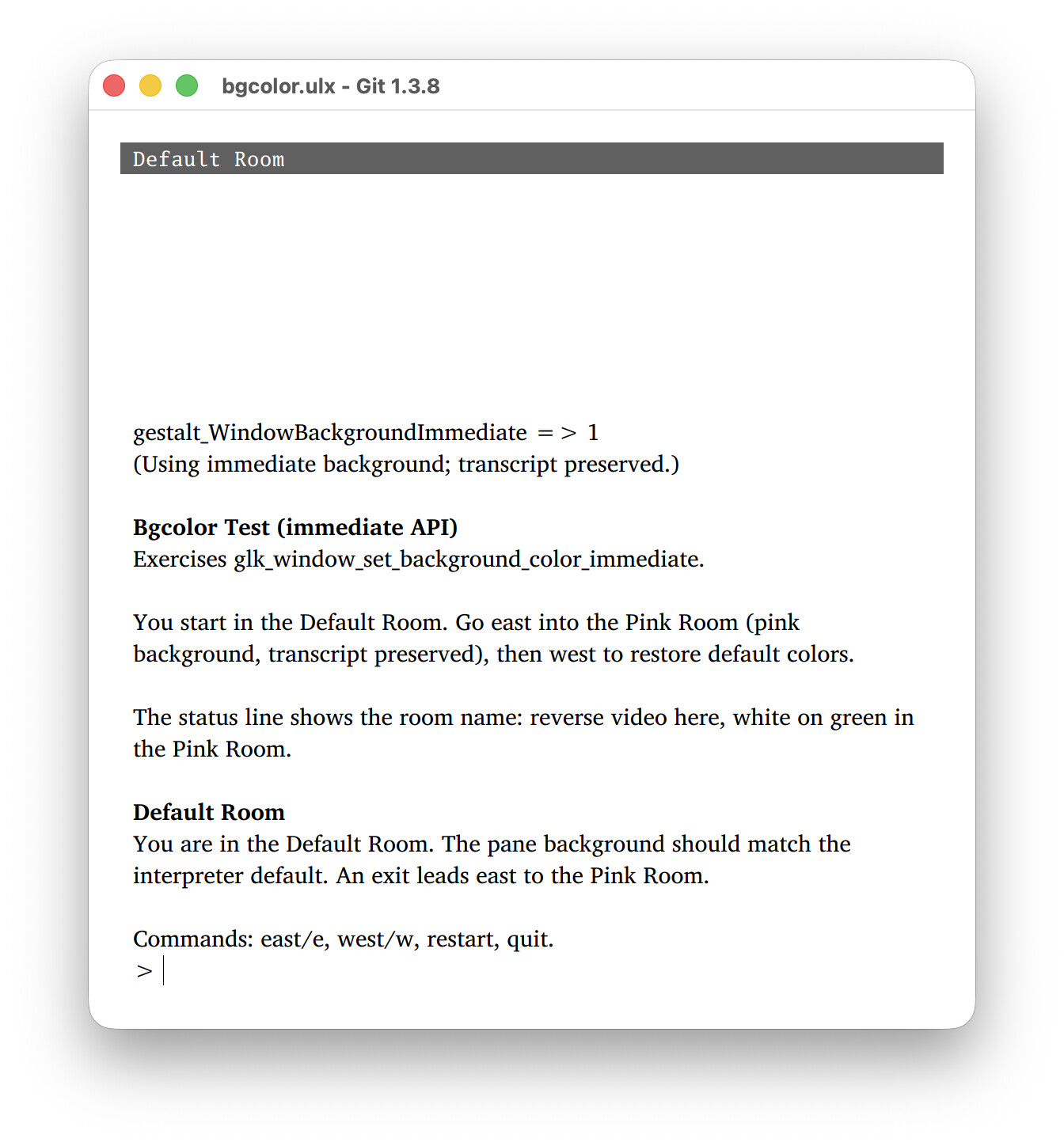
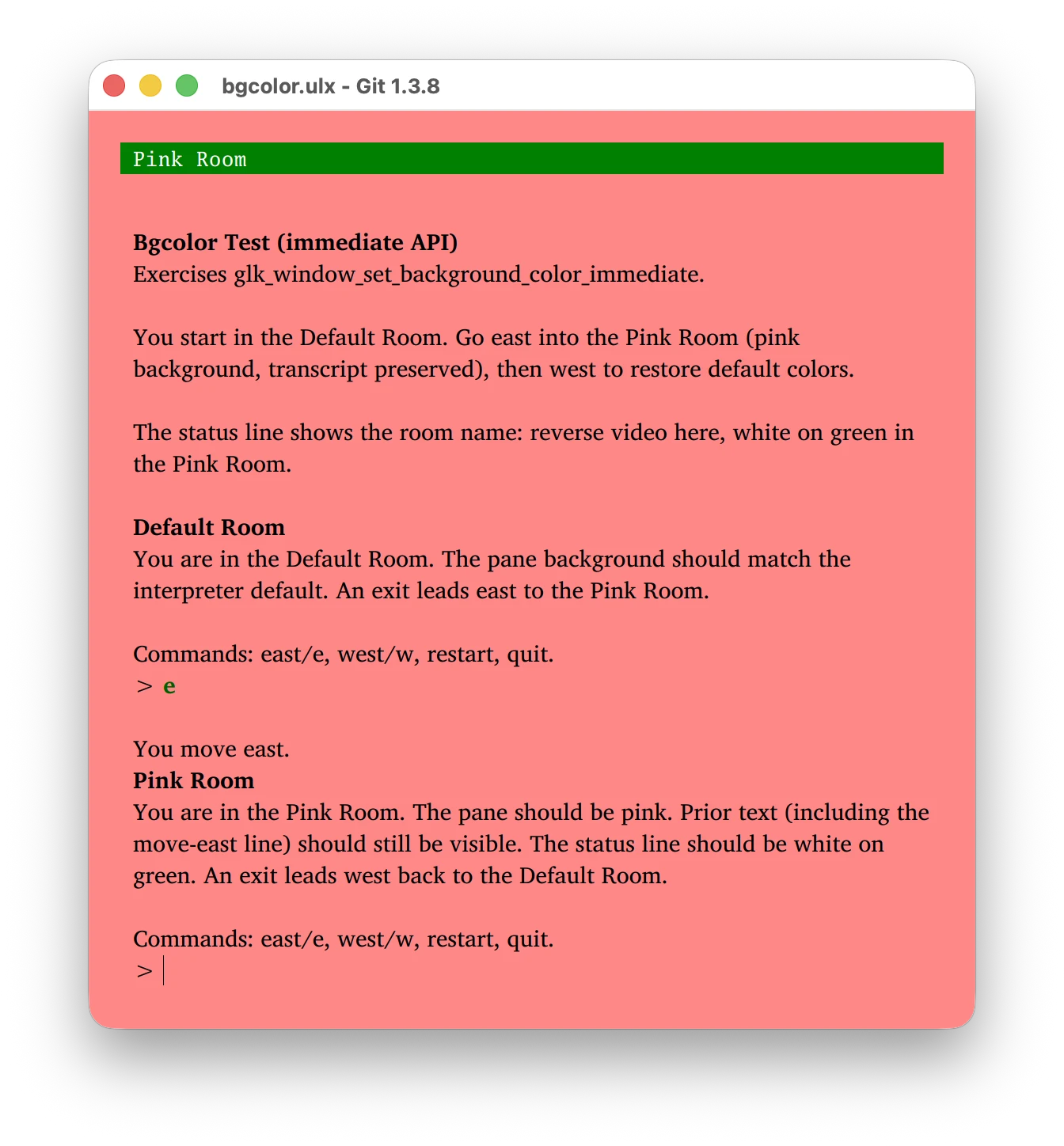
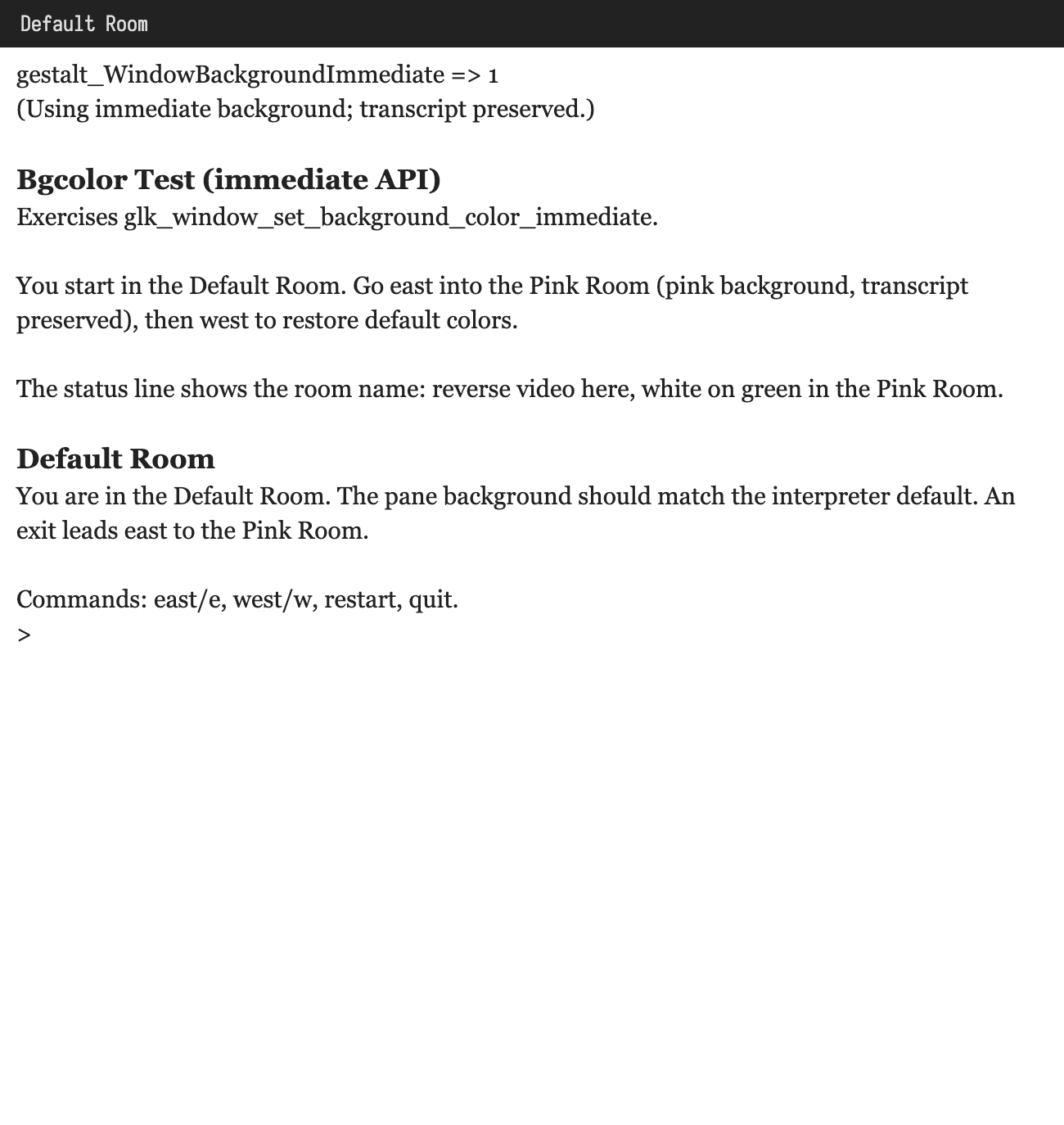
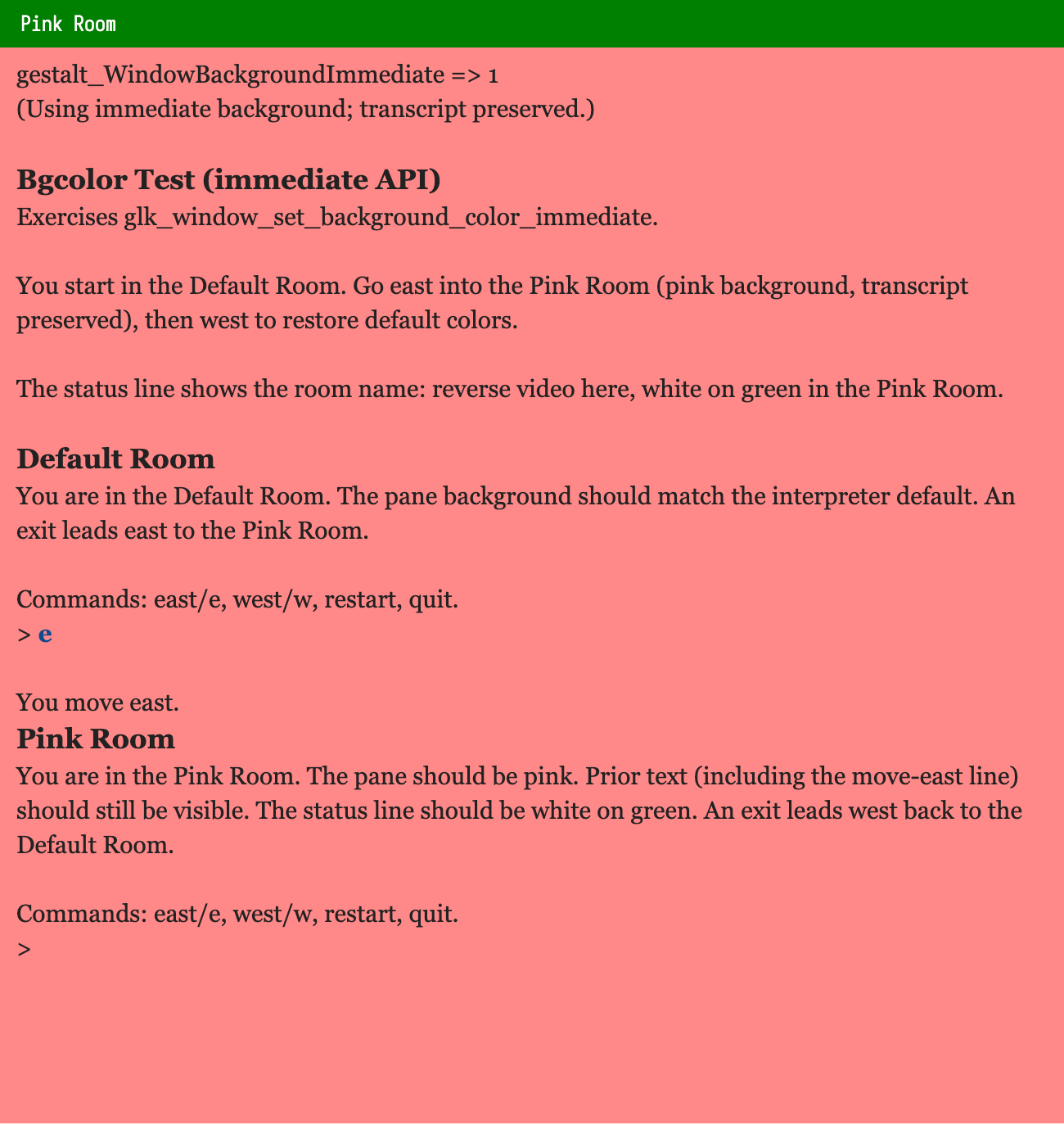
I tested these with https://github.com/dfabulich/glk-window-background-immediate. You navigate from the starting “Default Room” to the “Pink Room” next door, which updates the background to pink. When glk_window_set_background_color_immediate is available, we use that to change the background color; when it isn’t available, we set stylehints, delete the main text buffer, and recreate it.

Screenshots

Spatterlight


Gargoyle


Parchment


If we like the look/shape of these PRs and screenshots, I think they’re basically ready to merge, once we pick a gestalt ID + function selector ID for the new function.

But… I’m not sure what to do with @Draconis’s concerns. Should we make a general-purpose Glk API for immediately modifying arbitrary Glk CSS styles, live, without closing/opening a window?

I know that this is kinda a core philosophy of Glk, but I’m not really clear on why. Is it implementation complexity?