Hello! I’ve been working on Bardic, a new IF engine/language that bridges the gap between interactive fiction branching narrative and the power of a full programming language. If you’ve even been tinkering with a macro or function in Twine or Ink and thought “I wish I could just import custom Python classes into my story to handle all of this!”, Bardic might be for you.
I was building a game that required lots of complex game state modeling and got frustrated with primitive variables in Ink, and all the macros (and whitespace handling) in Twine, so I made Bardic.
- Bardic lets you write stories with real Python objects and code, not just primitives. You can import your own classes, functions and methods into the story and use them.
- It also has parameterized passages you can use (perfect for shops or NPC conversations) that accept parameters just like function arguments. You can pass around data behind the scenes easily.
- The engine handles auto-serialization of your entire game state, including your custom Python objects, automatically. The game also compiles to JSONs so it’s portable and easily readable by just about any system.
- It’s frontend-agnostic. It produces structured JSON data (just like Ink!) and the engine ships with templates for NiceGUI, Reflex, and React+FastAPI. You can choose one of these frontend stacks, or bring your own, as long as something in your system can run Python!
- The syntax is clean and Ink-inspired, so it’s mostly there to get out of the way while you write. BUT you can drop into pure Python blocks inside the narrative files, whenever you need it!
Development experience:
- 60-second setup with the built-in
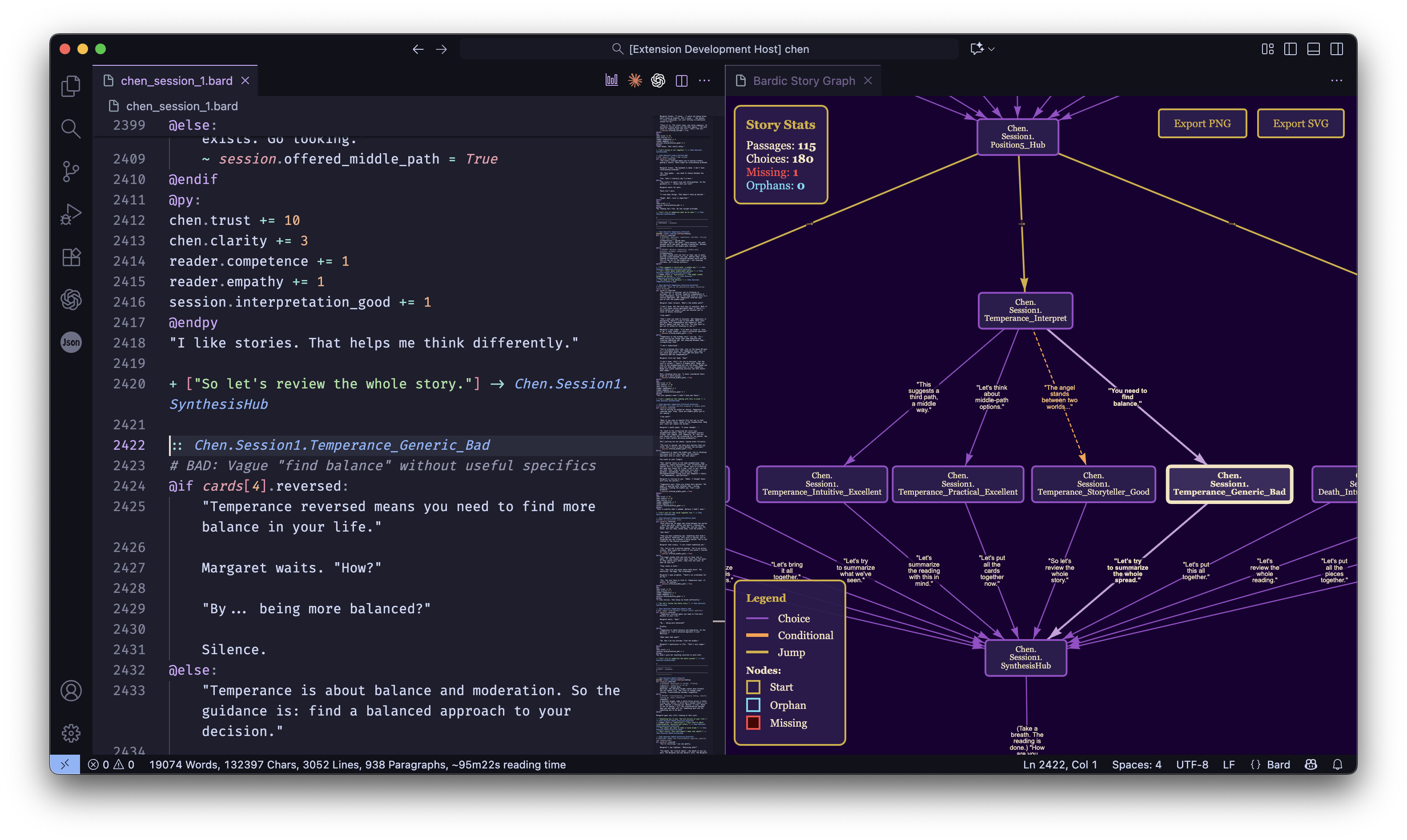
bardic init- you get a working browser-based game immediately. It’s built on NiceGUI by default, which gives you a modern, interactive web-game. Other template options give you Reflex or React+FastAPI implementations out of the box. - VSCode extension with code highlighting and folding, snippets, and a full interactive node graph of your story that you can click on to navigate to passages in the .bard source file. (This is similar to Twine’s visual editor!)
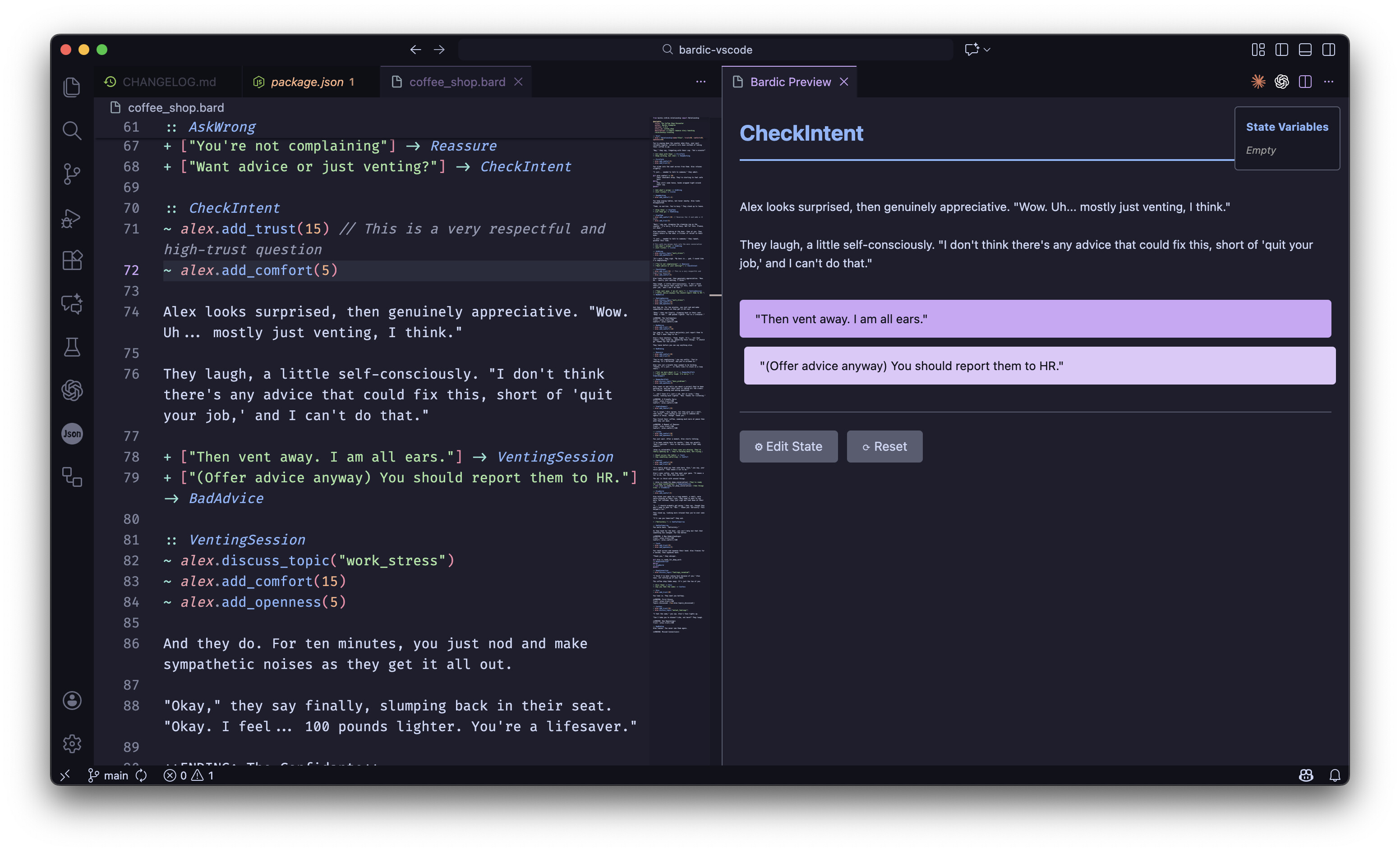
- VSCode extension also has a live preview from any passage feature that allows you to preview the rendering and appearance of any passage (even deep into the story) while allowing you to inject game state variables as needed. It’s been great IME for quick debugging and QA in long stories.
- CLI tools for compilation to JSON and terminal play (mostly for testing things out as you develop the game).
- Clean syntax with
~one-liners and@py:blocks for full code.
Here’s some screenshots of the VSCode extension at work:
An example of the syntax:
# Import your own Python classes, just like in a .py file
from my_game.character import Player

:: Start
# Create a new Player object
~ hero = Player("Hero")

Welcome to your adventure, {hero.name}!
You have {hero.health} health.

+ [Look around] -> Forest
+ [Check your bag] -> Inventory

:: Forest
The forest is dark and spooky.
~ hero.sprint() # Call a method on your object
You feel a bit tired.

+ [Go back] -> Start

:: Inventory
# Use Python blocks for complex logic
@py:
if not hero.inventory:
  bag_contents = "Your bag is empty."
else:
  # Use list comprehensions, f-strings...
  item_names = [item.name for item in hero.inventory]
  bag_contents = f"You have: {', '.join(item_names)}"
@endpy

{bag_contents}

+ [Go back] -> Start
My Use Case:
I build a narrative card-reading game (80k+ words of .bard files) where players influence their clients’ lives through interpretations and their own choices. Every card in the deck is a Python object with properties and methods and the narrative needed to interact with them naturally.
How to get started:
I’ve got a quickstart guide in my repo’s frontpage readme but here’s a quick guide:
pip install bardic[nicegui]
bardic init my-game # defaults to nicegui template
cd my-game
bardic compile example.bard -o compiled_stories/example.json
python player.py
And then your game runs at localhost:8080! That’s really all you need to do to get up and running!
Tutorials:
I wrote a full tutorial series to get you started (with separate paths for people who know python, and people who have never touched python in their lives but want to write a game). Documentation and ramping the user up from “zero” was really important for me. The tutorial takes you from writing simple branches (like Twine) all the way to creating custom Python Classes and economy systems, even if you’ve never coded before.
Check it out here: bardic/docs/tutorials/README.md at main · katelouie/bardic · GitHub
Links:
- Github (with instructive README): GitHub - katelouie/bardic: A Python interactive fiction engine
- Tutorial start: bardic/docs/tutorials/README.md at main · katelouie/bardic · GitHub
- VSCode extension: Bardic - Visual Studio Marketplace
- DeepWiki auto-docs: katelouie/bardic | DeepWiki
I would really love to know what the community thinks, and if you’re interested! I’m happy to answer any questions about design or technical details, or how to get started writing with Bardic. Also very interested in feedback about anything – engine, language, feature set, tutorials, dev tools like the VSCode extension, etc!
 That’s a good question, and it’s got a couple answers: