As there was some interest recently, I’ve created a new build of Windows Inform 10.1.2. For the moment this is only available from the Windows Inform Github releases page, until it’s had some more testing: Inform 10.1.2, 2026 update
Note that this is exactly the same core Inform compiler toolchain as the original 2022 release. Only the Windows front-end has been updated. In addition to being recompiled with the latest Visual Studio, using the latest versions of all libraries, and some bug fixes, the main changes are:
The front-end has a dark UI if the default Windows app colour mode is set to dark.
The preferences dialog matches that on macOS, and includes a new “Colours” tab, from which colour schemes can be defined.
In the skein, test nodes (those with a command starting "test ") are handled as a special case, so that the test node and the nodes beneath it generated by the test command are treated as a single unit.
In the skein, nodes can be moved by drag and drop, and copied by drag and drop with the Ctrl key held down.
The Story tab now implements Glk 0.7.6 for Glulx games.
For the UI dark mode, it’s worth noting that the HTML documentation, and HTML pages generated by the compiler (such as the index) don’t always respect dark mode. For that you’ll have to wait for Inform 10.2, which uses CSS for all such styling.
Just chiming in to say: awesome stuff! Always glad to see updates like this. It’s an impressive program with a more than impressive amount of work put into it.
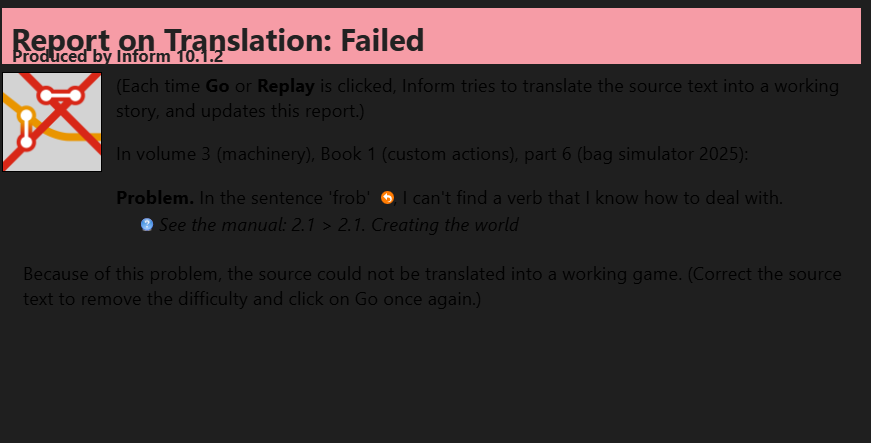
Enjoying the dark mode! I have noted that the results pane has a dark-on dark scheme that is pretty illegible. I don’t think the results pane can be customized, unless I’m missing it somewhere.
The results pane is HTML generated by the Inform compiler: as of 10.1.2, that isn’t really dark mode aware, leading to the less than legible results. In Inform 10.2 we’ve moved to having all HTML styling expressed through CSS, allowing light/dark mode switching, but for now this is a limitation of dark mode that isn’t avoidable.
Though having said that, one (ugly) solution would be to have the front-end force the HTML background to a light colour, even in dark mode. I’m not sure that that would look any more pleasing, though.
There is a registry key that gets created that can be used to completely disable dark mode, given that it skirts with the outer edges of undocumented functionality in order to work. In regedit, find “HKEY_CURRENT_USER\Software\David Kinder\Inform”, you should see that there’s a key under there called “DisableDarkMode”. If this is set to 1, Inform will never use dark mode.
I will think about having the Results, Index and Extension tabs having a light background, even in dark mode, since that’s all that is needed. As any future version will need to support the old versions of the compiler anyway, something like that would be worth considering.
This includes a fix for the issue mentioned previously in this thread, that HTML pages generated by the compiler (such as the Results pane and the Index page) don’t properly respect dark mode, so have a black-text-on-dark-background scheme. While this will be fully addressed in 10.2, for now in dark mode the front-end adjusts the pages to have a light grey background. While not perfect from a dark mode point of view, they are at least readable.