No worries felt. I’m just grateful someone reports if there’s an issue. Especially after a new release. There’s been lots of refactoring for readability in the code so I’m not surprised if things like this pop up. Keep them coming!
2 Likes
I’ve been trying this now and have no problems clearing the cache using the latest version of vscode. (I’m running vscode on a Macbook myself)
The “engines.version”=1.75.0 (what you saw in the marketplace), is a bit low I see now when I proof check what the version was used when language server/client 9.0.1 was introduced (which I recently adapted the extension to). It actually seems “engines.version”=“1.82.0” was the lowest compatible at that time. I’m not entirely sure this is what is affecting the clearCache-command for your computer though. Did you install it the regular way via the extension marketplace?
I suspect you need to upgrade vscode. What version of vscode are you running now?
Also, in case you didn’t know you can always degrade the extension to lowest working version, it’s not optimal but at least you can get it running again:
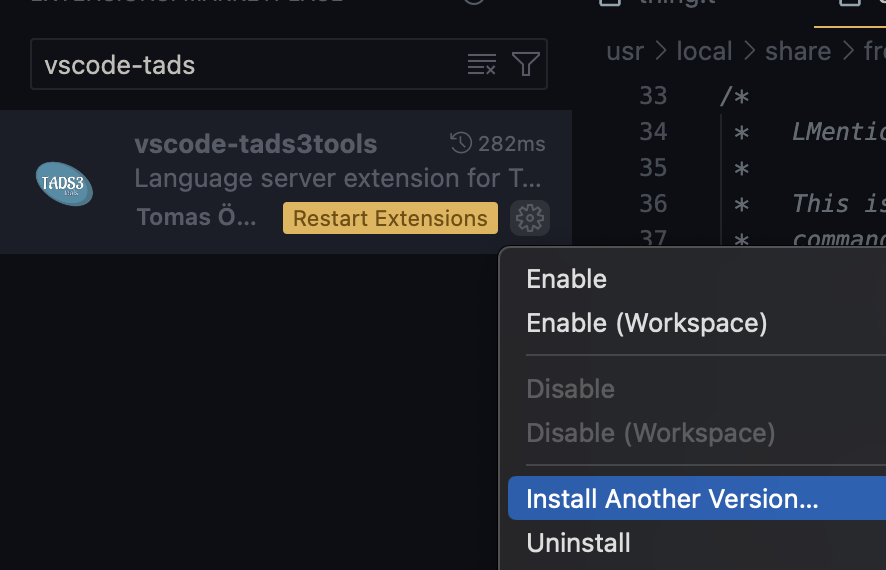
1 Like
That’s the thing, is that my current OS 10.14.2 won’t run the newer versions of Code (I have 1.75 now), and I don’t have room on my laptop to upgrade the OS.
I was aware of the downgrade option, which I’ll utilize if necessary…
I wasn’t able to get any info to appear in the output pane when I tried to run the clear-cache command again.
Also, I can find a bunch of cached stuff in /Users/me/Library/ApplicationSupport/Code, but I can’t identify which files would need to be trashed because most of the names are just gibberish.
And yes, I installed the 0.6.4 the “regular” way, through the VSCode sidebar…
To confirm, I downgraded back to 0.6.1 (on Code 1.75) and it is parsing my symbols again…
And I downloaded that version of vscode and ran the extension through it. Got the message "The language client requires VS Code version ^1.82.0 but received version 1.75.1. I’m going change the version I vscode marketplace label to 1.82.0 instead.
1 Like
tads3tools 0.7.0 is released!
The biggest highlights are:
-
Improved auto completions that will offer the user available templates to select from, specifically chosen for the class at hand.
-
Better support for other languages. It is auto detecting what language you’re using when adding new files to the project, so it gives the correct headers
-
There’s finally **debugger support** via the Debugger Adapter Protocol (DAP)! You’ll just have to wait a bit longer for the debugger itself. I’ve opened a PR to the frobtads repository containing the neccesary changes to give frobd DAP support, but there’s not yet an official version released.
-
The new version holds a rewrite of the antlr parser under the hood. This one will be able to sponsor the language server in a significant better way than the old ambiguous parser could do. It covers the groundwork for many improvements to follow, such as call hierarchy, better static analysis, smarter code completions etc.
7 Likes
tads3tools 0.8.0 is released!
See the changelog for details. vscode-tads3tools/CHANGELOG.md at main · toerob/vscode-tads3tools · GitHub
5 Likes
tads3tools 0.8.1 is out. It contains nothing new besides a bugfix for the windows platform. https://github.com/toerob/vscode-tads3tools/blob/main/CHANGELOG.md
6 Likes
tads3tools 0.8.3 (+ 0.8.2) is released. It mostly contains parser and preprocessor bug fixes. These bugs caused symbols to be skipped, meaning goto definitions, etc, didn’t work on these. This was mostly noted when using the adv3Lite library where the syntax was used more than adv3.
- Also added specifc icons for the .t .h, t3m and .t3 files.
vscode-tads3tools/CHANGELOG.md at main · toerob/vscode-tads3tools · GitHub
4 Likes