Tools for narrative branching diagrams

I think this topic has come up before, but i cant find the thread. And there might be new ways now.

I’m looking for offline tools to diagram branching flows. So perhaps the main narrative branches rather than every detailed choice. I’ve found attempting the latter usually result in a bowl of noodles.

So far, I’ve been using miro, which is good for diagramming, but unfortunately is 100% online. What i mean by that, is you need a constant live connection to edit. If your internet is lumpy, the mouse stops moving! And this is quite annoying.

A while ago i used draw.io/diagrams.net, but this is also online. I’d really like an offline tool that just saves state in regular files.

Any suggestions or recommendations? Thanks for any pointers.

1 Like

It’s designed specifically for mapping, but I’ve used Trizbort for offline narrative flow chart creation before.

1 Like

I think you were thinking of this thread, from back in May. Suggestions for Narrative Tool Projects?

I hope it’s not too pretentious of for me to quote my own post from the thread:

5 Likes

I occasionally use dia, but sometimes I abuse idea processors, esp. visual ones.

Best regards from Italy,
dott. Piergiorgio.

2 Likes

I think you’re spot on for when you’re in active development, but for brainstorming diagrams can be helpful. So I’m interested in people’s suggestions.

I’ve tried using Twine and wasn’t quite happy with it, though it’s better than nothing. Trizbort is Windows/online only unfortunately for this Mac user.

2 Likes

What’s wrong with the online version? I use that on my Mac all the time. You can “install” it as a progressive web app if you want. It works offline.

My favorite way to use Trizbort.io is with its keyboard shortcuts. Shift+arrow will create a room in that direction, or move your cursor to that room, if that direction already exists. You can press Enter to start typing the name of a room, Enter again to close the edit box, and then more arrow keys to keep drawing. (Use Shift 1, 3, 7, or 9 to create rooms SW, SE, NW, or NE.)

1 Like

I use it for playing games all the time. But the save/load functionality is too clumsy for things I want to save for posterity. It downloads saves to my default download location rather than to where I’m working, which means I forget to move saves over and soon they’re all suffixed “(12)” or something. Additionally I’m never sure what is going to happen if I work in multiple tabs and reload one of them, for instance.

1 Like

That’s a browser setting. In Chrome, you can go to Settings → Downloads → Ask where to save each file before downloading. In Safari, it’s in Settings → File download location → Ask for each download. In Firefox, it’s Settings → Downloads → Always ask you where to save files.

The installed progressive web app only has one tab. In Chrome, there’s a little install button in the URL bar. In Safari, use the File → Add to Dock menu.

1 Like

Do I know how to use my browser? No. No I do not. Thanks, that’s helpful.

1 Like

I concur. The visual “node map” was what initially attracted me to Twine, but it was ultimately what put me off Twine as well. My PC is optimised for animation and visual effects, but scrolling around the node maps for my two large Twine games is noticeably laggy.

Recently it occurred to me that I could create a “scale model” of my Ink games in Ink itself, with each scene summarised in a single knot. It works quite well for me, but it depends on how you structure your games. Mine are quite labyrinthine.

2 Likes

I don’t know if you aware, but if you go to the current home website https://www.drawio.com/, you have an option to download a desktop version with local saving. There are mac, windows, and linux versions available and the project has been updated as recently as two weeks ago.

5 Likes

Thanks. I guess Trizbort could be used. I’d like to be able to branch multiply from one side, so maybe the NE, SE, NNE, SSE, E etc. could be used here.

1 Like

Thanks for finding that old thread. And now i remember your post there;

I agree about the complexity, but I’m trying the idea of making more of an overview diagram. So it would have the scenes and major branches, but not everything.

What I’ve discovered is even a high-level design drawing can reveal a lot about how linear your game is or how unbalanced it is by comparing the branches.

I guess this overlaps with the idea of brainstorming. But i see it as being a bit more concrete in the sense that the high-level diagram would be enough to start building the actual game. Perhaps in conjunction with a design document that elaborates each scene in some detail.

1 Like

Hey thanks a lot for this. I didn’t knows there was a downloadable version. I’ve just given it a spin and it’s not bad. Miro is a bit easier to work with multiple branches and loops, but like i said is 100% online.

I would really like a way to add some kind of text notes to the diagram. Making giant boxes looks bad. But maybe there’s a way. For example, you can make layers. So perhaps i can adapt that.

I will experiment further.

2 Likes

You probably want something with more power/control, but I’ve at times enjoyed using GraphViz’s Dot language. The online version is an easy way to get started.

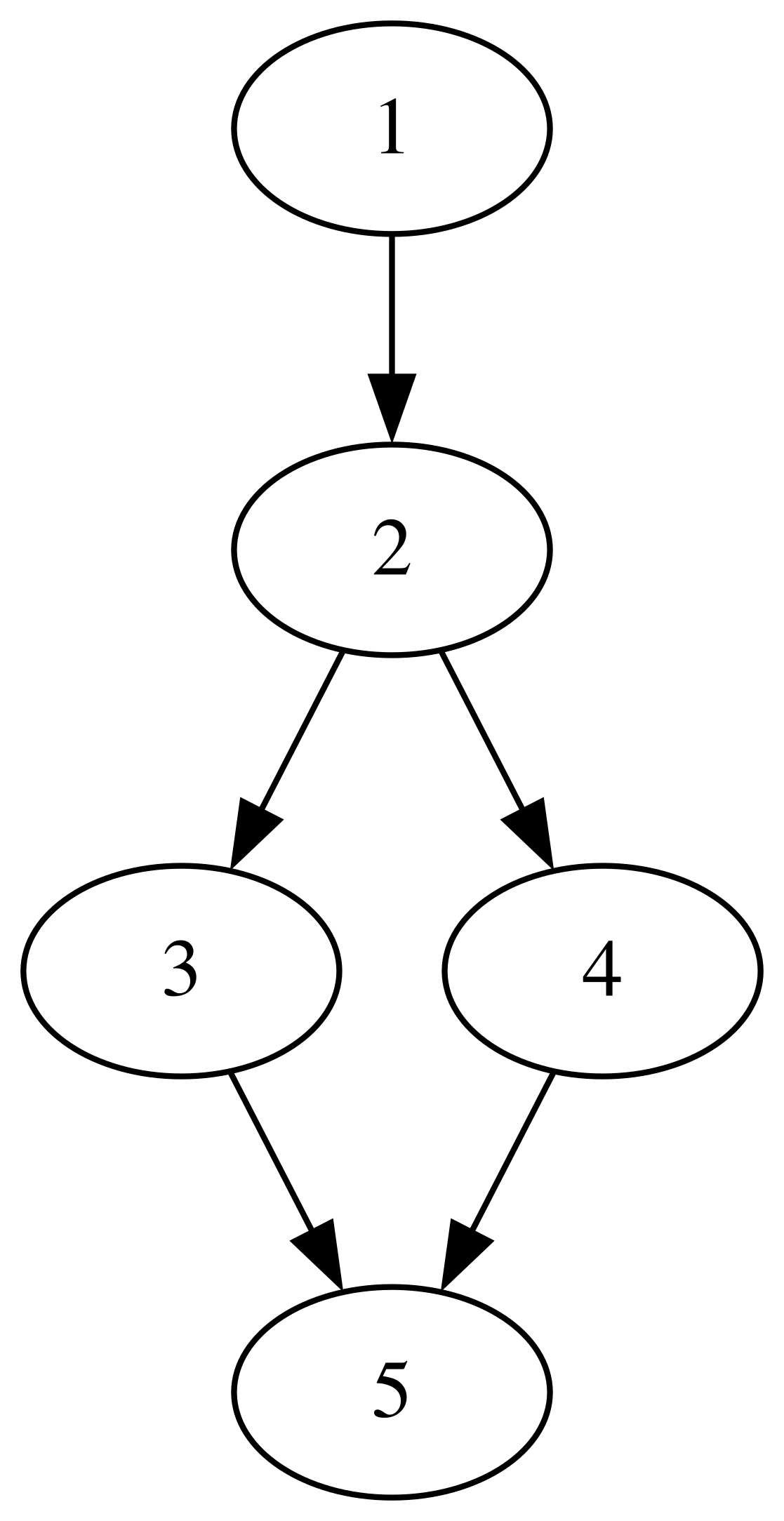
The starter example they give is quite complex, so you might begin by replacing the code with this starter:

digraph G {

  1 -> 2 -> 3 -> 5;
  2 -> 4;
  4 -> 5;
}

That will automatically render an image like this:

The premise of the Dot language is that you just type the node names and connections between nodes (edges), and GraphViz will try to pick a good placement for the nodes/edges.

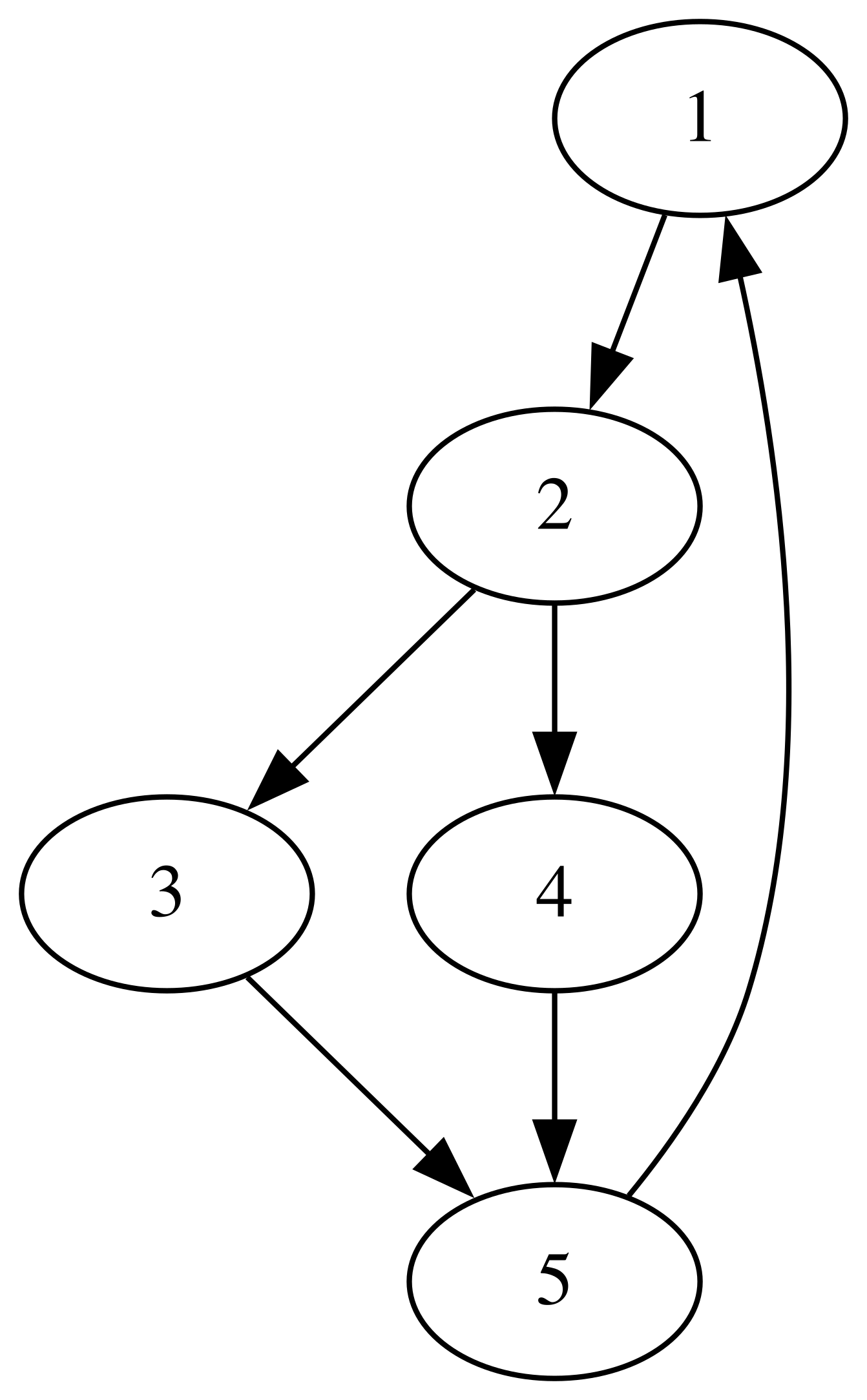
If you add 5 -> 1 like this:

digraph G {

  1 -> 2 -> 3 -> 5;
  2 -> 4;
  4 -> 5;
  5 -> 1;
}

You’ll get this:

See how it scooted the nodes around?

You can label the edges.

digraph G {

  1 -> 2 -> 3 -> 5;
  2 -> 4;
  4 -> 5;
  5 -> 1 [label="looping back"];
}

You can name the nodes whatever you want in quoted strings, including multi-line strings.

digraph G {

  "this is\nthe start" -> 2 -> 3 -> 5;
  2 -> 4;
  4 -> 5;
  5 -> "this is\nthe start" [label="looping back"];
}

If you want to label part of the diagram, well, you’ve kinda gotta put a box around it so people know which part of the diagram you’re talking about. You do that with a labeled subgraph.

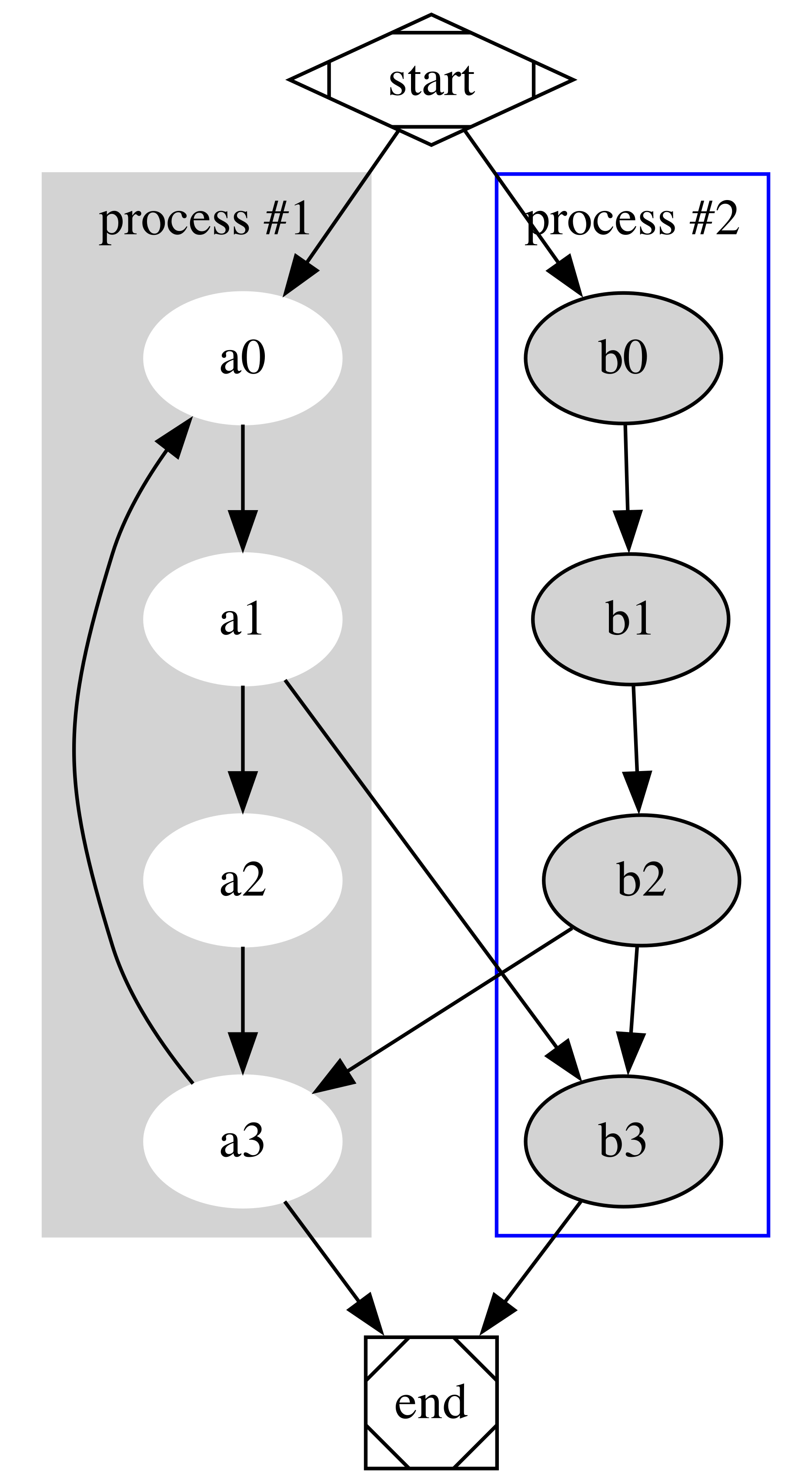
Their starting example has two labeled subgraphs.

digraph G {

  subgraph cluster_0 {
    style=filled;
    color=lightgrey;
    node [style=filled,color=white];
    a0 -> a1 -> a2 -> a3;
    label = "process #1";
  }

  subgraph cluster_1 {
    node [style=filled];
    b0 -> b1 -> b2 -> b3;
    label = "process #2";
    color=blue
  }
  start -> a0;
  start -> b0;
  a1 -> b3;
  b2 -> a3;
  a3 -> a0;
  a3 -> end;
  b3 -> end;

  start [shape=Mdiamond];
  end [shape=Msquare];
}
4 Likes

Nice, Dan ! and why not look if is feasible a twee2dot script ? interesting challenge…

Best regards from Italy,
dott. Piergiorgio.

2 Likes

Seconding Graphviz, which I find very helpful for making this sort of thing.

2 Likes

I also have used graphviz for e.g. puzzle dependency diagrams, although it doesn’t seem like it would be super convenient for brainstorming a high-level overview of a game.

1 Like

Thanks for this. I am definitely going to experiment with all sorts of ideas. I think the GraphViz approach may apply to parts of the design where auto-layout will help. Perhaps for storylet type approaches. However, sometimes manual layout is a good idea as well.

I remember some time ago battling with an early version of GraphViz. In some cases, you can get into a pickle where it just never manages to make a sensible diagram. But like i said, that might have been an early version.

1 Like

One thing that no one has mentioned yet in either this or the linked earlier discussion is Dia, which is an editor for structured diagrams. It has its rough spots – I found working with text to be annoying at first, in particular, though I got used to it relatively quickly – but it’s a decent tool for quickly sketching a diagram. It’s what I usually use for creating maps for parser IF.

Windows, Mac, Linux.

2 Likes