The verb coin (radial verb GUI menu) was not a stable solution. It was very clearly under selective pressure to discard verbs, one at a time, until you were down to EXAMINE/USE. And then still some pressure to go one step further (at which point you have Myst).
3 Likes
Ah, but once you’re down to just USE, you could introduce the wheel from Mass Effect, and USE as Paragon or USE as Renegade.
2 Likes
I think it depends entirely on the game.
Myst is a good example, in that there were no characters to interact with. There, everything has a single obvious action, or a machine to fiddle with. There’s no need for, say, an action command, AND a talk command.
I’ve played some interactive fiction where there was really one or two commands, beyond movement and examine, and for those I kind of think a verb coin makes a lot of sense. It’s entirely intuitive; there’s no way you can end up with a “guess-the-verb” dilemma, and plays well on any kind of screen, even mobile. I think a lot about interactive fiction on a phone.
But some games really do need a parser. It would be impossible to implement, say, Counterfeit Monkey, with a verb coin.
4 Likes
They should make a version of counterfeit monkey that uses the NES Zapper gun. You just shoot letters out of the words.
5 Likes
So would Counterfeit Monkey ported to the NES with Zapper support count as a remake or a demake? And has anyone figured out a light gun that works properly with a modern display? I forget the details, but I understand the Zapper and other light guns from the Golden Age of Arcades depend on a quirk of CRTs that render them useless… and while I’ve never tried using a Wiimote with a pistol grip or a Wiimote plus nunchuck with a rifle grip, I never could get the hang of aiming with the Wiimote’s IR camera and the official Sensor bar as IR source(granted, part of the problem is that, sitting at a distance where the Wiimote could see the sensor bar while held in a comfortable position, I couldn’t see on-screen reticules with my naked eye, using my pocket telescope to see the reticule meant I couldn’t hold the Wiimote and nunchuck at the same time, and getting close enough to the television to see the reticule with the sensor bar in the location Nintendo tells you to put it meant angling my body at odd angles and shooting from the hip for the wiimote to see the sensor bar, which was just a major pain in the anatomy even for a guy in his early 20s… I was never great at Duck Hunt, but it was far more playable than Wiimote aiming in Twilight Princess).
1 Like
I think this is one of the keys to making a USE-centric game work. (The other is to design puzzles around sequences and combinations, so that the player can’t just lawnmower through the game trying USE on every object.)
DiBianca is great at this. One complaint I had about his early work (specifically Excelsior) was that, in avoiding “guess-the-verb”, it was easy to fall into “guess-the-outcome.” It’s obvious what USE LEVER will do; it’s not so obvious what USE STATUE will do. Later games largely solved this problem by designing worlds where the immediate meaning of each action is clear, but its longer-term consequences may not be.
2 Likes
Being able to handle different languages is such a huge part of internationalization, that people sometimes forget that there’s more to it.
Long ago, I worked on personal financial software, which we had to “translate” from the American market to both the U.K. and the Canadian markets (at least, the English-speaking portion of the Canadian market). Given that all three versions were using flavors of English, the translation work was pretty manageable (stock/shares, shares/shares, check/cheque/check, etc.). And the program already respected the user’s preferences for number and date formats.
Most of the work was dealing with unexpected differences. Some Canadian mortgages (loans) used a different algorithm to compute compound interest; non-U.S. exchanges already used decimal share prices but the U.S. markets were still transitioning from fractional prices; and some printers (and stationery suppliers!) didn’t agree on the height of A4 paper (which matters when you’re trying to fill in forms pre-printed on fanfold paper).
Internationalization means (re-)designing the program in a way that makes it possible to localize it. Localization means translating the interface and adjusting the business logical for a particular region and/or culture. Translation is the portion of localization that primarily focuses on the text in the interface, but can also include iconography, color palettes, and layout.
I’d argue that an IF parser is mostly “business logic” that’s usually tightly coupled to the world simulation. If you could reduce the coupling to the world model (and treat responses as a separate problem) internationalization would involve making the parser a plug-in, and localization would mean creating a plug-in appropriate for a particular language.
6 Likes
This can be minimised by grouping synonyms for your particular game if ‘get and ‘take’ or ‘say’ and ‘shout’ etc make no difference in your game make them the same. A simpler way to implement the ubiquitous ‘push’ and ‘pull’ can just be to also allow ‘move’ for example. To me the point is never to play “guess-the-verb” the point is to interpret the users intent as openly as possible. The object isn’t to intentionally minimise the word choice of the player. Many different people will use similar words based on their vocabulary and location for example. Quite a few original 1980s text adventures were bad for this, with the author often only expecting the words they would personally use.
3 Likes
Sorry for a mini-necropost, but this didn’t really deserve its own thread. Following on from the discussion of how to make parser-based text adventures more user-friendly, I have finished the first pass on my ‘gameified’ hint system, with the aim that people don’t refuse to look at hints because they think that’s cheating. I would rather people flowed through at least the main path of the narrative without too many blockages. I also took up the suggestion made somewhere to have the location test permanently viewable on screen. Link should have a time-stamp to that.
I think I might have overcomplicated the user interface somewhat, and I might be paring that back after some feedback from my current testers. But this is a ‘high water mark’ on the gameification, I think.
I am totally leaning into stuff I can do in this engine - am prototyping item and location images next.
2 Likes
Thanks for sharing. As a fellow parser developer, I enjoy seeing your progress updates. It looks like you’ve made it pretty far with the in-game hint prompting, which is cool, and seems like a good system.
I’ve been working in somewhat similar directions in response to the discussions in this thread and related ones. I’m building in Javascript with no dev GUI so obviously my inputs are pretty different, but I’m just about wrapping up a basic standalone hint system.
Here’s my hint setup - author’s markdown code on the left, game display on the right.
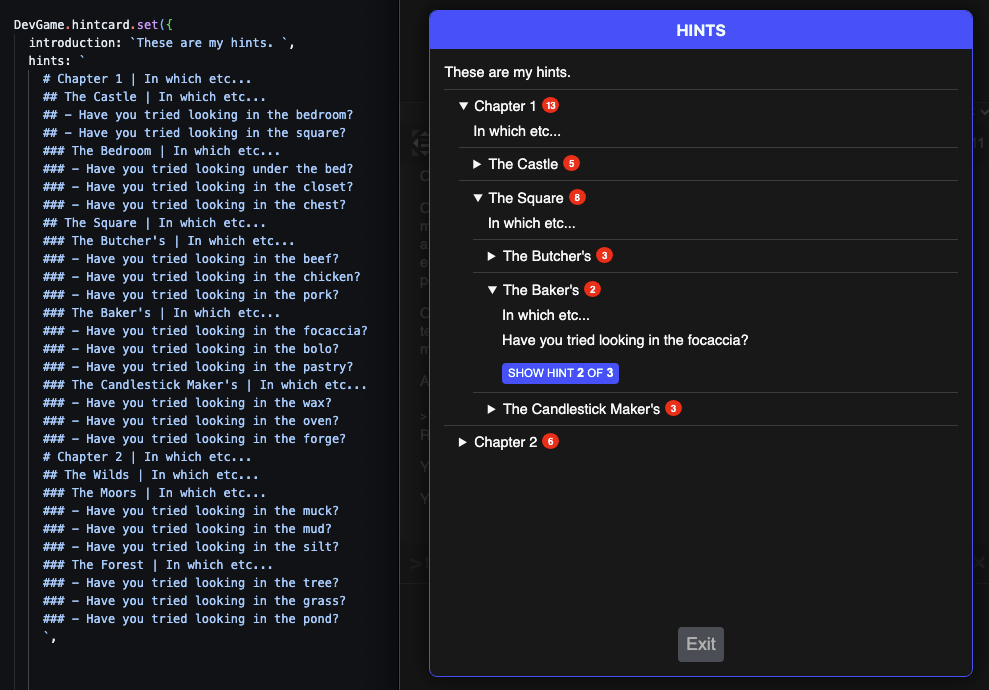
I haven’t yet begun with any kind of progressive in-game hints, though I’ve been using the exercise of building the basic system as food for thought. In a sense, you have an advantage working in the UE GUI, because you can use contextual menus to prevent a lot of errors up front, for making associations, checking states, etc. I’m still thinking through how to let authors make those associations in a way that isn’t too complex for the author and can also be error checked.
I’m intrigued by the way you hid the persistent room description beneath the status bar. I guess it takes up less screen real estate, but requires an additional click, so kind of a toss-up. I added persistent room description as a floating panel. I haven’t applied any styling to this example, but all it takes is some CSS.
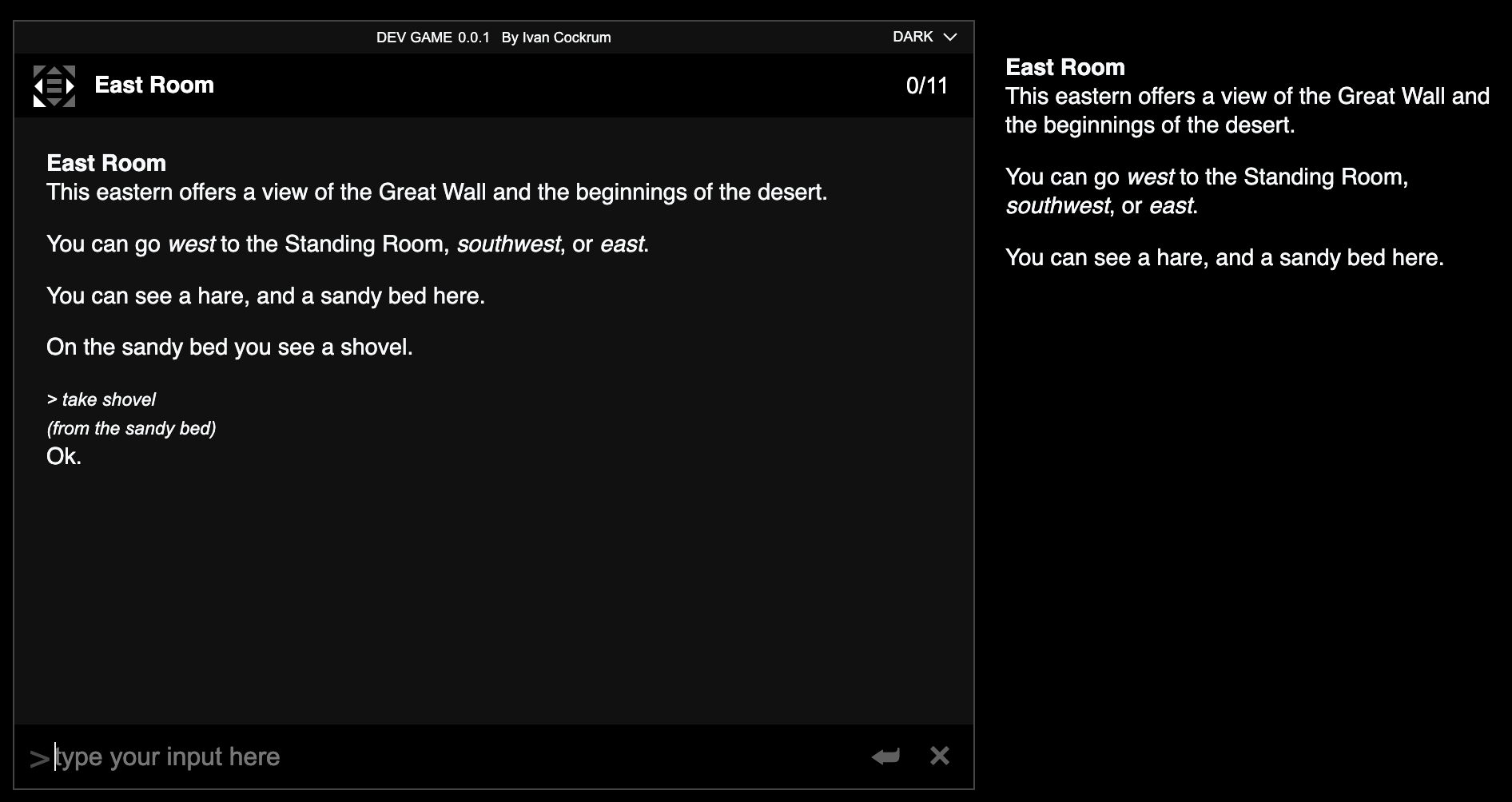
And then to create one just takes a couple lines of code.
DevGame.createDock({
  class: "Room",
  id: "MyRoomDock",
});
I added item and location images a while back, with Legend-style games in mind. (Please forgive this example which contains some AI generated images that I added ages ago before forming an opinion on GAI and haven’t gotten around to replacing.)
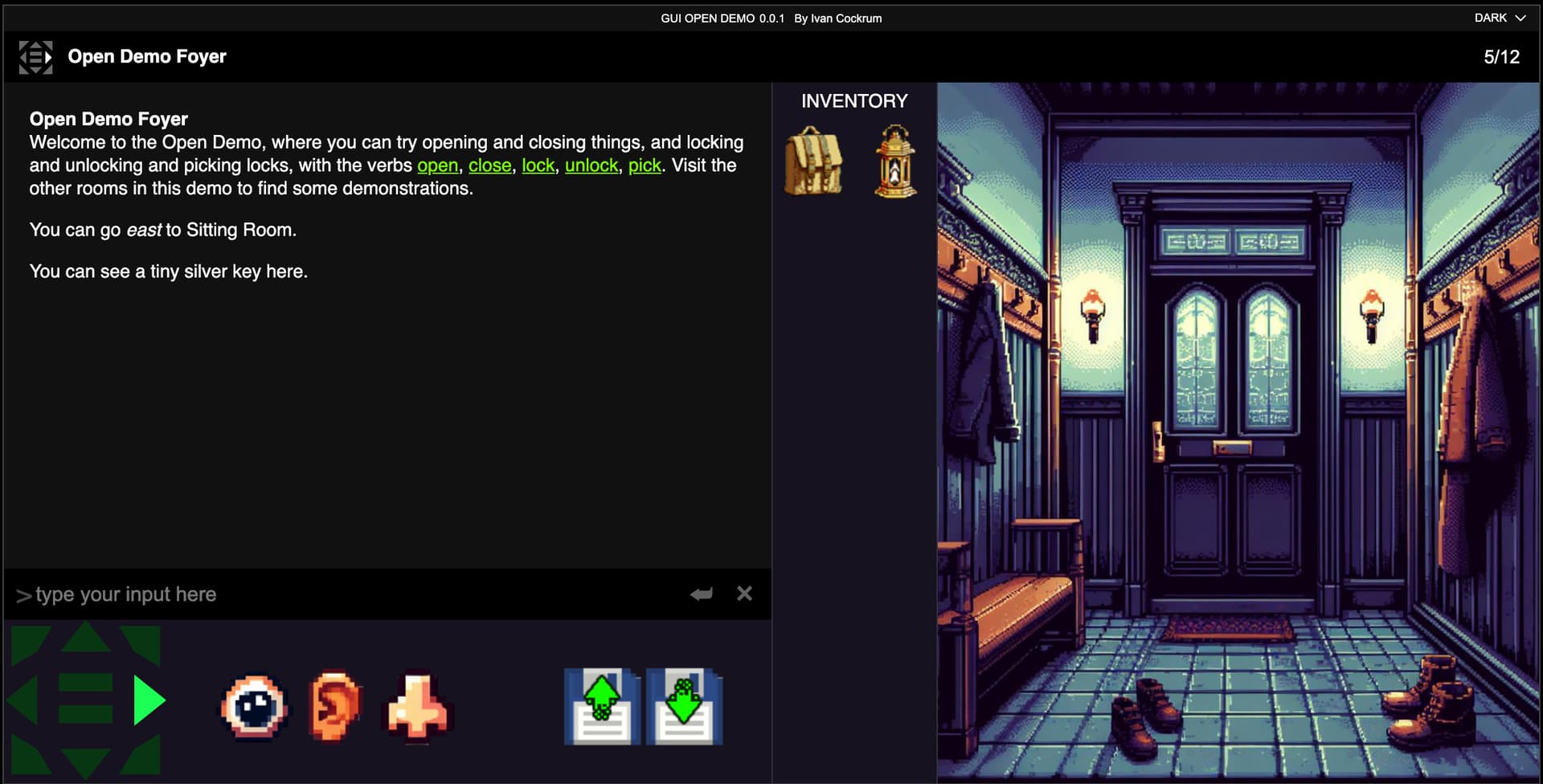
All it takes to add an image to a room or inventory item is to define an image property, using a reference to an image lookup table.
GUIOpenDemo.createAsset({
  class: "Room",
  name: "Open Demo Foyer",
  image: "foyer",
  description: `Welcome to the Open Demo, where you can try opening and closing things, and locking and unlocking and picking locks, with the verbs <a href='/doc/open.html'>open</a>, <a href='/doc/close.html'>close</a>, <a href='/doc/lock.html'>lock</a>, <a href='/doc/unlock.html'>unlock</a>, <a href='/doc/pick.html'>pick</a>. Visit the other rooms in this demo to find some demonstrations. `,
  exits: {
    east: "Sitting Room",
  },
});
GUIOpenDemo.createImageLookup({
  images: [
    {
      id: "foyer",
      image: "/examples/GUIOpenDemo/images/background_foyer03.jpg",
    },
    {
      id: "brasskey",
      image: "/examples/GUIOpenDemo/images/icon_brass-key.png",
    },
    {
      id: "lantern",
      image: "/examples/GUIOpenDemo/images/icon_brass-lantern.png",
    },
    { id: "knapsack", image: "/examples/GUIOpenDemo/images/icon_knapsack.png" },
  ],
});
2 Likes
Thank you for sharing your process/system - also fascinating to see under the hood, with a completely different implementation/environment. Because reasons, I have actually simplified almost everything to lookups by name (rather than soft/hard pointer), which is very far from error-free. Part of my system involves loading sublevels in and out depending on what has happened in the adventure world, and even soft pointers (if that means anything to you in a UE context) throw lots of errors when you do that, it seems. If in doubt, simplify… though it is now making me think that I could make some useful editor tools to help me author and check this stuff - but not for now (need to push on with the prototype).
Your UI looks pretty sharp. I am expecting to have my good friend who is on the UI design side do a ‘polish pass’ at some point, and maybe even a redesign if needed. For now I am just trying to fit everything in sensibly. This is my work in progress adaptation to get images in there too somehow

I hadn’t thought to make individual item icons. I think I will probably pass on that because of the sometimes shades-of-grey division between scenery/irrelevant items and discrete carryable things. And it’ll take a hell of a lot of work to make the icons also 
I am also taking a different route with images because (as I currently envisage it) they will either be photobooth style views of particular static meshes (same as those used in the 3D world) or static camera angles on in-world areas. But maybe also pre-rendered views of particular rooms. Whatever works in each context, I guess. For one example, in relation to a puzzle involving an electrically-powered door lock, examining the door or the lock would unlock a camera view of the door and the lock as seen in-game. As actions in the world can change the status of the lock (=displayed light), the examined image will change in real time. This is kind of a gimmick, because for most of the adventure part, the player is not going to be able to physically access the playspace in the 3d world afterwards. But in some cases, yes.
1 Like
Yeah, I think your current version is a totally serviceable starting point that gets the point across to the user, even if ultimately you wind up shuffling things around or thematically reskinning it.
Makes sense - here again you have the UE advantage of having an in-game camera. I could see you doing things like updating the room photo in real time if the room evolves during the course of gameplay; or alternately, keeping your static pic as a reference point while the room changes, which might play nicely in a detective game where the player can get clues by tracing changes made to the original state of the room.
It seems like it could be a real nicety to be able to generate images on the fly rather than having to pre-populate all your static art. It seems like it would let you handle subtleties like, maybe that lock has scratches on it from someone trying to lockpick it, which weren’t there before, and now it’s included in your screenshot, without you having to pre-render a bunch of combinatorial assets.
Hah, yeah, for sure, that is a creative decision with extra-work implications. I built that piece with LucasArts-style inventory grids in mind, like Monkey Island has. Though, I also made a method for including those images in the text-flow, so you could for instance show a picture on examine.
2 Likes
From what I understand, it was actually somewhere in between. The precursors to QWERTY were trying to be efficient by putting the most frequently hit letters under the most adroit fingers. But jams were frequent because common two-key sequences used adjacent hammers. QWERTY tweaked the layout to reduce such sequences, but not without consideration for typing efficiency. The result was that, in English, there is a lot of alternation between hands, which is actually helpful for speed and comfort. So QWERTY wasn’t optimized for efficiency nor was it optimized to minimize mechanical issues. It was actually an attempt to strike a balance between those.
8 Likes
Belatedly following up on some specific points in this thread… I’ve been working recently on handling for possessives and abbreviations. Here are some things I have my parser doing now that it wasn’t doing before, so thanks to all who participated in the thread for the discussion.
Accepts names with abbreviations in them such as Dr., Ph.D., etc.
> examine mrs. mighty hero ph.d.
Mrs. Mighty Hero Ph.D. is carrying a phone.
Is agnostic about whether the periods are present.
> examine mrs mighty hero phd
Mrs. Mighty Hero Ph.D. is carrying a phone.
My parser was already handling do x then do y and do x. do y. and now also handles ambiguity between abbreviations and sentence boundaries. For example, splits this input…
> examine mrs. mighty hero ph.d. go north.
…into
> examine mrs. mighty hero ph.d.
Mrs. Mighty Hero Ph.D. is carrying a phone.

> go north
You can't go north. You can go east, southeast, or west.
Handles partials and some amount of fuzziness in multi-part names, for example I typo’d “mighty mrs” rather than “mrs mighty”.
> examine mighty mrs.
Mrs. Mighty Hero Ph.D. is carrying a phone.
Also handles disambiguation between characters with very similar names.
> examine myself
You're a Mighty Hero. You're carrying a white paper.

> examine mighty hero
You're a Mighty Hero. You're carrying a white paper.

> examine mrs mighty hero
Mrs. Mighty Hero Ph.D. is carrying a phone.
Handles objective pronouns (him, her, it, them) and considers multiple contexts (did player refer to a suitably gendered character recently; is a suitably gendered character present).
> examine her
Mrs. Mighty Hero Ph.D. is carrying a phone.
Handles possessive determiners (his, her, its, their) without synonyms, as well as ambiguity between possessive determiner and objective pronoun (which chiefly applies to her). At the moment possessive determiners are only satisfied by things that are actually in the possessor, as opposed to things owned by but not held by the possessor, though that could easily be changed with an ownership property. If no female gendered character has been referred to, or in the case of multiple female gendered characters present, it also checks contextually to infer what instances of her may be present in the room and which her has a phone.
> examine her phone
A phone.
Handles possessive nouns with apostrophes.
> examine Mrs. Mighty Hero Ph.d.'s phone
A phone.
Understands when possessive nouns don’t apply.
> examine roger the turtle's phone
Roger the turtle doesn't appear to be carrying any phone.
Handles unused possessive body parts with a lookup table of common body parts. The table has about 70 items at the moment, but it’s easily editable; could be more, could be less, could be none, depending on author’s preference.
> examine Mrs. Mighty Hero Ph.d.'s hands
You don't notice anything special about Mrs. Mighty Hero Ph.D.'s hands.
The unused bodyparts message is easily customized if an author prefers to be clear that these things don’t need to be referred to.
MyGame.settings.if_word_is_unused_bodypart_print_this =
  `{We} {don't} need to refer to {name}'s {bodypart}. `;
In the event of a player referring to body parts without specifying a possessor, the game just shrugs.
> x feet
You don't know of any feet.
And then if an author creates an actual body part asset, that always takes precedence over unused body parts, preventing any awkward disambiguation prompts.
> x roger the turtle's shell
It's a shell.

> x shell
It's a shell.
I was about to share an example of this in action when I realized that I broke my NPC, do x handling during these other changes (as so often happens during tech demos) - but I’ve got provisioning for NPC, do x then do y or NPC, do x. do y. I was already handling multiple commands, and I already had input queuing, so I just added a subject property to the input object that gets carried across the queue. If a multi-part command is given to an NPC, then the NPC will be the subject of all the queued inputs. Each queued input must complete before the next one is processed, so scope and state follow the NPC’s actions. Should work.
And finally, though I don’t think anyone was asking for this, but I also recently added handling for verb then verb noun so you can > take then wear eyeglasses or > take and wear eyeglasses
And it’s parsed as
> take eyeglasses
You take the pair of eyeglasses from the desk.

> wear eyeglasses
You wear the pair of eyeglasses.
6 Likes
This is an impressively sophisticated parser. Good job.
I think the main danger with parsers that handle some things with such sophistication is that you create a greater potential for disappointment in areas where you haven’t (yet) achieved a similar level of sophistication. Experience tells me you will never stop discovering these. Which is not to try to be discouraging - more to note that making a parser this good is probably something of a never-ending task. Or maybe you just made your base parser a lot better/more flexible than I did
I am also more confident in my decision to simply disallow multiple commands. I found the complexity it introduced - especially in terms of figuring out what is in scope at what time - not to be justified by the benefits. But that speaks to a poor base design in my parser, perhaps. You seem to have picked that up and run with it.
3 Likes
That, and once you reach that parser also becomes more fiddly. There may be times where (okay this is a silly example) but say the person with “PH.D.” in their named can be named PH for simplicity, then the parser might not want to be parsed as X PH.D. but instead X PH THEN D (or down). My point is a terrible example but it always adds that issue where disambiguation is a massive issue and sometimes “guessing” is worse.
In my opinion, Counterfeit Monkey strikes a great balance because it has enough sophisticated bits like GO TO and so on, but not too much that it feels weird when you CAN’T do so with other bits. Also, it has this implied law in-game of compliance and guessing. For example, the T-inserter will assume where the T is placed, no? It’s up to the game to decide whether that’s the word you wanted to create. And by doing that, you’re actively handing the reins to the game (or in-game parser), saying “You make the decision.” It also helps that disambiguation between objects can be minimised in most cases because, for example, if you had a hose and then a horse appears at some point in the game, removing the r could cause big problems. But just having them be the same object (someone used a modified r-remover on the horse) would fix that issue. I’m overthinking this, probably. But I like looking at the game and just thinking “yeah, that is clever”.
Another one you could look at is Superluminal Vargrant Twin. In so many ways the parser is not very easy or graceful, with so many unefficient things. But due to the large and expansive nature of the game, you kind of get used to it. Usually I’d just get annoyed at it, but they managed to pull it off. So, yeah, that too.
2 Likes
I think it’s absolutely fair to present a limited parser so long as its limits are communicated clearly. And your points about complexity are spot on (ask me about mixing substances! and temperatures!). For my part, I think it’s just turned out that my interests lead me toward a more detailed simulationist approach. I like that sense of infinite possibility, even knowing that it is a lie. I think the trick is to try as best as possible to always degrade gracefully and try to offer informative error messages - or more to the point, contextually aware error messages that show that the parser has some recognition of what you were trying to do, even if it can’t operate on it. I would say that the end goal of any parser, regardless of the level of its complexity, is to reduce friction / player frustration.
2 Likes
Great work on the parser. I really like it!
Ok, fixed that.
> examine roger
It's a turtle. Roger the turtle is carrying a lettuce.
roger, go east then drop the lettuce then eat the lettuce is parsed as:
> go east
Roger the turtle goes east to the East Room.

> drop lettuce
Roger the turtle drop the lettuce.

> eat lettuce
Roger the turtle eats a lettuce.
So, that’s my proof of concept, though I still have some obvious verb agreement and article handling to work out in that example. To @fatmarrow’s point, it also raises a world of complexity in how to report the actions of off-stage NPCs that I’ve only just begun to think about. But totally doable.
1 Like