Hey! I’m currently trying to get a Shop working in the sidebar as a window… I am brand new to Twine and sugarcube so I have no idea how exactly I’m supposed to do this, I figured out how to add new buttons to the sidebar but I’m currently trying to figure out how to have it as a window instead of a new page (And including items).
To pop up an overlay in SugarCube you use the Dialog() function, and you can load some existing passage in it.
Let’s assume you have a sidebar button called “shop” and a passage called “shop” that can populate your pop-up. You’d like your pop-up to say “Item Shop” at the top.
<<button "Shop">>
    <<run Dialog.create("Item Shop")
	            .wikiPassage("Shop")
	            .open()>>
<</button>>
That’s all you need. The Dialog takes care of providing its own close button.
hmm… All that’s happening is when I press shop it opens another passage… if i have the code in the shop section it just adds a button that moves you to another passage…
Ahh, you can’t have the passage and the button named the same thing, I realise. Because then it opens the passage instead.
Just rename the passage to “ShopDialog” or something and that should fix it.

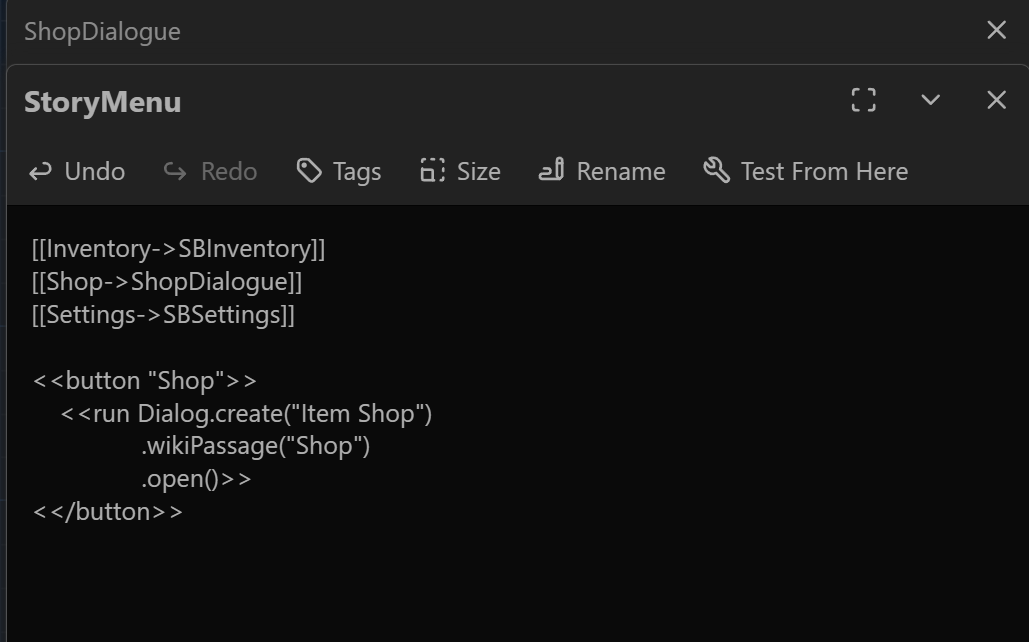
My apologies, I forgot that you were using StoryMenu, which ignores <<button>> and only works with <<link>>.
I made this absolutely minimal story to demonstrate that this works:
:: StoryTitle
Dialog


:: StoryData
{
  "ifid": "1256EFC9-68F6-46AC-A8AC-9957F6124321",
  "format": "SugarCube",
  "format-version": "2.37.3",
  "start": "Start",
  "zoom": 1
}


:: Start {"position":"700,350","size":"100,100"}
Start


:: Shop {"position":"950,350","size":"100,100"}
Shop!


:: StoryMenu {"position":"825,350","size":"100,100"}
<<link "Shop">>
    <<run Dialog.create("Item Shop")
	            .wikiPassage("Shop")
	            .open()>>
<</link>>
Check that you are also using SugarCube 2.37, in older versions the Dialog commands are slightly different