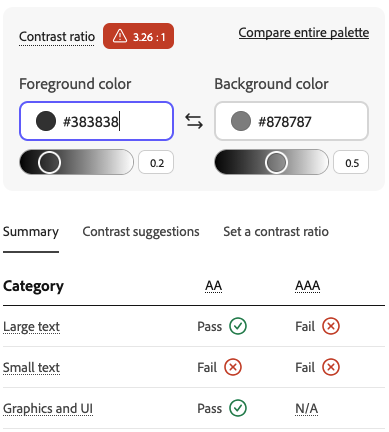
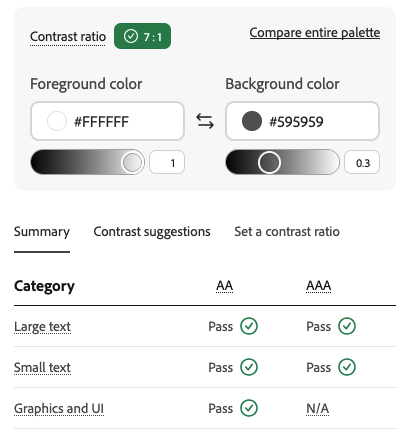
Just from an accessibility standpoint, you might want to adjust your colors, either by darkening the background or setting the text color to black.
Using Adobe’s color contrast analyzer (there are many such tools but Adobe’s is good) here are results for your current colors. Ideally you want at least a 5:1 contrast.
I like the colors. They are inspired by this C64 screen.
edit - I will probably make multiple versions of the same game just sitting in the game main menu that differ by palette. I may even make a cray version that randomizes all the colors before playing for fun. I got clobbered over my previous color choices for other things but hey, I liked them…
MAD Candy IF Studio Engine 1.4.1 is now available that lets anyone add images and sounds to the welcome screen like in my previous post.
Here’s an alternative color that is more forest themed. I redid the photo. I think it needs to be edited to size better. This is how is it looks from the main menu on the phone app.
One of the most challenging parts of working on a text engine is handling disambiguation gracefully. Disambiguation can occur when the objects in the parser command don’t cleanly have a 1:1 mapping. The engine has always supported object disambiguation but now I am wrapping up portal disambiguation. In the contrived example there are 9 rooms labeled 1 to 11. Room 5 is the center and it has both door and window exits to all rooms in a cardinal manner, including up and down. In this contrived example I want to test opening doors and windows, looking through them, and throwing an object through them but causing disambiguation to trigger. In the example, in location 5 are 10 closed doors and 10 closed windows. By just commanding it to open a door, it asks me which one, the same with windows, the same with looking and throwing. In the case of throwing, I am hold 2 kinds of rocks. The disambiguation system needs to activate for this as well. Doors and Windows can be aliased and do not need to be named as their cardinal location on the map. I’ve done this with one of the windows for other tests that I do with this testing project. Have a look at the screen. At any time had I just added the full name of the door, disambiguation is not needed. It is probably one of the most challenging aspects of a game engine to do in a way that is generic and works for verb actions that take a directional component like looking, throwing, or opening/closing/locking/unlocking. What is even more challenging is when verb classes share the same verb for different things. In the example, it is not demonstrated but one of the rocks is defined as a lever. One of the levers verbs is “throw”. So you can throw a rock and throw a lever. That is part of the dimension of this test.
I needed to build in disambiguation in general and also for John’s Quest. In John’s Quest, his shack has a back and front door. When in the shack if you opened just the door before disambiguation it just chooses the first one always. So while open door opened the back door, open front door was needed to open the front door. Being the detail oriented person I am I wanted open door to give you the choice of front or back door.
edit - The goal of the text game engine was to really focus on modeling mechanical items and actions. I’m mostly interested in making things with rich mechanics. It has many curated object types and actions. Part of the fun for me was to make something I could make the kind of visual puzzles I experienced in the last of us, far cry, and Indiana Jones games but in a text manner. I try to make these actions and rules as low hanging and accessible as possible.
One of the things that I got clobbered on, with a text adventure, early on was something that didn’t think was a big deal at all. That was wall, door, and window details. In my text engine, doors and windows are portals. They can be locked, unlocked, etc. After playing other games in game jams I saw how details for doors and windows could matter. In John’s Quest they don’t but the book calls for echoing that when you look at one. The location text editor has been massively extended to cover adding door, window, and wall text to any location, and also aliasing the locations so that “north door”, or “west window”, “or east wall” don’t necessarily need to be commanded. This effort has also been combined with disambiguation so if I command something on a door or window without being specific and there is more than one, disambiguation happens. Here is a sample from John’s Quest, the spec driven adventure that I am working on and that will become the documentation reference for how to make a text adventure in the studio. Shown is the game play and the location editor for door as it exists from the village center. It is also set inside the shack with the same text which is not entirely necessary. These new pieces of text are also mutable during game play by the game rules. If there was some detail in the description that needed changing, it can be changed to accurately reflect the game state. None of this text is necessary and defaults like the one in the game when I look at the other door will occur.
edit - None of these changes have been released yet as I’m still in unit and acceptance testing. I can’t seem to ever underestimate or underrate how much benefit there is in making real games with a game engine. Duh… I guess the proper term is dogfooding, as distasteful as that word is. Nothing has found more rough edges, corner cases, bugs, and other gotchas than making something with the tool that makes something. When this slog is over, is it ever, almost 2 years running now, I’m going to have to relearn how to take a proper holiday.
Sometimes I feel like a proud parent when the game engine works just as intended. In John’s Quest you have many “Shack’s”. “The Woodcutter’s Shack”, the west face of that building which carries “Shack” as an alias. And the “Shack Door” which is the alias for the west door into the shack. In the screen the commands all properly funnel to the correct action. The parser also would understand “Look at the west wall” or “Look at the west door” and “Look West”. They all do the same thing but it seems strange to make a player think cardinally unless something good is about to happen. Any doors, windows, and surfaces automatically can be looked at and if text has not been set then the default responses come back.
You might be interested to know that Inform 6 has the ability to examine all walls by default (e.g. EXAMINE WEST => “You see nothing special about the west wall.”) but it’s removed in Inform 7 because if the author doesn’t override it it’s too often misleading or flat-out wrong (if the player is outdoors, say).
The way I handled that in my parser in progress was to make all walls examinable by opt-in rather than opt-out, so it’s up to the author to enable them as needed. I also made it possible for the author to set non-present walls to return a customized “there’s no _ wall here” message in case they want to use it for hinting or to restate the available exits or whatever.
This example has three possibilities. It will either look west of the current location or at the west surface. If the adjacent location has “look text” defined it is displayed, otherwise it generates it from the location text. In the case of the surface or no adjacent location it will respond with a more generic message that doesn’t include the word wall. “You don’t see anything that way” which is the generic response for no adjacent location. Generic responses can be handled or altered with custom rules which can be globally applied or individually on a case by case basis. Because all these things are done in a WYSIWYG editor it becomes a pretty simple affair to add, change, or remove text. Doing text linkage directly in script is usually more work.
This example uses a prior game jam game that was made before the feature and the look text is generated from the location text. If I ever republish the game I would probably go in and add look text to each location for when this command happens.
In that situation you would need to go out of your way to “engage the surface” and do this which is somewhat nonsensical of the player but still expected really to someone who is figuring out how parser games work. For this game, I might go back and make a global rule to say something, or just put look text that says something more appropriate
I would characterize the engine as working this way. None of what I’ve been showing has been released yet. I’m still working through it as I build John’s Quest from the book.
In general the game engine parser subscribes to a rather heathen methodology. The code is designed with the assumption that people gravitate towards typing commands which look correct to them. Behind the curtain a lot of the text can be ignored. I really tried to get away from starting the parser from the roots of a proper sentence diagram state machine with proper grammar enforcement. I studied a 9th grade English grammar book looking at all the parts of the sentence and decided I didn’t want to go that route. I used myself as the test case and decided that more cavemanlike approaches work better from a playability standpoint.
I have asked the community to take this topic down. I do not wish for it to be here. They brought it back against my wishes. There will be no more updates to this thread.