One thing you can do is replicate the behavior:
Most people can edit their own initial post. I believe you can “retro-quote”, or put the link to the solution in the original post.
Below the post that is the solution, click the link icon and the “copy” button.
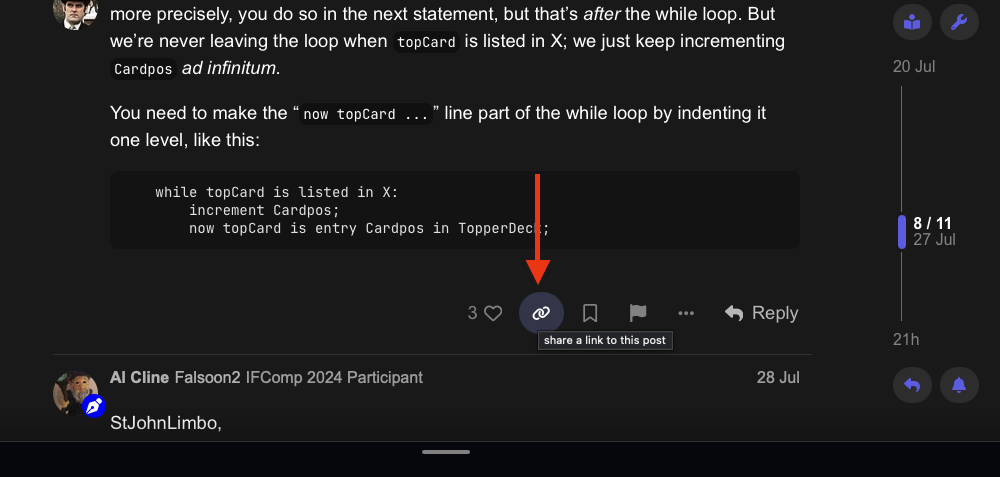

Edit your original post and paste that link marking it as the solution.
This is the solution!
## This is the solution!
https://intfiction.org/t/macos-update-to-m1-pro-tahoe-causing-problems/81117/8?u=hanono
If you want to get fancy, you can use the Obsidian-style quote boxes.
[!done]This is the solution!
MacOS update to M1 Pro Tahoe causing problems - #8 by StJohnLimbo
> [!done]This is the solution!
>
>https://intfiction.org/t/macos-update-to-m1-pro-tahoe-causing-problems/81117/8?u=hanono
“Done” is an alias for the “Success” quote block style: see New component: Quote Callouts (Stylized Quote Boxes)
You can even add the quote block:
[!done]This is the solution!
MacOS update to M1 Pro Tahoe causing problems - #8 by StJohnLimbo
> [!done]This is the solution!
>
>https://intfiction.org/t/macos-update-to-m1-pro-tahoe-causing-problems/81117/8
>
> [quote="StJohnLimbo, post:8, topic:81117"]
> The freezing seems to be caused by an infinite while loop which happens when the `TopperDeck` starts with 2, 3, 13, or 14.
> [/quote]