Introducing iffinity, a new minimal IF engine with iffinite possibilities!

Let’s get this out of the way first. I’m such a dolt. I meant markdown, not markup. Hopefully that reframes my question in a way that makes sense. However, it’s hardly a deal breaker. I thought the logic that replaces [[ ... ]] could be leveraged, is all.


Regarding <button> versus <a>. An <a> without an href makes browsers unhappy. It stops being a valid link. It loses the default cursor setting and obviously doesn’t exist in the keyboard tabbing list. I did find some code that you can use in the href value that removes the “tool tip” in Chrome only though. It’s hacky, but harmless. I’ll dig that up later today so you can see it.

You’re right about the involved default CSS with buttons. I believe there are about 6 properties that must be overridden with inherit in order to “undo” the default CSS, but that is a fully compliant thing so it’s not hacky, just unfortunate to have to do. I’ll dig up those properties as well and share them. <button>s are standard tab focus-able elements and all screen readers understand buttons as clickable elements. I’ll test this tonight and report back, sir! *salutes*

3 Likes

Well, my little lunch break revealed that <button> tags have an underlying box code that won’t let them flow like <a> or <span> tags when word wrapping occurs within a paragraph of text. The CSS display: contents property exists, but it is not implemented well enough in browsers to allow <button> tags to render underline decorations, background colours, etc.

However, I have a couple of hot leads to explore with using <span> or <a> tags to get the desired result. My goal is to use <a> tags, of course. I’m going to muscle my way through this. Come hell or high water, I will remove that nasty little tool tip from making my stories look like regular websites instead of the superior game applications that they truly are! :wink:

3 Likes

1
Good to hear!

2
I’m not super familiar with how integrating libraries works or what iffinity does to allow that. I guess it could be useful, maybe? Not sure.

My way of doing things is to have a separate folder full of Typescript files, which get compiled by esbuild into one large .js file that gets included in the actual iffinity project as a story script. In the actual iffinity project, the JS in the .ejs files and the other story + global scripts mostly just call functions defined in the Typescript files. It’s an admittedly messy way of doing things since all the JS in the project is split slightly-arbitrarily between two folders (in the graveyard game, they’re script_files for the Typescript and src for the actual iffinity source).

(I think it does make the final output smaller, though, since in the final HTML output, global scripts seem to be copy-pasted into every single snippet that uses them. So if you have a hundred snippets the code for the global script is copy-pasted a hundred times. I was somewhat worried about this when making my game, but the end result isn’t all that large in the end - less than 2 MB even with the repetition. A lot of the audio files I use are larger than that, even compressed down to their smallest size.)

3
Yep, that’s pretty much what I was thinking of.

This part especially. For me it’s less about including subcomponents, though that is also useful, and more about being able to add a few container divs around the iff-snippet for CSS purposes. It lets me have multiple ‘frames’ around the content and multiple backgrounds in each frame. Fancy stuff.


As for other stuff:

This would be a great idea! I’d definitely try to contribute.

The javascript:void(0) thing doesn’t actually bother me much. It would be nice to get rid of it, though. Best of luck!

This could be pretty useful. It’d be nice to be able to replace e.g. asterisks with <em></em> for automatic italicizing. Though you’d have to be careful not to go overboard with it, and make it easy to turn off.

Sugarcube supports basic Markdown, far as I can remember, but it also automatically turns line breaks into <br>. This can get annoying really fast when you’re writing inline code, since a <script> block that produces no text still gets turned into an empty newline and the next thing you know you’re wondering why there are newlines all over the place. They do have a <<nobr>> macro that removes the auto-br for anything inside it, but then you have to put it inside every passage you don’t want the auto-br for, and manually add the <p> tags to get line breaks working right.

I’m not sure what the best way to handle this kind of thing would be - maybe if iffinity had a special notation and anything inside it gets interpreted as Markdown and converted to its HTML equivalent, including the linebreaks? So instead of Sugarcube adding <br> and other Markdown styling automatically and requiring a macro to turn it off for a specific area, you could have iffinity not adding <br> and other Markdown styling automatically, but providing a way to turn it on for a specific bit of writing.

3 Likes

Regarding markdown language, I decided not to support it directly just to keep things clearer - what you can do with markdown you can also do with HTML. Also, what really pushed me into taking this decision was that Snowman used to support markdown as well, but the latest versions dumped it. The proper way to handle markdown support would be via a markdown parser (like marked - it’s a whole language, after all, no room for custom solutions) but this, I feel, would unnecessary complicate things. Once again, it’s one of these cases where you can have markdown if you like; just include and use the appropriate library.

You also reminded me of one more problem iffinity has, and that is the unnecessary repetition of scripts. That’s probably the most important optimization that I have to do. One more issue to add to my GitHub repo; thanks for reminding me that!

3 Likes

I think I got it.

So with regular <a> tags looking like <a href="javascript:void(0)">Click me!</a>, at the end of each snippet (or after a snippet is rendered), run the following JavaScript…

let _links = document.querySelectorAll("a");
_links.forEach( _element => {
	_element.setAttribute("tabindex", "0");
	_element.removeAttribute("href");
});

Setting a tabindex allows focus to happen with keyboard tabbing. Also, by removing the href, an <a> tag link ceases to look like a link so you’ll need the following CSS…

a { color: #69c; text-decoration: underline; cursor: pointer; }

Now that the link works with clicking/tapping we need to make it work with the keyboard properly for accessibility reasons. Normally, pressing the spacebar or enter will activate an element’s default behaviour. (The enter key works to follow links normally.) However, there is no href anymore so we have to capture a spacebar or enter key press when the link has focus. It’s getting late for me, but this tutorial explains how to do just that.

Screen readers use ARIA attributes in order to know about and describe things properly. I don’t have a screen reader installed, but my understanding is that role="link" or role="button" can be added to elements to identify them properly in case the missing href interferes with a screen reader’s ability to identify the modified <a> tags.

The nice thing is that once the code is in place, you don’t have to touch it again. Make links until you puke and all should be right. I’ve only half tested this code on Win10 in Firefox and Chrome so I’ll run it through the paces maybe on the weekend. I’m curious about screen readers so I’ll look into that as well, but I feel pretty confident about this so far.


Edit: Kind of related, but too much of a hack job, I think… changing the href to "http:/ㅤ/../.." will eliminate the tool tip, but will try to navigate the page to nowhere. It does keep the href though. Welcome to the internet where standards evolve at the speed of molasses. :wink:

3 Likes

I’m creating something similar to iffinity currently, and for much the same reasons: I found Twine quite limiting when you get to more than trivial amounts of code, and I had to resort to some hacks to get Sugarcube to do what I want.

I’m approaching this from another direction though: Instead of reinventing the wheel with another build tool (which the iffinity cli is as far as I understand), I’m using normal JS ecosystem tools: The UI is made with Svelte (making reactivity much easier than in Twine) and the code is in Typescript (because I just can’t live without static types).

I even have a Webpack plugin that turns markdown files into Svelte components and a directory of Svelte components or markdown files into a nice import array you can just feed to the engine:

index.ts:

import "if-framework/styles/default.scss";

import { History, Main, define } from "if-framework/choice";
import { Moment, engine } from "if-framework/choice";
// Generated from the passages directory by the Webpack plugin
import passages from "./passages";


// Add the generated passages to the engine.
// For generated passages, the passage name is the file name without the extension.
engine.addPassages(passages);

// Set the starting point with an initial history.
engine.initHistory(new History([new Moment("test", {})], 0));


// Define the custom elements used in Markdown passages.
define();

// Remove the default Javascript warning.
document.getElementById("iff-noscript-container")?.remove();

// Initialize the default UI.
new Main({
    target: document.body,
    props: {
        // Additional components to be displayed in the sidebar can be added here. A Svelte component constructor is expected.
        sidebarComponents: [],
        // Header and footer components can be added, too.
        header: null,
        footer: null,
    }
});

passages/test.md:

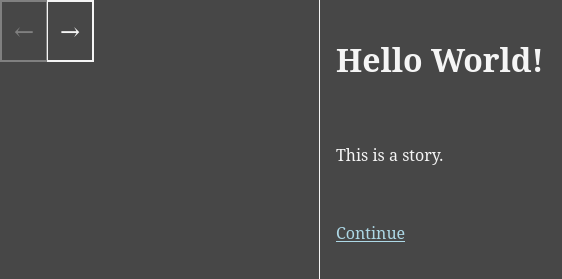
# Hello World!

This is a story.

<iff-link passage="test2">Continue</iff-link>

I could wrap much of the coed in the engine, but for modularity I kept it out. I do want to emphasize modularity, and in order to bridge the gap of creating a new project, I’ll make a project generator (probably using yeoman).

Currently the framework provides the Webpack loaders for generating passages, a history system inspired by Sugarcube, and I’m working on a saving system right now. That is, the saving system works, but currently only the automatic save to session storage after a history change, like Sugarcube does, I’ve jet to finish the saving UI. Another nice thing I got working is a webpack loader that enables you to use markdown at compile time in the Svelte component passages, so you don’t have to ship marked in the final build.

One more complex part I want (and the main reason why I made this in the first place) is a module that helps creating a text-based RPG.

With how nice Svelte can handle reactivity and conditional rendering, I don’t think I’ll need to include many builtin elements.

I’ll make a post of its own for this when I make the code public, but for now here’s the rendered output of the example I gave:

4 Likes

As an aside. In Rez I used to support Markdown (and even HAML) but I threw it all out to return to plain HTML. In particular I found it compelling to use class and data-xyz attributes on links and without the [[…]] link syntax you really aren’t benefitting that much. I did play with inventing a more complex [[…]] syntax but… HTML already does a good enough job.

3 Likes