There aren’t many IF systems designed for education. I’m not aware of any that allow for teacher / student interaction, unless you count quiz-making apps. So yours could have its uses, why not.
(My own Ramus did find a small niche in education for a while, but it’s more akin to Squiffy.)
As for node-based editors: I think it’s telling that a lot of authors, myself included, try Twine’s famous visual interface once or twice, then move on to writing Twee files with a text editor and compiling with Tweego. Heck, I made my own alternate editor for Twine files, using a two-pane user interface much like an outliner, and never actually used that one either.
Actually wait: I did use Twine to make an interactive version of a TTRPG, precisely so I could visualize the passage structure, and it turned out to be a nigh-unmanageable mess; the current edition comes with a version made in Feather Wiki (sort of a distant cousin to Twine), that preserves the chapter order with links as a bonus.
Perhaps the authors of Ink are onto something with their philosophy of a story that keeps moving forward no matter what, with the interactivity being more like railroad-diagram branches along the way.
@Ijinx I just wanted to say that your UI is pretty nice for viewing branching passages. Though I might not be your target audience, don’t take my preferences as criticism. I honestly believe that when a tool becomes everything for everyone, it becomes nothing… or extremely difficult to use.
“I’m crafting a controlled experience for someone specific.”
Thanks, I appreciate that, especially coming from someone who clearly knows what works for them.
I’ll check out Sleep Is Death, I didn’t know about it.
And yeah, I think you’re right about tools that try to be everything. I’ve been adding features based on the feedback from this thread but I’m starting to worry about losing sight of the original idea. It’s a tricky balance.
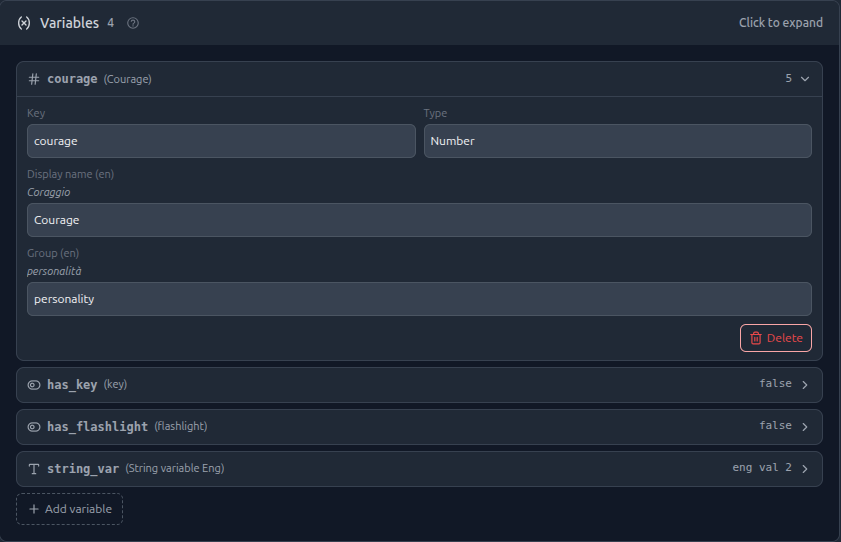
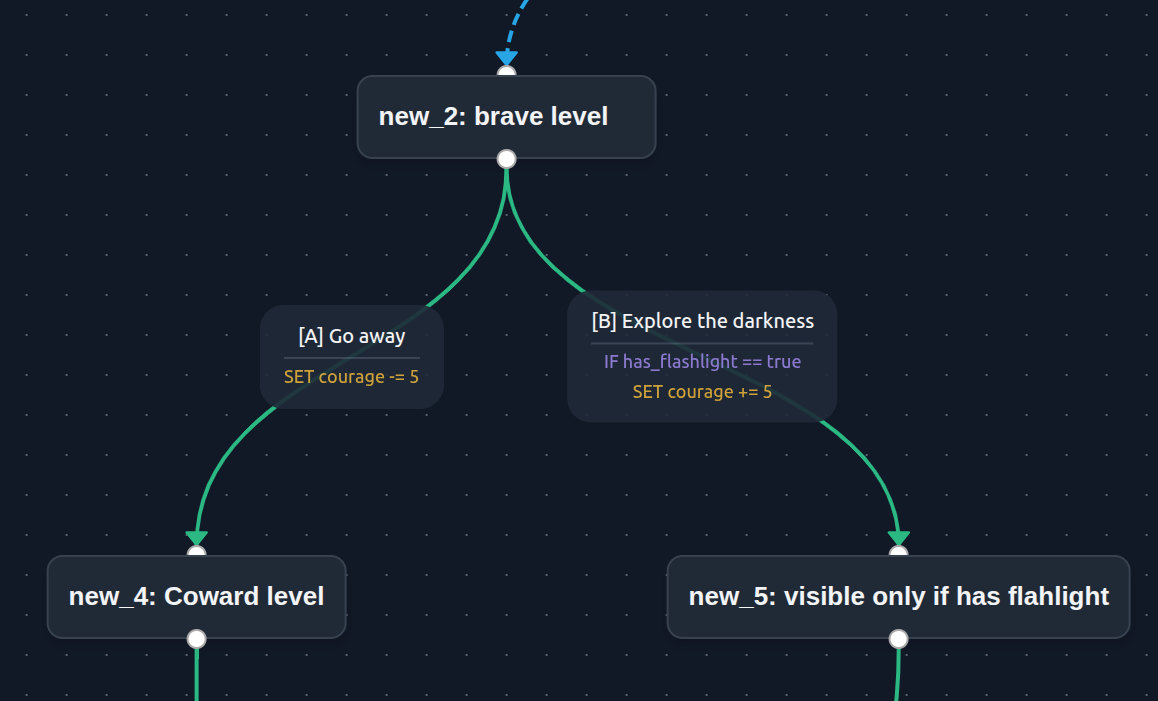
Quick update: the system now supports variables (text, number, boolean) defined at story level, with conditions on transitions to show/hide choices based on state, and effects to update variables when a choice is made.
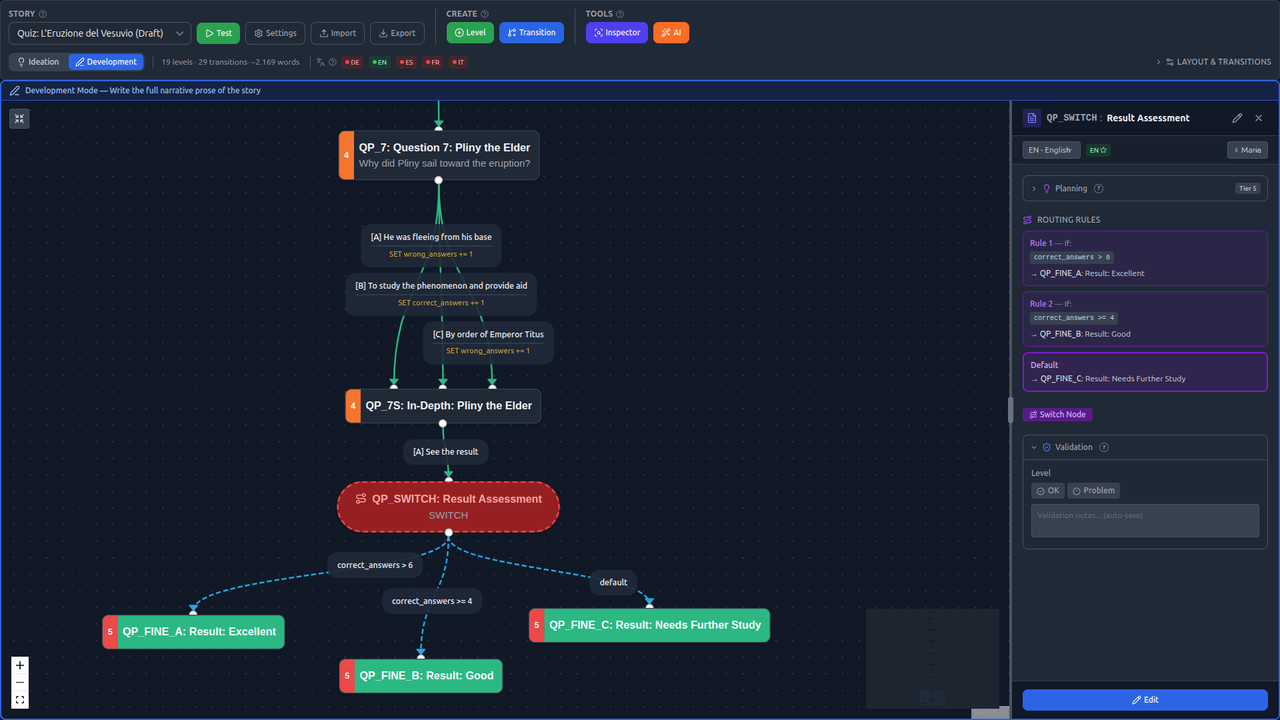
I also added conditional switch nodes that automatically route the player based on variable values without requiring a choice. String variables support translations too, so variable content follows the same multilingual workflow as the rest of the story.
During gameplay, players can see their variables in a dedicated variables panel (only those that the master wants to show), and also in test mode there’s a debug panel where you can inspect variables values on the fly.
variable definition at story-level
Auto Switch node based on conditions
Conditions and Effects on transations
Next step: import/export support for other formats. Standalone html and Twee is high on the list
Another update: the platform now supports multi-format export and import.
HTML Standalone Export
You can export any story as a single .html file fully self-contained, no server needed. It includes the complete game engine, theme styling, variables, switch nodes, timers, and typewriter effect. Just open it in a browser and play. All 10 visual themes are supported, and you can drag-and-drop a different story JSON onto the page to switch stories without reloading.
Twee3 / Twine compatibility
This is the one I’m most curious about feedback on:
Twee3 export: stories export as .twee files in SugarCube 2 format. Variables, conditions, effects, switch nodes, and placeholders are all mapped to SugarCube macros (<<set>>, <<if>>, <<goto>>, setter links). You can import the result directly into Twine 2 or compile it with Tweego.
Twee3 import: you can import .twee files (SugarCube 2) into the editor. The parser handles [[setter links]], <<if>> conditions, <<set>> variables, <<goto>> patterns, and converts SugarCube macros back to the platform’s placeholder system.
So if you already have stories in Twine, you can bring them in. And if you build something here, you can take it to Twine. The round-trip isn’t lossless (each tool has features the other doesn’t), but the core structure: story flow, choices, variables, and conditions, survives the conversion.
The import modal auto-detects the format, so you can drop either a .json or a .twee file and it just works.
As always, demo stories at Play Interactive Stories - The Black Rabbit and the editor at Create Interactive Stories - The Black Rabbit Studio happy to unlock limits for anyone who wants to try it out.
Is this required? I know there’s a button to skip the slow-type out, but if I authored anything with this, I’d want to turn it off so the entire passage appears at once.
Also the demo story only appears in Italian, and that’s the one I’d be most interested in perusing to see all the features. I only complain about this because the title page does offer a choice for English.