I’m programming a gaming using Inform 6.35 compiling to Glulx. Is there a comprehensive guide somewhere explaining how to add graphics to a game? I’d like to have two windows, one on top to display a picture and one at the bottom to display all text. It’d be great if the instructions did not expect me to have a degree in computer sciences.
Note that the graphics routines assume a fixed-size image of 320x240, so adjust the numbers accordingly. I never worked out how to scale the images properly. I know it’s possible, but my experiments were less than successful.
My notes also explain how to play music or sound effects. You can omit that code if you’re not using sound.
It’s a pity that PunyInform doesn’t support Glulx or z6, otherwise we’d be able to use that.
so Filename.res contains the line “CODE Filename.ulx”. Then “bres.exe Filename.res” does indeed create the .blc and the .bli file, but they’re both empty (0 bytes large). What am I doing wrong?
I have no idea. Are you using the command line, batch file or running the command from within an editor?
I’m guessing that it created the empty .bli and .blc files in preparation for reading the .res file, but it couldn’t find the .res file. Check your paths and file names. If the .res file is not in the same folder as the bres.exe file, make sure you specify the path to the .res file. If the file name contains spaces, make sure you surround the file name (and path) by double quotes.
So bres.exe does compile now. The resulting .bli file looks like this:
! Blorb Resource Definitions File
! Generated automatically by c:\SugarSync\Inform 6\Games\Wanderlust\bres.
! Do not edit!
! Include this file in your inform source with “Include “Wanderlust.bli”;”
Message “Including c:\SugarSync\Inform 6\Games\Wanderlust\bres resource declarations generated on 11-13-2025”;
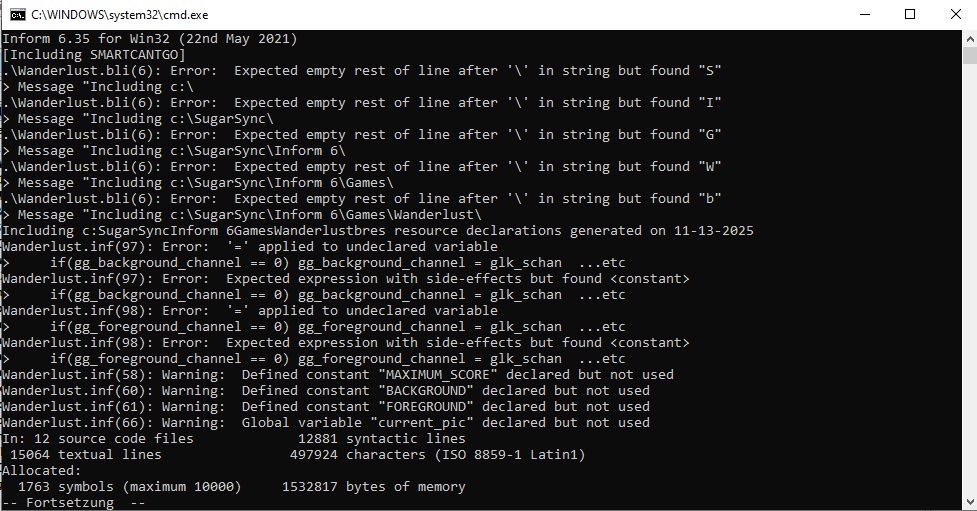
Unfortunately, compiling my game now results in this:
The .bli file should contain valid Inform 6 code only. In Inform 6, the character “\” can only be used at the end of a line within a string (it’s an obsolete notation, meaning that the string continues on the next line).
If you replace all instances in “\” in strings for Message-commands with “/”, this should go away.
If you also have Include-commands that have \ in path names, you may need to replace those with / as well - Not sure.
Quite possibly, if you just put all the files you need in the same directory, and don’t use full paths to point to the files, you won’t have a problem at all.
BTW: Are you using some ancient library version that doesn’t work with the modern compiler versions? If not, switch to Infom 6.44.
So I have exchanged the Inform6.exe to v6.44 and manually changed the backslashes to slashes in the .bli file, which now looks like this:
! Blorb Resource Definitions File
! Generated automatically by c:\SugarSync\Inform 6\Games\Wanderlust\bres.
! Do not edit!
! Include this file in your inform source with “Include “Wanderlust.bli”;”
Message “Including c:/SugarSync/Inform 6/Games/Wanderlust/bres resource declarations generated on 11-13-2025”;
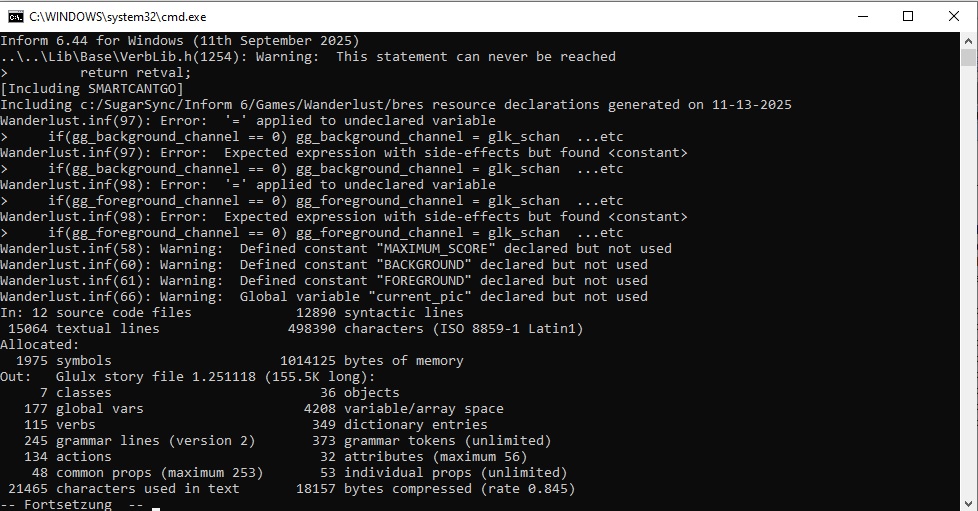
This took away some errors when compiling my game. Still - shouldn’t there be more content in that .bli file?
Hmmm… Zarf’s code comments might be the right track. Those are sound variables and I don’t need sound and didn’t include some code provided in the guide. Let me check…
Okay it compiles! Thanks Fredrik! Gonna follow Garrys documentation again now, no idea where that takes me, but for now - cool, I’m on the track again!
Now I have included the code from chapter 1-7 (“Add the following entry-point routines”). That results in the following compiler error:
“IdentifyGlkObject” is a name already in use and may not be used as a routine name (Routine “IdentifyGlkObject” was defined at “....\Lib\Base\Grammar.h”, line 659)
Well, the compiler is right, but what’s my mistake? Wrong grammar.h? Something wrong with the code from the PDF? I’m clueless, again…
The latest version of the Inform 6 library is 6.12.7. In this version, the stub for IdentifyGlkObject is defined at line 569, not line 659 (or was that a typo?) If you aren’t using the latest version, then it’s time for an update.
The error tells you that the entry point routine name is already in use. This implies that you’ve defined it after including grammar.h, but you need to define it before including grammar.h. The same applies for the HandleGlkEvent entry point routine.