GULLET - TADS WebUI Preview (and some questions for the community)

Hey all,

I just started with TADS3 a few days ago, and I’m pretty happy with my progress. I’ve managed to get the basic skeleton of my project (GULLET) set up, and was able to deploy the WebUI version of TADS3 to a VPS. Please forgive the naked IP address, I haven’t gotten around to acquiring a domain name yet.

http://204.168.133.150/t3launch/t3launch.php?storyfile=http://204.168.133.150/games/tadsnet.t3

This project is meant to be a sort of an experiment/companion piece to another project I’m working on together with a visual artist, in the Godot engine, which will likely take much longer to complete.

Right now, all of the traditional IF actions are disabled, and the only available actions are meant to mimic shell commands, but my intention is to nest a few small, traditional IF sequences within this meta-framework.

Since I want to play with some meta-fictional themes and atmosphere, I also want to maintain some sense of “kayfabe”. To this end, I have stripped away many of the UI elements that identify the TADS3 interpreter as such, and intend to host the .t3 game file only on my VPS, in the hopes of maintaining some air of mystery.

I am completely new to this community, but I have already realized that my approach is bucking some conventions that exist for very good reasons, and I wanted to ask a few questions to make sure I’m doing everything as correctly and respectfully as possible:

  1. I have removed access to the “preferences” menu of the interpreter, in part because I want to retain some control over the interpreter’s aesthetic; however, I also understand that these controls can be an important accessibility tool. I am thinking of re-creating some of the menu’s functionality in a more kayfabe-friendly way, and wanted to ask the community: which features do you consider to be most important for accessibility (or otherwise), and are any additional considerations along these lines that I’ve missed?
  2. I intend to keep the .t3 file private and only serve the game via my own VPS, instead of uploading to the IFA. In part, this is because I love the idea of games with deep secrets, layers of surprises, the feeling that there might be something even more, just under the surface… and that vibe kinda melts away when you have access to the .t3 file on your desktop. I’m a preservationist and data-hoarder at heart, though, so my intention would be to release the file publicly at whatever point in time the official server goes down for good. Is that reasonable, or a faux-pas?
  3. TADS is an awesome tool, and I am extremely grateful to its creators, and especially to Eric Eve for the boon of his thorough documentation. I want to make sure that I credit everyone involved, while still maintaining the kayfabe of the fiction (which has included removing the built-in ‘credits’ action.) Does anyone have any guidance on the most appropriate and respectful way to approach this issue? My project will eventually have a full website along with the TADS WebUI, and my current plan is to list credits on a separate page of the site, but I wanted confirm whether people thought that was sufficient.

Thanks, everyone, for your help! :smiley:

7 Likes

Me too, and i always put mystery Easter eggs in my games that mostly no one ever finds.

Which is why my story files are encrypted. I don’t know if anyone else does this with their interpreters. It’s not really designed as a proper security thing, only to deter casual inspection of the story.

Good luck with Gullet.

6 Likes

Let me just open by saying I cannot presume to speak on behalf lf the TADS community. I do intend to support any and all TADS projects however, so I am willing to offer some suspect/ill-informed opinions!

I should ALSO mention I don’t have any particular WEBUI experience to offer. When you say you have tweaked the WebUI for TADS, do you mean Parchment, QTADS, an HTMLTADS interpreter, or something else entirely?

I will defer to members that actively engage accessibility to answer this. I can only offer that for my own project, I give the user the opportunity to completely neuter formatting (mostly font colors, italics/bold emphasis and the banner system) towards the goal of minimizing friction with screen readers. This works for my WIP, as it is mostly a traditional storytelling exercise with inessential graphic flourishes. I think you will have to consider how much of the project integrity depends on your visual elements, and how to alias that effect with accessibility strategies (if possible). Will the idea of a ‘kayfabe’ menuing system extend to accessibility ‘kayfabe’?

I don’t see anything wrong with this approach myself. Certainly, many here are predisposed to making the .t source files available, but I for one don’t perceive this to be a community norm, more the collection of personalities we happen to have at the moment. I will confess to some slight confusion here - are folks in the habit of opening .t3 files with bit editors? I would think of the .t files as more generally ‘spoiler-bait’ than the t3 file itself.

Oh yeah, documentation admiration ENDORSED. RE crediting - my WIP also has a kayfabe of sorts, wherein the CREDITS have narrative responsibilities. The tack I took was to replace those ‘story’ credits with a ‘real’ credits supplanting them at game’s end. Not sure if that would be an acceptable compromise for your vision. Certainly listing credits on a webpage is a good step. My personal feelings are that unpaid volunteer testers/helpers deserve the shout out, and it’s worth the artistic compromise to see they get it. That said, contributors are likely to have a pretty clear view of your final product, and open discussion with them about the credit-conundrum would likely be received generously.

Lastly, thank you for the term ‘kayfabe’ I was unfamiliar with it prior to this post, but turns out, I have been DOING it for YEARS!

4 Likes

Lol, I expect this to be my experience as well. It’s just too hiilarious NOT to do!

3 Likes

Challenge accepted!

3 Likes

Thank you very much, JJ McC, for your detailed and thoughtful answers :smiley:

I will take some time to mull over everything you said, and figure out what is/isn’t aesthetically essential to what I want to make.

RE: credits, my game design isn’t set in stone yet, but it’s possible that players won’t be expected to reach an “ending” in the traditional sense, so I’m not sure if that would be a good fit. No matter what, though, I am going to be sure to place the credits for all the awesome volunteers somewhere prominent and accessible.

From the TADS3 System Manual docs on the WebUI:

In the traditional UI, the user installs a TADS interpreter on her machine, and the interpreter displays the user interface using the native features of the operating system - opening a window on the Mac, for example, or writing to the terminal window on Unix. With the Web UI, the user interface isn’t part of the TADS interpreter at all, but instead runs in a standard Web browser. The game still runs in the TADS interpreter, but the interpreter doesn’t show any UI windows; instead, the game sends everything to the Web browser for display, via a network connection.

My .t3 file, along with the FrobTADS interpreter, are hosted on my Ubuntu virtual private server accessible at the IP address linked above. Parchment is not involved, nor does the end-user ever actually interact with a TADS interpreter. When the user enters a command, it’s sent as a request to the server, which then sends a response in the form of HTML.

When I say I’ve tweaked the WebUI, I mean that I’ve modified/overridden the main.htm and main.css files found in “/Tads 3/lib/webuires/”.

The issue is, it’s not just that I would keep the .t files private, but also the .t3 file itself. It lives on the server, and the player never downloads it, they just get served HTML in response to each command.

One of the tricky things I’ve come to learn about WebUI is that it needs to be run from a server, there’s no simple way to run the .t3 file locally. It doesn’t work in a normal interpreter. This significant limitation has been rightfully called out before:

…I do have an idea of how to solve this, though. If I could containerize a functional TADS3 web server, players could deploy it using a service like Docker, and it would allow for relatively easy local play of WebUI .t3 files.

To be completely honest, part of why I went this route is because I read this post, and took it as a challenge:

It was a bit of work, but honestly not as much as I expected. There were a couple of bugs caused by old code referencing ancient PHP methods that no longer exist, but it only took a few small tweaks. If my setup turns out to be robust and functional, and if anyone else is even remotely interested in using TADS3 WebUI, I could write up a little guide and/or make a pull request to update the necessary lines of code.

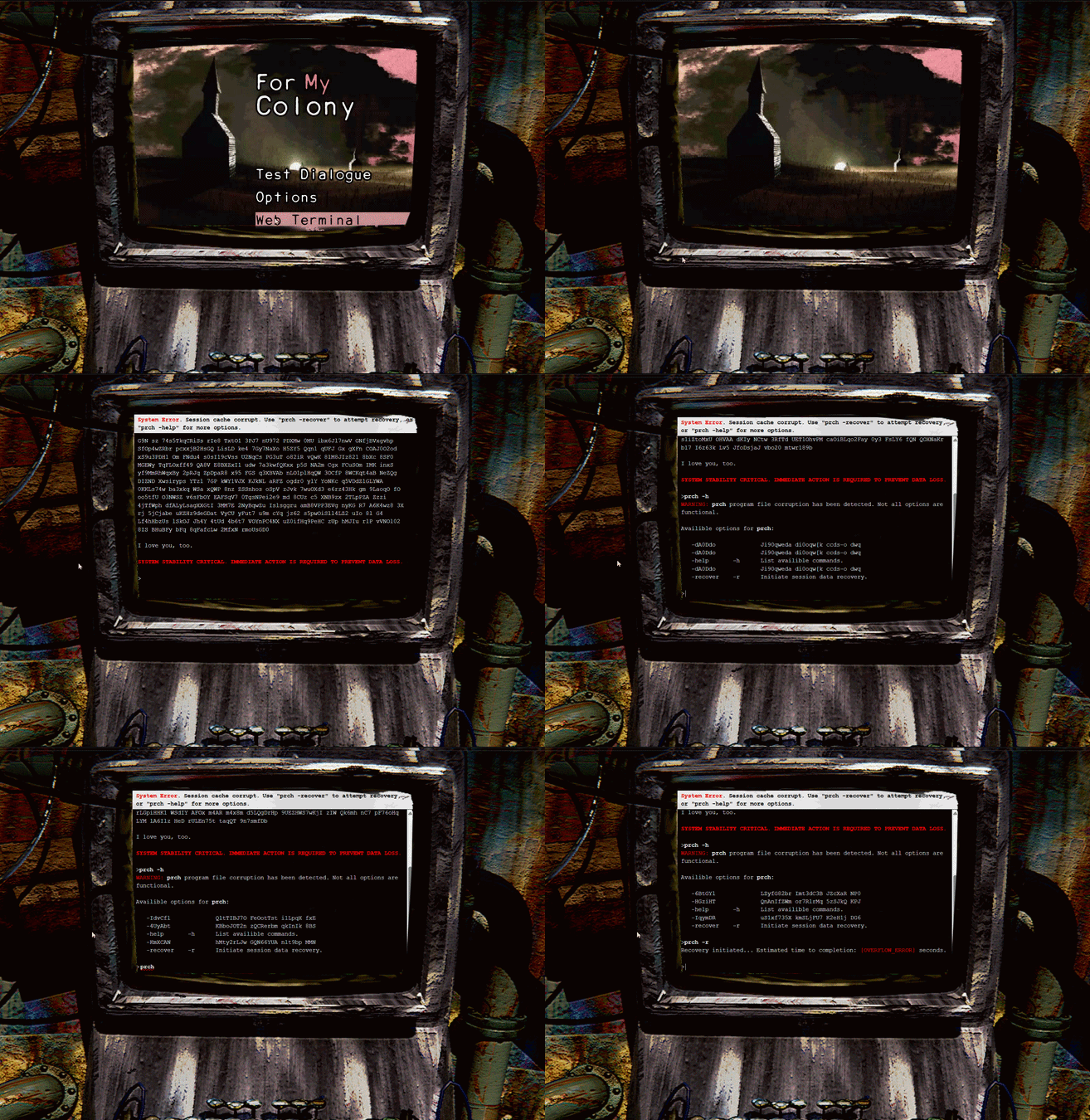
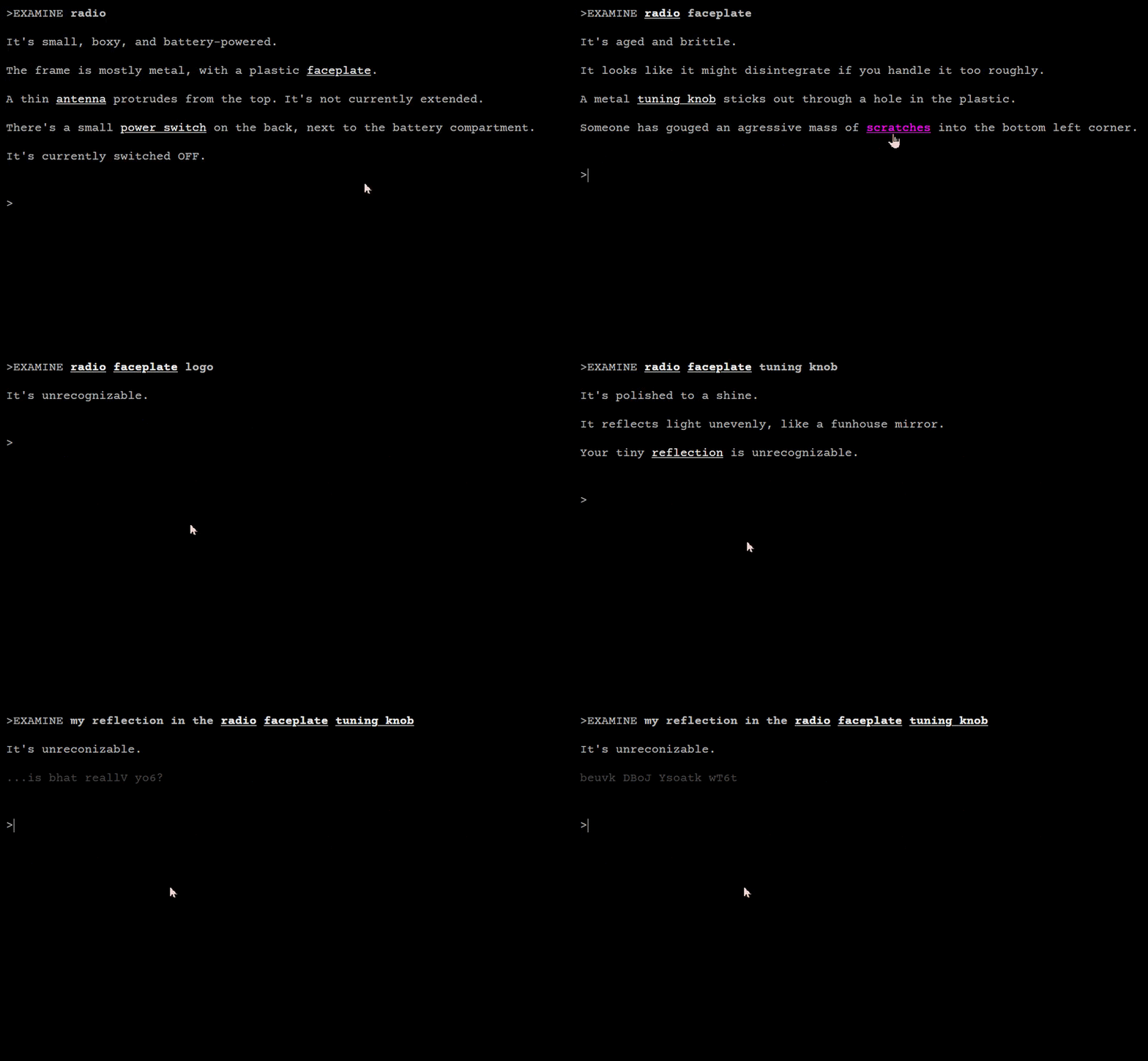
The WebUI also allows for JavaScript support, which is how I created the glitching text effect you can see in the preview.

The really cool feature of the WebUI I want to try and implement is this, quoted from the docs:

Multiuser gaming. A key TADS feature that makes the Web UI possible is a network server capability. The network capability goes beyond just talking to the browser, though: it’s really a full-featured networking layer that lets a game communicate with multiple clients, opening up numerous possibilities for collaborative and multi-user games. Although the Adv3 library is only designed for a single player character, its new Web UI support does allow multiple people to connect to the same session and play the game collaboratively.

I’m not thinking of creating a proper MUD, but I think it would be incredibly cool to implement a Dark Souls “player ghost” style feature, where your choices are recorded by the server and influence other player’s experience of the story.

Scratch that, I reread the section of the docs I quoted, and I misinterpreted it the first time. Multiuser gaming looks like it just allows multiple people to control a single game session at a time, and doesn’t allow one session to affect another. I think my feature would still be possible to implement, but it would need to be done via JavaScript and some custom back-end work outside of TADS.

I don’t watch professional wrestling, but will always be grateful it gave the world this term.


Here’s a fun little experiment that I implemented tonight: accessing my TADS3 WebUI server from inside a Godot game!

TADS3 WebUI + Godot - Test

Has anyone here played The Talos Principle? It’s a 3D puzzle game with various ‘lore’ terminals scattered between levels, but in the Road To Gehenna DLC many of those terminals contain short Interactive Fiction experiences.

I think it would be neat to do the same thing though integrating TADS3 WebUI into a broader game, and since it’s all server-side, the player can receive messages or clues from other people who played before them.

5 Likes

FrobTADS can run them locally, you just need to use -N 0.

5 Likes

Oh, that’s awesome, I didn’t realize, thank you!

Do you know how it differs from running WebUI .t3 with t3run.exe on Windows? I’m developing on a PC and was originally using t3run.exe -plain to test my builds, but that would launch the game within a “tadsweb.exe” window, which I think is using an old version of Internet Explorer under the hood. This wasn’t ideal, and also frequently but inconsistently resulted in the same JavaScript error described by this post: Error with WebUI - Adv3Lite 2.0

Does FrobTADS also serve WebUI .t3 files in a bundled browser, or does it expose the service to any local browser? And if it does expose the service to any local browser, is it possible to do the same thing with t3run.exe on Windows?


Also, because I realize I forgot to say this explicitly before: to get TADS working with PHP 8.0+, I had to replace the now-removed get_magic_quotes_gpc() method call on line 13 of /t3launch/inc/util.php (tads-sources/t3launch/inc/util.php at master · tajmone/tads-sources · GitHub)

2 Likes

I use FrobTADS and it launches a browser window to run the game. Whatever my default browser is will be the one that is launched. I have my game set up using the WebUI, which is what is run in the FrobTADS mini server that runs locally. I actually have my game set up to create both types of games, which is great for testing.

I hope that helps. I don’t know how it works but I’ve enjoyed developing my game that way.

2 Likes

It absolutely does, thank you! Now I know that should set up a VM with a GUI and start messing around with FrobTADS.


Today’s progress: setting up some helper classes to make assigning HTML tags + classes easier, and a bit of prettifying with CSS.

5 Likes

A note on updating the WebUI to use HTML5, for posterity:

/tads3/vmhttpreq.cpp
from FrobTADS source repo
lines 2770-2776

/* check for <HTML or <?XML prefixes */
                if ((rem > 5 && memicmp(p.getptr(), "<html", 5) == 0)
                    || eq_skip_sp(p.getptr(), rem, "<!doctype html "))
                {
                    /* it looks like HTML */
                    cont_type = "text/html";
                }

This block looks for a trailing space after <!DOCTYPE html, which doesn’t match the standard syntax for HTML5. If you try to use <!DOCTYPE html>, the missing space means it won’t be recognized as HTML.

This can be fixed by either deleting the trailing space from the block above, or, hackily, <!DOCTYPE html > gets recognized just fine.

4 Likes

I don’t really see the point of this, to be honest. The .t3 file is right there in the URL. Anyone who wants it can just download it. (You could obfuscate that URL but the file is still accessible on the server so I think my point remains regardless)

I just hadn’t set up the proper permissions yet, the .t3 file doesn’t need to be publicly accessible for the WebUI to run the story. The server should now correctly throw a 403 forbidden error if you try to access the .t3 file directly.


More progress:

Gullet Prototype1

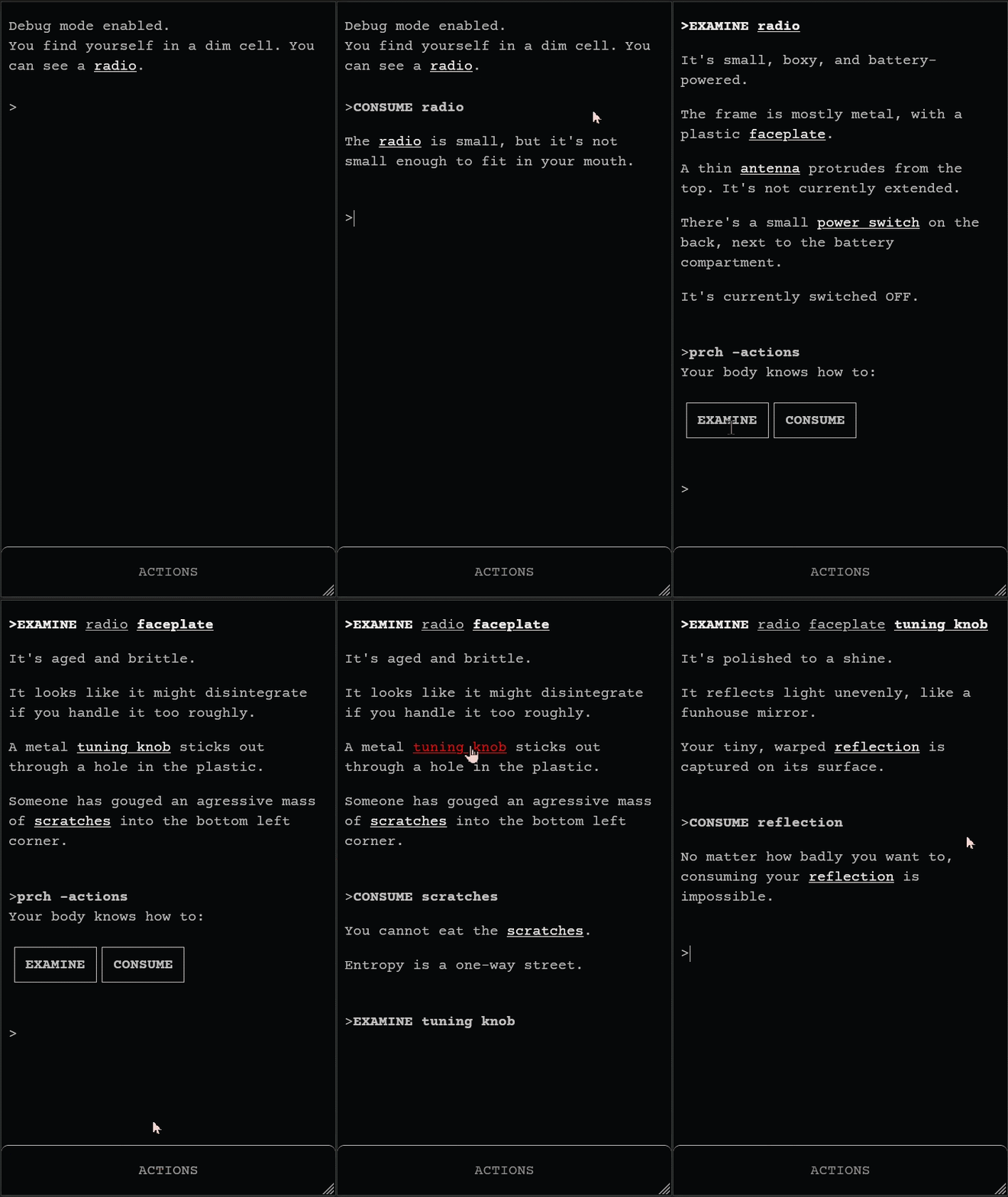
Some progress on a mobile-friendly UI. I am planning to give the player access to a very limited verb set that is unlocked over the course of the story, so I think this approach to the UI will work reasonably well.

Gullet Prototype2

1 Like

One word of advice: in my Dialog experiments, I’ve found “select noun then select verb” more effective than “select verb then select noun”, unless it’s possible to have the verb list always visible. It requires one less click (since the nouns are already visible in the room description) and if your verb set is anything more than tiny it means you can leave out irrelevant ones like EAT PIANO (though it sounds like your verb set is in fact tiny).

Parsers already do a good job of minimizing typing for keyboard users (e.g. accepting N instead of GO NORTH); the same thing applies for touchscreen users (e.g. showing the directions on the page instead of requiring GO > NORTH).

1 Like

That totally makes sense, thank you for your advice.

Right now, tapping a noun without first selecting a verb automatically EXAMINEs that noun. Part of why it currently works this way is because my game design is inspired by Lime Ergot, in the way that the player is restricted to a single physical location but still capable of “exploring” by examining nested rabbitholes of nouns. In this way, EXAMINE replaces the traditional movement verbs, so I thought it made sense to make for it to be the default verb when selecting a noun.

I think I will add a command to toggle this behaviour, so that the player can choose whichever they prefer, verb->noun or noun->verb.

1 Like

Oh, no argument there! I think EXAMINE on first click is good behavior.

The way I’ve been handling it, the first click on a noun does an EXAMINE, but also, when you EXAMINE something, you get a bar at the bottom of the screen listing possible actions on it. So you see a key in the room description, click KEY (which does an EXAMINE KEY), and then see the bar with GET KEY and so on.

1 Like

Ohhh I get what you mean now! The only thing is, part of my design is that the player is always examining something, the top of the main window shows the hierarchy of the object currently being examined… but I think my verb set is small enough so that I could include them all on an always-visible shortcut bar at the bottom of the page.

The list will eventually become larger, but I could always solve that by turning the action bar into a “drawer” that only shows your five most recently used verbs before you tap to expand it, or something similar. I don’t want to restrict the list to only “useful” verbs for the examined object, because my verb list is small to begin with, and I am writing unique messages for each “useless” verb interaction on most objects. The experience of using “useless” verbs is thematically relevant to what I’m trying to do.

I will definitely follow your advice, thanks again!

1 Like

Good luck! I’m always in favor of more experiments combining the freedom of a parser with the mobile-friendliness of links and buttons.

2 Likes

Part of me loves this design, but there are two things that always bug me:

  • Transcript clutter from examining everything over and over, especially if objects have long descriptions
  • Sometimes this approach causes problems with timed puzzles, because examining first takes an extra turn (you can make examining free, but to me this tends to make timed sections feel weird because you can spend so much time looking around at stuff without any time passing)
3 Likes