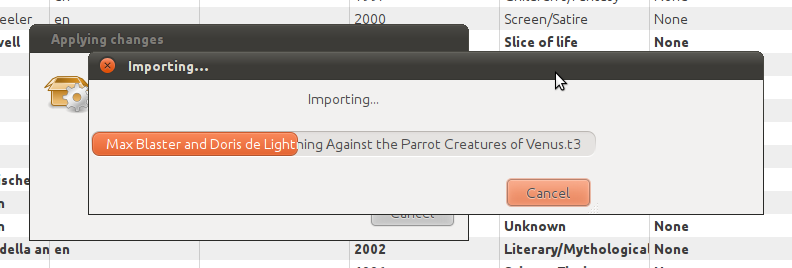
0.9.2 is looking really nice! Some further observations, for when you get another two free weeks of coding time:
Although the import process now recognises TADS 3 games, it’s still having trouble extracting metadata from many of them. For instance, David Fletcher’s SpeedIF Light of My Stomach failed to import. It didn’t even manage to extract the IFID, instead generating a default “TADS3-[etc]” IFID. Actually, TADS 2 games also seem to suffer from this problem. Grotesque failed to extract the IFID from Slap That Fish as well, instead generating a default, incorrect IFID for it. And even in the cases where a game has no IFID embedded in it, the IFID generation doesn’t seem to be producing the correct IFID - at least, they never match the ones listed on IFDB.
The alphabetisation of the Author panel isn’t very sophisticated. It puts all the names starting with uppercase letters first, then the lowercased names, and then poor Øyvind Thorsby all alone at the bottom.
When the import progress dialog resizes itself to fit an extra long file name, the dialog ends up longer than progress bar (see attached screenshot). It’s only temporary; when the import moves on to a different game, it resizes the progress bar and moves the cancel button to fit the window. But it looks strange while in the mean time.
Btw, I noticed you saying that you’re waiting for FTP access to the SF web space. FTP doesn’t work anymore with SF. You need to login through SFTP (meaning through SSH). The URL is of the form:
Thanks for the feedback! Tackling the metadata extraction is my next big task. I really haven’t touched that code at all since inheriting the project. From what I recall in having glanced through the (undocumented) code, I think it is, indeed, generating IFIDs for TADS games rather than extracting them. I’ll profess complete ignorance on this subject. I have a lot of learning to do before I can get this part working nicely. Until then, I apologize that a lot of manual entry will be needed, but at least it’s not outright failing with a crash/hang anymore.
Alphabetisation: Thus far I have used the built-in GTK sorting and I’ve also noticed the problem. I’m looking into Python implementations of the Unicode Collation Algorithm, which would solve this. As far as the capitalization, I had initially considered automatically capitalizing author names but in the end I made a conscious decision to leave that to the user to do. Nonetheless, capitalization should not affect sorting.
Thanks for letting me know about the progress dialog resizing itself. That’s an easy fix.
OK, I updated my installation to Python 2.7 and it now works OK. Will finish up the Gentoo ebuild soon and make it available on the interactive-fiction overlay.
One request: can you add QTads (executable “qtads”) as a possible choice for TADS (2 and 3) games and Hugor (executable “hugor”) for Hugo games? (Hugo game extension is “.hex”.) Not just a shameless plug, but these two support the full feature set of Tads and Hugo games (formatting, graphics, sound) and are not just text-only
Also, I noticed that the application uses ~/.grotesque as its default configuration file dir. It should preferably be using the ~/.config/ directory, or the directory contained in the $XDG_CONFIG_HOME env var. The standard can be found here:
Yep, that’s where I’m checking. My project-web folder is empty. I contacted the original author of Grotesque but I haven’t heard anything back. I’ll probably contact Sourceforge myself soon.
Sounds good! My Arch Linux links are getting lonely on the front page.
Sure, that’s no problem to add!
That is an excellent suggestion. I’ll implement that for the next version.
In the config folder there’s a subfolder for storing the cover art. Do you think that should go in ~/.local/share?
And then I need to figure out what’s best for Windows…
Yes, it’s user data so it goes to $XDG_DATA_HOME/grotesque/, and if that var is either empty or not defined, then to the hard-coded fallback “~/.local/share/grotesque/”.
Yes, placing it in a subdirectory to AppData sounds right, if my memory serves me right on Microsoft’s guidelines. I think that’s a good place for those other config files and things, too, rather than directly in the home dir.
It’s ready and Gentoo (and other Portage-based distros, like Sabayon or Calculate) users can now install it from the interactive-fiction overlay. The full package name is “games-util/grotesque”. If you don’t yet have that overlay added in your system, add it with:
layman -a interactive-fiction
After that, simply install Grotesque as you do any other package:
emerge grotesque
At the moment, only the Gtk 2 version is provided.
I’ve found a bug. If I define my own custom format (Hugo games, hex extension) in the settings and then I add a directory (full of games, various formats, zcode, tads, hugo), nothing happens except a message that the hugo games were not recognized. But the other game formats aren’t recognized either.
Hm. If you look in your ~/.grotesque/grotesque.cfg file, are all the formats listed with all of their extensions?
You say that both hugo games and the other games were not recognized, but based on how you said it, I interpret it to mean that importing the hugo games failed, while it simply skipped over the other formats. Is that correct?
Everyone, in order to make sure that I don’t miss suggestions and bug reports here on the forum, I kindly ask that you also consider adding them to the issue tracker on Sourceforge: sourceforge.net/tracker/?group_id=232625
You have to log in to add an issue, but Sourceforge supports OpenID, so you can log in with your Google, Yahoo, etc accounts.
I’ve already gone through this thread and made bug reports and feature requests for everything that’s been mentioned so far.
To the Windows users who have successfully run Grotesque, what version of Windows are you running?
It seems that having packaged it in Windows 7 is causing problems for users of Windows XP. This may be a tall order, but if anyone has Windows XP and is willing to help me package it, the help would be greatly appreciated. In order to do it, you would need Python 2.7, PyGTK and py2exe installed.
It probably won’t be difficult to do, since I already have the packaging script ready, but nonetheless, problems may arise…