Finding transcripts on old versions of Parchment

I’m beta-testing a game which is hosted on Itch. I saved my “first impressions” transcript (with inline comments) while I played, got to the end and now I can’t download the transcript.

Here’s what I know:

  • The game was written on borogove.app using PunyInform, exported as a zip file and uploaded to a private project on itch.io
  • I believe this means it’s bundled with the Parchment interpreter, but a fairly old version thereof. Not sure if there’s a way to find out exactly which
  • When I started, I turned on the transcript with SCRIPT ON and gave a filename (“session1”). When I finished my first session, I turned off the transcript with SCRIPT OFF
  • If I enter SCRIPT ON again, I get a dialog which shows that my previous transcript (“session1”) exists. I can click the “edit” button which then causes a new button labelled “display” to appear, along with the following error in the browser console
Error message
main.js:1 Uncaught ReferenceError: Cannot access 'l' before initialization at evhan_storage_changed (main.js:1:8911) at HTMLButtonElement.evhan_edit_button (main.js:1:6483) at HTMLButtonElement.dispatch (jquery.min.js:2:43090) at v.handle (jquery.min.js:2:41074)

||evhan_storage_changed|@|main.js:1|
| --- | --- | --- | --- |
||evhan_edit_button|@|main.js:1|
||dispatch|@|jquery.min.js:2|
||v.handle|@|jquery.min.js:2|
  • Selecting “session1” and then clicking “display” doesn’t do anything, presumably because of the above error
  • If I enter RESTORE, I get a dialog which shows my saved game but not my transcript. It also has an “edit” button which produces an error
  • If I view the contents of local storage with Chrome’s dev tools, it lists two domains: https://html-classic.itch.zone and https://{authors-name}.itch.io. The first of these has a bunch of saved game data from other games but nothing that appears to relate to this one (I’m fairly sure I can pin down which other game all of the other keys come from, so I don’t think I’m overlooking it). The second one is empty
  • Entering localStorage.getItem("content:transcripts::session1") in the browser console returns null. Entering localStorage.key(0) returns an empty string and any higher index returns null as well

So the data still seems to be there somewhere in the browser, but I can’t for the life of me figure out where. Since this is meant to be me recording first impressions of the game, I’d prefer to retrieve it if I can than try to recreate it. Anyone have any ideas?
1 Like

Just a wild guess, but you might look in your IndexedDB, which is not unlike localStorage (and found in the same section in the Firefox dev tools – under the Storage tab).

(I know the TextAdventures site uses IndexedDB rather than localStorage these days. Not sure at all about itch.)

I already had a look in IndexedDB but of the keys there, one is empty, one I can’t work out what it is but it has timestamps from a year ago, one is something related to Ren’Py and one is called “Adventuron”. So I don’t think it can be any of those.

1 Like

The game is almost certainly running in an iframe. The iframe is probably on the https://html-classic.itch.zone/ subdomain that you saw.

If you load that inner URL into your browser directly, you may then be able to do localStorage.getItem() in the console. At minimum it will simplify the situation. iframes have weird security rules.

2 Likes

If I open the iframe directly, I can see a different key in the localStorage that I couldn’t see before, named autosave:08000001351835192590024816651c2a005032363032313801802c8f30ae, with an associated value consisting of a bunch of JSON including what looks like Glk state and z-machine RAM. But still no transcript?

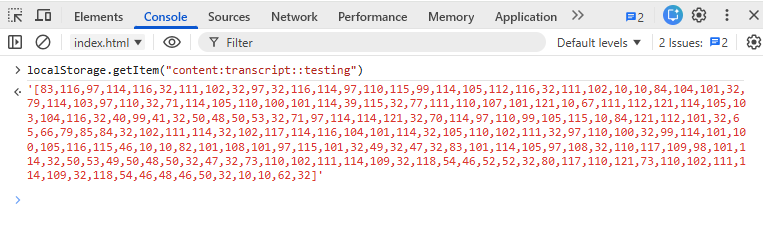
I don’t have Chrome to check, but in Firefox I can open the dev tools, go to the Storage tab, select Local Storage, select the entry title “content:transcript::testing” then right-click on the Data that pops up on the right to get the data.

content:transcript::testing:"[83,116,97,114,116,32,111,102,32,97,32,116,114,97,110,115,99,114,105,112,116,32,111,102,10,10,84,104,101,32,79,114,103,97,110,32,71,114,105,110,100,101,114,39,115,32,77,111,110,107,101,121,10,67,111,112,121,114,105,103,104,116,32,40,99,41,32,50,48,50,53,32,71,97,114,114,121,32,70,114,97,110,99,105,115,10,84,121,112,101,32,65,66,79,85,84,32,102,111,114,32,102,117,114,116,104,101,114,32,105,110,102,111,32,97,110,100,32,99,114,101,100,105,116,115,46,10,10,82,101,108,101,97,115,101,32,49,32,47,32,83,101,114,105,97,108,32,110,117,109,98,101,114,32,50,53,49,50,48,50,32,47,32,73,110,102,111,114,109,32,118,54,46,52,52,32,80,117,110,121,73,110,102,111,114,109,32,118,54,46,48,46,50,32,10,10,62,32,108,10,78,111,114,116,104,32,69,110,100,32,111,102,32,67,97,114,110,105,118,97,108,10,84,104,105,115,32,105,115,32,116,104,101,32,110,111,114,116,104,101,114,110,32,101,110,100,32,111,102,32,116,104,101,32,99,97,114,110,105,118,97,108,44,32,119,104,105,99,104,32,105,115,32,115,112,114,101,97,100,32,97,114,111,117,110,100,32,116,104,101,32,116,111,119,110,32,115,113,117,97,114,101,46,32,84,104,101,114,101,39,115,32,109,111,114,101,32,116,111,32,116,104,101,32,115,111,117,116,104,46,10,10,89,111,117,32,99,97,110,32,115,101,101,32,84,111,109,109,121,44,32,97,32,108,97,109,112,32,112,111,115,116,44,32,97,32,98,97,108,108,111,111,110,32,118,101,110,100,111,114,32,97,110,100,32,115,111,109,101,32,98,97,108,108,111,111,110,115,32,104,101,114,101,46,10,10,62,32]"

That’s my data after making a couple of moves in The Organ Grinder’s Monkey.

I think the issue is the url we are using to play the game is not “https://html-classic.itch.zone”, but that’s the url used for the transcript in localStorage.

ETA I somehow missed the post with Zarf explaining this. Sorry about that. (:

Well, I’m out of ideas. The transcripts, save files, and autosaves should all be in the same localStorage.

In Chrome:

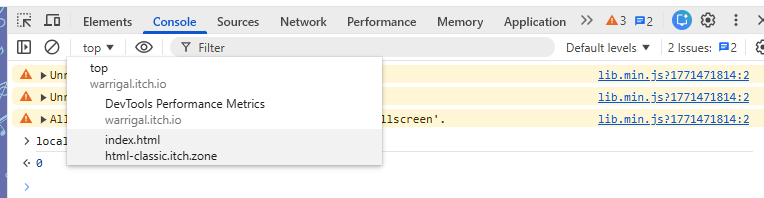
Switch the little drop-down where it says ‘top’ to the “html-classic.itch.zone” address, then it will work from the console:


EDIT

Converting that to text:

JSON.parse(localStorage.getItem("content:transcript::testing")).map((entry)=>{return String.fromCharCode(entry)}).join('')

OUTPUT:

Start of a transcript of\n\nThe Organ Grinder’s Monkey\nCopyright (c) 2025 Garry Francis\nType ABOUT for further info and credits.\n\nRelease 1 / Serial number 251202 / Inform v6.44 PunyInform v6.0.2 \n\n>

Unfortunately, it shows me the same contents of localStorage as when I viewed it in the dev tools (a bunch of stuff, none of it related to this game). I had a look at the source and it refers to Storage rather than LocalStorage throughout but I can’t work out whether I can do anything with that.

The Storage object is just a wrapper around localStorage.

glkote/dialog.js at 366c8271563c3b8e33a780b5594ce88d5e94c2e1 · erkyrath/glkote · GitHub

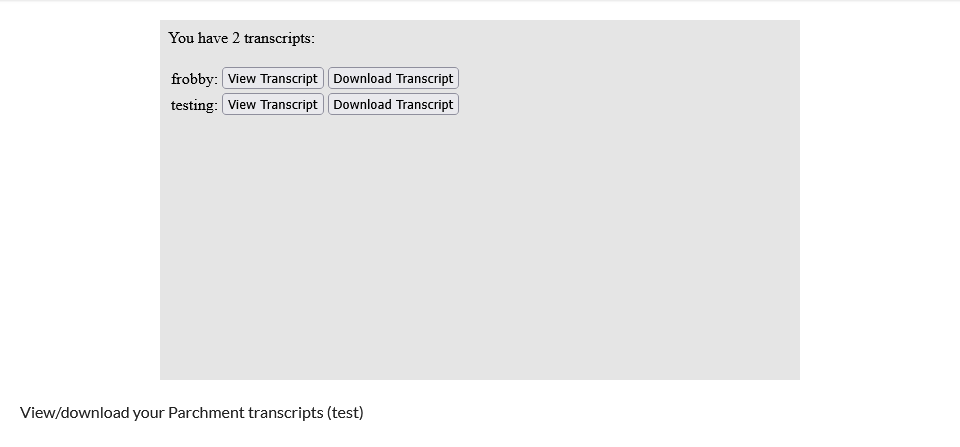
Here is a webpage which can be uploaded to itch.io (as a tool for browsers), where it would be hosted from the same URL, and it would then list all transcripts saved on itch.io.

It will allow viewing or downloading the transcripts.


The HTML file:

<!DOCTYPE html>
<html lang="en">
  <head>
    <title>Transcript Viewer for itch.io</title>
    <meta charset="UTF-8">
    <meta name="viewport" content="width=device-width, initial-scale=1">
  </head>
  <body>
    <div id="transcript-header">You have <span id="transcript-count"></span> transcript<span id="transcript-plural-s">s</span>:<br/><br/></div>
    <div id="transcript-list"></div>
  </body>
  <script>
    (()=>{
      let choices = {len:0}
      for (let entry in localStorage) {
        if (entry.startsWith("content:transcript::")) {
          choices[entry.split('::')[1]] = JSON.parse(localStorage.getItem(entry)).map((data)=>{return String.fromCharCode(data)}).join('')
          choices.len++
        }
      }
      document.getElementById("transcript-count").innerText = choices.len
      if (choices.len != 1) {
        document.getElementById("transcript-plural-s").innerText = "s"
      } else {
        document.getElementById("transcript-plural-s").innerText = ""
      }
      if (choices.len == 0) {
        document.getElementById("transcript-header").innerText = "You have no transcripts saved."
        return
      }
      let tbl = document.createElement("table")
      for (let choice in choices) {
        if (choice != "len") {
          let entry = document.createElement("tr")
          let titleEl = document.createElement("td")
          titleEl.innerText = choice + ": "
          let viewBtn = document.createElement("td")
          let btn = document.createElement("button")
          btn.innerText = 'View Transcript'
          btn.onclick = function() {
            let tscript = choices[choice]
            let newWindow = window.open()
            newWindow.document.write("<pre>" + tscript + "</pre>")
          }
          viewBtn.appendChild(btn)
          let downloadBtnEl = document.createElement("td")
          let downloadBtn = document.createElement("button")
          downloadBtn.innerText = 'Download Transcript'
          downloadBtn.onclick = function() {
            let tscript = choices[choice]
            let blob = new Blob([tscript], {type: "text/plain"})
            let url = URL.createObjectURL(blob)
            let a = document.createElement("a")
            a.href = url
            a.download = choice + "_transcript.txt"
            document.body.appendChild(a)
            a.click()
            document.body.removeChild(a)
            URL.revokeObjectURL(url)
          }
          downloadBtnEl.appendChild(downloadBtn)
          entry.appendChild(titleEl)
          entry.appendChild(viewBtn)
          entry.appendChild(downloadBtnEl)
          tbl.appendChild(entry)
        }
      }
      document.getElementById("transcript-list").appendChild(tbl)
    })()
  </script>
</html>
1 Like

I discovered that if I open a new copy of the tab, it no longer reports the existence of the saved transcript. So my best guess is that it failed to save the transcript, but added it to some data structure within the page so that it still reported that it existed.

1 Like