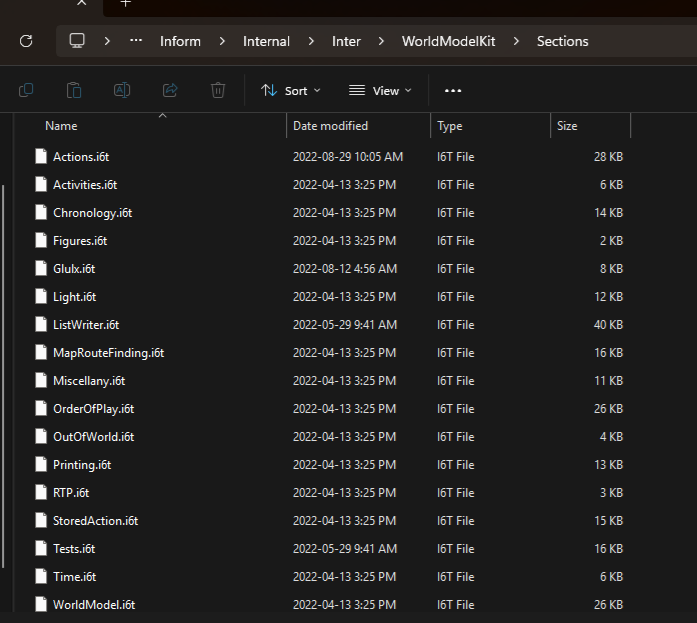
I have to ask, does anyone have any advice for how best to look at these Inform 6 guts for Inform 7? Do I need something specific to open the files they’re written into (god I really hope I don’t because I prefer not to download things)? Is there a good way to find out which of the 50 files these pointers are in? So often I need to modify, or at least examine, some default behaviour but can’t because my search leads me to a pointer to a section of code in a file I don’t know the location of or, even if I did discover which of these i6t files it was in, how to open. I’m sadly not familiar with I6, but I feel like I could make more progress if I was at least allowed to see what I’m building on top of.
I don’t know. I just feel like I’m at wit’s end plugging holes I7-side when I know the proverbial leak is coming from I6.
Edit: Okay, hunted down the xref file. The “documented at” may not be referring to sections of code but rather be an obscure (from an I7 perspective) pointer to the I7 Documentation. You still get the general idea, though, I imagine.
Unfortunately, there’s no easy way to know which I6T a given routine is in—the “documented at” (as you’ve discovered) is only used for cross-references in the documentation, not in the code itself.
Since the I6T files are just text files in a folder, though, you can grep for a routine name and see where it’s referenced. Then you can open the right one in your favorite text editor. Given the mention of I6T, I assume you’re using a pre-Inform 10 version, but for Inform 10 you can also browse them online with syntax highlighting.
BasicInformKit (underlying data types like lists and texts)
BasicInformExtrasKit (the activity mechanism)
EnglishLanguageKit (English spellings of words used by the parser)
CommandParserKit (the parser guts)
WorldModelKit (the game turn loop)
Inform 10 also uses I6T files, but it puts them into more subdirectories, so it’s a bit more annoying to grep for the thing you want. There aren’t that many, at least, and it’s usually not too hard to guess which kit it belongs to.
If there’s some specific issue that you’re having in I7, then I encourage you to post a question about it.
Chances are surprisingly good that there is a way to address it without going to the I6 layer. There are a lot of sparsely-documented features that are easy to overlook.
If your problem does require going to the I6 layer, then chances are surprisingly good that somebody can offer some guidance on resolving it. As Zed once put it (paraphrasing from memory): Really understanding any part of it requires understanding all of it. That’s not strictly true in all cases, but it’s a lengthy process of education to discover how what looks like an innocuous change at point A results in unexpected breakage at point B (and/or C, and/or D, etc.).
Mm, mm. I’m managing for the most part! I would just like to look at the guts to fully assess the problem. It’s less feeling a need to change things in Inform 6 than it is that I would like to be working less blind.
If it’s fine to open I6T files in, say, notepad then that will likely help a lot. I’ve been avoiding opening them since I didn’t know much about what this format was.
Yeah, they’re just text files. Basically Inform 6 source code, but unlike INF files, I6T files have documentation and notes built-in—it’s an approximation of literate programming except without the freedom of macros.
(I7’s compiler is written in a full-fledged literate programming system, but the macro part was restricted to the C side instead of the I6 side to simplify compilation.)
And in the upcoming new Inform version (Inform 10.2, or Inform 11, or whatever it ends up being), the Inform 6 layer of Inform 10 (now called Inter) has been ported to the literate programming system as well, and I6T doesn’t exist anymore.
That doesn’t matter too much yet, but the documentation version is already readable online, even though it’s for the upcoming release (so some things might have changed). For example:
You can search for [ function to find where it’s defined and not just all the other functions which call it.
What makes you say that? They’re a little different, but they’re still basically the same .i6t files as before. They just use different literate markers.
Yeah, it has the documentation and comments and such, but not the macros that the actual compiler source can make use of.
Which is also why it’s such a royal pain to make any changes to the parser in Inform 10! You can’t replace any section smaller than Parser__parse, even if you only change one line, so every extension that touches it becomes automatically incompatible with every other.
I guess this could be “solved” in future releases by additional refactoring of the large function(s) into smaller su functions that the new system can override?
How much local state does the parser use? From the reading I’ve done so far I got the impression that most of it is actually global, which might make things easier for such a refactoring.
The majority of the parser state is global, yeah, stored in a bunch of registers and various arrays. Breaking it down into a bunch of smaller routines is, in theory, not difficult. The problem is that the Inform parser is a notoriously opaque, notoriously huge monolith of code, and it’s hard to be sure any given change isn’t breaking something else in a subtle way.
For example, the Z-machine uses the same stack for its call records as for anything you push and pop, so if one of the new refactored routines pushed anything onto the stack, it would be lost when the routine returned. The stack isn’t used much in the parser, so this probably wouldn’t be an issue, but those sorts of side effects can be hard to predict.