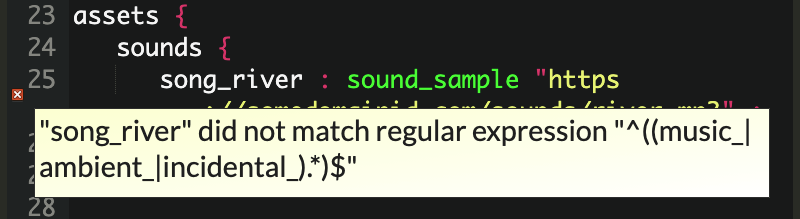
I’m really enjoying using Adventuron to write an adventure with my son, but we are hitting a problem with sound. For example, when we paste the example from the Cookbook into the interpreter, it gives the error ‘Song_river did not match regular expression: …’
Does anyone know how to fix this? The code from the cookbook is as follows:
start_at = river

locations {
   river : location "You are in the river.\n" ;
}

on_tick {
   : if (is_just_entered () ) {
      : if (is_at "river") {
         : play_music sound="song_river";
      }
      : else {
         : stop_music;
      }
   }
}

assets {
   sounds {
      // NOTE :: Make sure that only reference content you are
      //         licensed to use.

      // ALSO :: You can use relative paths here, but you can only
      //         test in compiled versions of your code (not the
      //         web editor)
      song_river : sound_sample "https://somedomainid.com/sounds/river.mp3" ;
   }
}
I don’t know Adventuron, but I notice that the leading ‘S’ in your error message is uppercase, while the cookbook code shows all lower case, so it might be a case sensitivity issue. Check for any instances of Song_river vs song_river.
Alrighty! I’ll caveat again that I don’t know Adventuron, so take my advice with salt, but I’ve been curious about it for a long time, enough to look into this. I found that recipe and reproduced that error.
I’m understanding the error message to mean that Adventuron expects for sound effect keys to begin with one of those three substrings: “music_” or “ambient_” or “incidental_”. This looks to me like a case of Adventuron’s developer updated the system, but hasn’t updated the cookbook docs yet. I was able to clear that error in the Adventuron editor by prepending “music_” to “song_river”. Gotta do it in both places - where it’s defined in the assets block and where it’s called in the on_tick handler.
@Ivan’s answer is 100% correct. Although I’m pretty rusty on Adventuron and haven’t used music before, I do know that assets need to have the correct prefix. In this case, it would be music_, so change all instances of song_river to music_river or music_song_river. I’m guessing that the song_ prefix is an old notation that was later replaced by music_ and @adventuron forgot to update the doco.
Regarding the url, replace this with the absolute url to where the mp3 file is hosted. Alternatively, I’m pretty sure you can use a relative url such as sounds/river.mp3. The relative url is relative to the location of the compiled html file when it’s deployed. This means you’ll have to compile it and open the html file to test it locally.
Aha, thank you so much for this, folks! It’s been very busy recently, but I’m looking forward to dipping back in and testing this once the weekend is here!
Just given it a quick try and it works! It never occurred to me that the name would have to have a specific prefix. This will probably help me make sense of some of the other stuff in the docs that don’t work!