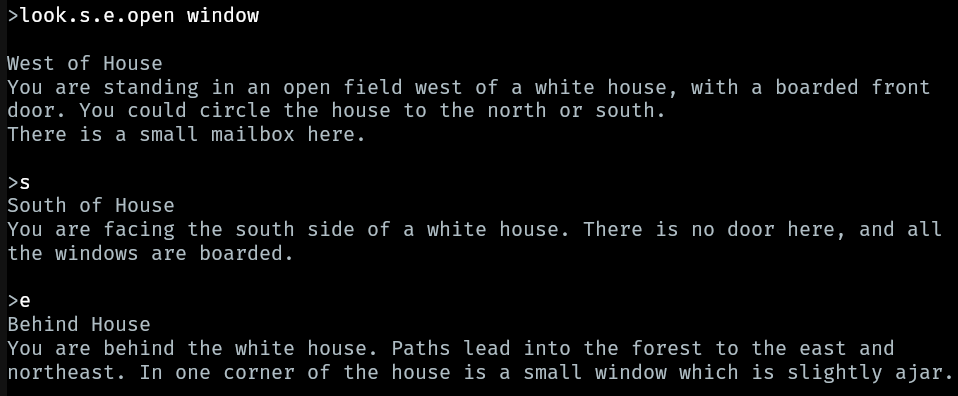
I just started up the player and loaded one of my games. The first thing I noticed is that the player’s command is followed by a blank line. That’s not normal. Can you remove that? It’s easier to associate commands with responses when they’re “glued” together and a blank line separates the next command and response. Interpreters have been doing that for 50 years.
2 Likes
i installed fluuter with the dart SDK and it seemed to work (both flutter --version and dart --version give me valid responses).
but when i try to install the CLI player using
dart pub global activate --source git git@github.com:atebitftw/zart_cli.git
i get:
Git error. Command: `git clone --mirror git@github.com:atebitftw/zart_cli.git /Users/charlesmoorejr./.pub-cache/_temp/dird2xyeN`
stdout:
stderr: Cloning into bare repository '/Users/charlesmoorejr./.pub-cache/_temp/dird2xyeN'...
git@github.com: Permission denied (publickey).
fatal: Could not read from remote repository.

Please make sure you have the correct access rights
and the repository exists.

exit code: 128
i’m sure this is operator error and i am VERY limited in the intricacies of git. i’ve cloned the zart_cli repository if that helps. how do i get it to work? it looks awesome.
3 Likes
When you’re using other people’s Github repositories you generally should use a https URL instead: GitHub - atebitftw/zart_cli: Interactive Fiction CLI Player that uses the Zart Library
3 Likes
My apologies. Dannii above is correct. Use this to activate Zart CLI:
dart pub global activate --source git https://github.com/atebitftw/zart_cli.git
2 Likes
thx that works. and yes, this is very cool.
2 Likes
Hi were you using the web player?
1 Like
both. but i was having trouble with the CLI player.
1 Like
Ah yes I see. It’s a visual bug. I will get it corrected in the next release. The first output has a space that shouldn’t be there, but the subsequent lines in a chained command are correct.
1 Like
Just pushed a new minor update to the web player. It supports three modes of scrolling now: mousewheel, pgup/pgdn, and gestures. I was able to scroll the game display on my phone with a two-finger scroll gesture. Let me know how it works for you!
3 Likes
It sounds like you’ve fixed this, but, yes, I was using the web player.
3 Likes
I haven’t fixed the spacing issue yet, but that will happen in the next release of the core Zart library.
Ticket open here: Remove extra line break after player input · Issue #3 · atebitftw/zart · GitHub
4 Likes
Pressing the pgup/pgdown keys works for me.
4 Likes
I haven’t tried this yet it but it sounds like a brilliant project and it’s always great to.see the community getting more tool support.
My brain trips over the typographical similarity between “Zart” and “Zarf” every time I read the name though! Am I the only one having this problem?
4 Likes
I am too, but I figured that was a me problem… :)
7 Likes
Funny. “Zart” is a play on words combining Zork + Dart (the language it is written in). Besides “Dork” didn’t have as nice a ring to it. 
4 Likes
Me too!
It looks like the Zart logo is in all caps here: GitHub - atebitftw/zart_cli: Interactive Fiction CLI Player that uses the Zart Library
Though I’m not sure if calling it ZART would help, or if it would just make it look like people were yelling at zarf.
3 Likes
I vote for Zort
3 Likes
I actually think Dork is an amazing name.
3 Likes
“Dartz” if you want to spell it cool-guy style.
2 Likes
And Zort has the advantage of coming with a cute mascot:
2 Likes