[ANN] Dialog Tool 2.0

I’m having trouble with the skein. dgt debug works as expected, so I would assume Dialog Tool finds my project alright.

When I run dgt skein new it starts up the server and opens the web page in my browser. However, the START node is empty. If I type in a command, it creates another empty node. There are no warnings in the developer tools JS console, and no failed requests in the network tab.

If I press the dots on the start node and select “trace startup” in the menu, I get an error message in the UI saying “Unable to reach the server. It may have crashed or been stopped.” The full exception stack trace is printed in the dgt stdout logs as

Error:  #error {
 :cause Cannot invoke "java.lang.CharSequence.length()" because "this.text" is null
 :via
 [{:type java.lang.NullPointerException
   :message Cannot invoke "java.lang.CharSequence.length()" because "this.text" is null
   :at [java.util.regex.Matcher getTextLength Matcher.java 1806]}]
 :trace
 [[java.util.regex.Matcher getTextLength Matcher.java 1806]
  [java.util.regex.Matcher reset Matcher.java 459]
  [java.util.regex.Matcher <init> Matcher.java 255]
  [java.util.regex.Pattern matcher Pattern.java 1181]
  [java.util.regex.Pattern split Pattern.java 1403]
  [java.util.regex.Pattern split Pattern.java 1482]
  [clojure.string$split invokeStatic string.clj 225]
  [clojure.string$split_lines invokeStatic string.clj 229]
  [clojure.string$split_lines invoke string.clj 229]
  [dialog_tool.skein.trace$parse_trace invokeStatic trace.clj 48]
  [dialog_tool.skein.trace$parse_trace invoke trace.clj 44]
  [dialog_tool.skein.handlers$trace_knot invokeStatic handlers.clj 390]
  [dialog_tool.skein.handlers$trace_knot invoke handlers.clj 376]
  [dialog_tool.skein.handlers$fn__18140 invokeStatic handlers.clj 727]
  [dialog_tool.skein.handlers$fn__18140 invoke handlers.clj 625]
  [clj_simple_router.core$router$fn__12160 invoke core.clj 133]
  [dialog_tool.skein.handlers$expand_raw_string_body$fn__17857 invoke handlers.clj 28]
  [dialog_tool.skein.handlers$wrap_not_found$fn__17867 invoke handlers.clj 57]
  [ring.middleware.content_type$wrap_content_type$fn__12341 invoke content_type.clj 39]
  [dialog_tool.skein.handlers$wrap_signal__GT_session$fn__17874 invoke handlers.clj 84]
  [dialog_tool.skein.ui.utils$wrap_parse_signals$fn__17626 invoke utils.clj 72]
  [ring.middleware.params$wrap_params$fn__12472 invoke params.clj 75]
  [starfederation.datastar.clojure.adapter.http_kit2$wrap_start_responding$fn__17532 invoke http_kit2.clj 127]
  [dialog_tool.skein.handlers$log_errors$fn__17871 invoke handlers.clj 66]
  [dialog_tool.skein.handlers$wrap_with_response_logger$fn__17862 invoke handlers.clj 41]
  [dialog_tool.skein.service$service_handler_proxy invokeStatic service.clj 23]
  [dialog_tool.skein.service$service_handler_proxy invoke service.clj 18]
  [org.httpkit.server$wrap_ring_websocket$ring_handler_STAR___17296 invoke server.clj 443]
  [org.httpkit.server.HttpHandler runSync RingHandler.java 144]
  [org.httpkit.server.HttpHandler run RingHandler.java 138]
  [java.util.concurrent.Executors$RunnableAdapter call Executors.java 545]
  [java.util.concurrent.FutureTask run FutureTask.java 328]
  [java.util.concurrent.ThreadPerTaskExecutor$ThreadBoundFuture run ThreadPerTaskExecutor.java 323]
  [java.lang.VirtualThread run VirtualThread.java 460]]}
15:21:47 500 POST /action/trace/0 (95.2 ms)

This tells me very little about which server it is unable to reach, so my abilities to debug further are limited.

I’m running this on Fedora 44. My JRE is

openjdk 25.0.3 2026-04-21
OpenJDK Runtime Environment (Red_Hat-25.0.3.0.9-1) (build 25.0.3+9)
OpenJDK 64-Bit Server VM (Red_Hat-25.0.3.0.9-1) (build 25.0.3+9, mixed mode, sharing)

Although it’s probably clear from the fact that dgt debug works, I have separately confirmed that dgdebug is in the $PATH in the shell where I run dgt skein new.

I have also tried creating a new named skein. I can save it, but it still won’t let me interact with the game.
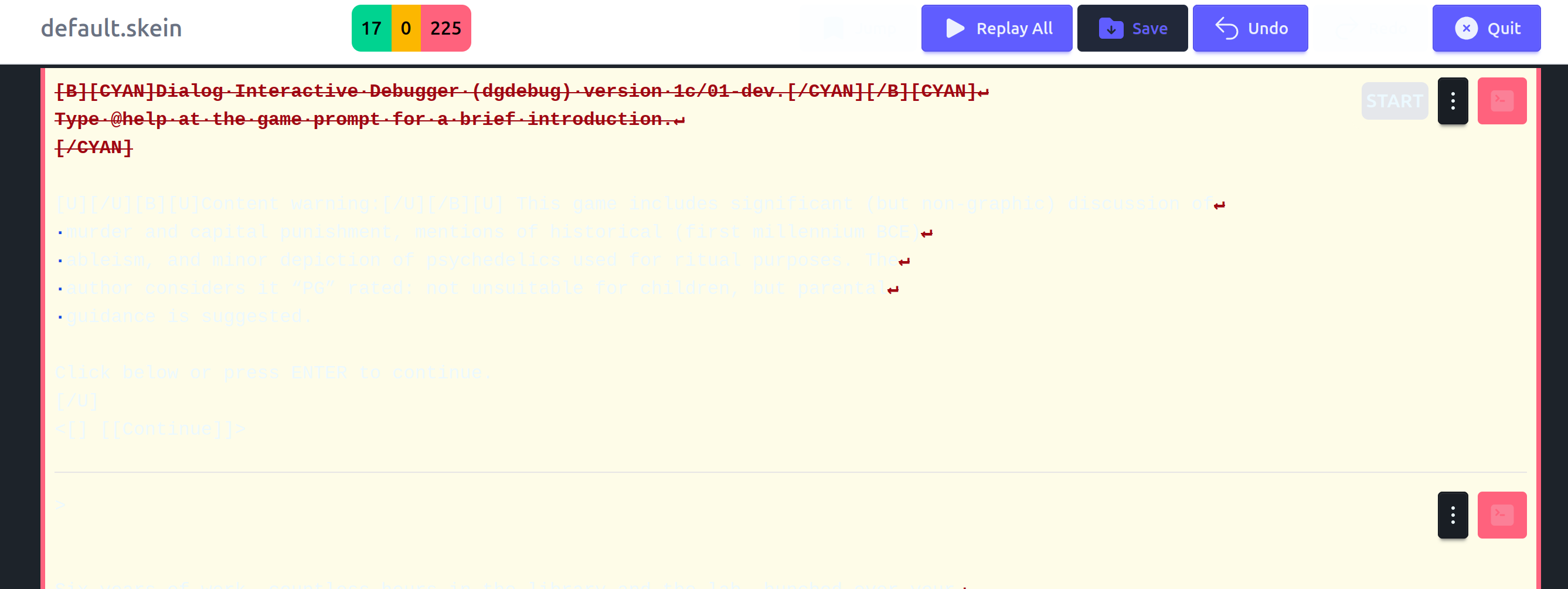
It turns out I had accidentally introduced a typo in my Dialog source code between when I successfully ran the project in the debugger and when I tried starting the skein. The above error is what happens when the debugger fails to start because there’s a syntax error in the Dialog code. Maybe that could be made more clear to the user?

1 Like

Agreed! Especially when the error is introduced in the middle of an active Skein session: “replay” actions silently start failing and I need to dgt debug to find the cause. Popping up a modal with the compiler error in it would be great.

(Does the debugger use a different exit status if it chokes on a syntax error when run with -q? If not, I should add that.)

Yes, that’s in either my mental checklist or as an issue in dialog tool. It should present a modal dialog with the error(s) and let you fix them before retrying.

Added an issue: Skein fails when the source contains errors that prevent dgdebug from starting · Issue #48 · hlship/dialog-tool · GitHub

One of the things I imagine using the skein for is, for each location, adding a bunch of child nodes representing various ways of interacting with scenery, just to make sure the scenery that should be present is implemented.

This calls for two things to work effectively:

  1. Keyboard shortcuts for navigating the skein, and adding new child nodes. I am currently clicking the three dots on the previous node, navigating down to “Add a new child node” with the mouse, and then clicking it. This takes a lot of time when I have like 20 commands I want to add as children to a node. Similarly marking a node as blessed takes some time.
  2. The ability to “curse” a node, i.e. indicate that what it currently says is NOT correct, and should be fixed later. This is different from a regular unblessed node in that it’s not merely new – I have looked at it and made a decision about it, I just didn’t think a blessing was the right decision.

What are your thoughts on these two features? Are they implemented already, only I haven’t found them yet?


I suppose an alternative to keyboard shortcuts would be a way to mark a node as “sticky”, where commands entered on that node add child nodes, but don’t navigate to the child nodes, so further commands typed in add more children to the sticky node rather than its newly produced children.

Personally, I don’t like the system for switching between multiple child nodes, so I avoid it as much as possible—instead I’ll examine all the scenery in a row, and UNDO if something has unpleasant effects on the world. I end up with one staggeringly huge transcript that I can jump through by hitting the red or yellow buttons at the top.

(I don’t know what would improve it, though. I like how nodes have all their text visible by default, so I’m not recommending switching to Inform’s zoomed-out view!)

That sounds very similar to the workflow I’ve used with Zarf’s regtest.py script for making sure scenery is implemented in Inform 6. It always felt a little unclean to have a tree of data in a straight sequence, but I can probably make that work with the Dialog Tool skein too.

1 Like

I’m also running into a strange issue where sometimes, a command just…won’t go through. No POST request in the terminal, no errors in the browser console, I’m just pressing enter and nothing is happening.

I can fix this by closing and reopening the Skein, but that’s annoying to do when I’m 200 commands deep.

EDIT: The page also isn’t frozen. I can save, bless, quit, just can’t enter new commands.

beta-11 uses a different server-side framework that, I believe, will address this kind of flakiness.

1 Like

dialog-tool 2.0-beta-11

dgt is a tiny, specialized, highly opinionated command line tool used to build, debug, and test interactive fiction created using Dialog.

What’s new in 2.0-beta-11?

  • feat: automatically replay all on skein launch
  • feat: add new dgdebug flags --no-header and --height
  • fix: center status counts in navbar
  • feat: add --flat option to dgt new, include lib/test/unit.dg as :test source
  • feat: Migrate Skein UI to Hyper framework
  • feat: Add Scoop manifest for Windows deployment
  • feat: Add dgt test command and sample unit test

… along with a number of other lesser improvements to the UI.

Keep the feedback coming!

Mac Installation

To install for the first time:

brew install hlship/brew/dialog-tool

To upgrade from an earlier version:

brew unlink dialog-tool
brew install dialog-tool

Windows Installation

This is still a work in progress!

Installs with scoop, a package manager for Windows.

scoop bucket add hlship https://github.com/hlship/scoop-bucket
scoop install hlship/dialog-tool

You may need to manually install some dependencies first, such as the Dialog tools, a recent Java VM (JDK 17 or better), etc.

Linux Installation

Download the latest distribution from GitHub dialog-tool releases.

You must have a recent version of Java installed. You must have the Dialog commands installed (see the full instructions for details).

Unpack the archive, and copy the dgt and dialog-tool-<version>.jar file onto your executable search path. You can also symlink dgt into a directory already on the search path.

2 Likes

You can now run dgt -d ... and get debugging output, primarily, details about started processes. This may be helpful for any adventerous souls who want to experiment with running this stuff on Windows.

1 Like

Spiffy! I’ll give it a go.

Including dgt test, just for you!

1 Like

Has anyone successfully run the skein under Windows yet?

Edit: just saw your comment about dgt -d ... so I guess not?

I don’t think so. There is an open issue for it on GitHub and I think I am the only other person who is trying it.
https://github.com/hlship/dialog-tool/issues/37

You may notice that all your knots are red and it’s not obvious why … it’s because beta-10 ran dgdebug with a terminal width of 80, and beta-11 runs with unlimited terminal width. If you look carefully, you’ll see end-of-line markers in red in the failed knots. Just bless all those changes.

Was just able to focus for several hours on improvements while flying PDX to Atlanta. Working on detecting source errors.

dialog-tool 2.0-beta-12

dgt is a tiny, specialized, highly opinionated command line tool used to build, debug, and test interactive fiction created using Dialog.

What’s new in 2.0-beta-12?

  • The Skein detects errors in the source at present a modal dialog showing the error and offering a “Replay All” option
  • New knots in the Skein are rendered in fixed-width font
  • Fixed-width knots wrap to the knot container
  • The --debug tool option now works with the Skein

There’s still quite a few little issues with the Skein, but detecting source errors is a big improvement. This is only implemented for dgdebug, not for frotz.

I know there’s some dissatisfaction with command navigation in the Skein, as compared to Inform 7’s version that has a visual graph for this purpose. I haven’t pursued that for both complexity of implementation reasons, and because of screen real estate reasons.

I’ve had some thoughts about how to address this, maybe discuss that seperately

Keep the feedback coming!

Mac Installation

To install for the first time:

brew install hlship/brew/dialog-tool

To upgrade from an earlier version:

brew ugprade dialog-tool

Windows Installation

This is still a work in progress!

Installs with scoop, a package manager for Windows.

scoop bucket add hlship https://github.com/hlship/scoop-bucket
scoop install hlship/dialog-tool

You may need to manually install some dependencies first, such as the Dialog tools, a recent Java VM (JDK 17 or better), etc.

Linux Installation

Download the latest distribution from GitHub dialog-tool releases.

You must have a recent version of Java installed. You must have the Dialog commands installed (see the full instructions for details).

Unpack the archive, and copy the dgt and dialog-tool-<version>.jar file onto your executable search path. You can also symlink dgt into a directory already on the search path.

1 Like

There seems to be a regression on the dark mode handling:

Previously, it wouldn’t recognize that my computer was in dark mode at all, and would always display dark text on a light background. Now it recognizes dark mode…but the yellow background is so light, the text is unreadable against it.

It also doesn’t recognize the ANSI escape code for fixed-width text, \033[50m:


It does handle backslashes properly now, which is great! I suspect that was just a cosmetic issue before, because the changes from ' to \ aren’t marked in the Skein.

I’m not seeing any changes in my Skein at all except the removal of the header at the top and the removal of a bunch of line breaks (due to --width -1 and --no-header), which is great!