I’ll give it a shot for my second TALJ experiment; I’ve found I’m a person who needs a lot of source files for anything, but I think there are only a few dependencies that aren’t solved by “story, then new features, then standard library”.
This isn’t perfectly clear in the Linux installation instructions. If you symlink dgt, you must symlink dialog-tools-xxx.jar as well; dgt expects the JAR to be in the same directory as the script.
1 Like
I’ll switch to doing that; that’s cleaner than having one dgt script just call another dgt script. Thanks!
dialog-tool 2.0-beta-3 was just released
dgt is a tiny, specialized, highly opinionated command line tool used to build, debug, and test interactive fiction created with Dialog.
Mac Installation
To install for the first time:
brew install hlship/brew/dialog-tool
To upgrade from an earlier version:
brew update
brew upgrade dialog-tool
Linux Installation
Download the latest distribution from Releases · hlship/dialog-tool · GitHub .
You must have a recent version of Java installed. You must have the Dialog commands installed (see the full instructions for details).
Unpack the archive, and copy the dgt and dialog-tool-<version>.jar file onto your executable search path. Both files must be in the same directory to operate.
What’s new in 2.0-beta-3?
- The knot counts in the navbar can be clicked to cycle through the knots in error, or new knots
- Skein service will pick an available port (or port specified with –port option)
- The Replay All dialog can be canceled while in progress
- Many minor cleanups of the Skein UI
1 Like
dialog-tool 2.0-beta-4 was just released
dgt is a tiny, specialized, highly opinionated command line tool used to build, debug, and test interactive fiction created with Dialog.
Mac Installation
To install for the first time:
brew install hlship/brew/dialog-tool
To upgrade from an earlier version:
brew upgrade dialog-tool
Linux Installation
Download the latest distribution from Releases · hlship/dialog-tool · GitHub .
You must have a recent version of Java installed. You must have the Dialog commands installed (see the full instructions for details).
Unpack the archive, and copy the dgt and dialog-tool-<version>.jar file onto your executable search path. You can also symlink dgt to a directory already on the search path.
What’s new in 2.0-beta-4?
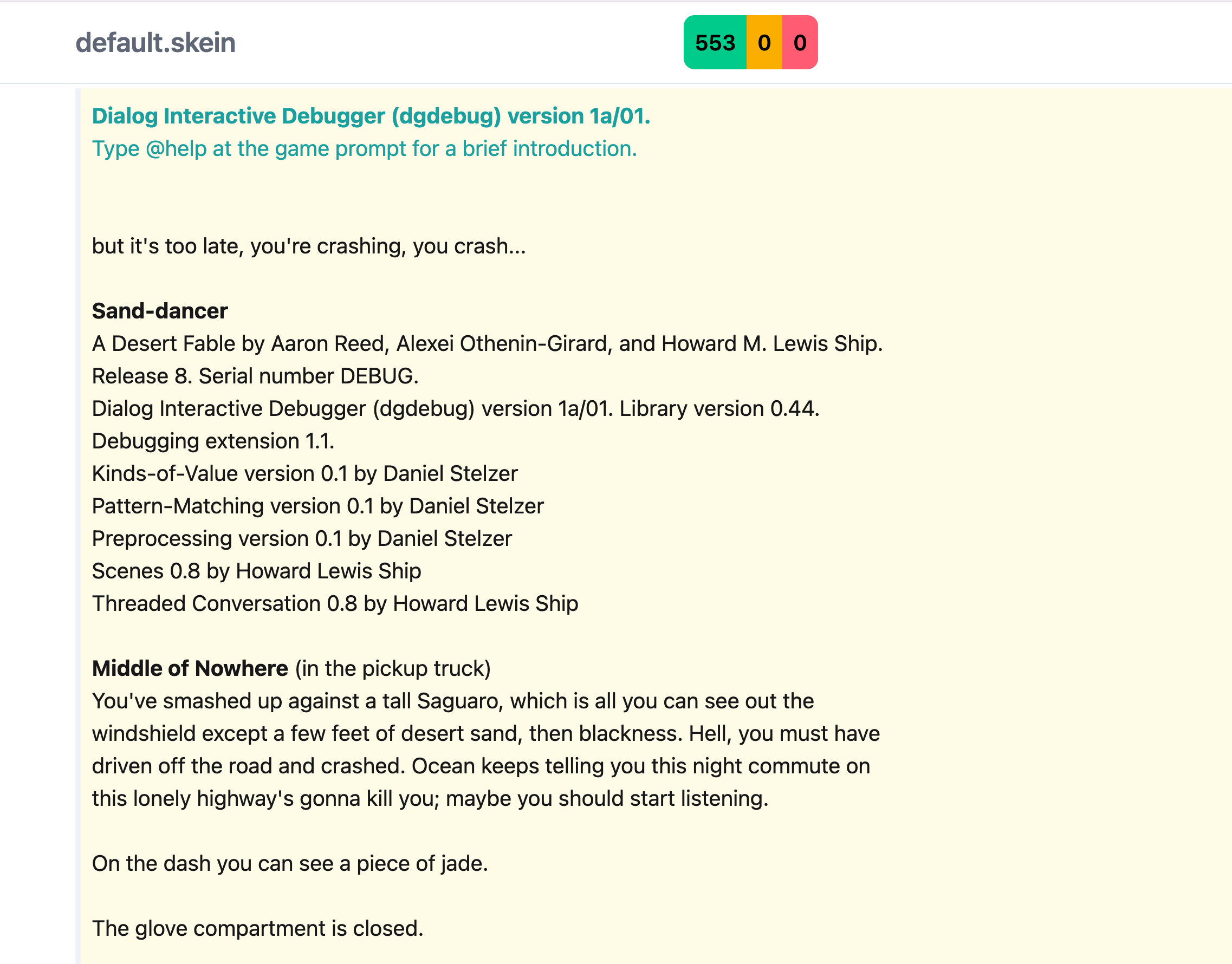
- The Skein now captures font information from the Dialog debugger
- The skein commands are in a subgroup:
dgt skein new,dgt skein run, anddgt skein test - Java only - no Babashka anymore
- Fixed a bug where the engine and seed were not written to a new skein file
- You can just symlink
dgtand it will still find the jar file (or print an error)
The font capture will, unfortunately, invalidate existing .skein files … you will have to bring them up in the Skein, then Replay All, then bless all the changes and save. The ANSI sequences will go right into the .skein file.
The Skein transcript looks so much better with the fonts:
1 Like
Oops. Looks like I broke dgt run when I removed Babashka. beta-5 later today if I have time.
1 Like
dialog-tool 2.0-beta-5 was just released
dgt is a tiny, specialized, highly opinionated command line tool used to build, debug, and test interactive fiction created using Dialog.
Mac Installation
To install for the first time:
brew install hlship/brew/dialog-tool
To upgrade from an earlier version:
brew upgrade dialog-tool
Linux Installation
Download the latest distribution from Releases · hlship/dialog-tool · GitHub .
You must have a recent version of Java installed. You must have the Dialog commands installed (see the full instructions for details).
Unpack the archive, and copy the dgt and dialog-tool-<version>.jar file onto your executable search path. You can also symlink dgt to a directory already on the search path.
What’s new in 2.0-beta-5?
- Fixed the broken
dgt runcommand - Unrecognized ANSI SGR sequences are represented in the diff as
[?] - Now handles ANSI underlines (which
dgdebuguses for italicized text)
1 Like
dialog-tool 2.0-beta-6
dgt is a tiny, specialized, highly opinionated command line tool used to build, debug, and test interactive fiction created using Dialog.
What’s new in 2.0-beta-6?
- Fixed a bug in parsing of dynamic predicates that would crash the UI
- In a knot, the label, actions button, and nav button now “float” down when scrolling to stay visible
Mac Installation
To install for the first time:
brew install hlship/brew/dialog-tool
To upgrade from an earlier version:
brew upgrade dialog-tool
Linux Installation
Download the latest distribution from GitHub dialog-tool releases.
You must have a recent version of Java installed. You must have the Dialog commands installed (see the full instructions for details).
Unpack the archive, and copy the dgt and dialog-tool-<version>.jar file onto your executable search path.
You can also symlink dgt to a directory already on the search path.
BTW, it’s amazing what you can get done in about 3K lines of Clojure code.
Things that should be hard, like the undo/redo system, are trivial (because immutability and structural sharing).
Speed (outside of sluggish startup) is amazing; there’s things I could do for performance (caching and memoizing) but haven’t felt the need to do so yet.
The example I work, Sand-dancer, is large enough (about 350K w/ all sources) and has a skein (350+ knots, 50 leaf knots) that I feel it is more than representative, scale wise, of most Dialog projects. And I’m doing all my work on an Mac M1 which is (no longer) a particularly fast machine.
I suspect I’ve done all this work for myself and a pool for three or four other people, but it’s also been a chance for me to learn various other techs (Svelte, Datastar) and experiment with LLM-assisted coding, so it’s a net win either way.
1 Like
Having used it for a couple days now, the startup time is definitely noticeable, but not a serious problem yet.
real	0m1.972s
user	0m4.777s
sys		0m0.472s
But I’m really enjoying how easy it is to drop in a new library or such. For my game files, the order matters, but for the libraries, mostly I just need to make sure stdlib.dg is at the end. So:
	:sources
		{
		:main
			["src/meta.dg" "src/intro.dg" "src/vanisher.dg" "src/interface.dg" "src/actions.dg"]
		:debug
			["lib/dialog/debug"]
		:library
			["lib", "lib/dialog"]
		}
I was going to ask if it was possible to include different files for Z-machine and Å-machine, because in Wise-Woman’s Dog, I used that to choose appropriate CSS for each platform. But if I’m releasing the Å-machine version on C64 as well as web now, I need to either write general CSS that covers both platforms, or compile two separate .aastory files. Breaking it down by platform won’t really be useful.
$ time dgt -h
Usage: dgt [OPTIONS] COMMAND ...

Options:
  -v, --version  Show version information and exit
  -d, --debug    Enable developer output
  -C, --color    Enable ANSI color output
  -N, --no-color Disable ANSI color output
  -h, --help     This command summary

Commands:
        build: Compile the project to a file ready to execute with an interpreter
       bundle: Bundle the project into a Zip archive that can be deployed to a web host
  completions: Generate zsh command completions
        debug: Run the project in the Dialog debugger
         help: List available commands
          new: Create a new empty Dialog project from a template
          run: Runs the project using the frotz command
        skein: Skein UI and testing commands
      sources: Print the sources for the project in compilation order

dgt -h  1.02s user 0.06s system 207% cpu 0.521 total
$ java -version
openjdk version "25.0.2" 2026-01-20 LTS
OpenJDK Runtime Environment Temurin-25.0.2+10 (build 25.0.2+10-LTS)
OpenJDK 64-Bit Server VM Temurin-25.0.2+10 (build 25.0.2+10-LTS, mixed mode, sharing)
$
I’ve noticed some big improvements in more recent JDKs w.r.t. startup time. Also, latest JDKs will often cache at lot of the startup activity from the first run to speed up later runs.
1 Like
There’s a lot that can be done to address this kind of thing, but unless we establish that it is a very common need, I don’t want to complicate things for the hypothetical average user for the exceptional case.
I’d say you can use dgt sources and invoke dialogc and aambundle your self, possibly modifying the sources before passing them along. Maybe like:
dgt sources | xargs dialogc -o out/game-c64.zblorb <options> c64-style.dg
… which will prefix the normal sources with c64-style.dg for that execution.
1 Like
Yeah, and for now even I don’t need it—I’m experimenting with using the same styles across platforms, and relying on ~(interpreter supports quit) when I need to check for full CSS support. Which isn’t ideal, but it’s better than hardcoding it into each file.
Overall, the Skein is looking great! But as soon as I bless something…

It looks like the generated HTML for the Skein respects my dark mode setting, and makes the default text light gray…but doesn’t make the background dark to compensate. I’d recommend either having alternate background colors for dark mode, or not changing the text color at all. (Working with dark text on a light background would be fine for this.)
I also can’t tell the difference between these two colors (I’m assuming the top one is green and the bottom one is yellow?), but that’s less of an issue because the blue text in non-matching knots stands out.
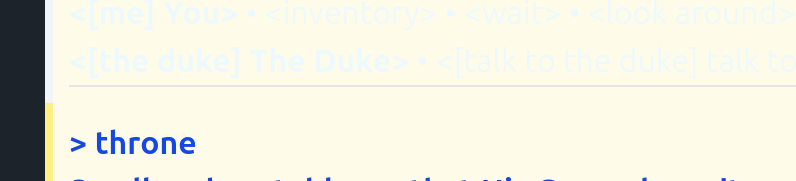
The yellow sidebar is also perfectly visible.
I only work in light mode. I’ll see what I can do.
If dgt only runs in light mode, that’s also fine! It’s the “text is dark mode, background is light mode” specifically that doesn’t work for me.
It looks like whatever stylesheet you’re using automatically sets variables like --color-secondary, --color-secondary-content for light and dark mode, and likewise for accent, neutral, info, success, warning, and error. So you could also use those for the Skein colors.
Another issue: if the debugger is waiting for input without printing a prompt (e.g. in a “press any key to continue” situation), the Skein freezes up. For now, I’m going to adjust my code to print a “>” when that happens, but only when running in dgdebug.
For this one, is there a better way dgdebug could signal to dgt that it’s waiting for input (and also whether it wants a key or a line)? If you’re already parsing out ANSI escape codes, my first thought would be to send an escape sequence that standard terminals ignore but dgt could notice.
Alternately, you could just assume that if dgdebug hasn’t done anything in half a second, it’s waiting for input.
This was something I was considering earlier today. But it needs to work in dgdebug and frotz, so special codes from dgdebug is not a great option.
I’ll look into whether there’s another option that work well; I haven’t dug out what we can do with the ptty we’re using with dgdebug, it’s possible that there’s an improved way to detect when the process output is complete and waiting for input.
I was thinking that we could special case that a command like [x] means send the single key x rather than an entire line.
I don’t want to jettison the ability to run a skein against dfrotz because if you are serious, you want at least a cursory run against the compiled z-code, rather than the debugger’s simulation of it.
1 Like
Hmm, that makes sense. But I also don’t want to print a > for my “press any key to continue” prompts, because that suggests you should type a full line of input.
We ran into this problem with the compiler regression tests too, and for those, we just assume each command takes effectively no time to run (and thus after a few milliseconds it’ll be ready for more input). For something like dgt, I imagine it’s a fair bet that no command will take longer than a half second to run.
1 Like