Here’s a question: can dgt be configured to use different binaries for the compiler and debugger? I’d like to use my own cutting-edge versions of those rather than the most recent release, since developing with them is going to be the easiest way to find subtle bugs before an official release.
That’s something I could add, but right now it’s simply hard-coded. It’s really something only you would need, I think. It’s not a big deal to do, however.
Let me see how well it all works on my system first—but if it could accept a path to a specific compiler binary to use, that would be very useful for testing differences in the new version!
I’ll look into adding this soon. It’s not a big deal and perhaps doesn’t need to be documented, just supported for you.
Coming soon …
To be fair, dialog-tool is kind of a learning ground for me; I’ve been using it to learn new technologies, and to experiment on things that I wouldn’t want to do at work.
That being said, I’ve just updated it from using Svelte for the Skein front end, to using Datastar, which is opening up all kinds of possibilities for more complicated UIs.
Currently, I’m pursuing an idea where, after each command is executed, the skein will silently run “@dynamic”, collect and organize the information, and then display (optionally, underneath the game text for the knot) a summary of changes across all dynamic flags and variables (global and per-object).
1 Like
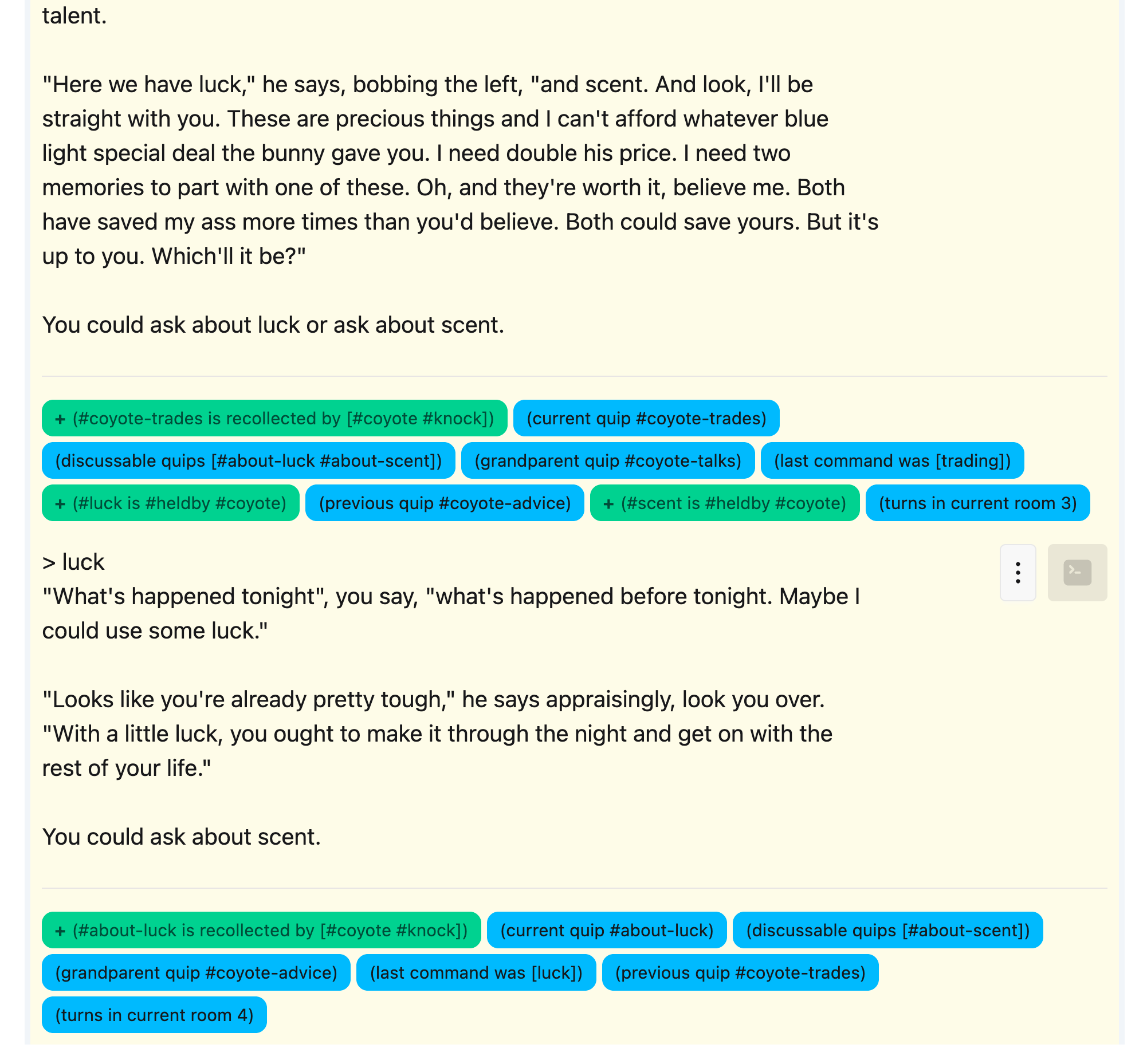
alpha-9 is just about released, though there’s one bug I noticed and want to check out, so it might be alpha-10. The above shows the updated Skein and a key new feature: world predicate tracing.
Essentially, the skein runs @dynamic after each player command, parses all that info into the world model, and shows a diff of which predicates (global flags, global variables, object flags, and object variables) have been added, removed, or changed as a result of the command. You can toggle that output on and off if you want.
3 Likes
dialog-tool 2.0-alpha-10 was just released.
dialog-tool is developed on and for OS X, though I may also work on some forms of Linux and, potentially, Windows (with some effort).
To install for the first time:
brew install hlship/brew/dialog-tool
To upgrade from an earlier version (if you have alhpa-7 or earlier installed):
brew uninstall aamachine dialog-if
brew upgrade hlship/brew/dialog-tool
This release rewrites the Skein UI (which is fun for me, not so relevant for users).
The new UI is faster and adds a number of new features; the main one is described in the posting above: the Skein will now track all the dynamic flags and variables in your game when it runs the game, and produce a list of added, removed, and changed predicates after each command.
The world icon that floats at the bottom right can be clicked to bring up a control to show or hide this extra information.
This really brings debugging with the Skein to an entirely new level beyond the command line debugger … being able to see a summary of how processing each command changes the state of the world is life altering.
The world state information is not saved in the skein, but can be recalculated easily with the “Run All” command.
I still have some ideas for further improvements to the Skein.
Other changes:
- The
dgt newcommand will create a.gitignorein the created project - Lots of speed improvements to the UI
I still have some further functionality improvements and could always use a hand making it look prettier; I also want to write some documentation now that the UI is essentially stable.
1 Like
Now that I have a “platform” for building this UI, I keep coming up with further ideas.
For example, the trace output from the debugger is useful, but so hard to parse! What if you could select a knot and “trace” it, and get a formatted, searchable/navigable result from it?
Could dialog-tool learn to parse Dialog source enough to perform more advanced linting operations?
Meanwhile, I’m making progress on being able to deliver dialog-tool as an executable JAR file. I’m working on something a bit complicated, where you would still run a Babashka script, but if you don’t have Babashka installed, you can just download the release and extract a single pre-compiled Java JAR file that you can execute instead.
In that case, you would only need Java installed, not Babashka, which may be easier for many!
I still have some rough edges to work out but I’m close to a new release with this feature, and a few additional things.
2 Likes
dialog-tool 2.0-alpha-11 was just released
dialog-tool is developed on and for OS X, though it may also work on some forms of Linux and, potentially, Windows (with some effort).
Mac Installation
To install for the first time:
brew install hlship/brew/dialog-tool
To upgrade from an earlier version (if you have alpha-9 or earlier installed):
brew uninstall aamachine dialog-if
brew upgrade hlship/brew/dialog-tool
Invoke using dgt.
Linux Installation
Download the latest distribution from Releases · hlship/dialog-tool · GitHub .
You must have a recent version of Java installed. You must have the Dialog commands installed (dgdebug, dialogc, and aambundle).
Unpack the archive, and copy the dgt.sh and dialog-tool-<version>.jar file onto your executable search path.
Invoke using dgt.sh.
What’s new?
- The Skein is now run as a Java process, much faster, even if all other commands run via Babashka.
- The entire tool can now be run as a Java process; there’s an extra
dgt.shscript. Good for Linux. - Dynamic state changes are now hidden initially, and a toggle will show and hide them.
- You can now view the entire dynamic state for a knot (not just the changes from parent knot)
Eventually, I should be able to merge it so that a single dgt script will run the tool via Babashka or via Java, depending on what’s available.
Note: as I type this, I realized that dgt.sh new on Linux may not fully work, so expect that and other teething problems. It’s still alpha.
1 Like
dialog-tool 2.0-beta-1 was just released
The core feature of dialog-tool is The Skein, a web-based UI around the Dialog debugger that significantly improves the process of creating, debugging, and maintaining Dialog projects.
Mac Installation
To install for the first time:
brew install hlship/brew/dialog-tool
To upgrade from an earlier version:
brew update
brew upgrade dialog-tool
Linux Installation
Download the latest distribution from Releases · hlship/dialog-tool · GitHub .
You must have a recent version of Java installed. You must have the Dialog commands installed (see the full instructions for details).
Unpack the archive, and copy the dgt and dialog-tool-<version>.jar file onto your executable search path.
What’s new in 2.0-beta-1?
- Knots can now be locked, to prevent accidental deletion
- The
dgtscript now uses Babashka if available, or Java if not (there is no longer adgt.shscript) dialog.ednmay specify a :bin-dir, where Dialog CLI tools are stored- The Skein will now reload source files when
dialog.ednis changed, or when files are added, removed, or changed in any source directories - Correctly exports the patch file needed to run the Skein using the frotz or frotz-release engines
- Now using a better library (plumula/diff) to identify text changes in responses
- Dialog standard libraries are now packaged inside dialog-tool (used when creating new projects) – previously, required the Homebrew install
I’m really interested in feedback now that the tool is much easier to use on Linux.
What’s next?
There’s a few things in the UI that could be prettier, and a couple of lurking bugs, like input fields not always clearing correctly.
I’m thinking about a feature where you could re-run a specific knot with trace on, and then have some kind of interactive dialog to drill down and see what queries triggered, etc. Being able to drill down on all that information could be invaluable.
A way to import (or paste in) a transcript could be useful (but watch out for randomness driven by RNG seed).
I would love to find a way to capture font information from the debugger, perhaps a dgdebug switch to mark italic or bold text specially.
Outside of the Skein, some new command to make it easier to run unit tests with the new test script (and collect and present the results).
1 Like
I’ve been doing some experimentation, and there’s a way I can simulate a tty to make dgdebug output all its ANSI fonts … but that raises a bunch of problems, such as how to convert that to HTML (annoying but not difficult) and how to present a diff where part of the diff may be font changes (this one has me flumoxxed).
This looks fantastic! (And thank you especially for the bin dir option!)
For the font changes, what kind of markup would be useful? It wouldn’t be hard to output something like <b>...</b> for bold text, i for italics, r for reverse, d for debug. (The debugger currently ignores the “input” and “fixed” styles, so I don’t know off the top of my head if those get sent to term_effectstyle or not. If they’re sent, they could get their own tags too.) It is hard to ensure those nest properly, because e.g. you could turn on both bold and italic, then turn off bold, then turn off italic, or vice versa; probably the cleanest option is just to close all tags when the style changes, then open new ones.
More importantly, as I now start trying this out:
dgt uses three sets of sources. For each set, you may specify a number of directories, relative to your project, in which to locate source files. All Dialog source files directly in each directory are included.
:main - sources specific to your project
:debug - used by the commands test, debug, skein, etc.
:library - additional libraries, including the Dialog standard library
Generally, source code that is specific to your project goes in :main; reusable code goes in :library and :debug; this may include code obtained from others, including the standard library.
Is there a way to specify the order of files within a directory? Is it strictly alphabetical? I tend to have files like act1.dg, act2.dg, interface.dg, actions.dg, liquids.dg, and so on, which need to come in a specific order, and making a new subdirectory for each one feels inelegant.
(Have I asked this before? Very possibly. My memory is unreliable at the best of times.)
Would it be feasible to add something like a --flat option to allow project structures that aren’t split up into subdirectories like this?
That would be great, yeah, or just allowing the paths in the .edn to be files as well as directories.
Currently, it’s just directories, and files are alphabetical within. I tend to break them up by type, so I have a rooms, scenes, actions, etc.
But I don’t see why I couldn’t make it a bit more flexible so that if the source is a file, not a directory, it just adds that specific file.
Originally, it was a bit more like a makefile, where you would specify paths with glob names in them, but I actually found that less useful. I definitely prefer directory-based over file/glob based, but that’s because I started with that structure.
1 Like
I can easily parse the ANSI output, don’t need anything special there. What I haven’t figured out is how to deal with:
- A delta that crosses font boundaries
- A delta that describes a font change (i.e, bold to italic, etc.)
Possibly, when there aren’t differences, just convert the ANSI to HTML and output that.
When there are differences, represent the font choices as text (i.e., [BOLD]The Dungeon[/BOLD]) and diff on that string. I think this might be the right path … taking a couple of hours for lunch and Costco gave me time to think it through a bit more.
1 Like
That would be perfect for my workflow, thanks!
And yes, I realize I’m requesting a new feature minutes after installing it, right after you already implemented another feature specifically for me  I’m going to try to do this next project in a single source file, and get a sense for how dgt works already.
Ok, I just released 2.0-beta-2 just for you. You can now list specific .dg files in dialog.edn.
1 Like
Thank you so much! I currently have all my projects organized with a list of source files at the stop of the Makefile; this will make it easy to transition them all to dgt.
I still maintain that for new projects, the directory approach may be better. It is for me.
Unlike dgdebug, the Skein will notice that new files have been added to a directory and will start a new process with the updated Dialog source path. So you can just drop new files as you go without leaving the Skein.
It will also handle renames or deletions gracefully.
1 Like