Thank you very much for writing these guides, which I have been reading with interest, even though I am not an inform author. But I am a big fan of IF with graphics and sound. let’s hope more authors follow this and expand inform capabilities to use graphics with effect.
2 Likes
Thanks! I know you spend a lot of time on these things in your own work, so I appreciate your comment.
1 Like
Fake Twine
Here’s another example, this time based on the Fake Twine example by @mathbrush.
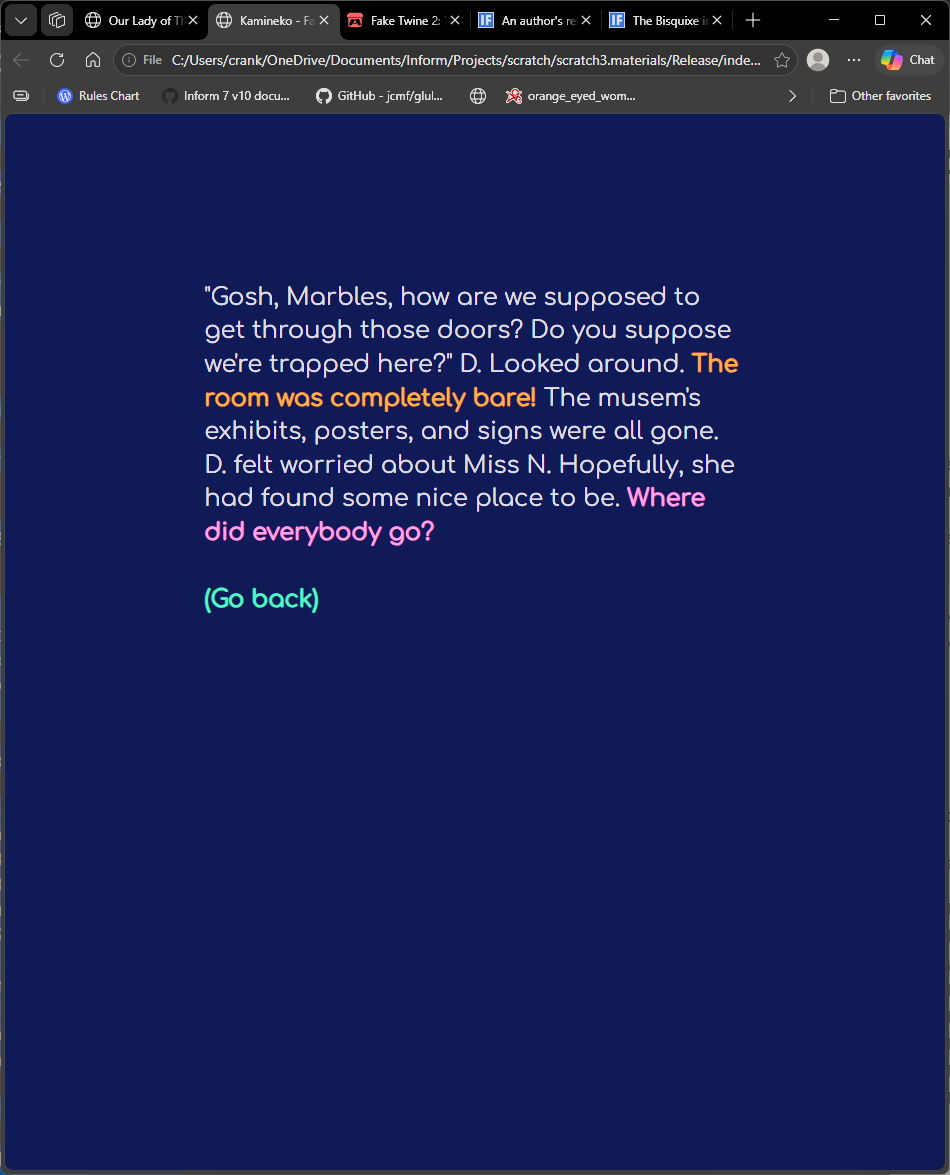
Features:
- hidden command prompt, intended to use links only
- light and dark modes
- a “back” button
- differently-styled links
From an authorial perspective, I think in-line links are preferable, but, with two color schemes, I needed a way to match link colors to two different backgrounds.
Observations:
- It would be interesting to see what could come of combining links with “Hybrid Choices” by AW Freyr. I think they would work very well together.
- A “back” button requires some thought. It isn’t exacly “undo”, but perhaps with “Undo Output Control” we could get good results with less effort.
- I think this runs pretty well on a phone in portrait orientation. Perhaps because
.Inputis not displayed, the keyboard does not pop up. - Since Bisquixe uses text strings, you can use substitutions and such. To change color mode here, I use a
[one of]...[cycling]
This will probably be the last demo that I will do for a bit. I’m interested in the command bar concept, but I’m not sure when I’ll have time to look into it. In the meantime, here’s the source.
Fake Twine 2: The Twining
"Fake Twine 2" by Kamineko.

the story headline is "Based on Fake Twine by Mathbrush"

Release along with a "Bisquixe" interpreter.

Include Simple Multimedia Effects for v10 by Mathbrush.
Include Basic Screen Effects by Emily Short.

[initial play setup]

the twining is a room.

id is a number that varies.
id is zero.

rule for constructing the status line:
	do nothing;

When play begins:
	follow the window setup rule;
	follow the typography rule;
	follow the color switch rule;
	follow the link styling rule;

[a small play area, no other visible elements]

this is the window setup rule:
	css-set-fast ".play; width; 23%";
	css-set-fast ".BufferWindow; overflow; auto";
	css-set-fast ".BufferWindow; padding; 5%";
	css-set-fast ".Input; display; none";
	css-set-fast ".Style_input; display; none";
	css-set-fast ".coverimage; display; none";
	css-set-fast ".interpretercredit; display; none";
	css-set-fast ".links; display; none";
	css-set-fast ".play; background-color; #020146";
	now the command prompt is "";

[download a font and set it. use a larger font to compensate for lower contrast]

this is the typography rule:
	import-google-fonts "Comfortaa";
	css-set-fast ".BufferLine; font-family; Comfortaa, sans serif";
	css-set-fast ".BufferWindow;font-size; 24px";

[use variable text substitutions depending on light or dark mode

because of the [one of] construction, the colors will alternate whenever these rules are re-run]

this is the color switch rule:
	css-set-fast ".BufferWindow; background-color; [one of]#020146[or]#f3f2fc[cycling]";
	css-set-fast ".BufferWindow; color; [one of]#f3f2fc[or]#020146[cycling]";
	css-set-fast ".GridWindow;background-color; [one of]#020146[or]#f3f2fc[cycling]";

[set up styling for links, again based on light or dark mode]

this is the link styling rule:
	css-set-fast ".Style_a-style a:any-link; color; [one of]#f7a240[or]#e97d01[cycling]";
	css-set-fast ".Style_b-style a:any-link; color; [one of]#fd9bd9[or]#823a68[cycling]";
	css-set-fast ".Style_back-style a:any-link; color; [one of]#50f2c1[or]#4f4f4f[cycling]";
	css-set-fast "a:any-link; color; [one of]#cdf9d2[or]#000000[cycling]";
	css-set-fast "a:hover; color; [one of]#ffffff[or]#000000[cycling]";
	css-set-fast "a:hover; font-weight; bold";
	css-set-fast "a:any-link; font-weight; bold";

to say a-style:
	set-any-class "a-style";

to say b-style:
	set-any-class "b-style";

to say back-style:
	set-any-class "back-style";

Instead of looking:
	say paragraph break;
	say "[color][roman type] or [click-begin]";

to say color:
	hyperlink "Change color mode" as "color";

to say click-begin:
	hyperlink "click here to begin" as "strt";

[an option for setting the color mode]

coloring is an action applying to nothing.
understand "color" as coloring.

[lots of paragraph breaks to pervent a scrolling effect when the player chooses a different color scheme]

carry out coloring:
	follow the color switch rule;
	follow the link styling rule;
	clear the screen;
	say paragraph break;
	say paragraph break;
	say paragraph break;
	say the banner text;
	try looking;

[starting is what happens at the, er, start]

starting is an action applying to nothing.
understand "strt" as starting.

carry out starting:
	clear the screen;
	say paragraph break;
	say paragraph break;
	choose row with an index of ID from the table of click history;
	now action entry is the current action;
	choose row with an index of id from the table of a-track links;
	say track A entry;
	increment id;

[atracking and btracking print the next text based on ID. They are the two choices on almost every screen.]

atracking is an action applying to nothing.
understand "atrack" as atracking.
btracking is an action applying to nothing.
understand "btrack" as btracking.

atracking is progressing.
btracking is progressing.

[up the counter, update play history, and clear the screen]

before progressing when ID is less than 4:
	choose row with an index of ID from the table of click history;
	now action entry is the current action;
	clear the screen;
	say paragraph break;
	say paragraph break;

[print the output]

carry out atracking:
	choose row with an index of id from the table of a-track links;
	say track A entry;

carry out btracking:
	choose row with an index of id from the table of b-track links;
	say track b entry;

[if we've reached the end, start over instead]

before progressing when id is 4:
	now id is 0;
	repeat through the table of click history:
		blank out action entry;
	try resetting instead;

[if there is a "back" to go back to, print the "back" link]

after progressing:
	say line break;
	if id is greater than zero,
		say "[back-style][back][roman type]";
	say line break;
	say line break;
	increment ID;
	continue the action;

[for use with a "back button]

regressing is an action applying to nothing.
understand "regress" as regressing.

to say back:
	hyperlink "(Go back)" as "regress";

[if id is too low, just reset the ID and start again]

check regressing when id is one:
	clear the screen;
	now id is 0;
	try starting instead;

[otherwise, go back to steps, then repeat the player's action according to the history table]

carry out regressing:
	now id is id minus two;
	choose row with an index of id from the table of click history;
	try action entry;

[once a full cycle of text has been printed, reset the cycle]

resetting is an action applying to nothing.
understand "reset" as resetting.

carry out resetting:
	clear the screen;
	say paragraph break;
	say paragraph break;
	say "Had I made the right choices? How could I even know?

I began to second-guess myself.";
	now id is 0;
	say paragraph break;
	say paragraph break;
	hyperlink "Click here to reflect on your choices." as "strt";

[the table of click history is filled automatically as play progresses. we never manually add to it]

table of click history
index	action
0	(an action)
1	--
2	--
3	--
4	--
5	--

[all texts for atracting action. The click-aa and click-ab values are used to build the hyperlinks in-text. Note that we have to style the links OUSIDE of the links. In the future, we will have inline styling that ought to reduce the overhead]

table of a-track links
index	click-aa (a text)	click-ab (a text)	track A (a text)
0	"one"	"two"	"In the end, I could only do [a-style][hyperlink-aa][roman type] of [b-style][hyperlink-bb][roman type] things."
1	"his clothing changed"	"He also wore a knapsack"	"Whenever D. appeared in the land of Zork, [a-style][hyperlink-aa][roman type] so that he could fit in. He was now wearing brown canvas trousers with a loose white shirt, just like all of the other boys his age. [b-style][hyperlink-ab][roman type] for carrying Marbles around. Marbles had her front paws perched on his shoulder. 'Mraow,' she said."
2	"She waved the wand again"	"a differently-shaded square"	"'My goodness!' Ms. N. said. 'Such a smart boy! Your parents must be very proud. It is thirty-six squares. Some of them are filled in, though.' [a-style][hyperlink-aa][roman type], and some of the squares became blocked off. 'Then there are some squares that can be pushed into open spaces.' The wand moved yet again, and [b-style][hyperlink-ab][roman type] began moving around the grid."
3	"He was the hero of Zork"	"The lights flickered dimly"	"Marbles was right, of course. [a-style][hyperlink-aa][roman type], and Zork was the only place where life seemed fair, the only place that he could ever win. He'd do anything and go anywhere to protect his place there, even if he had to use a time machine. He jumped in, turned the dial, and, before he could lose his nerve, pushed the button. There was a bright, blinding flash. When his eyes recovered, he was still in the museum, but it was a very different museum. [b-style][hyperlink-ab][roman type] and the place seemed very run down. Nearby machines were covered in rust. There was nobody there, not even the guards. D. and Marbles were alone."

[identically-structured table for btracting action.]

table of b-track links
index	click-ba	click-bb	track B
0	"one"	"two"	"In the end, I could only do [a-style][hyperlink-aa][roman type] of [b-style][hyperlink-bb][roman type] things."
1	"The room was completely bare!"	"Where did everybody go?"	"'Gosh, Marbles, how are we supposed to get through those doors? Do you suppose we're trapped here?' D. Looked around. [a-style][hyperlink-ba][roman type] The musem's exhibits, posters, and signs were all gone. D. felt worried about Miss N. Hopefully, she had found some nice place to be. [b-style][hyperlink-bb][roman type]"
2	"niiice huuuman"	"a prettyyy good cat"	"Bug gurgled. 'No, but I appreciaaate you asking. You are the first [a-style][hyperlink-ba][roman type] I've ever met. And you seeeem like a [b-style][hyperlink-bb][roman type], Marbles. But a gruuuue must taaake their own waaaay.' One of their coat sleeves flopped ridiculously. Perhaps they were waving. 'So long, huuumans of empiiiire.'"
3	"what a strange encounter"	"maybe there was more to it"	"D and Marbles headed forward, and soon Bugs was out of sight. 'Jeeze, Marbles, [a-style][hyperlink-ba][roman type]! I never thought I'd meet a grue in person!' Marbles meowed. 'It's true, they might not all be so bad. I wonder what happened with the Empire? It all seemed like a lot of fun, but [b-style][hyperlink-bb][roman type].' Marbles meowed again. 'That's right Marbles, when it comes to grown-ups, you never know.'"

[generating links based on click-xx entries in tables]

to say hyperlink-aa:
	choose row with an index of id from the table of a-track links;
	hyperlink "[click-aa entry]" as "atrack";

to say hyperlink-ab:
	choose row with an index of id from the table of a-track links;
	hyperlink "[click-ab entry]" as "atrack";

to say hyperlink-ba:
	choose row with an index of id from the table of b-track links;
	hyperlink "[click-ba entry]" as "btrack";

to say hyperlink-bb:
	choose row with an index of id from the table of b-track links;
	hyperlink "[click-bb entry]" as "btrack";
4 Likes
Bisquixe updates, tweaks, and fixes
Based on recent conversations, I have made an extension with a few fixes/changes.
- Inline link capabilities (thanks to @Draconis). It requires a dev version of Formatting Capture, which you can find in this post.
- A check to determine whether or not the game is currently running in a Bisquixe interpreter
- An increase to maximum string size
- A change to default white space behavior (
pre-wrap)
If something new comes up, I’ll update here. This won’t be uploaded to Friends of Inform; it should be superseded by the next version of Bisquixe.
This has only been tested with Inform 10.1.2, though I imagine it would work with Inform 9 after some minor tweaks. I am unable to provide Inform 9-specific updates at this time.
To use it, just include it in your project (in addition to SImple Multimedia Effects for v10, of course).
(updated to version 2 on 4/23/2026)
1 Like
This is a companion post to the Cloak of Bisquixe announcement thread, because I didn’t talk about any code or tech stuff over there.
The code uses a lot of to decide definitions to manage and prioritize links and nouns. I think it works well in practice, and an author would not have trouble implementing it (just edit a table), but it isn’t terribly readable. I don’t consider this a final method.
However, I’ve been working on Bisquixe for a month now and need a break. Rather than discuss the logic, let’s focus on the reason we’re all here: the Bisquixe content.
In terms of what Bisquixe is doing here, we have two color modes, light and dark. I chose the color schemes according to APCA recommendations using this tool. Font-sizes and weights were chosen specifically to work with these colors, and, while I had no specific font recommendations to work with, I chose two that I found especially legible.
I had to think about link colors presented in three ways: status window, buffer window, and command bar. In truth, and this will likely surprise people who don’t spend time on this sort of thing, getting complementary color schemes sorted out was a very high-effort activity that was only finalized late in testing. Because the css-set-fast phrase uses text strings, I was able to use what Inform calls “texts with random alternatives.”
This is the color scheme rule:
	css-set-fast ".play; background; [one of]#0c0c0d[or]#e1e0e0[cycling]";
	css-set-fast ".BufferWindow; background; [one of]#0c0c0d[or]#e1e0e0[cycling]";
	css-set-fast ".BufferWindow; color; [one of]#e1e0e0[or]#0c0c0d[cycling]";
	css-set-fast ".BufferWindow; scrollbar-color; [one of]#656586 #0c0c0d[or]#656586 #e1e0e0[cycling]";
	css-set-fast ".GridWindow; background; [one of]#292929[or]#e6e6e6[cycling]";
	css-set-fast ".GridWindow; color; [one of]#e1e0e0[or]#0c0c0d[cycling]";
	css-set-fast ".Style_input; color; [one of]#e1e0e0[or]#0c0c0d[cycling]";
	css-set-fast ".Input; color; [one of]#e1e0e0[or]#0c0c0d[cycling]";
	css-set-fast ".GridWindow a:any-link; color; [one of]rgba(249, 240, 133, 0.9)[or]rgba(4, 41, 190, 0.9)[cycling]";
	css-set-fast ".BufferWindow a:any-link; color; [one of]rgba(249, 240, 133, .9)[or]#01016f[cycling]";
Note that this rule does not include link colors for the command bar. This proved to be a special case. Inform does not honor alternatives here, presumably due to modifications made for making stale command bars disappear (more on this in a second). For this reason, I had to use a condition and two seperate rules for color mode changes.
to say linkbar:
	css-set-fast ".session[onlinecounter][sessionid]; display; none";
	increment onlinecounter;
	if dark mode is true:
		set-any-class "linkbar_dark session[onlinecounter][sessionid]";
	otherwise :
		set-any-class "linkbar_light session[onlinecounter][sessionid]";
Speaking of the vanishing command bar, Cloak of Bisquixe only displays one command bar at any time. This prevents the screen from becoming cluttered with command interfaces with dead links. Inform output, once printed, cannot change. That is an immutable law. But with Bisquixe, which changes CSS on the fly, we can change the properties of something that has alread printed. Using Onlinecounter and Sessionid variables, Cloak of Bisquixe gives every printed instance of the command bar a unique identifier.
Onlinecounter is initially 1.
sessionid is a number that varies

Sessionid is a number that varies.

The restore the game rule response (B) is "Ok[resetseed]."

To say resetseed:
	now sessionid is a random number from 1111111111 to 2147483647;

after starting the virtual machine:
	follow the light mode linkbar rule;
	follow the dark mode linkbar rule;
	now sessionid is a random number from 1111111111 to 2147483647;
	now the command prompt is "[linkbar][command bar][roman type][line break]>";
When a new command interface prints, the old one is set to display; none, removing it from the bufferwindow. The text is still there, somewhere, it just isn’t displayed anymore. This method was initially devised by Mathbrush, and it was further developed in coversations with him and Zed.
In terms of the formatting of the command bar, I chose to keep links aligned via a pseudo “tab stop.” Each column occupies ten characters, and, after printing a link, Inform prints however much white space is required to fill in the gap.
to decide which text is whitespace for ( l - a link ):
	let t be "";
	choose row with a link of l from the table of linking;
	let C be 10 minus the number of characters in printed entry;
	repeat with whitespace running from 1 to C:
		now t is the substituted form of "[t] ";
	decide on t;
I think ten characters is too much real estate for one link. If I get it down a bit, I think I could comfortably print up to five links on a line. Four doesn’t seem like enough.
The mini-map uses an extension that I wrote for a work-in-progress. That game has a massive map that could never fit on the status bar, so it centers on the player. That’s overkill here, but I didn’t want to write a new extension just for this demo. Hopefully it still communicates what the Simple Multimedia Effects extension can do!
What would I change? I have mixed feelings about deciding to define links in a table. This mostly worked out well, but the table can’t be sorted, and it can’t contain phrase names. These capabilities (one or both) would have trimmed the code quite a bit, though I suppose I would have needed to define the links elsewhere.
The concept of using an object-based rulebook for prioritizing links has been suggested by more than one party. I like the sound of it and will investigate further. However, in this moment, I need to declare this effort finished so that I can move on to other things. It’s been all-Bisquixe, all-day for a month!
After some time has passed, I’ll get an extension for the command bar released, and, following that up, I’ll look into a rewrite down the road. For now, I’d like to get to my current WIP, I, Thief, which I hope some people will look forward to.
As a reminder, now that the reference is complete, feel free to discuss Bisquixe here, though please make new threads for help with coding problems (to help your fellow programmers find solutions while searching the forum). This is also a great place to share Bisquixe code and examples if you have any. I’d love to see it!
Meanwhile: I’ve updated the itch page to include all assets required to compile, including extensions, figures, and build templates. Grab them here:
5 Likes