how difficult would it be to plug in another infocom game? it would be fascinating to see the NPC interaction code and NPC transit system at work in something like ‘deadline’. especially since these topics are largely missing from the ‘learning ZIL’ resources.
Since those topics are missing from the known resources, I’d have to figure them all out myself. So it would be a fair amount of work. :)
And all the object and global identification is just a lot of manual work for each game. I can’t realistically spend that kind of time.
4 Likes
Just wanted to add to what others have already said, this is amazingly cool. Great work.
2 Likes
Thanks!
Discussion on hacker news Zork: The Great Inner Workings (2020) | Hacker News
3 Likes
Bumping to note a small feature update (in honor of the project suddenly being entirely legal):
The “Activity" tab now shows the arguments to each function in the call tree.
Also, the app defaults to dark mode if your OS is set that way. There’s a manual dark/light theme selector in the hamburger menu.
11 Likes
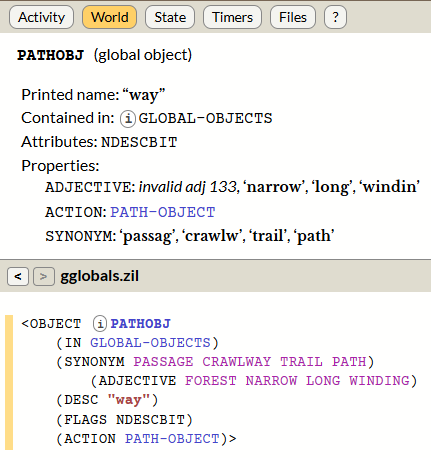
A small nit: the “invalid adj 133” here is “forest”, which appears in the source code and works to refer to the path.
1 Like
Huh, interesting. Let me remind myself how I hacked together the adjectives decoder.
(All the data decoding in there is a terrible hack.)
So, looking at the dict dump:
[ 233] @ $4180 forest [a0 01 85] <adj> <noun>
I was looking only at dictflag_1 for the adjective value, because the usual case for adjectives looks like:
[ 230] @ $416b forbid [22 89 00] <adj>
But I see more baroque logic is needed. (Michael Ko’s “Internal Secrets” writeup is helpful here.) If I read this correctly, the adjective value is dictflag_1 if flag bit 1 is set, dictflag_2 if clear. Yikes.
3 Likes
The full set of rules for assigning values to dictionary data slots is absolutely nuts.
2 Likes
Fixed, at least as far as the cases in Zork 1. Thanks.
(Shift-reload the web page if you’re still seeing the old display.)
2 Likes
I’ve read through that whole file and the Internal Secrets document and I still don’t understand it…I guess it must have been easier to just keep expanding the format they’d used for Z1 than to fundamentally alter the vocab-generating macros?
1 Like
Would it be possible to make tab characters 8 spaces wide rather than 4 in the source code panel?
The ZIL code uses typical Lisp indentation conventions. But it assumes a tab width of 8 spaces. 4-space tabs disturb the alignment, particularly with COND where the code is supposed to be aligned directly under the condition, but often is not.
See the example of UP-CHIMNEY-FUNCTION as it currently appears, with 4-space tabs:
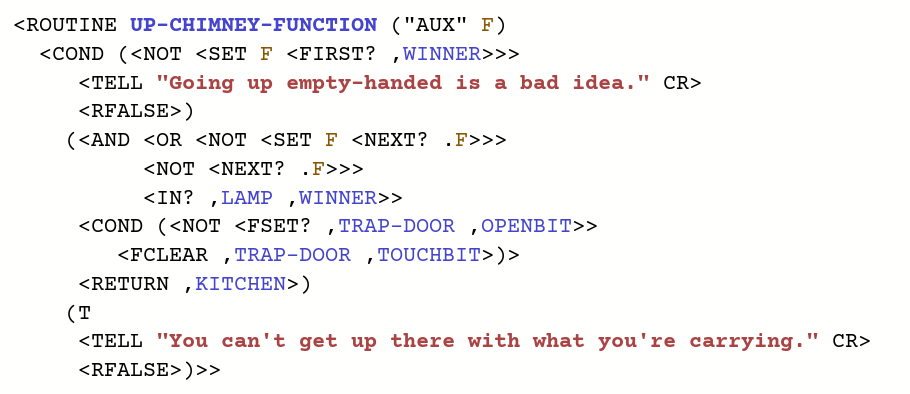
As text, it looks like this:
<ROUTINE UP-CHIMNEY-FUNCTION ("AUX" F)
  <COND (<NOT <SET F <FIRST? ,WINNER>>>
     <TELL "Going up empty-handed is a bad idea." CR>
     <RFALSE>)
    (<AND <OR <NOT <SET F <NEXT? .F>>>
          <NOT <NEXT? .F>>>
          <IN? ,LAMP ,WINNER>>
     <COND (<NOT <FSET? ,TRAP-DOOR ,OPENBIT>>
        <FCLEAR ,TRAP-DOOR ,TOUCHBIT>)>
     <RETURN ,KITCHEN>)
    (T
     <TELL "You can't get up there with what you're carrying." CR>
     <RFALSE>)>>
With 8-space tabs, everything looks a lot better. See how the first TELL is aligned directly under the NOT condition. And how the two NOTs in the second condition are aligned to show they are both inside the OR. The three top-level conditions (<NOT..., (<AND..., and (T are at the same level of indentation, as they should be.
<ROUTINE UP-CHIMNEY-FUNCTION ("AUX" F)
  <COND (<NOT <SET F <FIRST? ,WINNER>>>
         <TELL "Going up empty-handed is a bad idea." CR>
         <RFALSE>)
        (<AND <OR <NOT <SET F <NEXT? .F>>>
                  <NOT <NEXT? .F>>>
              <IN? ,LAMP ,WINNER>>
         <COND (<NOT <FSET? ,TRAP-DOOR ,OPENBIT>>
                <FCLEAR ,TRAP-DOOR ,TOUCHBIT>)>
         <RETURN ,KITCHEN>)
        (T
         <TELL "You can't get up there with what you're carrying." CR>
         <RFALSE>)>>
2 Likes
It would be a simple change, and I see what you mean about the native eight-space tab width.
However, that would make the average column width quite a bit wider. We’re already looking at a narrow column width for a lot of users. (I do this work with a full-screen browser on a 27" monitor – but that’s not how most people load the page up!)
I think the additional line-wrapping would not be worth the more consistent indentation.
(I suppose the better answer is to reindent everything to a consistent two-space indentation rule! Since I’ve already dropped the idea of exactly reproducing the original whitespace. Maybe later…)
The VS Code ZIL extension’s formatter is working pretty well these days, and can be used as a CLI tool separate from the language server. zilformat --indent-size 2 can solve both problems: line up the things that are supposed to be aligned, while collapsing arbitrary indents like the routine body to 2 spaces.
1 Like
Thanks, I may look at it.
I have written some rather experiment reindent logic. The experimental case is Starcross:
https://eblong.com/infocom/visi/starcross/
Simple functions are indented less with this process. More deeply-nested functions may have lines that are indented more. But almost everything should be more consistently indented, with vertical alignment.
This is not identical to what Infocom saw when editing, but it should be equally clear.
3 Likes
It looks great!
From what I can tell with a quick look, the main difference is indenting the body of ROUTINE by just 2 spaces, rather than the 9 spaces of the original source files that makes the body be vertically aligned under the function name. That’s a good decision.
Here’s the V-EXAMINE routine in the original source, with 8-space tabs:
<ROUTINE V-EXAMINE ()
         <COND (<GETP ,PRSO ,P?TEXT>
                <TELL <GETP ,PRSO ,P?TEXT> CR>)
               (<OR <FSET? ,PRSO ,CONTBIT>
                    <FSET? ,PRSO ,DOORBIT>>
                <V-LOOK-INSIDE>)
               (ELSE
                <TELL "I see nothing special about the "
                      D ,PRSO "." CR>)>>
And here’s how The Visible Zorker is now rendering it. The body is scooted 7 spaces to the left; otherwise the vertical alignment is the same:
<ROUTINE V-EXAMINE ()
  <COND (<GETP ,PRSO ,P?TEXT>
         <TELL <GETP ,PRSO ,P?TEXT> CR>)
        (<OR <FSET? ,PRSO ,CONTBIT>
             <FSET? ,PRSO ,DOORBIT>>
         <V-LOOK-INSIDE>)
        (ELSE
         <TELL "I see nothing special about the "
               D ,PRSO "." CR>)>>
The COND clauses line up, which fixes the biggest difficulty I was having with the source code panel 
1 Like