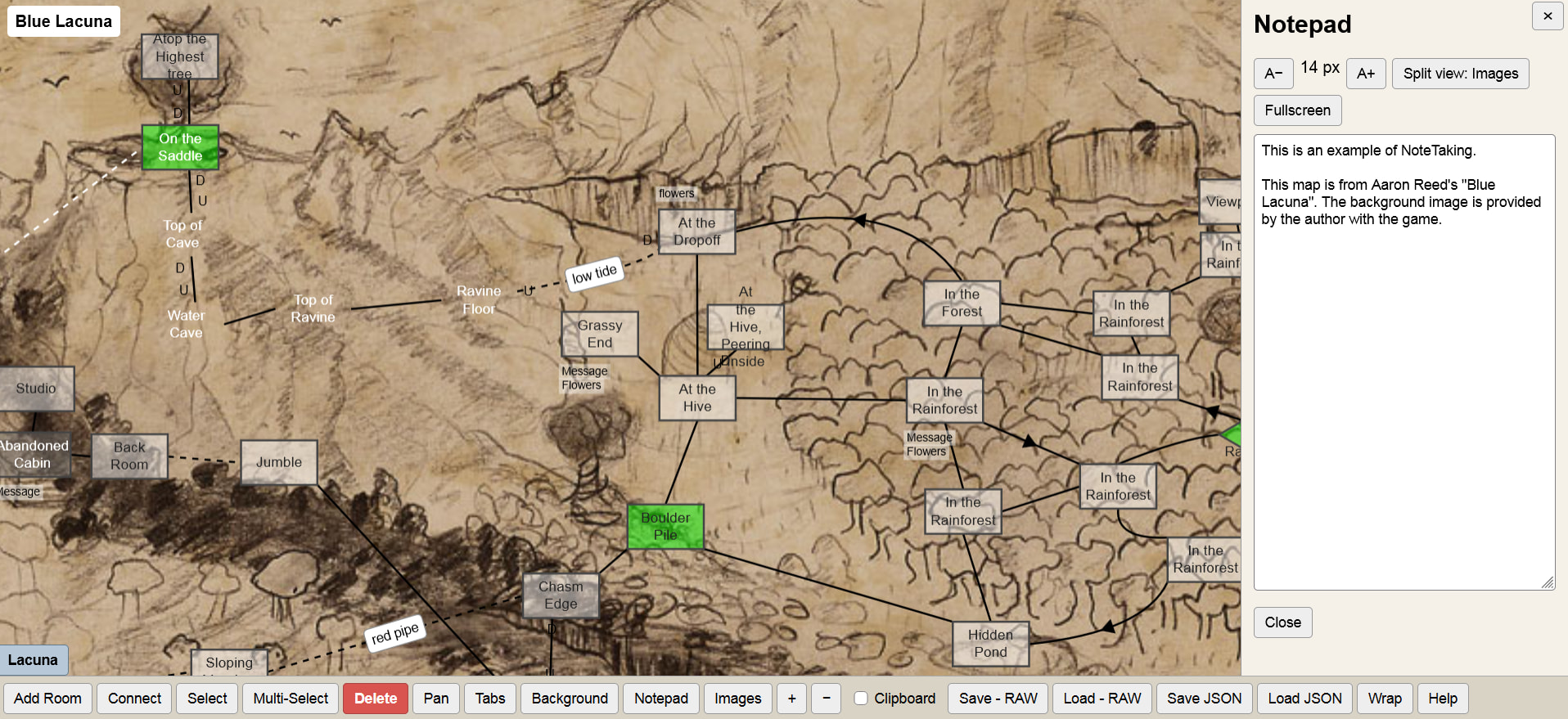
(screenshot is from the game Blue Lacuna by Aaron Reed. Has some spoilers, so, blurred)
What is this?
This is a lightweight, flexible HTML mapper and notetaker with support for loading images (in case you need to reference screenshots, for instance) which focuses on portability and offline use. By all means, preview it online here on this page, but I recommend you download the actual file. There are better tools out there for online mapping. I’m distributing this one, so I’m allowed to say that!
Who is it for?
Technically, it can be used for flowcharts and notes and stuff, but it’s primarily for adventure game and interactive fiction players (including choice-based games, as it can easily track states instead of locations) who want an offline portable tool that their system may not have.
I myself had it created by AI, more on that later, because I wanted this tool. I’ve been wanting it for a long time. Something I could use on Android without internet access. My only alternative, at the time, was one app which, while usable, wasn’t enough for me. So I made this tool for myself, I’ve been using it, I’ve been having it tweaked, and it got to the point where it became more than a mapper; it became a proper companion to an adventure gamer, by also allowing notetaking and image-displaying.
I share it not so it can become the next big thing (it won’t; there are tremendous tools out there already, some with years of pedigree) but so that people who happen to be in my situation can find a tool they can use.
How to use it?
I personally keep it in its own folder, but that’s because I’m ok with, every time I load an image file into the Companion (not an everyday occurrence), pasting the entire address. If this sounds like a drag, I recommend putting a copy of the Companion in the folder where you have your game, or where you have your screenshots. That way you can simply use the file picker.
Apart from that, there is a Help button but I like to think you can click and tinker and very quickly get the hang of it.
One quick note: when creating a connection, it detects where in the room you’re clicking. If you’re clicking on the right side of Room A and then on the bottom-left corner of Room B, it’ll create a connection east → southwest.
AI; or, I Did Not Code Any Of This
Completely coded by AI, and most of the “help” text is also AI. Them’s the breaks. I am not a coder by any stretch of imagination; it was either this, pay a coder (not an investment I wanted to make), or wait until someone created this tool for me spontaneously. So I used ChatGPT copiously. After it came up with the basic framework, I tweaked extensively. I used the tool, I requested changes. The skeleton framework is all AI; the user design choices are all me. The visual design choices are mostly AI; as you can tell by the cover image, graphic and presentation arts are among the skills that elude me.
If you are put off by AI, and believe me I personally am, you have my permission (which you don’t need) to dismiss this entirely. There, now we can all feel good about ourselves.  This is something I had AI make for me. I then tweaked it tremendously according to what I wanted to see in a tool. Now I’m just sharing it because I think it has value. That is all.
Personally, my stance is that I did not create this. I originated it by asking for it. I guided its design. I believe it reflects my design principles. I do not claim to be its creator, author, what have you. This is not something I made; this is something I had made for me.
I suppose we should talk features now
All the basic features you’d expect from a robust mapper, including skewable paths, multi-select and bulk edit, easily editable connections, notes, up/down, labels on paths, some different shapes for the rooms… I recommend giving it a whirl here on the online version to see what it’s like.
Other features are a tab system, which allows your map to have multiple maps in tabs; optimization for touchscreen because that’s my gaming platform; a notepad for freeform notes; an image loader that saves the path of your images and displays them, for those times when what you really need is to take a screenshot and refer back to it; also the ability, if you want, to have just the notetaker, just the images, or just a split window with notes and images, ignoring the mapper completely. You can also select an image to serve as the background. Oh, and bold/italic/underline tags are supported for formatting.
Features more than a way to save your map, because different platforms and systems will have different requirements. Save it as a JSON, or display the save-code on a pop-up (or copy it directly to your clipboard) to paste it on the file of your choice.
Versality: little automation
I was going for lightweight versatilty. To achieve versatility, you have to let the user do what they want, and not “helpfully decide what it is they want”. The various ways you can mark up your map are more valuable than anything I could automatically set up. Here’s a cute example: although you can’t draw notes on an image with this companion, you can set up a new tab, set an image as background, and then use the mapping features over that image to, effectively, make whatever notes you need.
Feedback welcome
Now that this is out there, I would be more than happy to adjust it as necessary. I don’t want feature-creep, I don’t want bloat, I don’t want automation. Apart from that, if I can somehow have this tool tweaked so that you have a better time with it, by all means.
The Bottom Line
_________________________________
The Bottom Line After The Bottom Line
There are many tools out there which do what this tool does. What I think is unique is the combination of things this tool does plus portability plus no internet dependancy. If you already use a tool that you’re happy with, this is unlikely to sway you. And that’s just the way it should be. This is not meant to be the best or the greatest. It’s meant to fill a specific gap.
Basically, it was, initially, what I needed. Then it became what I wanted. Hopefully, it is, by now, what you might find somewhat useful, too.