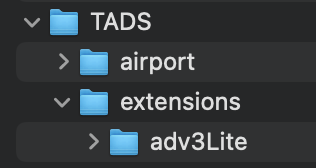
yes. i updated my makefile to point to these based on your other post.
appreciate the help but i’m giving up. TADS looks cool and it’s disappointing, but the whole thing seems VERY futzy. it seems like it’s a huge mass of interconnected files and libraries (as opposed to one library file with dialog and, like, 6 files in inform6 that you just copy into your source directory) and i apparently don’t have the skills to get it working.
it also seems like if i were using windows i would not be having ANY of these issues and the fact that the frobtads linux/mac installation is so out of date and such a chore is frustrating.
so, again, thanks to you and everyone else for the help but i can’t spend any more time on this.
I thought you had in fact successfully compiled with the adv3 example that @jbg gave? Could you not use that setup and write your game code in whatever .t file that was?
I’m really sad to think of you missing out on TADS for this! And very sorry that all this confusion is happening. My two cents is that TADS is worth getting over this unfortunate hump!
If the cut and paste in your post is accurate, it looks like you’re leaving the leading slash off /usr/local/share/frobtads/tads3/lib/extensions/adv3lite/.
i couldn’t help myself. i kept at it since it’s a freaking QUEST at this point to get this working.
i switched to my laptop (also a mac) and i have it working now (for one thing i was using ~ in the path name instead of explicitly listing it.
i’ve moved everything into my home directory as johnyywz00 recommended and that seems to be working as well. compiles are short and only the updated files are rebuilt.
i haven’t yet dared to try again to get adv3lite working but may give it a stab this weekend.
so, right now i’m playing around with TADS/adv3 and, man, it is DENSE. i’m not saying that as a criticism. it’s just an interesting contrast in design philosophies - TADS seems to have a million ways to do very fine-grained things, which is useful but means a lot to remember and keep track of. versus dialog, for instance, which is comparatively spartan but very powerful in the way it lets you use the the tools.
ok, so I owe TADS a public apology. I was having significant problems getting it installed; it would seem to work on one of my computers but not the other; much frustration. but I now know why.
a tip, kids. if you’re going to be “githubbing” back and forth and working on the same code on two computers, make sure when you set up the new computer that the username (and the resulting home directory) of the new computer matches the old one and you didn’t leave off the “jr” for junior on one but that you used on the other.
TADS is running fine but now i’d like to add in the adv3lite library but can’t seem to figure out the magic formula.
i’ve download and extracted the adv3lite package, changed the folder name to ‘adv3lite’ and put this in:
Users/charlesmoore/TADS/frobtads/tads3/lib/extensions
i’ve just been playing around with the minimal “heidi” setup from the tutorial. i copied the makefile from there and changed the path to the adv3lite folder so my makefile looks like this:
Is /Users/charlesmoorejr/TADS/frobtads/tads3/lib where the adv3 library is installed on your system? If so then the problem (or part of the problem) may that you’ve installed adv3Lite under a subfolder of the adv3 library, which I believe has created problems for other users in the past.
On my (Windows) system adv3Lite is installed under C:\Users\erice\OneDrive\Documents\TADS 3\extensions\adv3Lite. The idea is that you create (or have) a TADS 3 directory for all your TADS 3 projects that is quite separate from the directory under which the TADS compiler and adv3 library are installed, and then place an extension directory under that TADS 3 directory and the adv3Lite directory under that …/TADS 3/extensions directory (I can see that this could be made clearer in the quick start guide, though, so I’ll update that for the next adv3Lite release).
I’m not sure, but the problem may be that the compiler gets confused by having adv3 and adv3Lite in the same path, at least that seems to be the case on Windows systems and may also apply to your Mac.
but i have no real idea how i’m supposed to get the compiler to find BOTH the necessary TADS files AND the adv3lite files it needs.
i think a big part of the problem is that frobtads installs everything by default in a location completely different than the documentation/tutorial uses which messes up someone like me.
I created a TADS folder in my Documents folder and then created an extensions folder and put the adv3Lite folder in there. I put all my TADS games in a folder in the TADS folder. I would also reboot once you get everything rearranged.
yes. i have mine set up like this as well, with the extension folder under TADS in the document folder. and, yes, i’ve tried that makefile and still i get some variation of:
unable to open library file "system.tl"
unable to open library file "../extensions/adv3Lite/adv3Lite.tl"
i have noticed that the makefille path lists …adv3lite/adv3lite/
but there IS no second adv3lite directory in the frobtads download. not sure if this is meaningful or not.
Is the above still in your make file? If so remove it and try to compile.
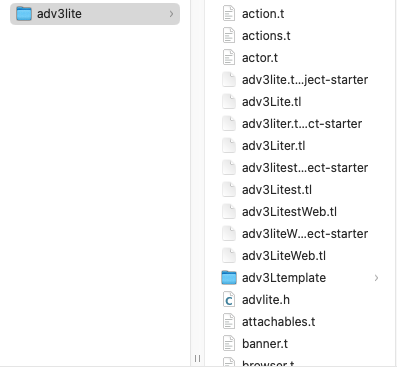
Also, my adv3Lite folder looks the same as your screen shot. So I think that part is ok, at least.
Also, are you using VSCode?
I got it working. embarrassingly, I brain-farted and thought I already had my code-folder already in the TADS folder but didn’t. so now it’s there and now it’s working.
yes, I’m using VSCode. is there something cool I should be doing?
a warm suggestion: pls don’t try to find something cool to do with TADS/VScode integration; as in the old saying, when things are fixed and working, don’t touch these…
… in other word, let’s hope that we can successfully close the issue here