Rez v1.7.0 — open source tool for creating non-linear games/IF

I wanted to implement a conditional continue link, based on what was typed into an <input>. It has been a while so I had to remind myself.

First we need to be able to hide the link.

@styles {
  .hidden {
    display: none;
  }
}

@card c_test {
  content: ```
    <a card="c_test_next" class="hidden">Continue</a>
  ```
}

Now we need the input whose value will enable the link. We add the rez-live attribute which automatically generates an on_input event whenever the input value changes.

@styles {
  .hidden {
    display: none;
  }
}

@card c_test {
  content: ```
    <input type="text" rez-live />
    <a card="c_test_next" class="hidden">Continue</a>
  ```

  on_input: (card, params) => {
    // When the input changes we'll get notified
  }
}

Now we tie the pieces together, giving the link an id attribute so we can target it:

@styles {
  .hidden {
    display: none;
  }
}

@card c_test {
  content: ```
    <input type="text" rez-live />
    <a id="continue-link" card="c_test_next" class="hidden">Continue</a>
  ```

  on_input: (card, params) => {
    const hidden = params.evt.target.value.length < 3;
    document.getElementById("continue-link").classList.toggle("hidden", hidden);
  }
}

This presents the card with the link initially hidden. If more than 2 characters are typed into the input the link will become visible.

If I also want this value stored somewhere I can use the rez-bind="#id.attrName" attribute to bi-directionally bind the input value to an attribute of an element.

@player {
  $global: true # so we can use $player to refer to the object
  user_value: "a"
}

@styles {
  .hidden {
    display: none;
  }
}

@card c_test {
  content: ```
    <input type="text" rez-live rez-bind="player.user_value" />
    <a id="continue-link" card="c_test_next" class="hidden">Continue</a>
  ```

  on_input: (card, params) => {
    const hidden = params.evt.target.value.length < 3;
    document.getElementById("continue-link").classList.toggle("hidden", hidden);
  }
}

Now the card will present the <input> field with "a", the initial value of the attribute user_value on #player. When the <input> value changes, $player.user_value will track it. If another handler was to modify $player.user_value the input field would be updated also.

Note that in our on_input handler we don’t use hidden = $player.user_value.length < 3. This is because there’s is no reliable way to ensure the order of the underlying events. If the on_input runs before the bind handler you’d get the old value. Hence we reference the value of the input directly.

3 Likes

Today I built a conversation system. It’s based on the built-in @inventory and @item systems that Rez provides.

I’ve put my implementation into the cookbook, here’s an example:

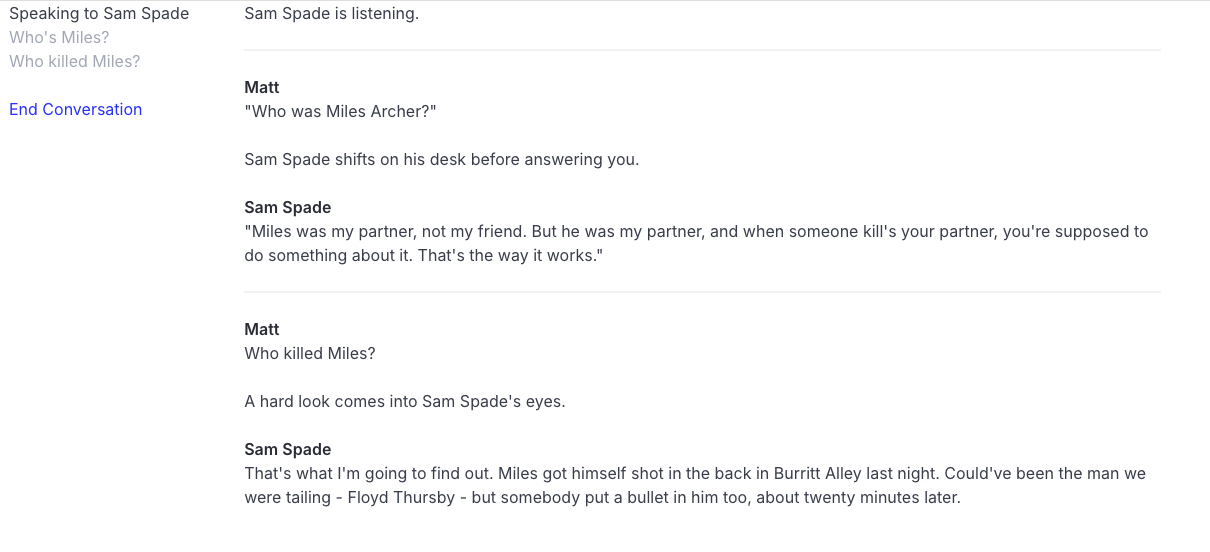
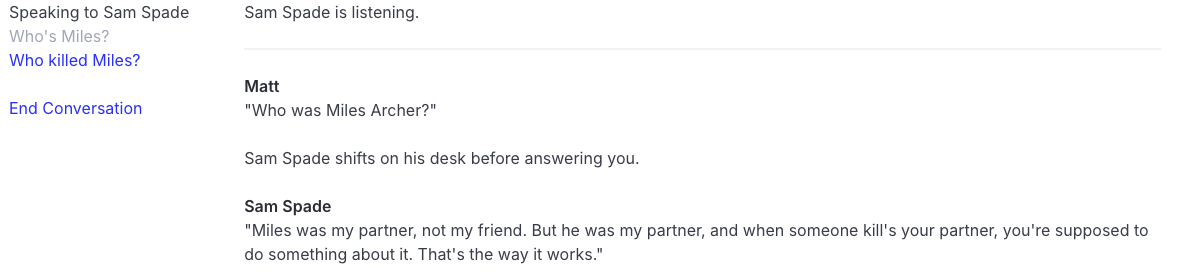
At the beginning of the conversation only the “Who’s Miles?” topic is available to the player.

But after asking about Miles a new topic “Who killed Miles?” becomes available.

Could use some nicer formatting, but I’m quite pleased with how it’s working. It’s the first time I’ve made use of layout_mode: :stack which allows for playing multiple cards into a scene. Means that the conversation history sticks around.

The implementation is simple: create a @topic and a @card for each dialog option you want to present to the player. Because the rendering is done via a card all the Rez layout tools are available:

@topic t_who_is_miles_archer {
  title: "Who's Miles?"
  card_id: #c_who_is_miles_archer
  related_topics: [#t_who_killed_miles]
}

@card c_who_is_miles_archer {
  bindings: [
    player: #player
  ]
 content: ```
  <.dialog speaker={player}>"Who was Miles Archer?"</.dialog>
  <.pb>${scene.actor.name} shifts on his desk before answering you.</.pb>
  <.dialog speaker={scene.actor}>"Miles was my partner, not my friend. But he was my partner, and when someone kill's your partner, you're supposed to do something about it. That's the way it works."</.dialog>
  ```
}

@topic t_who_killed_miles {
  title: "Who killed Miles?"
  card_id: #c_who_killed_miles
}

@card c_who_killed_miles {
  bindings: [
    player: #player
  ]
  content: ```
  <.dialog speaker={player}>Who killed Miles?</.dialog>
  <.pb>A hard look comes into ${scene.actor.name | possessive} eyes.</.pb>
  <.dialog speaker={scene.actor}>That's what I'm going to find out. Miles got himself shot in the back in Burritt Alley last night. Could've been the man we were tailing - Floyd Thursby - but somebody put a bullet in him too, about twenty minutes later.</.dialog>
  ```
}

The sc_conversation scene keeps track of marking topics as read when the player accesses them and adds related topics to the actors topic inventory when a topic is accessed, allowing hidden knowledge to be discovered. Of course any script in the game can also add knowledge in the same way.

As well as allowing for different layouts for different parts of the game this custom event processing is one of the key reasons why @scene exists.

4 Likes

I’m also experimenting with replacing Bulma CSS with Tailwind CSS. Since I use Tailwind for work projects it would make sense. It’s a little awkward as there isn’t a static CSS file available, but it’s not too hard to build one.

# Create a file with every class you might need
cat > all-classes.html << 'EOF'
<div class="text-xs text-sm text-base text-lg text-xl text-2xl text-3xl text-4xl text-5xl text-6xl">
<div class="bg-red-50 bg-red-100 bg-red-200 bg-red-300 bg-red-400 bg-red-500 bg-red-600 bg-red-700 bg-red-800 bg-red-900">
<div class="bg-blue-50 bg-blue-100 bg-blue-200 bg-blue-300 bg-blue-400 bg-blue-500 bg-blue-600 bg-blue-700 bg-blue-800 bg-blue-900">
<div class="p-1 p-2 p-3 p-4 p-5 p-6 p-8 p-10 p-12 p-16 p-20 p-24">
<div class="m-1 m-2 m-3 m-4 m-5 m-6 m-8 m-10 m-12 m-16 m-20 m-24">
<div class="grid grid-cols-1 grid-cols-2 grid-cols-3 grid-cols-4 grid-cols-5 grid-cols-6 grid-cols-12">
<div class="gap-1 gap-2 gap-3 gap-4 gap-5 gap-6 gap-8 gap-10 gap-12 gap-16">
<div class="flex flex-col flex-row items-center justify-center justify-between">
<div class="w-full w-1/2 w-1/3 w-1/4 w-2/3 w-3/4">
<div class="max-w-xs max-w-sm max-w-md max-w-lg max-w-xl max-w-2xl max-w-4xl max-w-6xl max-w-prose">
<div class="mx-auto px-4 px-6 px-8 py-4 py-6 py-8">
EOF

tailwindcss --input input.css --output assets/tailwind.min.css --content "./all-classes.html" --minify

I’m going through these shenanigans because there’s no convenient HTML templates lying around to get classes from and because I don’t want to clog up the build process with an external tool.

Update: this morning I saw more clearly (esp. since the tailwindcss scanner runs in about 22ms) and changed my build script to:

#!/usr/bin/env zsh
function show_time() {
    echo "$(date '+%Y-%m-%d %H:%M:%S') — Rebuild"
}
clear
show_time
rc compile src/game.rez && tailwindcss --minify --cwd dist --output assets/tailwind.min.css && osascript -e 'tell application "Google Chrome" to reload active tab of front window'
echo "Finished."

Because the tailwindcss scanner is looking for string matches this will pick up any use of tailwind classes as long as you don’t build them with dynamic experssions such as:

const color = params.color || "red";
const klass = `text-${color}-500`;

If you do then you’re going to need to do something like:

const color = params.color || "red";
// can generate text-red-500, text-blue-500, text-green-500
const klass = `text-${color}-500`;

So that the scanner can find all of the classes it might evaluate to.

I have a dummy tailwind.min.css file in my assets/css folder so that the rez compiler has something to copy and in my game:

%%@asset _BULMA_CSS {
%%  $built_in: true
%%  file_name: "bulma.min.css"
%%}

@asset _TAILWIND_CSS {
  $built_in: true
  file_name: "tailwind.min.css"
}

And now I am up and running with Tailwind. Rez itself doesn’t make use of any of the Bulma classes so it’s really just a case of re-styling my div’s and text how i want it.

What this has proved is how easy it is to replace the CSS library Rez uses.

I think I will leave Bulma as the default. I certainly think it’s friendlier to authors. Tailwind is great when you want more control and don’t mind fiddly detail. I’m hiding that detail in components but there’s no escaping it.

2 Likes

this reminds me of TADS3 libraries’ knowledge and conversation systems, cool. Might be worth looking at the documentation for inspo for more features

2 Likes

Thanks, that’s a good call.

1 Like

I’ve made three improvements to my conversation system.

First a topic can now specify removes_topics: [...] and, when it is used, it will remove the other topics from the available topics for that actor.

I use this to offer multiple responses to a topic. Here’s an example:

@topic t_offer_to_kill_the_prince {
  title: "Shall I kill the prince for you?"
  card_id: #c_offer_to_kill_the_prince
  related_topics: [#t_yes_kill_the_prince #t_no_let_the_prince_live]
}

@topic t_yes_kill_the_prince {
  title: "Kill the prince!"
  removes_topics: [#t_offer_to_kill_the_prince #t_no_let_the_prince_live]
  card_id: #c_yes_kill_the_prince
}

@topic t_no_let_the_prince_live {
  title: "Let the prince live"
  removes_topics: [#t_offer_to_kill_the_prince #t_yes_kill_the_prince]
  card_id: #no_let_the_prince_live
}

The card content isn’t terribly relevant. But what this does is let us present a choice in conversation with two responses. Picking one or other response removes the original dialog choice and the response not chosen.

Second, the conversation scene passes a parameter to the card rendering the topic content that indicates how many times the player has seen the topic. This means that, rather than repeating the previous dialog, we can offer something else:

@card c_yes_kill_the_prince {
  content: ```
  $if(params.read_count > 1) -> {%
    <.dialog speaker={actor}>"The order is understood m'lord. The prince is a dead man walking!"</.dialog>
  %}
  (false) -> {%
    <.dialog speaker={actor}>"Yes my lord, I will away and dispatch him this very night!"<./dialog>
  %}
  ```
}

This makes it simple to add different responses to a repeated topic.

Lastly, an @actor can now respond to a player choosing dialog topic. For example:

@npc advisor {
  frustration: 0
  
  on_topic: (npc, params) => {
    const {topic} = params;
    if(topic.read_count > 2) {
      this.frustration += 1;
    }
  }
}

And every time the player re-uses a topic more than once we can increase the NPCs frustration level. This would allow us to, for example, prematurely end a conversation.

Equivalently @topic’s can now implement an on_used: handler for conditional logic associated with that topic.

1 Like

The next major version of Rez is going to come with some kind of cookbook lib that contains a flexible storylet implementation and a fleshed out conversation system.

What’s quite gratifying is that the conversation system is based on the inventory system, confirming that it works and is as flexible as intended.

4 Likes

It’s interesting that a lot what this library is doing is working around the fact that the dialog system is hidden behind the parser and is limited in its interaction mechanisms. It’s clever but from my perspective, using Rez, mostly unnecessary.

One area that is useful to think about is the “Ask X about Y” which is definitely easier in a parser context because enumerating all the possible {X, Y} combinations in a visual interface isn’t going to be plausible once you hit a reasonable number of characters. Parser scores there for sure.

My current working hypothesis is to essentially offer the topic that comes with a dropdown to select the characters/concepts involved. But I can’t see any way that doesn’t feel clunky compared to the parser variant.

1 Like

This looks pretty similar to a language I was hoping existed a couple years ago. I ended up making my own language, but maybe I should wish that I’d found this first. Do you have a discord or somewhere with short-form messaging? I have a lot of smaller questions that a forum wouldn’t be as fit for.

1 Like

I think the coolest thing abt TADS libraries’ convo/actor system is its knowledge system. Have you looked at that? It’s something I thought you might be able to apply to rez.

2 Likes

This is what I mean about the flexibility of the inventory system. I think I get most of this for free:

@slot knowledge_slot {
  accepts: :concept
}

@item thing1 {
  type: :concept
  name: "a thing i know"
}

@inventory player_knows {
  slots: [#knowledge_slot]
  initial_contents: {knowledge_slot: [#thing1]}
}

If I want to model something more complex, let’s say the idea of belief:

@derive :concept :belief

@item world_is_flat {
  type: :belief
  confidence: 0.9
  name: "The world is flat"
}

@item moon_is_cheese {
  type: :belief
  confidence: 0.5
  name: "The moon is made of cheese"
}

@inventory player_knows {
  slots: [#knowledge_slot]
  initial_contents: {knowledge_slot: [#world_is_flat #moon_is_cheese]}
}

It’s all just inventories and items with their attributes.

The inventory could be attached to the actor or even to the @relationship between actors.

Again the notion of giving orders is more a UI problem than a modelling problem. I could create an @item type that represents an order and create an order inventory slot. Same as knowledge.

3 Likes

Hi Kyle.

I am @sandbags on the IF Discord. I think it’s the one mentioned here in this post, but I can’t be 100% certain.

Oh! I think I just welcomed you on the IF Discord… I didn’t connect your nick here with there. So it’s that one and that’s me :slight_smile:

Your dropdown doesn’t sound so bad, but i can tell you what i do:

“ask abouts” are authored as parent objects to characters. This means the parser understands > Ask Holmes about Sir Fitzgerald, but also the same object can be a parent to the conversation choice node too. Yes, choices can have object parents (and objects can have choice parents!).

The parent “ask about” object to the conversation choice node injects additional “ask about” choices into conversations. But importantly these are usually done as low priority. I have a choice priority system and these are usually marked for “padding”.

The system tries to keep the number of available choices at any time sensible, but once all the lead dialogue choices are exhausted, these “padding” choices start appearing.

If I understand you correctly you’re saying you pick “Ask Holmes” or “Ask Watson” or “Ask Lestrade” and then within that context you have the things you could ask that single character about. If you switch to another you might get a different set of questions. Is that right?

No sorry i didn’t explain it too well. what you’ve described is a good way but the way I’m doing it is simpler but not as fancy;

Because i have both a parser and choices, a peculiarity of my system is that i can factor out the “ask about X” options for a given character into a separate node and share it between both the parser and the choices. So this node is all the ask abouts for one character. Say there are 20.

When this node of 20 is part of the character object, there is no problem because it represents 20 things you can type in. But you don’t want it to also generate 20 choices for that character when it is used in the choice node.

So, your question was about how to manage the list of possible choices. What I’m doing is allowing choices to have a priority. So usually an “ask about” node will be marked as low priority - aka “padding”. And the choice engine will use use it to top up the number of available choices at any time. You can change the priority, in case one of the asks is important.

So it’s just a simple way of avoiding overloading the number of choices.

Just had a flash of inspiration. I was getting a bit annoyed with this duplication:

@elem topic = item

@defaults topic {
  type: :topic
}

@topic t_some_idea {
  card_id: #c_some_idea
  ...
}

@card c_some_idea {
  content: ```
  ...
  ```
}

The idea is that I need the @topic because an @inventory manages @items. But the renderer works with @cards so we need a topic:card pair if we want to render topic content.

I was looking into M4 as a pre-processor so that I could write something like:

@TOPIC(“some_idea”, ...)

and have it expand into the @topic and @card definitions. But… enh…

Then it occurred to me to ask what @item actually does. Here’s the definition of RezItem

class RezItem extends RezBasicObject {
  constructor(id, attributes) {
    super("item", id, attributes);
  }
}

So, not much. In fact it really only exists so that @item has a JS object representation. At that time I didn’t have the generic @object element. In practice the only thing an @item requires is the type: attribute that is matched to the type hierarchy defined by a @slot’s accept: attribute.

It suddenly occured to me that I can get rid of @item and RezItem altogether and simply have @slot accept anything with a type: (although I might change it to item_type).

Now I could write:

@elem topic = card
@defaults topic {
  item_type: :topic
}

@topic t_some_idea {
  content: ```
  ```
}

Now @topic has been made into a kind of @card that can also be an @inventory item. No more duplication.

Update: RezItem may not have anything much going on, but I forgot that the parsing for @item does. It has validations for attribute related to being an item like ‘size’ and so forth. In practice I think I can lose this stuff without too much trouble but it’s perhaps not so trivial as I first thought.

I’ve been checking out the docs and I really wanna give it a whirl :slight_smile: congrats on the system dev

1 Like

That’s brilliant and I am pleased. I’ll be happy to give you any assistance I can. If you want to chat it over the Discord might be easier.

1 Like

Talk about unintended consequences…

I’d been thinking about how I could turn conversation topics into @card elements so it was easier to make them part of the game, yet still allow them to be part of an @inventory (which is what @items are for). This lead me to thinking about how I do away with the @item element. After all, it wasn’t doing much except being a holder for attributes (most particularly the type: attribute that is used for inventory slot matching).

A simple change spiralled and after ending up rewriting about 50% of the compiler (~9k lines of Elixir) I am finally at the point where I can do that. Along the way I tidied up and simplified a bunch of compiler and AST internals that had accumulated quite some cruft. That’s great, but I hadn’t intended to do any of that work when I started!

The main observable change is that validations are no longer part of the Elixir codebase but, instead, part of the Rez language via a new @schema directive. The stdlib contains @schema that represents the old validations code for the built-in elements.

It looks like this:

@elem weapon = object

@schema weapon {
  damage_type: {kind: :keyword, in: [:blunt, :edged, :piercing]}
  damage_dice: {kind: :number, min: 1, required: true}
}

@weapon long_sword {
  damage_type: :magical
}

This will fail to compile with the error:

In item#long_sword: damage_type must be one of ["edged", "piercing", "blunt"] was "magical"
In item#long_sword: damage_dice must be defined

Note that, from an author perspective, the whole @schema system is entirely optional. If it helps, great, if not it can be ignored. For example, I find having the compiler validate the element id’s I am using to be pretty helpful and as my game gets bigger that should save me time and frustration.

So, in Rez v1.8 @item will switch from being a built-in element to being a pre-defined alias of @card that includes the validation schema items used to have.

This means that items, topics, whatever you want to include in an inventory can fully-take part in the rendering process and be described using all the template power available to cards.

But boy was this 10x the work I anticipated for what seemed, at first glance, a simple change :slight_smile:

3 Likes

Oh, one other thing I’ve done — which was a long standing desire — is to improve Ergo (my parser combinator library) to allow recovery of a partial AST when a sequence parser fails.

For example the parser for an attribute:value pair looks (a little simplified but) something like:

def attribute_value_pair() do
  sequence([
    attribute_name(),
    colon(),
    white_space(),
    attribute_value()
  ])
end

The problem would be that if attribute_value() failed it would cause the sequence to fail and not return an AST. Which is correct, there is no AST. But this meant that the partially built AST (containing the attribute name) was thrown away. I’d know an attribute had failed to parse, but not what it was called. It made writing good error messages hard.

Now the parser context receives the partial AST and error handlers can see what (if anything) was parsed before the error occurred.

Perhaps an overly nerdy detail but it made me happy.