Offtrail Tales: a free browser editor and player for choice-based stories with media, powered by ink

Offtrail Tales

Hi everyone,

My name is Richard, and I am an RPG enthusiast and aspiring novelist. This project is dedicated to my uncle R.K., who introduced me to the classic choice-based interactive fiction books of the 80s and to text-heavy RPGs like Baldur’s Gate. He was the one who truly sparked my interest in computers and software. In daily life, I am an academic who writes analytical code pipelines for genetic data on HPC clusters, so I am also a big fan of open-source libraries and tools that enable creative spin-offs.

I want to share Offtrail Tales, software I built for myself, which I think others can enjoy: a free browser-based editor and player for choice-based interactive fiction (CYOA) with full media support, powered by ink and with a modern GUI. The player looks good on mobile and computer; the editor works best on a computer. Both run in the browser: no install, no app store. If you use Inky, you will feel at home. And it is truly free. There is no business model, no logins or tracking, no marketplace, only a harness focused on the storytelling.

Please enjoy the demo story in the Offtrail Tales app, No Experience Required, shipped as a template to show how easy the editor is (no pun intended). It runs directly in your browser from the link. There is nothing to install or download.

The fastest way to see what I built is to look: watch the walkthrough on YouTube.

I am not from the IF community, so excuse me if I miss any conventions. I answered Hidnook’s checklist for new platforms on a separate page. I realise many AI-generated apps are being put out, perhaps to make a quick buck, but despite all the amazing efforts out there, none served my purposes, so I believe Offtrail Tales fills a gap. Most tools look like complicated coding environments, and their landing pages are seldom an intuitive app but a wall of links to installers, build systems and documentation. Offtrail Tales opens straight into the app. The editor is built for ink and ink only, with simple markup instead of macros. My philosophy and a comparison with 16 alternatives are on the features page. Try it and judge for yourself.

Whatever your opinion on AI: there is no AI on the platform, and authors decide whether and how to use AI, down to writing their tales with zero AI. For new users, I recommend keeping a chatbot on the side to help with ink syntax. That lets you focus on the story, not the code. If you prefer VS Code with full agent integration, the purpose-built .otproject file is just a ZIP of your plain ink text and media, so you can unzip it, work on your tale that way, and open it again in the editor. The shipped docs and specs mean AI agents work seamlessly. If this app ever dies, you are not locked in: it is all plain ink and on your machine.

I made Offtrail Tales because I wanted it to exist, and if you are looking for a strong and versatile app for choice-based IF, this may be what you have been looking for. The app will always be free. The real value is in the stories authors write, and they keep full control of those through their .tale and .otproject files. The GitHub server never sees your content.

Feedback is welcome: what works, what does not, what is missing. If you have a story in ink, you can open the .ink file in the editor right now. If you are new to ink, the editor starts with templates and a worked example.

MIT-licensed. The full app code is viewable in your browser or on GitHub, and the readable source will be released publicly after further testing. GitHub only hosts plain files, nothing runs on a server, and the app runs entirely on your own device. Unlike many web apps, there are no accounts and no server-side storage. Because it is only static files, you will also be able to host a copy yourself once the full source is open.

Thank you for reading. The craft in the IFTF community is something else, and I look forward to learning from you.

Richard offtrail-tales@proton.me


AI disclosure: I built it on top of ink and inkjs, with Claude by Anthropic writing the code. Every change goes through code review, security review and automated testing before it ships. There is no responsible-AI-coding standard yet, but this is the process I would want behind it. All the creative and design decisions are mine. The efficient, safe, fast and portable code is Claude’s. My philosophy is that AI will push the price of code toward zero, so we can focus on the value of the program. In this case, I woke up one weekend wanting to write an IF story, found no good tool, and the lack of one stopped the artistic process before it began. Thanks to AI, I could build the tool in three weeks. Writing the stories will take longer, and that is the whole point.
Hello. This worked really well. I took the basic demo start and added a couple of pictures. This worked very well, auto-converting for me. I published to a .tale and imported it again! Well done for that.

Most of the systems I’ve looked at did not do that re-import cleanly. Especially for media.

I played, “No Experience Required”. It’s quite good, but I expected a bigger ending. Nevertheless, good work making a playable example for your system!

Here’s what i think is the only thing missing:

The ability to “deploy” to HTML/js so that a story can be copied to a regular web server and played. Is this possible?

I also played No Experience Required and felt it played pretty well. It’s an interesting story, and the formatting looks good.

I was a little confused about the role of the art, though. There was art at the start, and then there wasn’t art any more. What was it doing for the story?

Also, when I followed the link to the website, I got an immediate error about media interaction being forbidden, probably because you tried to play music before I had interacted with the page.

Thank you both so much for taking the time, and for the kind and useful feedback. I have implemented your comments.

@jkj yuio
* I added an Export .html button to the Editor. It makes one self-contained page with the player and your tale. You can open it straight from disk, or host it on a web server or itch.io page. The page plays only its own tale: it cannot open other .tales and does not ship with the Editor. I also added a few security layers: an exported page can’t make any network requests, and it checks every file’s hash before it plays.

Also, see it as experimental in terms of how much asset file size you can pack before you hit load and RAM issues. A page loads whole into memory before it plays. The .tale avoids that: the app keeps it in the browser’s storage and reads each file from there as it plays.

Since an .html file can be tampered with, only open one from a trusted source. A .tale avoids that: it can’t run scripts in the Offtrail Tales app, and the app checks every .tale on import. As soon as I make the full source public, you can self-host the app as you wish.

@Hituro
* The error on entering the app has been fixed. It was indeed an interaction with sound playing. Good catch, and thanks for persevering past it. If you run into it or something similar again, please let me know.
* Most of the example story is indeed light on media assets. It is a work in progress. I added one more image to keep it moving forward. The main idea behind the few chosen assets was to showcase the Editor’s media insert functions.

Lastly:
* A new theme tag in ink for fine-grained control of colours: change the tale’s colours mid-story, or colour a single choice.
* A bunch of smaller performance, GUI and documentation fixes, such as a draggable divider between the text and the preview, and bold and italic buttons in the Editor.
* I added seventeen new entries to the feature comparison page on how existing alternatives compare, five of which were similar enough for a detailed comparison.

Thanks again. Feedback like this is exactly what helps.

We’ll see how long it takes, but I’ll now start writing Roadside Attraction, one of the reasons I made this software.

If you think of more features or run into bugs, please let me know.

Wouldn’t it be better to have an option to use external assets? That would reduce or eliminate the concerns about RAM issues, and allow the browser to leverage its normal caching mechanisms instead of trying to jury rig your own.

2 Likes

I just tried the export .html feature, and it works. The export generates a single .html file with embedded media. Great job on this!

However, this might be useful for prototyping, but as @Hituro says, it won’t scale. Also, it will take time to load if large. Especially over mobile networks.

Could it not work as follows;

Export .html could be “export web” and it actually exports a .zip file containing the game as index.html and a “media” subdirectory containing images, sounds, videos etc. The .html file references the media as “media/whatever.avif” etc.

This would then automatically load the media on demand?

Good progress. It’s looking very promising.

Thanks for thinking along. Very helpful.

I think I have found a better solution (hope to implement in the next few days).

The plan: I will make an export button for users to export the Offtrail Tales player app as a single .html file (the user can choose with or without: theme music, test stories, or Editor). Without all these, the HTML version of the app is less than 1 MB. This gives you a single .html with the entire player and no built-in tales, running either locally or hosted. If the tale you want to distribute is small enough, then you embed it.

Next, for tales too large to embed, we do not spread media assets in directories (like an index.html and a “media” subdirectory), and why would we – we have the .tale format to hold media. This leads to the same or better compression. See the spec: a .tale is basically just that ZIP you mentioned, but with a fixed spec and controlled parsing by the app layer. This spec makes it safer for the user too, as the player does not allow code or scripts via the media or .tale.

You have already seen the proof of concept for this idea via the current export .html file. But the current html-export either embedded the tale, or it applied the problematic system of an index.html document with tags pointing to media in subdirectories (see issues below).

Thus, the solution becomes two files: offtrail-tales.html (as app, not html document) and story.tale. Nothing more, nothing less, and it runs locally and hosted. And if your tale is small enough, then you embed it. If not, you send .html plus .tale, which is no more burden than index.html plus directories in a zip.

Please tell me if this solution resolves your direct request of having a standalone HTML that runs both locally and can be hosted, and that can still play any media that the real player can, via the .tale file (not loose assets in directories).

To answer your question why not just do a standard index.html document with tags pointing to directories with external media assets like you suggested? Because each solution for full support of external asset media directly readable by an HTML document (not an app in HTML form) encounters some issue or risk. AFAIK, none of the alternatives solve all of these issues at once, while a standalone OT-player app in HTML with a .tale does.

Ultimately, I am all ears to an argument why index.html plus asset directories would beat the above plan. But I am pretty convinced offtrail-tales.html app together with a .tale is the way to go when your media is too large to embed. In that case, the limiting factor is the device memory and storage.

Also, remember that my entire philosophy is that player, editor and tale are separate modules – and why I chose that: Offtrail Tales — Features & Comparison

Please let me know what you think about this proposal!

1 Like

This does sound really good. I like the idea that a standalone game is really just it’s .tale file. presumably, the exact same as can be loaded into your game library.

I do have a few questions though,

I figured a .tale is a zip. And this is a good way to package your content. However, how will this work running over a network? So;

As I understand it, the player and the .tale are hosted somewhere, and the client runs the player html. In this scenario, does the client immediately fetch the whole .tale file before the game can begin? Or are parts of the tale fetched on demand remotely?

If the former, you are back to the scaling problem. If the latter, you’ll need to range fetch segments of the tale. Doable, but fiddly.

Please clarify what you mean by running over a network? Offtrail Tales always runs locally, whenever hosted (say my public hosted site), the full app is served and then runs locally. That is the design.

With the proposed solution for html, say you have a standalone HTML player and a .tale locally. Opening the HTML loads the 1MB app into browser storage and memory. If you load a .tale, it loads its assets into browser storage (disk, not RAM). Assets are read from browser storage into RAM when called by the app (lazy loading).

Thus, the limiting factor under my solution for standalone local play is disk and RAM.

Over a network, transferring the tale is what takes bandwidth. Loading the app — HTML or otherwise — in its hosted form is less than 1MB minified. Preferably the user downloads the tale file of arbitrary size locally from whatever network storage link you provide.

Thus, even in the hosted form, everything runs locally in the browser — device storage and memory remain the only limiting factors. Perhaps have a look at my design documentation to get a feel for this design philosophy that nothing runs outside users device.

Thanks again for thinking along!

If you have the player HTML and .tale locally, i can see it working exactly as you describe. However, my concern is for web hosted play;

Here, you’d have both the player HTML and the .tale on a server somewhere (eg itch.io). When a user runs the player, the browser will fetch the 1MB player HTML as you’ve described.

But then how is the player HTML in the local browser to access the remote .tale file? Either;

  1. the whole .tale file is downloaded at that point before the game can start. or;

  2. The local HTML fetches parts of the remote .tail file on demand.

From what you describe, it seems you have case (1).

That being the case, there is no improvement over your “package everything into a single HTML” solution you have right now.

And it;s going to be terrible for games with lots of media running from a hosted server (like itch.io). Because the game will take an age to start. So long, the user will give up thinking it frozen up.

I think your possible solutions are;

  1. player uses HTTP GET Range within the .tale to network fetch files within a .tale (zip file). OR;

  2. not use .tale files and go back to the idea of index.html and a “media” directory with plain files. OR;

  3. You can run locally from a player HTML and a .tale, but when hosted, you would unzip the .tale file and the player would know to HTTP GET the component files on demand.

Thanks for clarifying. I think the confusion stems from this: if you host, you do not need a standalone HTML; and if you need a standalone HTML, you are in the local play setting.

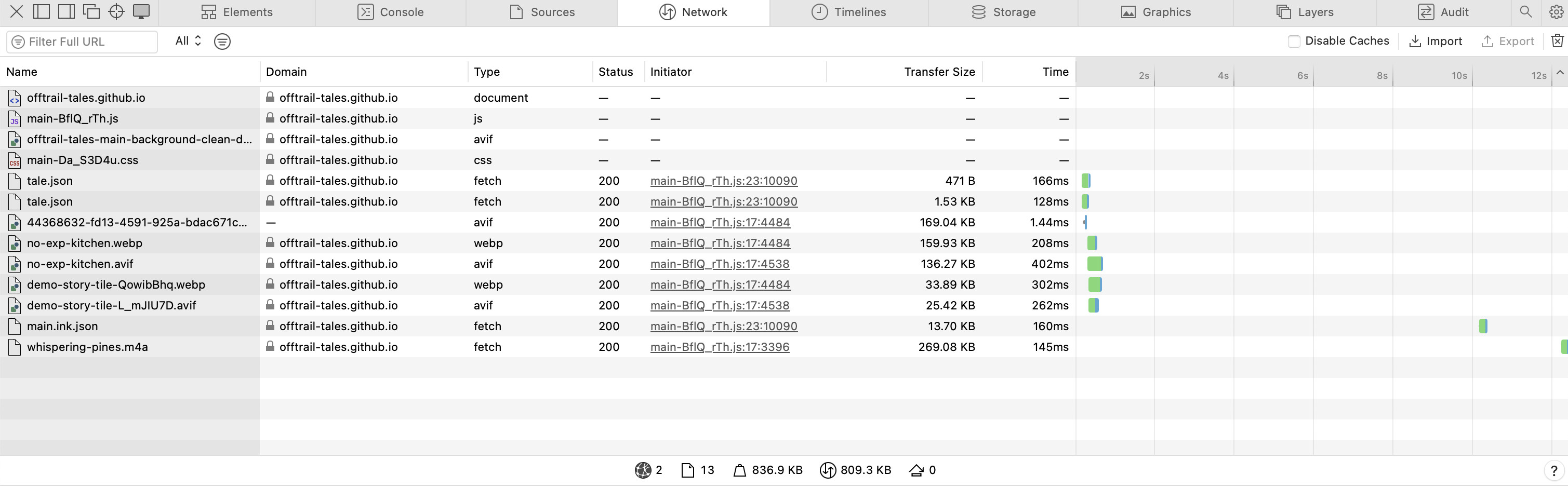
If you host, Offtrail Tales already does what you describe. Each media asset is a separate HTTP request, fetched only when the story reaches it. Here is a screenshot of Safari’s network tab on the live site, playing the built-in tale:

13 requests, 837 KB total. The 6.8 MB tale bundle is never downloaded. A player who quits after the first scene downloads only that scene’s assets. Only one audio track loaded (whispering-pines.m4a, 269 KB). The three large ones are still on the server, because their passages were not played:

  • dark-crime-atmosphere.m4a — 1.2 MB
  • edge-of-darkness.m4a — 3.5 MB
  • noir-crime-tension.m4a — 1.2 MB

That is 5.9 MB of audio that stays on the server until the story calls for it.

The standalone player with a .tale solves a different problem: when there is no server. And if local, assets are loaded lazily from the .tale file.

The hosted Offtrail Tales app is index.html + JS + CSS + media files in directories — exactly the model you describe. What breaks is when you want it to work standalone: browsers block fetch to local files, so audio and video stop working. That is the problem the .tale format solves.

I was too hasty proposing the export button — that solves the local play case, not yours. I am sorry, and thank you for bearing with me. Give me a few days. I will publish full instructions for hosting Offtrail Tales with large tales.

Understood. I’m interested to see what you come up with.

In practical terms this is not true for many people in this community. A lot of people host their work on itch, neocities, the IF Archive or other sites which allow you to upload files but not to run a server. This works fine with e.g. Twine where you can point it to statically-served image assets which are fetched using the browser’s usual mechanism. However, it sounds like your setup either requires software running server-side (which is generally not available for free, unlike itch hosting) or for the whole asset bundle (in the .tale file) to be downloaded before play begins.

This particular facet of the IF community, at least, is not super high volume but is big on longevity. Discussions on games written 30 years ago or more are commonplace. Being able to upload a game and expect it to still be there in a couple of decades without keeping server-side software running may be a stronger requirement than you realise.

2 Likes

Thank you. This is what I was trying to explain.

Thanks for clarifying what this community needs. I think I have addressed those needs, and more. Here is what I just pushed live.

@jwalrus, you quoted my line on when a standalone HTML file is needed. I believe the export below covers your point and clarifies how my definition of standalone differs; if not, could you say what remains unaddressed?

@jkj_yuio and @Hituro, I believe the instructions and app features below now give you the hosting you asked for: itch.io or self-hosted, with any collection of your own tales, and with no upper limit on a tale’s total size when self-hosted. If I missed anything, could you tell me what?

Hosting a single tale exported from the Editor. In the Offtrail Tales Editor, wherever you run it, the new “Export for itch.io” button makes a ZIP of plain files: an index.html with the player app, the story, and each picture, sound and video as its own file. Upload it to itch.io, or unzip it on any static host. The browser fetches each file only when the story reaches it, so start-up does not depend on the tale’s size. itch.io caps the ZIP’s size and file count; on your own host, Offtrail Tales sets no limit on a tale’s total size. You choose whether the export lets players import other tales (default: off). The export carries its own player app (no Editor) and calls no other address, so it keeps working as long as the files stay up.

That answers the point about uploading a game and expecting it to still be there in a couple of decades: it runs as plain HTML5, CSS, and JavaScript in the browser, needing nothing from the server but static files over HTTPS.

The ZIP from “Export for itch.io” cannot be imported back into the Editor, so keep the .otproject as your master save. For play via a hosted Offtrail Tales app (say, to let testers play before you launch your itch.io page), send or link the .tale instead. Testing a new version is then just sending a new file, instead of pushing a re-host. And testers can hold multiple versions of your same tale in the app side-by-side. Quick tests on my iPhone suggest that about 1 GB is a good soft limit for switching from a .tale to hosting (though itch.io’s default limit of 200 MB is so low that, at that size, a .tale has essentially no impact on load time). For scale, a 200 MB .tale is playable on an iPhone 14 in about 6 to 7 seconds: about 4 seconds to download over 400 Mbit/s 5G and about 2 to read into the browser.

New feature: The new “Download player” button on the main menu is a better way to export the player app and the Editor: to run the player or write stories offline on a computer, or, for full control over hosting, to pack a collection of your own tales, either as a player-only ZIP like the itch.io export, or built into the full app with the Editor. For hosting, this gives you what opening the full source would: the whole app, yours to serve anywhere.

Download player, on the main menu of the main site (offtrail-tales.github.io), on a computer:

  1. Player only (or with menu music): one .html file of only about 1.7 MB (5.6 MB with music). On a computer, it opens from disk, with no server and no network, and plays any .tale you import into it. This is what I meant by a standalone HTML: one file, with no media folders beside it. The use case: playing a .tale offline on computer, or novice authors that want to share typical tale sizes peer-to-peer without hosting any servers to readers, just send a .tale file and point reader to my main app site, or include the downloaded standalone HTML player app.
  2. Player with your imported tales: a ZIP of the player app with any selection of your imported tales on its menu. Like my test stories, they ship built in, so players cannot remove them from the main menu. Like the itch.io export, it is a ZIP of plain files, directly suitable for itch.io or your own host; when served from your own host, your tales can be any size.
  3. Full app with editor: the whole app as a ZIP, with the Editor’s worked example, to host yourself online or offline, with a selection of your own tales built in if you want.

Playing offline. So on a computer, offline works for both: the player app as a standalone HTML file, usually with a .tale, and the Editor via localhost. The Editor runs in a browser, but it does not need the internet, so you can write in the rustic countryside cottage of your choice.

Offline play on phones and tablets remains unsupported.

I also made a series of smaller fixes and improvements. The new version ships with one more test story, Pending, which is in early development but illustrates more of the media capabilities, such as video, the keypad prompt, and the map system.

Details on the new release in the wiki: How to publish and host tales.

Thanks again. Your perspectives really helped. This discussion pushed the design in the right direction. If you encounter any bugs, please let me know. And if not, I hope you will start enjoying the Editor to write some stories.

/Richard

3 Likes

Sounds like you’ve definitely covered all the bases! Thank you for that, it’s good to see someone really working with the community and not just insisting on the sort of platform lock-ins that make people nervous.

This sounds fantastic. I’m looking forward to trying this out. Right now I’m away until Tuesday. I’ll give it a go

If you get 400Mb on your iPhone, I envy you. I’m lucky to get 200KB with the wind behind me!

Cheers.

Thank you! The next update will include a thank-you acknowledgment with your usernames. If you would rather not be mentioned, let me know.

As I have little experience with itch.io, feel free to try creating bugs by exporting any of the templates or “No Experience Required” and the various players, then previewing those on itch.io. If you have experience with their interface (I don’t), you will probably find out faster whether my current implementation works fully or whether there are breaking edge cases. Since this was whipped up with much cross-functionality over a weekend, I have not fully tested each terminal node of all the new export functionalities.

Here is the feature wishlist for the next major release (write me and I will add more):

  • Version control inside the .otproject file using isomorphic-git (pure JS, no external dependencies). Authors can name checkpoints, compare versions, and roll back their ink files through a visual timeline in the Editor.
  • Editor: Zoom feature on media cards in the Media tab to see images full screen.
  • Improved user control to work with image layers for the Map function in the Editor.
  • Feature to rename the Map button via ink code for author control. The Map functionality is more versatile than its name suggests. It can be repurposed for various dynamic image work, such as a bureaucratic form (where the reader should see “Form” or “Record” on the button instead of “Map”) that gets stamps and fields filled (see the new test story). Implementation-wise, it is the same as a Map: an image file with opaque or see-through layers on top.
  • Improve ink code writing support, block commenting, more keyboard shortcuts, better version control, better search and replace, etc.
  • Perhaps introduce a story state tracker so that authors more easily can build from a particular scene with the story variables in a particular state.
  • Perhaps give users the opportunity to code mini-windows or other interactive elements within the ink system that do not require running code in the app. As always, old tales will continue to work in new players; new tales may require the newest player to run.
  • A mobile editor for writing individual story cells on the go. Not the full Editor, just easy writing and IO that slots well back into the project once you are at a computer.
  • What else?

Yesterday, after having pushed the latest update live, I spent four enjoyable hours actually writing on my new interactive story “Roadside Attraction,” which I have wanted to write for years, but no tool made easy. With the Offtrail Tales Editor, for the first time the blank page was not the difficulty, instead putting the work down to go to bed was. This was a litmus test for me that the Editor is now functional enough to write full stories.

Thanks again!

/Richard

2 Likes

The proposed features look good. I like the picture zoom idea. For this you might have to relax the current image downsizing. You have two options,

  1. Let the author choose the downsize.
  2. Generate two versions, big and small. Small is used for normal play (like now). Big only called up when zoom pressed.

Edit

Method 2 can be generalized into a family of different resolutions. For low bandwidth use, the app can measure loading time to select appropriate resolution to meet time constraints. I have tested this. I wound up with 4k, 2k and 1k images. Mobiles would almost always use 1k when over the air

1 Like

I tried the new version. Things are looking very promising. I made a game, but it won’t publish:

Publish plays the tale 50 times with random choices first, as the build does. One play-through ran into this, so fix it, then publish:

seed 1, turn 1000: no end within 1000 turns

In this game, there are bit that do not end. Perhaps this should be a warning, or there should be a separate “validate” button that generates a report.