Mini-Cluedo in Dendry
Here’s my stab at the Mini-Cluedo challenge using Dendry!
I put up the game at itch, but it is a clone of Daniel’s version textwise, so nothing new there.
I started out creating the game using Borogove, but at some point the process broke down. Autumn Chen confirmed she could compile the game, so I fired up docker and used that instead to compile my game.
Creating a Dendry project
First, I created an info.dry file containing some basic information about the game. I used the IFID Generator to grab a unique IFID.
info.dry
title: mini-cluedo
author: Onno Brouwer
ifid: B7170209-E784-4AF6-AC6D-C5EAB1DD3B27
firstScene: utilities
A unit of content served by Dendry is called a scene and is stored in a file with naming convention scenename.scene.dry.
Creating utilities
The info.dry file tells us that the first scene of the game is called utilities and will therefore be stored in utilities.scene.dry. I use this scene to create the list of murder weapons used in Daniel’s game, along with some general-purpose functions I plan to be using later.
utilities.scene.dry
title: utilities
onArrival: {!
//  static data
    Q.weapons = [
        "waffle iron",
        "poisoned croquembouche",
        "spell of ancient power",
    ];
//  functions
    Q.all_keys   = function(o) { return Object.keys(o); }
    Q.pick_entry = function(a) { return a[Math.floor(Math.random() * a.length)]; }
    Q.list_text  = function(a) {
        let t = "";
        let n = a.length;
        a.forEach((v,i) => {
            if (i) {
                if (n > 2) { t += ","; }
                if (i == n-1) { t += " and"; }
                t += " ";
            }
            t += v;
        })
        return t;
    }
!}
goTo: rooms
Dendry does not have support for structured data (yet), all we can use are simple variables. However we can easily drop down in JavaScript by escaping the code using a {! ... !} construct. Any simple variables (numbers or strings) stored in the Q object in JavaScript are accessible by Dendry, so I am using this object to store any data I want to keep around during the game.
In the utilities scene the onArrival entry allows us to execute code when the game enters the scene. There is also an onDeparture entry, but I am not making use of that here.
| variable | purpose |
|---|---|
| Q.weapons | holds the list of murder weapons used in the game |
| Q.all_keys | given an object, returns the list of keys used by this object |
| Q.pick_entry | given a list, returns a random entry in the list |
| Q.list_text | given a list, joins the list entries together in a comma-separated text |
Creating rooms
The goTo entry tells Dendry where to go after the scene has been completed. In this case, we go to the rooms scene, where I define a list of rooms used in the game, along with some helper functions to manipulate rooms.
rooms.scene.dry
title: rooms
onArrival: {!
//  static data
    Q.rooms = {
        hedgemaze:  { name: "the hedge maze"  },
        fountain:   { name: "the fountain"    },
        rosegarden: { name: "the rose garden" },
    }
//  functions
    Q.all_rooms = function()  { return Q.all_keys(Q.rooms); }
    Q.pick_room = function()  { return Q.pick_entry(Q.all_rooms()); }
    Q.room_name = function(r) { return Q.rooms[r].name; }
!}
goTo: persons
| variable | purpose |
|---|---|
| Q.rooms | holds the list of rooms used in the game, and provides a name for each room |
| Q.all_rooms | returns a list of all rooms |
| Q.pick_room | returns a random room |
| Q.room_name | given a room, returns its name |
Creating people
Next up: persons! We need to define a list of persons used in the game, along with some helper functions to manipulate persons.
persons.scene.dry
title: persons
onArrival: {!
//  static data
    Q.persons = {
        peach: { name: "Miss Peach",     verb: "flounces" },
        brown: { name: "Reverend Brown", verb: "shuffles" },
        gray:  { name: "Sergeant Gray",  verb: "strides"  },
    }
//  functions
    Q.all_persons = function()    { return Q.all_keys(Q.persons); }
    Q.pick_person = function()    { return Q.pick_entry(Q.all_persons()); }
    Q.person_name = function(p)   { return Q.persons[p].name; }
    Q.person_verb = function(p)   { return Q.persons[p].verb; }
    Q.person_room = function(p)   { return Q.persons[p].room; }
    Q.move_person = function(p,r) { Q.persons[p].room = r; }
!}
goTo: intro
| variable | purpose |
|---|---|
| Q.persons | holds the list of persons used in the game, and provides a name and verb |
| Q.all_persons | returns a list of all persons |
| Q.pick_person | returns a random person |
| Q.person_name | given a person, returns his/her name |
| Q.person_verb | given a person, returns his/her verb for moving around |
| Q.person_room | given a person, returns his/her current room (will be set later) |
| Q.move_person | given a person and a room, moves the person into the room |
Creating the intro
So far, we have not presented anything to the user. It is about time to change that, and present some eye candy and tell the user a bit of story. Enter the intro scene.
intro.scene.dry
title: intro
new-page: true
onArrival: {!
    Q.crimeScene = Q.pick_room();
    Q.murderer = Q.pick_person();
    Q.crimeSceneName = Q.room_name(Q.crimeScene);
    Q.murdererName = Q.person_name(Q.murderer);
    Q.all_persons().forEach((p) => { Q.move_person(p,"hedgemaze"); });
!}

= MINI-CLUEDO

{!<img src="sherlock.jpg"/>!}

Could it be? A murder most foul, at this pleasant garden party? Your crime senses are tingling—it must be!

You've dispersed all the guests except your three suspects. Now, can you prove your suspicions before it's too late? Or is this the end of your illustrious detecting career?

- @fountain: The game is afoot!
- @credits: Credits
| variable | purpose |
|---|---|
| Q.crimeScene | the location where the murder took place |
| Q.crimeSceneName | the name of the crime scene |
| Q.murderer | the person who committed the murder |
| Q.murdererName | the name of the murderer |
First, we use the new-page entry to tell Dendry clear the screen and start a new page. Here I accidentally used an alternate syntax (I should have written it as newPage for consistency, but I forgot…). We then pick the crime scene and the murderer, and move all persons to the hedge maze.
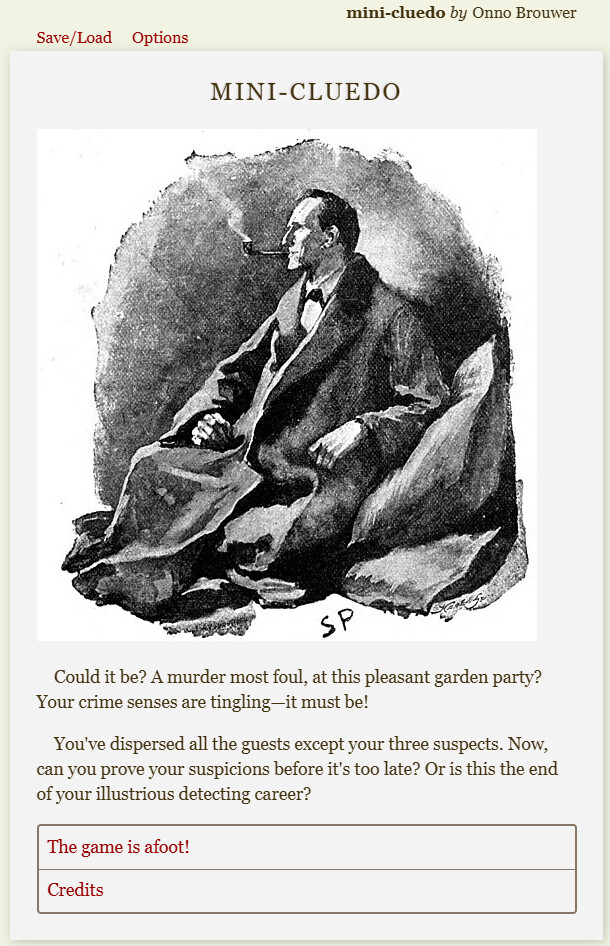
The = MINI-CLUEDO content specifies an HTML heading. We embed a public domain Sherlock Holmes image (using {! ... !} within content allows us to embed arbitrary HTML) and give some backstory.
Finally, we offer the player two options: Start the game by moving to the fountain (The game is afoot!) or view the Credits. Dendry lists links at the end of the page using a - @sceneName syntax, optionally followed by a link title. If no link title is specified. the title of the target scene will be used.
Here’s what the intro looks like:
Creating the credits
First, let’s have a look at the Credits scene.
credits.scene.dry
title: credits
new-page: true

= MINI-CLUEDO

> Written by Onno Brouwer for the {!<a href="https://intfiction.org/t/lets-code-mini-cluedo/75653" target="_blank">Let's Code: Mini-Cluedo</a>!} challenge.

> Coded using {!<a href="https://github.com/aucchen/dendry" target="_blank">Dendry</a>!}, originally by Ian Millington, with heavy modifications by Autumn Chen.

= Acknowledgments

> Original text taken from the Dialog game {!<a href="https://ifdb.org/viewgame?id=zwnijqzwab1d14vh" target="_blank">Mini-Cluedo</a>!} by {!<a href="https://ifdb.org/search?searchfor=author%3ADaniel+M.+Stelzer" target="_blank">Daniel M. Stelzer</a>!}.

> The cover art is in the public domain and can be found on {!<a href="https://commons.wikimedia.org/wiki/File:Sherlock_Holmes_-_The_Man_with_the_Twisted_Lip.jpg" target="_blank">Wikimedia</a>!}.

> This is a work of fiction. Any names or characters, businesses or places, events or incidents, are fictitious. Any resemblance to actual entities or actual events is purely coincidental.

- @intro: Continue...
As with the intro scene, we start on a new page, present a heading and serve some content. I use the quotation markup (>) to avoid every paragraph starting with an indented first line, as is the default mode of displaying text in Dendry.
At the end I link back to the intro scene with Continue... as its title.