As a side note, if anyone has feature requests for the Å-machine, now is the time to get them in! I’m hoping to get the Å-machine to a 1.0.0 release candidate state next weekend.
2 Likes
A pair of debug verbs without arguments, which just turn “more” on and off, are easy. Would that work for your use case?
Absolutely!
1 Like
Just curious, because I’ve only tinkered with it so much: To what extent did it support multiple custom output streams? I was still experimenting with sending different Dialog outcomes to different fields, and having my custom interpreter handle that information in different places.
The other day I changed part of the standard library (specifically, I redefined (prompt and input $Words) to unify $Words with an empty list) and accidentally created an infinite loop that apparently results in the web interpreter allocating infinite memory.
Here’s a sample game that causes the same problem:
memory_test.zip (159.1 KB)
It doesn’t allocate infinite memory in the debugger, so seems like a memory leak in the web interpreter. Could you look into the problem?
1 Like
Hmm, I’m not seeing a memory leak on Firefox; the browser tab just locks up and eventually gets killed, which is what I’d expect from an infinite loop. Which browser and OS are you using?
1 Like
Instruction $6F starts sending all output to a custom stream. It takes two parameters, a byte for which stream, and a one- or two-byte index for how to style that stream (because currently the only supported alternate streams are 0 = status bar and 1 = inline status bar). Instruction $E7 (no parameters) goes back to normal stdout output.
If you don’t need the styling information, I’d recommend having a single “which stream” value for your interpreter, and using the style index to select which field it should go into.
A block of changes to dgdebug:
--heightoption (abbreviated-H;-hwas already used for--help) fixes the virtual screen height, regardless of what the terminal tries to say.-H 5means you’ll get[more]prompts every five lines.-H -1means you’ll never get them.-H 0means the default behavior (listen to what the terminal says). On Windows, these unfortunately do nothing—there’s no way to enable or disable[more]prompts in standard Glk.@moreand@nomoredebugging commands act like-H 0and-H -1respectively.--unit-testoption (abbreviated-u) acts like--no-warn-not-topic --quit --height=-1, for when you want to set all three of those at once.
Any objections to this implementation? Say them now! (Either here or on the linked pull request.) -u is specifically for Susan’s unit testing library, so consider it equivalent to “whatever unit.dg needs to function properly”, which may or may not always be exactly this set of options.
1 Like
For the SHOUT issue, let’s put it to a vote!
- Keep SHOUT as a synonym for TALK, with a custom response for SHOUT TO ME
- Keep SHOUT as a synonym for TALK, with all the same responses
- Remove SHOUT from the standard library; it should not be a synonym for TALK
0
voters
Personally, I’m hesitant to remove anything from the standard library, but if that’s what the public wants, it’s not hard to get rid of.
And for (tagged name), a new predicate that does nothing by default but allows hooks like Inform’s “before/after printing the name of”:
- Add it to the standard library; this is useful
- Don’t add it to the standard library; authors can handle it themselves
0
voters
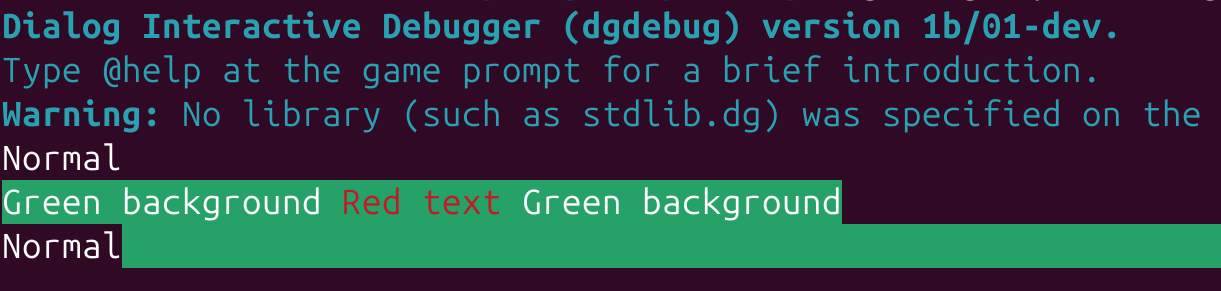
The debugger now supports color to a very limited extent: if a style class has a color value that is exactly black, red, green, yellow, blue, magenta, cyan, white, initial, or inherit, it will display on a Mac or Linux terminal using ANSI escape codes. Same for background-color. (Sorry Windows-users, Glk doesn’t allow this kind of stuff. That part’s entirely out of my hands.)
The results aren’t perfect—in particular, the background-color of a marginless div can spread onto the unprinted parts of the following line, depending on the terminal. But since I mostly expect this to be used for things like unit tests, fixing that is not a high priority at the moment. (Spans work fine.)
Similarly, there’s an ANSI escape sequence for arbitrary 24-bit foreground and background colors that could be used to support #123456 codes as well as named colors. This wouldn’t be hard to add (the groundwork is mostly already in place for the Z-machine), but it’s a similarly low priority, because if people want good typography, they’re probably using a separate Z-machine or Å-machine terp instead of the debugger.
(style class @green)
	background-color: green;
(style class @red)
	color: red;

(program entry point)
	Normal
	(div @green) {
		Green background
		(span @red) { Red text }
		Green background
	}
	Normal (par)
3 Likes
What should unit.dg display, once the debugger colour and body style PRs get merged?
- Green or red text on the default background
- White text on a green or red background
- Growing progress bars that start green, then turn red when a test fails (this might involve clearing the screen and erasing some output)
- Regular old text in the default terminal colours, like it does now
0
voters
It does with the Garglk extension functions! And Windows Glk supports them.
2 Likes
To explain my vote: I would prefer the use of color to be optional, probably opt-in because that doesn’t make assumptions about how capable the terminal is.
But just to check, would the color codes only appear when using a tty and not appear in the process output when running outside of a tty?
Correct; the debugger currently only outputs ANSI formatting codes if isatty(1). I’ve considered adding a command-line switch to override this (both to turn it on and to turn it off), but currently dgt uses some trick to make isatty return true, and you can make stdout not be a tty with | cat, so it’s low priority.
If the debugger is using Glk, does that mean that the Å-machine is broadly Glk compatible? Or is it a more reduced version (like a cheap mode) that just happens to use Windows-Glk?
Unfortunately, at the moment, it’s the latter. The debugger is fundamentally a terminal application, but because the Windows terminal is so limited compared to Mac/Linux, the Windows version is run through Windows-Glk to provide a more functional terminal. Glk is treated basically like a glorified stdin/stdout that also provides line editing and word wrapping.
Specifically...
The only things the debugger needs from Windows-Glk are a single text buffer window with “get line input”, “get key input”, “send Latin-1 text”, “clear the screen”, and “set basic styling”. It doesn’t even use Unicode I/O; non-Latin-1 characters are just replaced with ?.
That said, I would love to see an Å-machine interpreter built that uses Glk for output, so it could be incorporated into things like Gargoyle. There are various Å-machine features that Glk doesn’t support (like most of the styling system), but it does support hyperlinks, which are the Å-machine’s biggest advantage over the Z-machine.
The main difficulty is that the only currently-existing Å-machine interpreters are written in JavaScript and in 6502 assembly, so using Glk would mean porting the whole thing to either C, C++, or Glulx, and then maintaining that in parallel with the other two interpreters. Far from impossible, but hard to do on top of our current development and maintenance work.
This, though, is exciting! Support should be pretty trivial to add; I basically just need a table to convert ANSI colors to Glk colors. There’s currently a stub:
void term_colors(int fg, int bg) {
}
And that just needs to become a garglk_set_zcolors call.
1 Like
That was straightforward.
// https://zspec.jaredreisinger.com/08-screen#8_3
static int32_t ansi_to_glk_color[] = {
	0x000000, // black
	0xef0000, // red
	0x00d000, // green
	0xefef00, // yellow
	0x006fb0, // blue
	0xff00ff, // magenta
	0x00efef, // cyan
	0xffffff, // white
	zcolor_Current, // inherit
	zcolor_Default // initial
};

void term_colors(int fg, int bg) {
	if(termfg != fg || termbg != bg) {
		garglk_set_zcolors(ansi_to_glk_color[fg], ansi_to_glk_color[bg]);
		termfg = fg;
		termbg = bg;
	}
}
I don’t have a Windows machine to test on, but this is a small enough change that I’m pretty sure if it compiles it’ll work. (And I can ensure it compiles, at least.)
I voted for “green or red text on the default background” because terminals are much more consistent about setting text color than background color. I’ve been trying to find some specification of what’s supposed to happen when a newline is printed with a non-default background color; as best I can tell, some terminals fill the current line with color, then move to the next line, while others fill the next line with color, then move to the next line. My default terminal on Ubuntu does the latter.
Which means the properly Dialog-ic thing to do is disallow background colors in the debugger completely (if something can’t be guaranteed, don’t allow it at all), but when it comes to styling, I say it’s not Dialog’s fault if terminals behave inconsistently. If you don’t print explicit newlines ((line), (par), or (div $)) with a background color, it should work fine everywhere.
(I’m afraid this bit of terminal behaviour is a horrid mess. E.g. Searching for “background colo[u]r erase” / “bce” will find more stuff. Some terminals support an escape sequence or other configuration to influence some of this sort of behaviour. I’m not sure exactly what is the safe subset of behaviour an escape-sequence-emitter can rely on.)
1 Like