That’s in my TODO and I need to do some surgery to capture the failed execution and present it to the user somehow (yet another modal, I think).
1 Like
I don’t think that’s a usecase I considered. I’ll add it to the TODO list.
1 Like
Ahh, I see! I was doing compilation manually (with dgt sources in my Makefile) so I could build separate Z-machine and Å-machine targets; I didn’t realize dgt had a particular place it wanted the output to go.
So what if the internal forms that ask for input (such as (get key) and (get input $))
were renamed to (internal get key) and (internal get input) and in stdlib.dg or elsewhere (get key) simply delegates to (internal get key).
Then the Skein could inject a rule to provide the missing “>” it needs before that kind of input.
I haven’t found anything around the psueo-terminal library that will help with determining whether the terminal is waiting for input, never mind whether it is waiting for a single key or an input line.
I’ll experiment with using timeouts (which would not require any Dialog changes) maybe over the weekend.
dialog-tool 2.0-beta-7
dgt is a tiny, specialized, highly opinionated command line tool used to build, debug, and test interactive fiction created using Dialog.
What’s new in 2.0-beta-7?
- Skein stays in light mode, even if browser or OS is in dark mode
- New Floating Action Button toggle to display the entire transcript in a monospace font
- When diffing a knot, the added and removed text now visually displays spaces and new lines
- When diffing a knot, the knot text is always in monospace font
Mac Installation
To install for the first time:
brew install hlship/brew/dialog-tool
To upgrade from an earlier version:
brew upgrade dialog-tool
Linux Installation
Download the latest distribution from GitHub dialog-tool releases.
You must have a recent version of Java installed. You must have the Dialog commands installed (see the full instructions for details).
Unpack the archive, and copy the dgt and dialog-tool-<version>.jar file onto your executable search path. You can also symlink dgt to a directory already on the search path.
How important is a full dark mode? It’ll take a little bit of work.
I continue to be amazed at what Datastar can do; when you click the toggle for the font, it re-renders and updates the entire page … in about ~50ms even when there’s considerable number of knots to display. So far I haven’t felt the need to do any caching or optimizations. That’s with Java JDK 25 on an M1 Mac.
It would work, but this feels like swatting a fly with a sledgehammer. It means that all programs not using the standard library need to be updated to use the “internal” predicates, which have a scary name suggesting they’re not meant to be used by authors.
I’d prefer something like a compiler setting that always sends a particular obscure character before asking for input. That way it wouldn’t change the behavior for anyone not using dgt.
Fair enough; I want to see if I can find a solution that doesn’t require any change to Dialog.
I think our use-cases are subtly different in that, in my case the user has direct access to what is effectively the pseudo-terminal. The collection of game data after a new input is automatic but optional, and it is entirely valid for someone to play the game normally by manually responding to prompts when they appear.
In terms of data collection I send @dynamic and @tree commands whenever the regular "\n> " prompt appears and capture the outputs; outside of handling the paging (by temporarily making the pseudo-terminal very tall) there isn’t a scenario that exists by default where commands get sent and the regular prompt doesn’t reappear. I definitely wouldn’t want any kind of transformation which made other prompts look like the regular one because I am specifically looking for the regular one.
For replaying back to the current position the user would just use @replay and there should be no prompts to handle.
For suppressing prompts when doing automated testing I would expect that part of that testing involves loading additional files that just remove the need to enter input, e.g. just define (yesno) to suppress that type of prompt.
I guess that you are actually re-sending all game input to try and recreate a previous state and that is why you would need to identify every type of prompt? I haven’t really tested using @restore but it seems to handle prompts without any issues, e.g. sending restart followed by y will restart the game. If I were going to try replaying different game states in bulk I would probably try storing the different input streams in different files and just let @restore handle it, and an improvement in dgdebug to make that easier would be making it easier to specify the filenames or allowing the input to come in from a different source.
Personally, I’m fine with changes to Dialog, as long as they’re not things the average user will notice. So I’ve added the “monospace” ANSI escape sequence, which will do nothing on any terminal I’m familiar with, for example, and the -w -1 option to dgdebug. But I’m opposed to things like changing (get input $) unless it’s locked behind a command-line option.
So at this point, the solutions I’d prefer are:
- Do it entirely on dgt’s side, assuming that any delay longer than a few milliseconds is waiting for input
- Have a command-line option that tells Dialog to inject code that prints private-use characters (U+0091 and U+0092 perhaps?) when waiting for line and key input
- Adjust dgdebug, dfrotz, and aamrun to signal somehow when they’re waiting for input (maybe with those private-use characters)
The Skein doesn’t rely on the dgdebug to reload changed source files; it has its own checks, including dialog.edn, and can also detect new files being added (in addition to changes and deletions), at which point it starts a fresh dgdebug process with the update list of source files.
The Skein invisibly runs @dynamic after each command. That’s going to be a problem if the game is prompting for a single key of input, or prompting for input outside of the main game loop. I’m not quite sure how I’ll handle that. I may need a way to categorize knots: is this a single key input? Is it safe to send @dynamic after? Those are actually disconnected from each other.
And I really want to maintain the ability to run frotz instead of dgdebug as the engine; you lose the handling of @dynamic but still will have live reloading (the Skein can compile, or recompile, the zcode before command execution, and handles replay-to-knot the same in both dgdebug and frotz).
I’m mucking about unifying how dgdebug and dfrotz are run by the Skein.
Looks what’s in the manual:
   Line Type Identification Characters
   Input lines (untimed)
       >      A regular line-oriented input

       )      A single-character input

       }      A line input with some input before the cursor.  Use \d to discard it.
I’m going to play around with it. Maybe we can implement something similar for dgdebug and not get bogged down on guessing.
1 Like
Huh! I never knew it could do that.
So a command-line option for dgdebug and aamrun to output \n> when waiting for line input and \n) when waiting for character input? (Dialog doesn’t support timeouts, which is the only place the other four types can come from.) That’s entirely doable. Slightly harder will be avoiding \n>\n> if the game prints its own prompt before dgdebug’s. What does dfrotz do when that happens?
So, when is the next release of dialog-if that might have these features?
Whenever the current pull requests are merged (including this one); hopefully within the next couple weeks! I don’t want to rush the other contributors because of my own frenetic development pace, so if there are still outstanding PRs by the end of March or thereabouts, I’ll make release 1b/01 then, and move the rest of them to 1c/01.
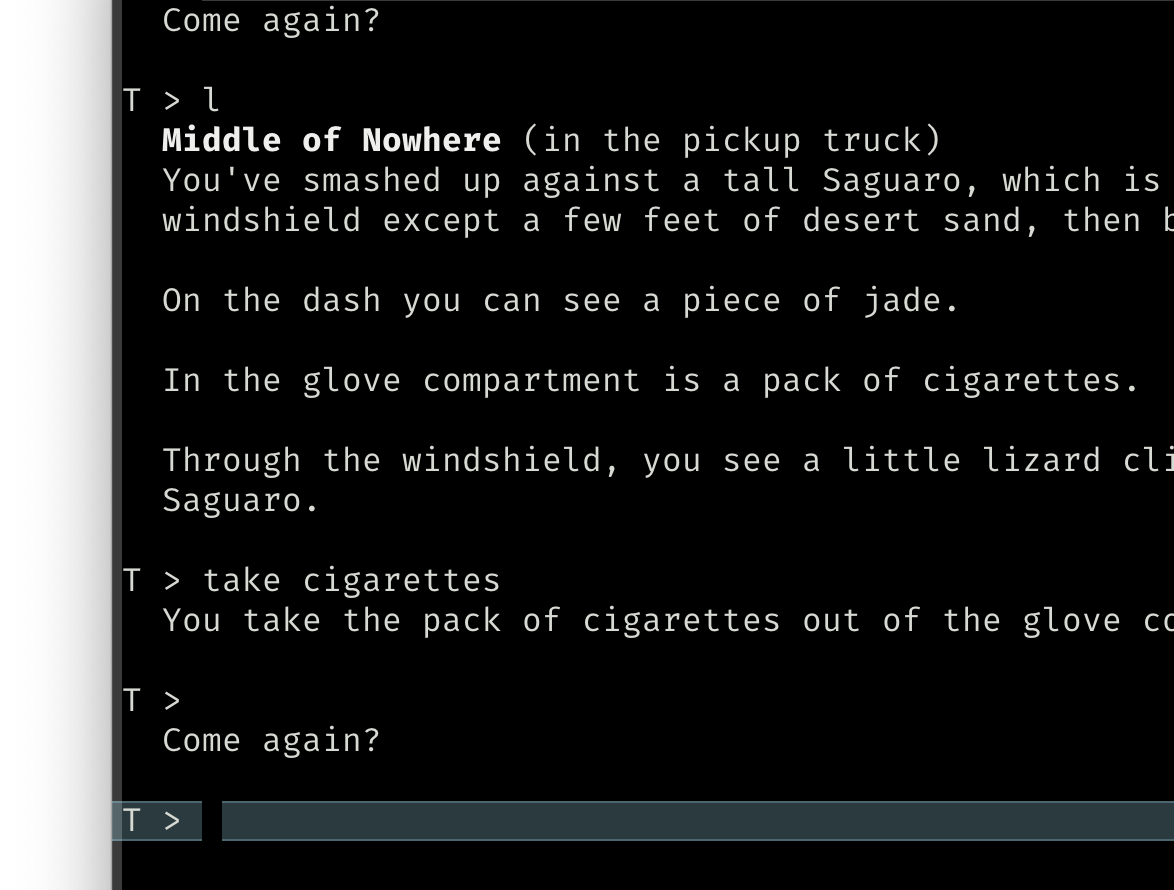
Ahh, so each output line is preceded with , and each input line is preceded with > or ) ? I’m not sure if I can get exactly that—since dgdebug is meant to work with both stdout and Glk, there’s a lot of separation between input and output, and the prompt has usually already been flushed to the screen by the time the “get input” routine is called. I don’t think the extra newline will especially matter for dgt, though, as long as it’s consistent.
I’m a bit confused why it’s using T instead of > for the input lines, though. As far as I’m aware, Dialog doesn’t use the Z-machine’s timed input features at all.
Current progress:
  Ever-faithful Watson is crouched over it, whimpering faintly.

  <look at my body>
  <look at Watson>
  <stand up>
  <go upstairs>
  <go to the sitting room>
  >
> look at my body
  Oh, dear. You must have fallen down the stairs and broken your neck. At least there isn’t much blood...and, well, it must have been quick.

  <[look at myself] look at yourself>
  <look at Watson>
  <stand up>
  <go upstairs>
  <go to the sitting room>
  >
> (cursor is here)
This look reasonable? If so, I’ll do the same in aamrun. It would be better if the prompt was tagged as an input line rather than a separate output line, but dgdebug’s architecture makes that surprisingly hard.
Usage entry:
--tag-lines -T Prepend output with " ", input with "> " or ") ".
I can make that work. It’s slightly different from what dfrotz produces but should not cause a problem. Different functions for different engines.
1 Like
In that case, pull requests are in for both dgdebug and aamrun! I’ll give them a few days in case anyone objects, but niche command-line options that most people will never need like this tend to get merged pretty fast.
When dgdebug is waiting for a line of input (not a command line, but via (get input $)) can you still execute @dynamic? I should test this myself, just in middle of a few things. In any case, perhaps a different line marker for when its just input and @dynamic is not possible?